
1. Product Overview
The Generico System White 10A Unipolar Push Button is a modular electrical device designed for controlling lighting systems in both civil and commercial environments. This push button operates with a normally open (NO) contact, typically used in conjunction with a relay to manage lighting from one or more points.
Key features include:
- Durable white polymer construction, resistant to impacts and UV rays.
- Basculating mechanism for reliable operation.
- Non-porous, glossy white finish for easy cleaning.
- Occupies 1 module in standard flush-mounted supports and surface-mounted enclosures.
- Designed, engineered, and manufactured in Italy with IMQ and TSE certifications.
2. Safety Information
Please read and understand all safety instructions before installation and use. Failure to follow these instructions may result in electric shock, fire, or serious injury.
- WARNING: Always disconnect power at the circuit breaker or fuse box before installing or servicing any electrical device.
- Installation should be performed by a qualified electrician in accordance with all local and national electrical codes.
- Do not use this device if it appears damaged.
- Ensure proper grounding where required.
- Keep away from water and moisture.
3. Package Contents
Your package should contain the following items:
- 3 x Generico System White 10A Unipolar Push Buttons
If any items are missing or damaged, please contact your retailer.
4. Setup and Installation
The Generico System White 10A Unipolar Push Button is designed for simple and intuitive installation. It features double-housing terminals with Phillips head screw tightening for secure connections.
4.1 Installation Methods
This push button can be installed using various methods:
- Flush-mounted: In masonry walls and plasterboard.
- Surface-mounted: Using external wall boxes.
- On profiles: With dedicated boxes and plates.
- In systems: Such as Multibox and Interlink.
- On conduits, turrets, and DIN rails.
4.2 Wiring Diagram
Refer to the following diagram for typical wiring with a relay (relay not included).
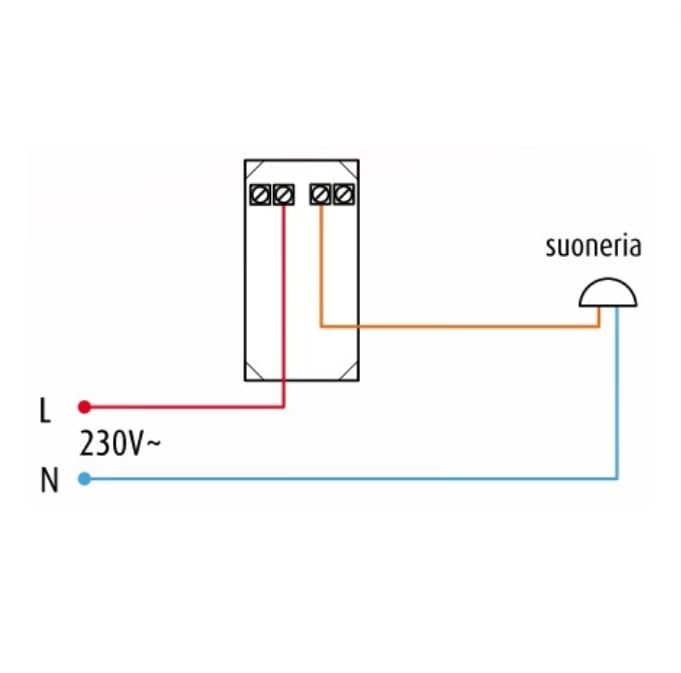
Image 1: Wiring diagram showing connection of the unipolar push button to a 230V~ power supply (L for Line, N for Neutral) and a doorbell ('suoneria') circuit, typically through a relay. The red wire connects the Line (L) to one terminal of the push button, and an orange wire connects the other terminal of the push button to the relay input. The blue wire connects Neutral (N) to the doorbell, and another orange wire connects the relay output to the doorbell.
4.3 Component Assembly
The push button modules are designed for easy integration into compatible frames and plates.
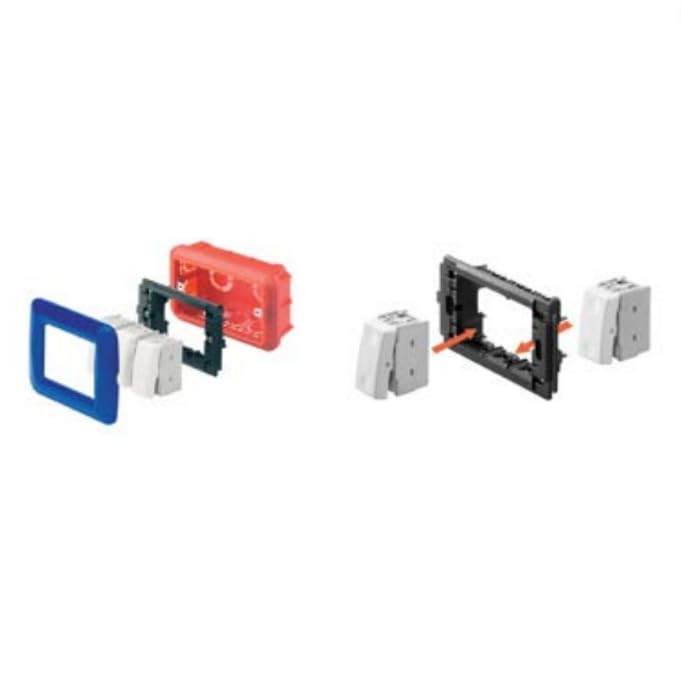
Image 2: Exploded view illustrating the assembly of modular electrical components. On the left, a blue decorative plate, a white module, and a red mounting box are shown disassembled. On the right, a black mounting frame is shown with two white modules being inserted, indicating a snap-in or screw-in installation process for the modules into the frame.
4.4 Compatibility
Ensure compatibility with appropriate mounting boxes and frames. Below are examples of compatible Idrobox IP40 and IP55 enclosures.
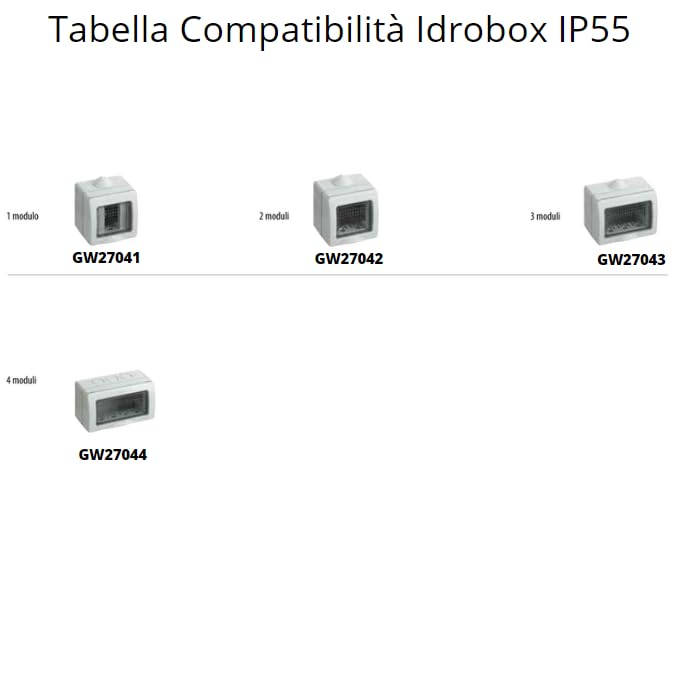
Image 3: Compatibility table for Idrobox IP40 enclosures. This image displays various sizes of IP40 rated enclosures, ranging from 1-module (GW27001) to 16-module (GW27008) configurations, showing how the push button can be integrated into different sized housing units for indoor applications.
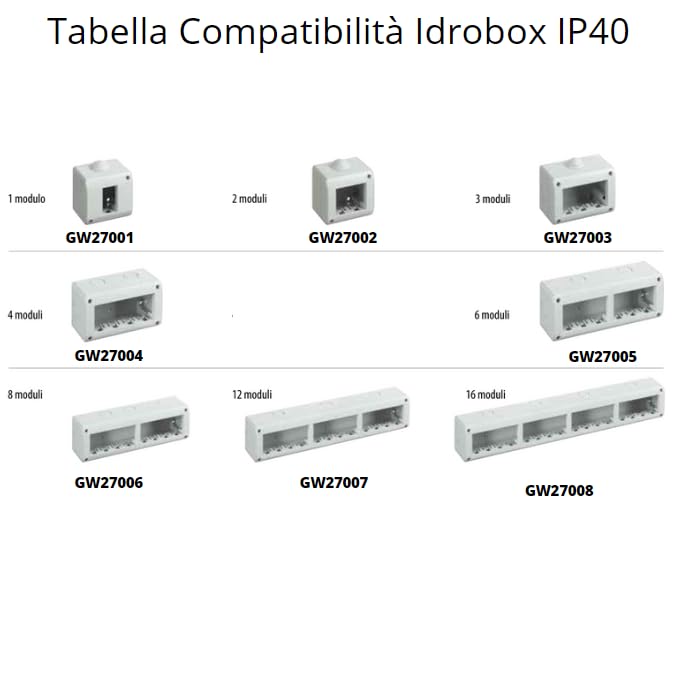
Image 4: Compatibility table for Idrobox IP55 enclosures. This image displays various sizes of IP55 rated enclosures, ranging from 1-module (GW27041) to 4-module (GW27044) configurations, indicating suitable housing units for outdoor or high-humidity environments.
Once installed, the push button should appear flush and integrated with the wall plate.
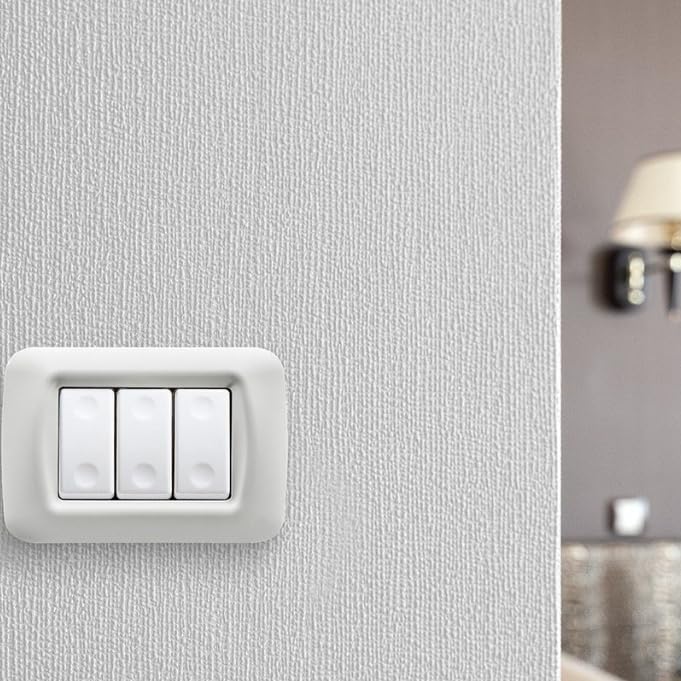
Image 5: A Generico System White 10A Unipolar Push Button, shown as part of a three-gang switch plate, installed on a textured white wall. This image demonstrates the aesthetic integration of the product into a typical indoor setting.
5. Operating Instructions
The Generico System White 10A Unipolar Push Button functions as a momentary contact switch. When pressed, it momentarily closes a circuit (normally open contact), sending a signal to a connected relay or control unit. Releasing the button opens the circuit again.
- To activate the connected device (e.g., turn on lights via a relay), simply press the button.
- The button will return to its original position upon release.
- For applications like staircase lighting, multiple push buttons can be wired in parallel to control the same lighting circuit through a single relay.
6. Maintenance
The Generico System White 10A Unipolar Push Button requires minimal maintenance due to its durable construction and non-porous finish.
- Cleaning: To clean the surface of the push button, use a soft, damp cloth. Avoid abrasive cleaners, solvents, or harsh chemicals, as these can damage the finish.
- Inspection: Periodically inspect the push button and its surrounding plate for any signs of damage, loose connections, or discoloration. If any issues are found, disconnect power and consult a qualified electrician.
7. Troubleshooting
If you encounter issues with your Generico System White 10A Unipolar Push Button, consider the following troubleshooting steps:
- Device not responding:
- Ensure power is supplied to the circuit. Check the circuit breaker or fuse.
- Verify all wiring connections are secure and correctly installed according to the wiring diagram.
- If used with a relay, check the relay's functionality and its connections.
- Button feels loose or sticky:
- Disconnect power and carefully inspect the button mechanism for any obstructions or damage.
- Ensure the button is correctly seated within its frame.
If the problem persists after attempting these steps, it is recommended to contact a qualified electrician or the product's support.
8. Specifications
| Attribute | Value |
|---|---|
| Brand | Generico |
| Model Name | Pulsante Unipolare 10A |
| Manufacturer Part Number | GW20510-3 |
| Current Rating | 10 Ampere |
| Switch Type | Unipolar Push Button |
| Contact Type | Normally Open (NO) |
| Actuator Type | Push Button |
| Terminal Type | Screw |
| Material | White Polymer |
| Color | White |
| Operational Mode | Civil and Commercial |
| Made In | Italy |
9. Warranty and Support
For warranty information or technical support, please refer to the documentation provided with your purchase or contact the retailer/manufacturer directly. Keep your proof of purchase for any warranty claims.