
Pard TA32-25/L/F-PARD
PARD TA32-25-LRF Thermal Monocular User Manual
Model: TA32-25/L/F-PARD
1. Introduction
The PARD TA32-25-LRF Thermal Monocular is a high-performance, compact, and lightweight device designed for observation in various environmental conditions. Featuring a 25mm lens and a high-sensitivity 384x288 sensor with NETD ≤25mK, it provides clear and detailed thermal images. The integrated Laser Range Finder (LRF) allows for precise distance measurement up to 1200 yards. With WiFi connectivity and IP67 waterproofing, this monocular is a versatile tool for wildlife observation, security, and outdoor activities.
2. Safety Information
- Do not look directly at the sun or other strong light sources through the device. This can cause permanent eye damage.
- Keep the device away from extreme temperatures, humidity, and direct sunlight.
- Avoid dropping or subjecting the device to strong impacts.
- Do not attempt to disassemble or repair the device yourself. Refer to qualified service personnel.
- Ensure the USB Type-C port cover is securely closed when not in use to maintain IP67 waterproofing.
3. Product Features and Components
The PARD TA32-25-LRF is equipped with several advanced features to enhance user experience and performance.
- Laser Range Finder (LRF): Compact and precise, capable of measuring distances up to 1200 yards.
- High-Sensitivity Sensor: 384x288 sensor with NETD ≤25mK for clear thermal imaging even in challenging conditions like rain or fog.
- PARD IREA Infrared Image Enhancement Algorithm: Improves image detail by correcting distortion, reducing noise, and enhancing contrast.
- Multiple Scene Modes: Quick switch function between three individual scene modes to optimize visibility and contrast for different environments.
- Thermal Color Options: Various color palettes to highlight visibility based on environmental backgrounds and weather conditions.
- Silent Buttons: Designed from soft silicone material to minimize sound during operation.
- Photo & Video Recording: Capture HD video and images directly from the device.
- Built-In WiFi: Connects to mobile devices for use as an external viewfinder and instant transfer of media.
- USB Type-C: For charging the device.
- SD Card Slot: For firmware upgrades and media storage.
- Tripod Thread Mount: Integrated threads for attaching to a tripod or smartphone holder for stability.
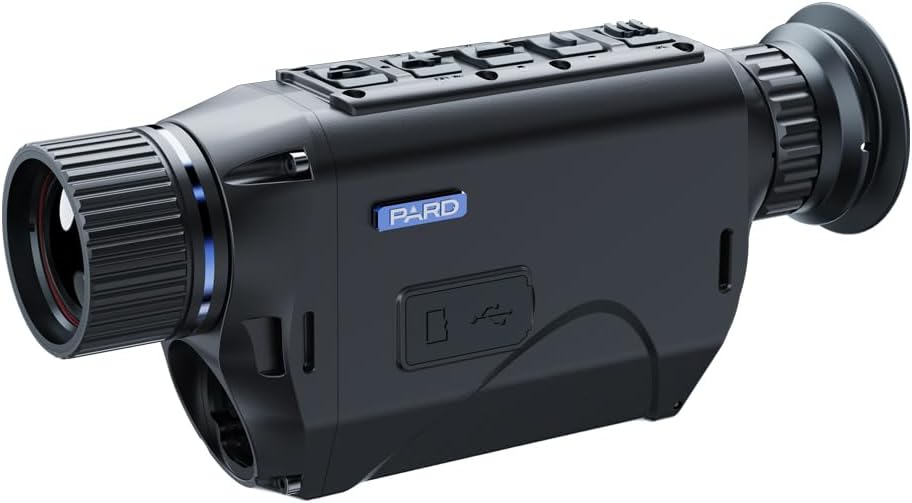
Figure 3.1: Front view of the PARD TA32-25-LRF Thermal Monocular, showing the objective lens and control buttons on top.

Figure 3.2: Side view of the PARD TA32-25-LRF Thermal Monocular, highlighting the eyepiece and the model number label.
4. Setup
4.1. Charging the Device
The TA32-25-LRF can be charged via its integrated USB Type-C connector. Connect the device to a power source using a compatible USB Type-C cable. The charging indicator will show the charging status.
4.2. Inserting an SD Card
Locate the SD card slot on the device. Insert a compatible SD card (not included) into the slot until it clicks into place. This card is necessary for recording photos and videos, and for firmware upgrades.
4.3. Attaching to a Tripod (Optional)
For enhanced stability during prolonged observation or recording, the monocular features an integrated tripod thread mount on the bottom. Securely attach the device to a standard tripod or a compatible smartphone holder.
5. Operating Instructions
5.1. Power On/Off
Press and hold the power button (usually located on the top panel) for a few seconds to turn the device on or off.
5.2. Basic Observation
Once powered on, look through the eyepiece. Adjust the focus ring on the objective lens to achieve a clear image of your target. Use the diopter adjustment on the eyepiece for optimal clarity for your vision.
5.3. Using the Laser Range Finder (LRF)
Activate the LRF function via the dedicated button or menu option. Aim the reticle at your target and press the LRF button to obtain a distance reading. The measured distance will be displayed on the screen.
5.4. Changing Scene Modes and Color Palettes
Navigate through the device's menu using the control buttons to access scene mode and thermal color options. Select the desired mode (e.g., City, Forest, Rain) or color palette (e.g., White Hot, Black Hot, Red Hot) to optimize image display for current conditions.
5.5. Photo and Video Recording
To capture a photo, press the photo capture button. To start or stop video recording, press the video recording button. Ensure an SD card is inserted to save media.
5.6. WiFi Connectivity
Enable WiFi in the device settings. On your mobile device, search for the PARD monocular's WiFi network and connect to it. Use the dedicated PARD application (downloadable from app stores) to view the live feed, control the device, and transfer files.
6. Maintenance
6.1. Cleaning the Lenses
Use a soft, lint-free cloth specifically designed for optical lenses to gently wipe the objective and eyepiece lenses. For stubborn smudges, use a small amount of lens cleaning solution applied to the cloth, not directly to the lens.
6.2. Cleaning the Device Body
Wipe the body of the monocular with a soft, damp cloth. Do not use abrasive cleaners or solvents.
6.3. Storage
When not in use, store the device in its protective case in a cool, dry place, away from direct sunlight and extreme temperatures. Ensure the battery is partially charged if storing for extended periods.
6.4. Firmware Upgrade
Periodically check the official PARD website for firmware updates. Download the latest firmware to an SD card, then insert the SD card into the device and follow the on-screen instructions for upgrading. This ensures optimal performance and access to new features.
7. Troubleshooting
| Problem | Possible Cause | Solution |
|---|---|---|
| Device does not power on. | Low battery or battery depleted. | Charge the device using the USB Type-C cable. |
| Image is blurry or out of focus. | Improper focus adjustment. | Adjust the objective lens focus ring and the eyepiece diopter. |
| Cannot record photos/videos. | No SD card inserted or SD card full/corrupted. | Insert a compatible SD card, check available space, or format the card (this will erase all data). |
| WiFi connection issues. | WiFi not enabled on device, incorrect app settings, or interference. | Ensure WiFi is enabled on the monocular. Restart both the monocular and your mobile device. Check the PARD app for connection instructions. |
| LRF not providing readings. | Target too far, too close, or reflective surface. | Ensure target is within the LRF's operational range (up to 1200 yards). Aim at a non-reflective surface. |
8. Specifications
- Model Number: TA32-25/L/F-PARD
- Sensor Resolution: 384x288
- NETD: ≤25mK
- Lens Diameter: 25mm
- Laser Range Finder: Up to 1200 yards
- Waterproofing: IP67
- Connectivity: WiFi, USB Type-C
- Dimensions: 2 x 6 x 3 inches (approx.)
- Weight: 1.9 pounds (approx.)
- Manufacturer: PARD USA
- UPC: 850042449851
9. Warranty and Support
For warranty information and technical support, please refer to the official PARD USA website or contact their customer service directly. Keep your purchase receipt as proof of purchase for warranty claims.
Note: Specific warranty terms and conditions may vary by region and retailer.
Ask a question about this manual
Ask about setup, troubleshooting, compatibility, parts, safety, or missing instructions. Manuals+ will review the question and use this page’s manual context to help answer it.