
Introduction
This manual provides detailed instructions for the assembly, operation, maintenance, and troubleshooting of your ODK 66 Inch Gaming Desk. Please read this manual thoroughly before assembly and use to ensure proper function and longevity of your product. Keep this manual for future reference.
Safety Information
Important Safety Precautions:
- Do not exceed the maximum weight recommendation of 150 pounds on the desk surface.
- Ensure the desk is stable on all surfaces, especially on uneven ground, by adjusting the non-slip foot pads.
- Keep all electrical components (USB ports, power outlets, LED lights) away from liquids.
- Ensure all screws and fasteners are securely tightened during assembly and periodically check for looseness.
- Keep small parts out of reach of children during assembly.
Package Contents
Before beginning assembly, verify that all components listed below are present and undamaged. If any parts are missing or damaged, please contact ODK customer service.
- Desk Panels (Main, L-shaped extension, Monitor Stand)
- Metal Frame Components
- Storage Shelves
- USB Charging Ports & Power Outlets Unit (pre-installed or separate)
- LED Light Strip with Controller
- Versatile Hook
- Assembly Hardware (screws, nuts, bolts, Allen wrench)
- Instruction Manual
Setup and Assembly
Assembly of the ODK 66 Inch Gaming Desk is designed to be straightforward. Follow the detailed instructions provided in the included assembly guide step-by-step. All parts are clearly labeled to assist with the process.
Key Assembly Features:
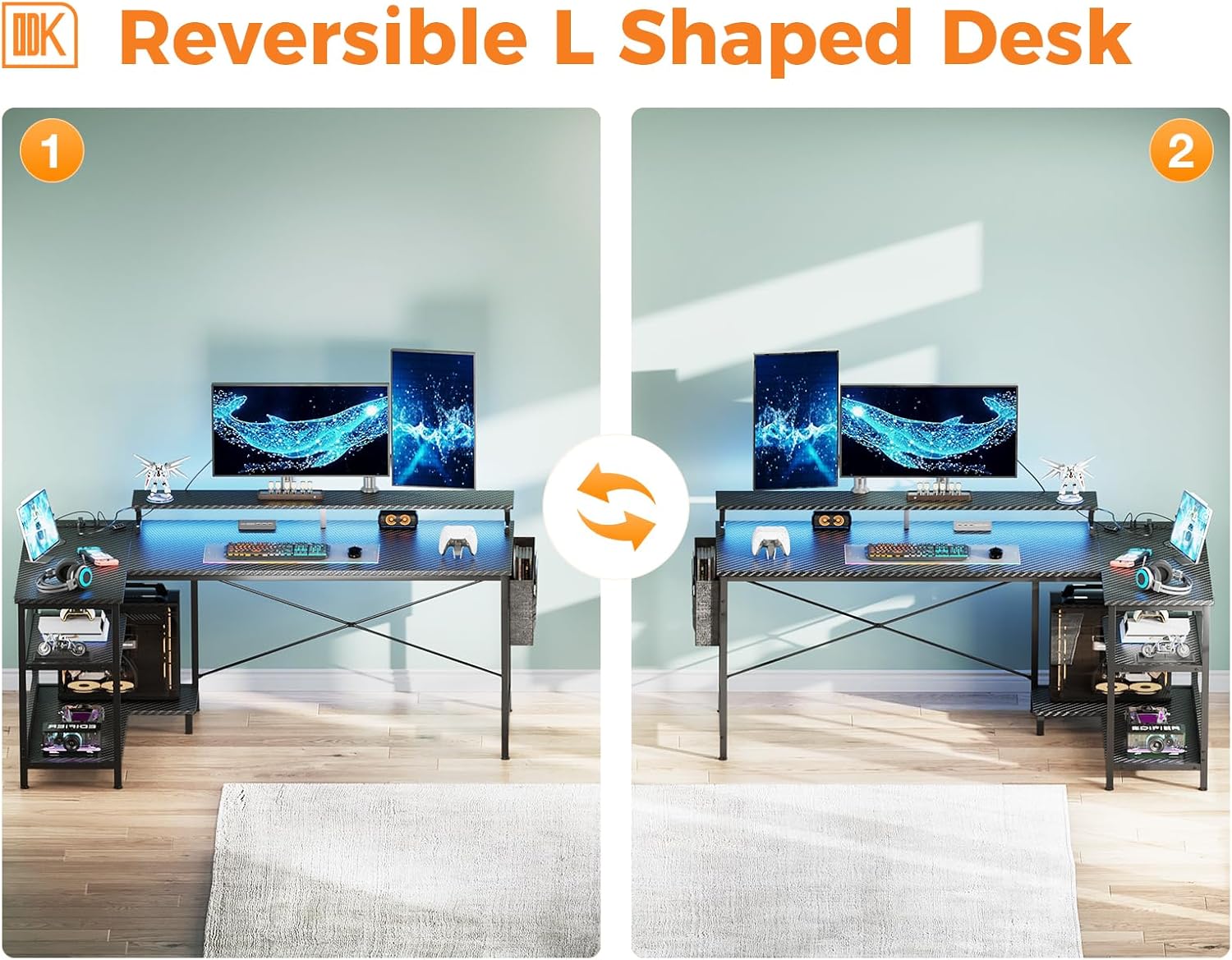
- Reversible L-Shaped Design: The desk can be configured with the L-shaped extension on either the left or right side to best suit your room layout. Pay close attention to the orientation of parts during assembly.
- Two Ways of Shelf Space: The under-desk storage shelves can be assembled in two configurations to accommodate your PC tower or other items. Refer to the assembly guide for options A and B.

Desk Dimensions and Weight Capacities: This image illustrates the overall dimensions of the 66-inch L-shaped gaming desk, including the main desk area, the L-extension, and the monitor stand. It also indicates the maximum weight capacities for different sections of the desk, such as 130 lbs for the main desk, 45 lbs for the monitor stand, and 55 lbs for the lower shelves.
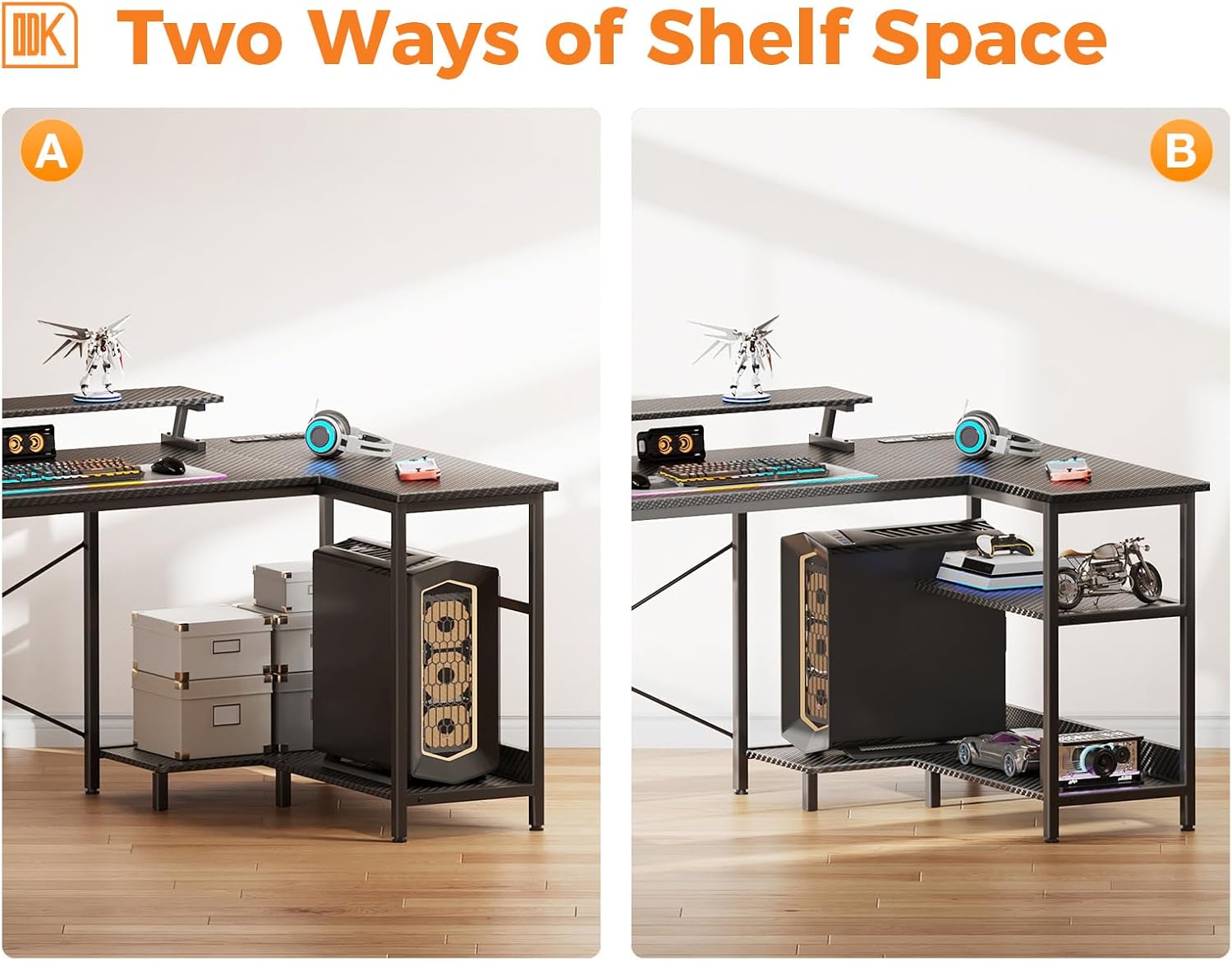
Flexible Shelf Space: This image displays two possible configurations for the under-desk storage shelves. Option A shows a larger open space suitable for a PC tower, while Option B shows two smaller, stacked shelves, providing versatile storage solutions for various items.

Reversible L-Shaped Configuration: This image demonstrates the reversible nature of the L-shaped desk. It shows how the extension can be assembled on either the left or right side of the main desk, allowing users to adapt the desk layout to their specific room requirements and preferences.
Operating Instructions
USB Charging Ports & Power Outlets:
The desk is equipped with a recessed power strip featuring 3 standard AC outlets (120V/12A) and 2 USB charging ports (5V/2A). To use, simply plug the desk's power cord into a wall outlet. You can then connect your electronic devices, such as smartphones, gaming gear, or Bluetooth devices, directly to the integrated ports for convenient charging and power supply.
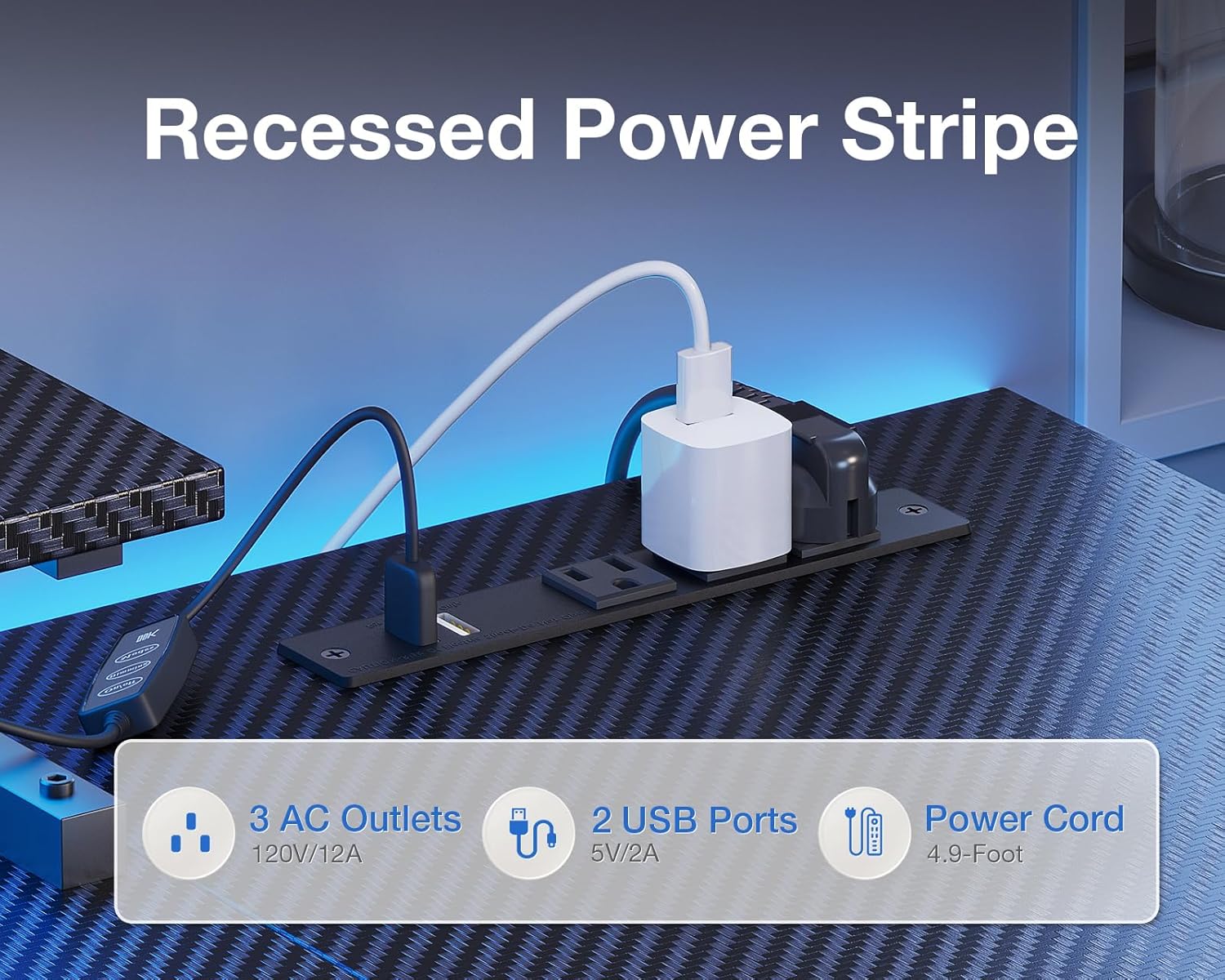
Integrated Power Strip: This close-up view shows the recessed power strip built into the desk, featuring three standard AC outlets and two USB charging ports. It highlights the convenience of having power access directly on the desk surface for various electronic devices.
LED Lights:
The gaming desk features an integrated LED light strip with a dedicated controller for customization. The LED strip offers 10 static colors, 6 brightness grades, and 10 dynamic modes. It also includes a memory function that recalls your last setting. Use the switching controls on the remote to adjust the lighting to your preference, which can help reduce eye strain and enhance your workspace or gaming environment.

Customizable LED Lighting: This image showcases the LED light strip installed beneath the monitor stand, illuminating the desk surface. It also displays the remote control for the LED lights, indicating options for 10 static colors, 10 dynamic modes, 6 brightness levels, and a memory function, allowing users to personalize their lighting experience.
Monitor Stand:
The elevated monitor stand is designed to position your monitors at an ergonomic eye level, promoting better posture and reducing neck strain during extended use. Place your monitors directly on this stand.

Ergonomic Monitor Stand: This image highlights the integrated monitor stand, demonstrating its ergonomic benefits by comparing proper posture with the stand versus poor posture without it. The stand elevates monitors to eye level, promoting a more comfortable and healthy viewing experience.
Maintenance
To ensure the longevity and appearance of your ODK Gaming Desk, follow these maintenance guidelines:
- Cleaning: The desk surface is made of high-quality MDF board with a durable, easy-to-clean coating. Wipe the surface regularly with a soft, damp cloth. Avoid abrasive cleaners or harsh chemicals that could damage the finish.
- Stability Check: Periodically check all screws and fasteners to ensure they remain tight. Adjust the non-slip foot pads as needed to maintain stability, especially if the desk is moved or placed on an uneven surface.
- Electrical Components: Keep the USB ports, power outlets, and LED light strip free from dust and debris. Do not attempt to disassemble or repair electrical components yourself.
High-Quality MDF Board: This close-up image shows the carbon fiber textured surface of the desk, emphasizing the high-quality MDF board material. The description notes its solid feel and resistance to scratches and water, indicating durability and ease of maintenance.

Adjustable Non-Slip Footpads: This image focuses on the adjustable non-slip footpads at the base of the desk legs. An arrow indicates the rotational adjustment, highlighting their function in protecting floors from scratches and ensuring the desk remains stable on uneven surfaces.
Troubleshooting
If you encounter any issues with your ODK Gaming Desk, refer to the following common troubleshooting steps:
| Problem | Possible Cause | Solution |
|---|---|---|
| Desk is wobbly/unstable | Uneven floor; loose fasteners | Adjust the non-slip foot pads until stable. Tighten all assembly screws. |
| LED lights not working | Power connection issue; controller malfunction | Ensure the LED strip is properly plugged into the power source. Check the controller for battery (if applicable) or damage. Try unplugging and re-plugging. |
| USB ports/Power outlets not working | Desk power cord unplugged; circuit overload; faulty device | Ensure the desk's main power cord is securely plugged into a working wall outlet. Check if the device you are trying to charge/power is functioning correctly. Avoid overloading the outlets. |
| Missing parts or damaged upon arrival | Shipping damage; packaging error | Do not proceed with assembly. Contact ODK customer service immediately with your order details. |
If the problem persists after attempting these solutions, please contact ODK customer support for further assistance.
Specifications
| Feature | Detail |
|---|---|
| Brand | ODK |
| Model Number | 66 Inch Gaming Desk |
| Product Dimensions (D x W x H) | 31.5"D x 66"W x 34.6"H |
| Color | Carbon Fiber Surface, Black |
| Material | Engineered Wood (MDF Board) and Metal Frame |
| Maximum Weight Recommendation | 150 Pounds |
| Power Outlets | 3 AC Outlets (120V/12A) |
| USB Charging Ports | 2 USB Ports (5V/2A) |
| LED Lights | 10 Static Colors, 6 Brightness Grades, 10 Dynamic Modes, Memory Function |
| Assembly Required | Yes (Includes all assembly tools) |
| Special Features | Reversible L-Shape, Monitor Stand, Storage Shelves, Versatile Hook |
Warranty and Support
ODK provides a limited warranty for this product. For specific warranty terms and conditions, please refer to the documentation included with your purchase or contact ODK customer service.
If you have any questions, require assistance with assembly, or need to report a damaged or missing part, our professional customer support team is available to help. Please contact us with your product model number and purchase details.
Contact Information:
- Refer to your purchase documentation for the most current contact methods.
- Typically, support can be reached via the seller's contact page on the platform where the product was purchased.
