
1. Important Safety Information
Please read and understand all instructions before assembly and use. Retain this manual for future reference.
- Always ensure the desk is properly adjusted and stable before use.
- Keep the desk away from high-traffic areas to prevent accidental collisions.
- Do not allow children to play or climb on the desk.
- Do not exceed the maximum weight capacity of 132 lbs (60 kg).
- Avoid placing hot items directly on the carbon fiber surface without protection.
- Ensure all electrical connections for the LED lights are secure and away from liquids.
2. Package Contents
Verify that all components are present before beginning assembly. If any parts are missing or damaged, contact customer support.
- Carbon Fiber Desktop with Integrated LED Lights
- Z-Shaped Steel Frame Components (Legs, Support Beams)
- Large Mouse Pad (31.50"L x 21.65"W)
- Cup Holder
- Headphone Hook
- Cable Management Tray
- Adjustable Foot Pads
- Assembly Hardware (screws, bolts, washers)
- Assembly Tools (Allen wrench, screwdriver)
- Instruction Manual
- LED Remote Control
3. Setup and Assembly
Assembly is required. It is recommended to have two people for easier and safer assembly. Follow the numbered steps provided in the included assembly guide.
- Unpack Components: Carefully remove all parts from the packaging and lay them out on a clean, soft surface to prevent scratches.
- Identify Parts: Refer to the parts list in the separate assembly guide to identify each component.
- Assemble Z-Shaped Frame: Attach the horizontal support beams to the Z-shaped leg frames using the provided hardware. Ensure all connections are finger-tight initially.
- Attach Desktop: Carefully place the carbon fiber desktop onto the assembled frame. Align the pre-drilled holes and secure the desktop to the frame using the appropriate screws.
- Install Accessories: Attach the cup holder, headphone hook, and cable management tray to their designated locations on the desk.
- Adjust Foot Pads: Screw the adjustable foot pads into the bottom of the Z-shaped legs.
- Final Tightening: Once all components are in place, systematically tighten all screws and bolts with the provided tools. Do not overtighten.
- Connect LED Lights: Connect the LED light strip cable to the power adapter and then to a power outlet.

4. Operating Instructions
4.1 LED Lights Operation
The integrated LED lights offer customizable illumination for your gaming or work environment.
- Power On/Off: Use the remote control to turn the LED lights on or off.
- Color Selection: The remote allows you to choose from multiple static colors.
- Brightness Adjustment: Increase or decrease the brightness level using the remote control.
- Mode Selection: Cycle through various dynamic lighting modes (e.g., flashing, fading) if available.
- Memory Function: The LED system retains the last selected color and brightness settings when powered off and on.

4.2 Accessory Usage
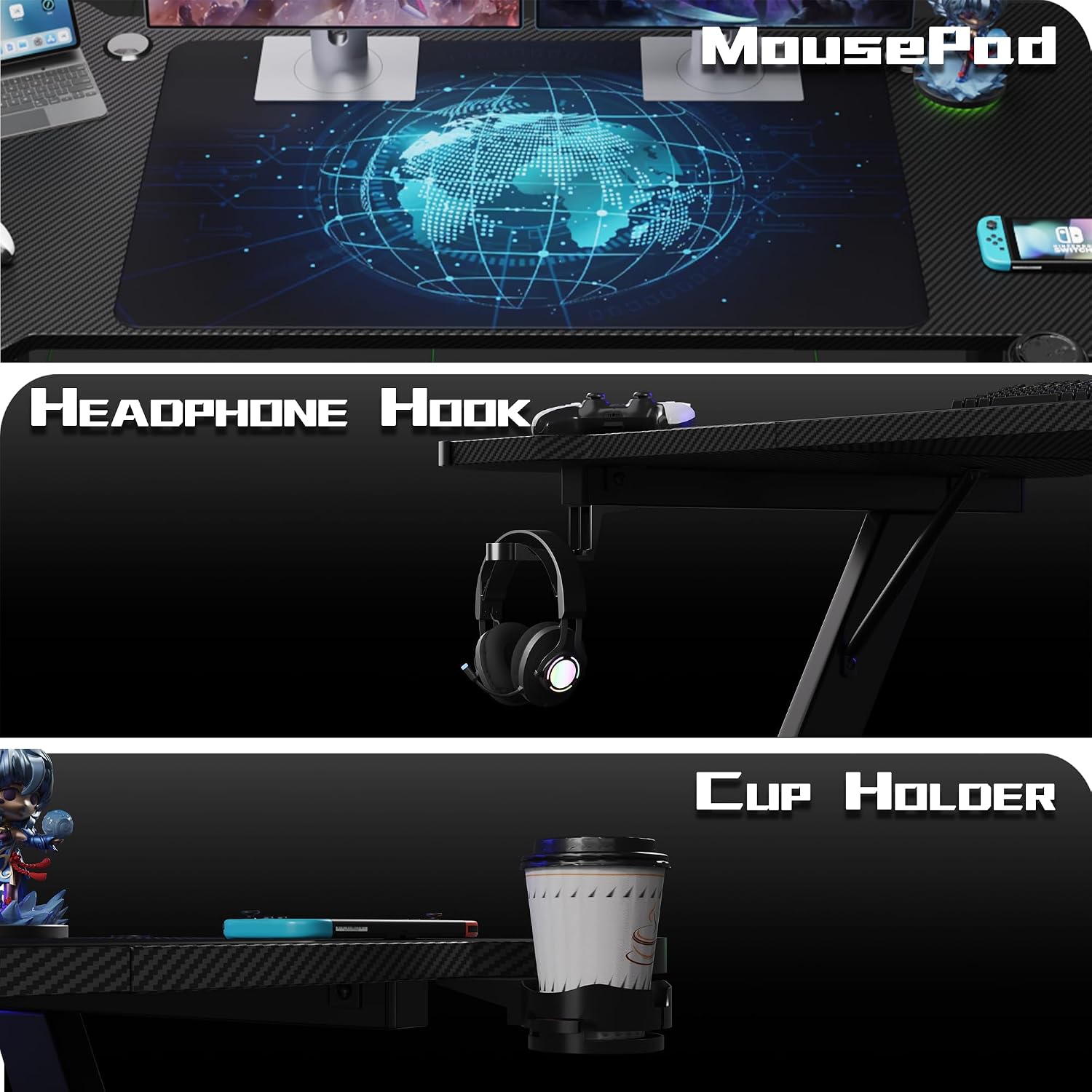
- Mouse Pad: The oversized mouse pad covers a significant portion of the desktop, providing a smooth and consistent surface for mouse movement.
- Cup Holder: Use the integrated cup holder to securely place beverages, reducing the risk of spills on your equipment.
- Headphone Hook: Hang your headphones on the hook for easy access and to keep your desk tidy.
- Cable Management Tray: Utilize the tray to route and organize cables, preventing clutter and tangles.

5. Maintenance
Regular maintenance ensures the longevity and appearance of your gaming desk.
- Cleaning the Surface: The carbon fiber texture surface is designed for easy cleaning. Wipe with a soft, damp cloth. Avoid abrasive cleaners or harsh chemicals that could damage the finish.
- Frame Cleaning: Clean the metal frame with a damp cloth and mild detergent if necessary. Dry thoroughly.
- Check Connections: Periodically check all screws and bolts to ensure they remain tight. Retighten if any looseness is detected.
- LED Lights: Ensure the LED light strip and connections are free from dust and debris. Do not attempt to repair the LED strip yourself; contact customer support if issues arise.
6. Troubleshooting
Refer to the following common issues and their solutions.
| Problem | Possible Cause | Solution |
|---|---|---|
| Desk wobbles or is unstable | Uneven floor; loose assembly hardware | Adjust the foot pads at the bottom of the legs to compensate for uneven surfaces. Ensure all assembly screws are securely tightened. |
| LED lights do not turn on | Power cable disconnected; remote control battery dead; faulty LED strip | Check if the power cable is securely connected to the LED strip and the power outlet. Replace the remote control battery. If the issue persists, contact customer support. |
| Accessories (cup holder, hook) are loose | Mounting screws are loose | Tighten the screws securing the accessories to the desk. |
7. Specifications
| Feature | Detail |
|---|---|
| Model | 47 inch Z-Shaped Gaming Desk |
| Dimensions (D x W x H) | 23.6" x 47" x 29.3" (60cm x 119.4cm x 74.4cm) |
| Weight Capacity | Up to 132 lbs (60 kg) |
| Material | Carbon Fiber Texture Desktop, Metal Z-Shaped Frame |
| Color | Black |
| Special Features | Integrated LED Lights (multi-color, adjustable brightness, memory function), Large Mouse Pad, Cup Holder, Headphone Hook, Cable Management Tray, Adjustable Foot Pads |
| Assembly Required | Yes |

8. Warranty and Support
8.1 Warranty Information
Furniwell products are manufactured to high-quality standards. This product comes with a limited warranty against manufacturing defects. Please refer to the warranty card included with your purchase or visit the official Furniwell website for detailed warranty terms and conditions.
8.2 Customer Support
For technical assistance, missing parts, or warranty claims, please contact Furniwell customer support through the following channels:
- Website: Visit the official Furniwell website for FAQs and contact forms.
- Email: Refer to your purchase documentation for customer service email addresses.
- Phone: Check the Furniwell website for available customer service phone numbers.
When contacting support, please have your product model number (47 inch Z-Shaped Gaming Desk) and proof of purchase readily available.