
EAFC B0CG98Q789
EAFC Battery Charger 10-Amp 12V and 24V Fully-Automatic Smart Car Battery Charger User Manual
Brand: EAFC
Model: B0CG98Q789
1. Introduction
This manual provides essential information for the safe and efficient operation of your EAFC 10-Amp 12V and 24V Fully-Automatic Smart Car Battery Charger. This versatile device functions as a battery charger, battery maintainer, trickle charger, and battery desulfator, designed to charge and repair various lead-acid batteries found in cars, trucks, SUVs, motorcycles, lawnmowers, boats, and marine vehicles.
Please read these instructions carefully before use to ensure proper functionality and to prevent damage to the unit or your battery.
2. Safety Information
Always prioritize safety when working with electrical devices and batteries. Failure to follow these safety guidelines may result in electric shock, fire, or serious injury.
- Ensure the charger is disconnected from the power outlet before making or breaking connections to the battery.
- Operate the charger in a well-ventilated area.
- Avoid charging frozen batteries. Allow them to thaw before charging.
- Do not expose the charger to rain, snow, or excessive moisture.
- Keep out of reach of children.
- This charger is designed for 12V and 24V lead-acid batteries only (AGM, GEL, SLA, Flooded). DO NOT use with lithium batteries.
- The charging cable features heat-resistant and oxidation-resistant copper wire for enhanced safety.
- The unit includes multiple protection circuits: overcharge, overvoltage, overcurrent, short circuit, reverse connection, overheat, and undervoltage protection.
3. Product Overview and Components
The EAFC Battery Charger features a compact design with an intuitive LCD display and robust construction.

Figure 1: EAFC 10-Amp Smart Car Battery Charger with battery clamps and power plug.
Key Features:
- Fully-Automatic Operation: Detects battery type and condition, then automatically adjusts charging parameters.
- LCD Backlit Display: Clearly shows charging status, battery voltage, charging percentage, and temperature.
- Integrated Thermal Sensor: Automatically adjusts charge based on ambient temperature to prevent over-charging or under-charging.
- Advanced REPAIR Mode: Helps recover old or idle batteries and extends battery life through high-frequency and low-frequency pulse technology. Note: This mode cannot activate a completely dead battery or repair a physically damaged battery.
- Multi-Protection: Comprehensive safety features including overcharge, overvoltage, overcurrent, short circuit, reverse connection, overheat, and undervoltage protection.
- Intelligent Memory: Remembers the last used mode after power disconnection, simplifying subsequent uses.
4. Setup and Connection
Follow these steps to properly connect your EAFC Battery Charger to your vehicle's battery:
- Prepare the Battery: Ensure the battery terminals are clean and free of corrosion. If necessary, clean them with a wire brush.
- Connect Battery Clamps:
- Connect the RED positive (+) clamp to the positive (+) battery terminal.
- Connect the BLACK negative (-) clamp to the negative (-) battery terminal.
- Ensure a secure connection to prevent sparks or poor contact.
- Connect to Power: Plug the charger's AC power cord into a standard 120V AC wall outlet. The charger will power on and begin detecting the battery.

Figure 2: The charger is suitable for various 12V and 24V lead-acid battery applications.
Video 1: Demonstration of connecting the EAFC 10A car battery charger to a vehicle battery.
5. Operating Instructions
Once connected, the charger will automatically detect the battery voltage (12V or 24V) and display the current status on the LCD screen.
5.1. Mode Selection
Press the "MODE" button to cycle through the available charging modes. The charger supports multiple modes for different battery types and conditions:
- STD (Standard): For standard lead-acid batteries.
- AGM/GEL: For AGM (Absorbed Glass Mat) and GEL batteries.
- WET: For wet cell batteries.
- MOTORCYCLE: For motorcycle batteries, which often switches to trickle/float charging after full charge.
- REPAIR: For desulfation and recovery of old or idle batteries.

Figure 3: One-touch switching between various charging modes.
5.2. Automatic Temperature Compensation
The charger features an integrated thermal sensor that detects the ambient temperature. It automatically adjusts the charging voltage to prevent over-charging in hot climates and under-charging in cold climates, ensuring optimal battery health and performance.
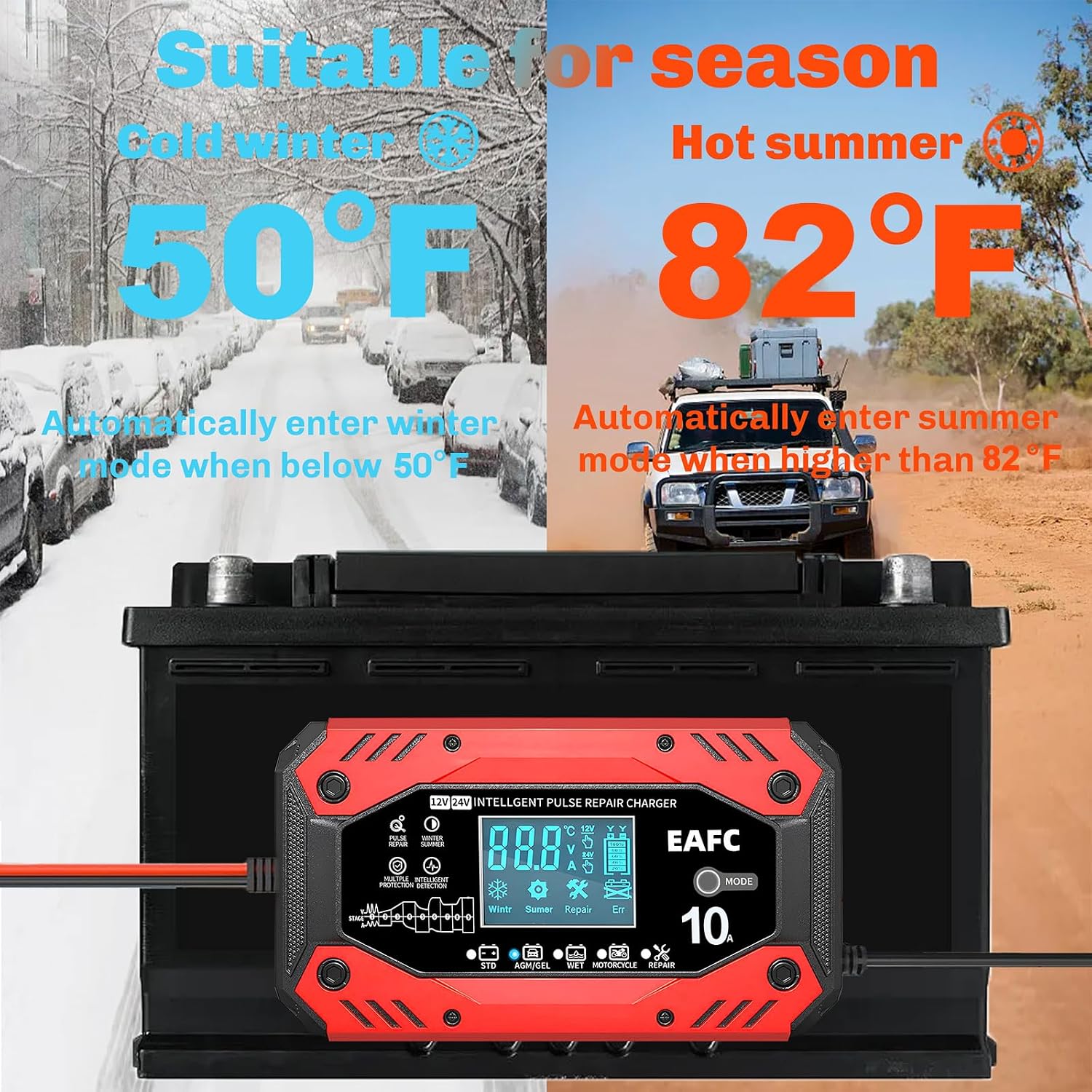
Figure 4: Automatic temperature compensation for optimal charging in different seasons.
5.3. Charging Process
The charger utilizes a 9-stage charging process to optimize battery performance precisely and gently. The LCD screen will display the charging progress and battery percentage.
Video 2: Visual guide on the charging process and display features of the EAFC Battery Charger.
6. Maintenance
Proper maintenance ensures the longevity of your battery and charger.
- Regular Cleaning: Keep the charger and its cables clean and dry. Wipe with a soft, dry cloth.
- Storage: Store the charger in a cool, dry place when not in use.
- Trickle/Float Charging: For batteries stored for extended periods (e.g., over winter), use the appropriate mode (e.g., MOTORCYCLE mode for smaller batteries) to switch to trickle or float charging. This prevents overcharging and maintains battery health.
7. Troubleshooting
If you encounter issues with your EAFC Battery Charger, refer to the following common solutions:
- Charger Not Turning On:
- Ensure the power cord is securely plugged into a live AC outlet.
- Check that the battery clamps are correctly and securely connected to the battery terminals (positive to positive, negative to negative).
- Battery Not Charging / "Err" Display:
- Verify that the correct charging mode is selected for your battery type.
- If the battery is severely discharged (below a certain voltage threshold), the charger may not initiate charging. Try using the REPAIR mode.
- Remember, the REPAIR mode cannot revive a completely dead battery or repair physically damaged cells.
- Ensure the battery is a lead-acid type. This charger is not compatible with lithium batteries.
- Overheat Protection Activated:
- The charger may temporarily stop charging if it detects overheating. Allow the unit to cool down in a well-ventilated area.
- Ensure the cooling fan is not obstructed.
For persistent issues, please refer to the Warranty and Support section.
8. Specifications
| Specification | Value |
|---|---|
| Product Dimensions | 6.22 x 3.54 x 2.44 inches |
| Item Weight | 1.23 pounds |
| Output Voltage | 12 Volts (supports 12V & 24V batteries) |
| Charging Current | 10-Amp (12V), 5-Amp (24V) |
| Manufacturer | EAFC |
| Color | Black and White Display Screen |
| Date First Available | August 22, 2023 |

Figure 5: Physical dimensions of the EAFC Battery Charger.
9. Warranty and Support
9.1. Warranty Information
Starting from the date of purchase, if the product is damaged by non-human factors, it will be replaced free of charge for 30 days.
9.2. Customer Support
For any questions or issues with your EAFC Battery Charger, please contact customer support. If you receive a damaged product, first take a photo and then contact Amazon Logistics for corresponding after-sales support. For general inquiries, EAFC is committed to replying with a solution within 24 hours.
Related documentsB0CG98Q789


Ask a question about this manual
Ask about setup, troubleshooting, compatibility, parts, safety, or missing instructions. Manuals+ will review the question and use this page’s manual context to help answer it.