
HTU HTUPHTU1
HTU Car Phone Holder Instruction Manual
Model: HTUPHTU1
Brand: HTU
1. Introduction
The HTU Car Phone Holder is designed to provide a secure and stable mounting solution for your mobile device in your vehicle. It features a robust steel-hook vent mount and offers 360-degree adjustability for optimal viewing angles. This manual provides detailed instructions for installation, operation, and maintenance to ensure safe and effective use of your device.
Key features include a stable triangular physical structure for maximum anti-shake performance, a sleek design that does not obstruct vision or vent airflow, and a one-hand operation for easy phone placement and removal. The core spindle is made of aviation-grade material for durability and smooth 360-degree rotation.
2. What's in the Box
- 1 x HTU Car Phone Mount
- 1 x Steel Air Vent Hook
- 1 x Cable Clip
- 2 x Cleaning Wipes
- 5-Year Support Information
3. Setup and Installation
Follow these steps to properly install your HTU Car Phone Holder:
- Attach the Vent Hook: Unscrew the collar on the back of the phone holder. Insert the ball joint of the steel air vent hook into the socket on the back of the phone holder. Tighten the collar securely to fix the hook to the holder.
- Extend the Hook: Push the button on the back of the hook mechanism to extend the steel hook to its proper length. The hook length can extend up to 1.5 inches.
- Mount to Air Vent: Carefully hook the extended steel hook onto one of your car's air vent blades. Ensure the hook is firmly secured.
- Lock the Mount: Once the hook is in place, turn the locking collar clockwise to tighten the hook onto the vent blade. This will secure the mount and prevent shaking.
Important Compatibility Notes:
- The width of the hook is 10mm (0.39 inches), and its length is 1.5 inches.
- Compatible vent blade width should be less than 38mm (1.5 inches) and thickness less than 6.8mm (0.27 inches).
- The hook clip is NOT suitable for ROUND, CROSS, or DIAGONAL air vents.
- It is recommended for HORIZONTAL and VERTICAL vent blades only.
- If your vent blades are fragile or loose, they may cause the bracket to shake. Ensure your vent blades are secure before installation.

Figure 3.1: Installation Steps for the HTU Car Phone Holder.

Figure 3.2: Compatible Air Vent Types.
4. Operation
Operating your HTU Car Phone Holder is designed to be simple and intuitive:
- Placing Your Phone: Gently press your phone against the center of the holder. The side arms will automatically open and then close to securely grip your phone.
- Releasing Your Phone: To release your phone, press the quick-release button located on the back of the holder. The side arms will open, allowing you to easily remove your device.
- Adjusting Viewing Angle: The holder features a 360-degree rotatable ball joint. Loosen the collar behind the holder slightly, adjust your phone to the desired portrait or landscape orientation and viewing angle, then tighten the collar to secure it.
- Cable Management: Use the included cable clip to organize charging cables, GPS cords, or earphone cords, keeping your car interior tidy and promoting safe driving.
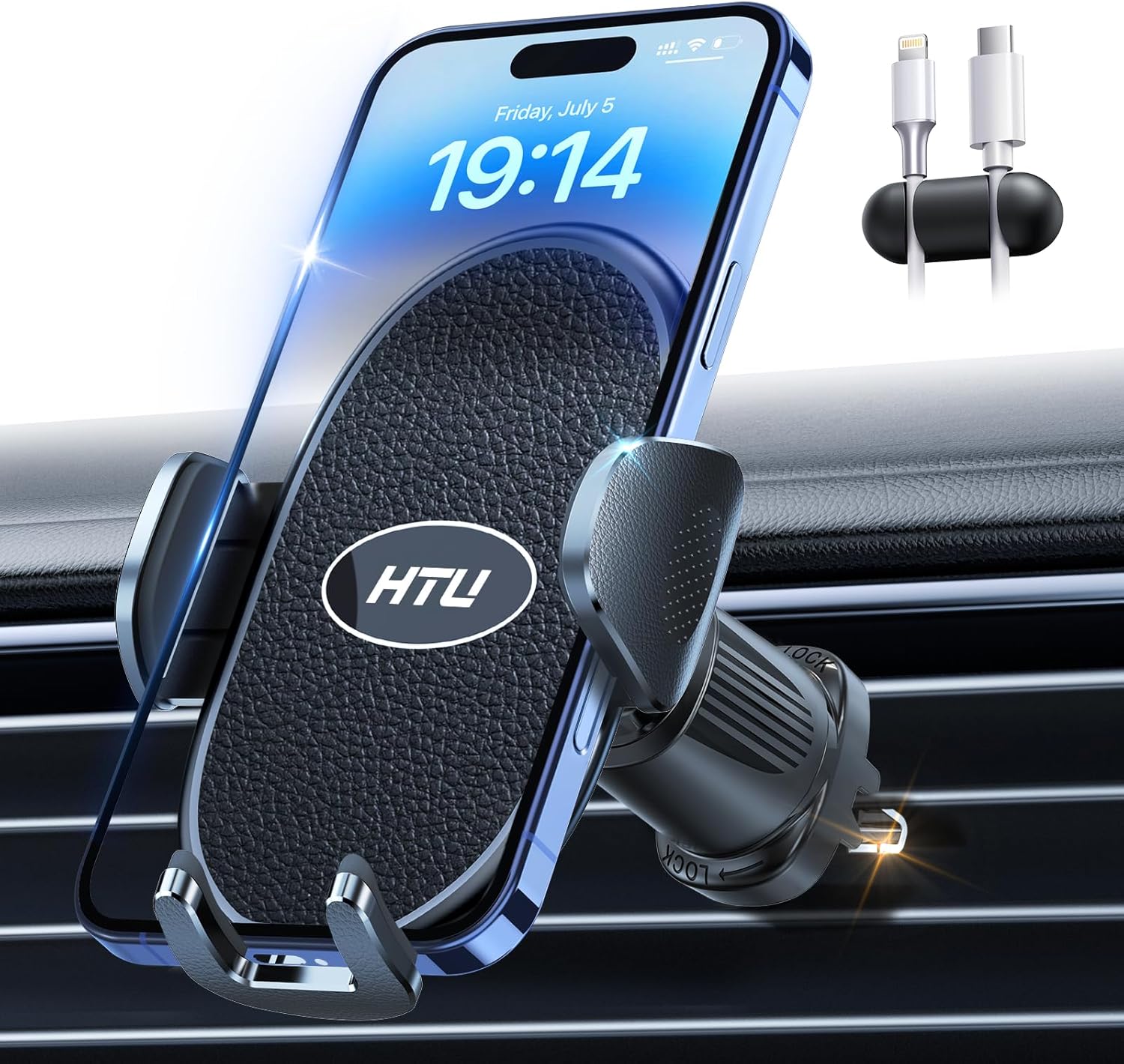
Figure 4.1: Phone securely held in the HTU Car Phone Holder.

Figure 4.2: Easy one-handed phone release.

Figure 4.3: 360-degree adjustable viewing.

Figure 4.4: Integrated Cable Organizer.
5. Maintenance
To ensure the longevity and optimal performance of your HTU Car Phone Holder, follow these simple maintenance guidelines:
- Cleaning: Use a soft, damp cloth to wipe down the surface of the holder. Avoid using harsh chemicals or abrasive cleaners, as these can damage the material.
- Vent Blades: Periodically check the car's air vent blades for any looseness or damage, as this can affect the stability of the mount.
- Storage: If removing the holder for extended periods, store it in a clean, dry place away from direct sunlight and extreme temperatures.
6. Troubleshooting
If you encounter any issues with your HTU Car Phone Holder, please refer to the following common solutions:
| Problem | Possible Cause | Solution |
|---|---|---|
| Holder is not stable/shakes | Hook not fully tightened; Incompatible vent type; Loose vent blades. | Ensure the locking collar is fully tightened. Verify your car's vent type is horizontal or vertical. Secure any loose vent blades. |
| Phone does not fit | Phone size exceeds limits; Phone case too thick. | This holder supports phones from 4 to 7 inches. Ensure the total thickness of your phone and case does not exceed 0.76 inches. Not compatible with ring phone holders or uneven cases. |
| Phone is not charging wirelessly | The product does not support wireless charging. | This model does not have wireless charging capabilities. Use the included cable organizer for wired charging. |
7. Specifications
| Feature | Detail |
|---|---|
| Model Number | HTUPHTU1 |
| Mounting Type | Vertical & Horizontal Vent (Steel Hook) |
| Compatible Phone Sizes | 4-7 inches (e.g., iPhone 7-16 Pro Max, Samsung Galaxy S series, Google Pixel series, etc.) |
| Max Phone/Case Thickness | 0.76 inches |
| Item Weight | 5.6 ounces |
| Package Dimensions | 4.76 x 3.31 x 2.91 inches |
| Color | Black |
| Special Features | Adjustable, Shockproof Silicone, Easy Release Button, Cable Organizer |

Figure 7.1: Product Dimensions.
8. Warranty and Support
HTU stands behind the quality of its products. Your HTU Car Phone Holder comes with a 5-Year Happiness After-Sales Support. For any inquiries, technical assistance, or support needs, please refer to the contact information provided with your product packaging or visit the official HTU website.
Related documentsHTUPHTU1


Ask a question about this manual
Ask about setup, troubleshooting, compatibility, parts, safety, or missing instructions. Manuals+ will review the question and use this page’s manual context to help answer it.