
Introduction
This manual provides comprehensive instructions for the setup, operation, and maintenance of your Baseus UltraStable Pro Series Rotatable and Foldable Laptop Stand. Please read this manual carefully before use to ensure proper functionality and longevity of the product.
Product Overview
Key Features
- Durable Construction: Crafted from high-quality aluminum alloy for stability and long-term use.
- 360° Rotatable Base: Allows for easy adjustment of viewing angle without repositioning the entire stand.
- Adjustable Height and Angle: Ergonomic design to achieve optimal viewing and typing positions.
- Enhanced Stability: Features a large 388cm² backing base and anti-slip material strips to prevent wobbling.
- Efficient Heat Dissipation: Hollow carved design with ventilation openings to keep your device cool.
- High Load Capacity: Supports devices up to 8 kg.
- Foldable Design: Compact for easy storage and portability.
Components
The Baseus UltraStable Pro Series Laptop Stand consists of the following main components:
- Main Support Arms
- Device Holding Platform (with ventilation holes and anti-slip strips)
- Rotatable Base Plate
- Fixed Bottom Base
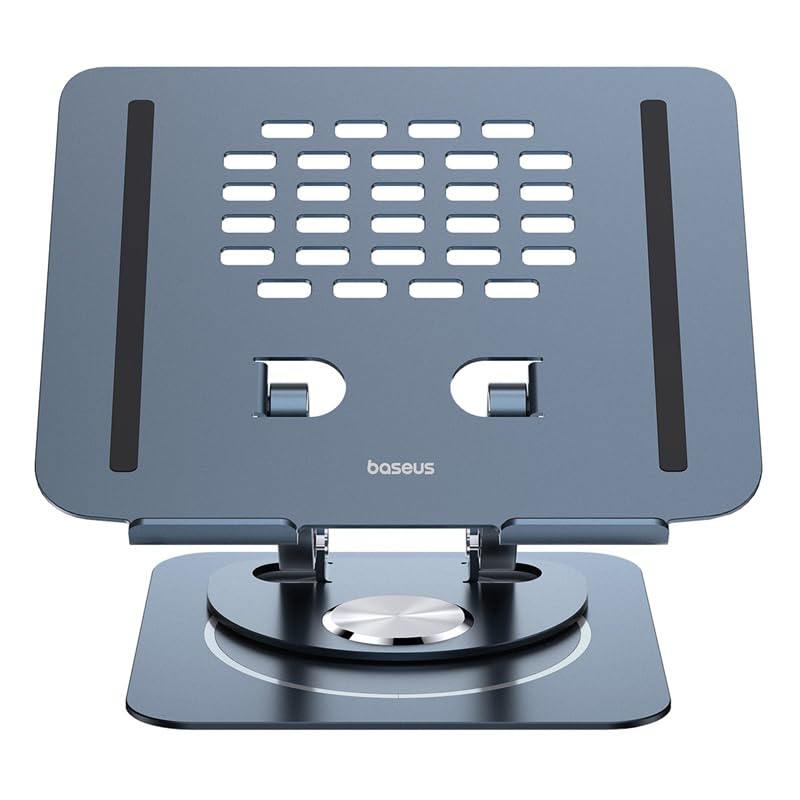
Image: Front view of the Baseus UltraStable Pro Series Laptop Stand, showcasing its adjustable design and ventilation holes.
Setup Instructions
- Unpack the Stand: Carefully remove the laptop stand from its packaging.
- Place on a Stable Surface: Position the stand on a flat, stable surface such as a desk or table.
- Unfold the Arms: Gently unfold the support arms to the desired height and angle. The damping hinges allow for smooth adjustment.
- Adjust Height and Angle:

Image: Illustration showing the adjustable viewing angle and height of the laptop stand, highlighting its ergonomic capabilities.
The stand features a wide range of adjustment for both height and viewing angle. Adjust the arms to find the most comfortable ergonomic position for your laptop or tablet. The maximum adjustable height range is approximately 31cm.
- Place Your Device: Carefully place your laptop or tablet onto the device holding platform. Ensure it rests securely on the anti-slip strips.
Operating Instructions
- Using the Rotatable Base:

Image: Close-up of the stand's base, illustrating the 360-degree rotation feature for flexible viewing.
The upper part of the stand, including the device platform, can be rotated 360 degrees independently of the fixed bottom base. Gently rotate the platform to share your screen or adjust your viewing angle without moving the entire stand.
- Ensuring Stability: The large 388cm² backing base provides stable support. Ensure your device is centered on the platform for optimal balance. The stand is designed to support up to 8 kg.
- Heat Dissipation: The hollow carved design and ventilation openings on the platform facilitate airflow, helping to dissipate heat from your laptop during operation. Ensure these openings are not obstructed.
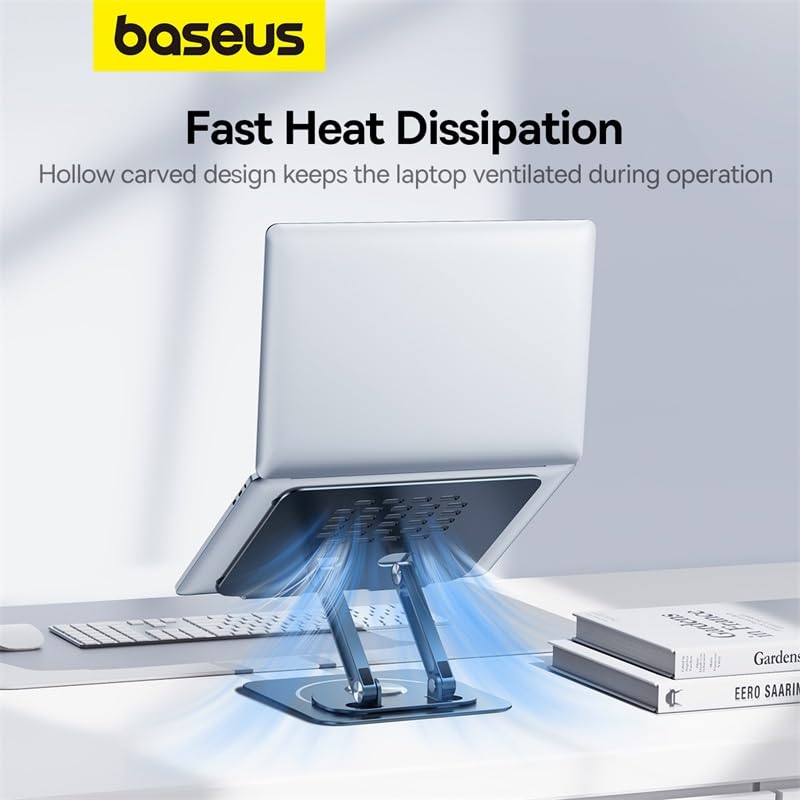
Image: A laptop on the stand, with blue arrows indicating airflow through the hollow design for effective heat dissipation.
Maintenance
- Cleaning: Wipe the stand with a soft, dry cloth. For stubborn marks, a slightly damp cloth can be used, followed by immediate drying. Avoid abrasive cleaners or solvents.
- Inspection: Periodically check all moving parts and hinges for smooth operation. Ensure anti-slip pads are intact.
- Storage: When not in use, the stand can be folded for compact storage. Store in a dry place away from extreme temperatures.
Troubleshooting
| Problem | Possible Cause | Solution |
|---|---|---|
| Stand feels unstable or wobbles. | Uneven surface; device not centered; excessive weight. | Ensure the stand is on a flat surface. Center your device on the platform. Verify device weight does not exceed 8 kg. |
| Difficulty adjusting height/angle. | Hinges are stiff. | Apply gentle, even pressure. The hinges are designed with damping for smooth, controlled movement. Do not force adjustments. |
| Laptop overheating on the stand. | Ventilation holes obstructed. | Ensure no objects are blocking the ventilation holes on the stand's platform. |
| Anti-slip pads are worn or missing. | Normal wear and tear. | Contact customer support for replacement parts if available. |
Specifications
| Attribute | Detail |
|---|---|
| Brand | Baseus |
| Model Number | B10059900811-00 |
| Colour | Metallic |
| Form Factor | Table Stand |
| Compatible Devices | Laptops |
| Mounting Type | Tabletop |
| Special Features | Adjustable, Arm, Foldable Build |
| Item Dimensions (L x W x H) | 30 x 29.5 x 9.7 Centimeters |
| Item Weight | 935 Grams |
| Enclosure Material | Aluminium, Metal |
| Load Capacity | Up to 8 kg |
| Country of Origin | India |
Warranty and Support
For warranty information and customer support, please contact the authorized distributor or manufacturer directly.
- Importer Contact: MP International - Authorised Distributor - 8369646880
- Manufacturer Contact: SHENZHEN BASEUS TECHNOLOGY CO., LTD - 8369646880
Please retain your proof of purchase for any warranty claims.