
TVON Floor TV Stand with Wheels
TVON Rolling TV Stand User Manual
Model: Floor TV Stand with Wheels
For 32 to 70 Inch TVs
Introduction
Thank you for choosing the TVON Rolling TV Stand. This elegant and versatile floor TV stand is designed to provide optimal viewing flexibility and convenience for televisions ranging from 32 to 70 inches. Its mobile design, adjustable height, and swivel capabilities make it an ideal solution for various living spaces, including living rooms, bedrooms, yoga rooms, gyms, and dormitories. This manual provides detailed instructions for assembly, operation, maintenance, and troubleshooting to ensure safe and efficient use of your new TV stand.
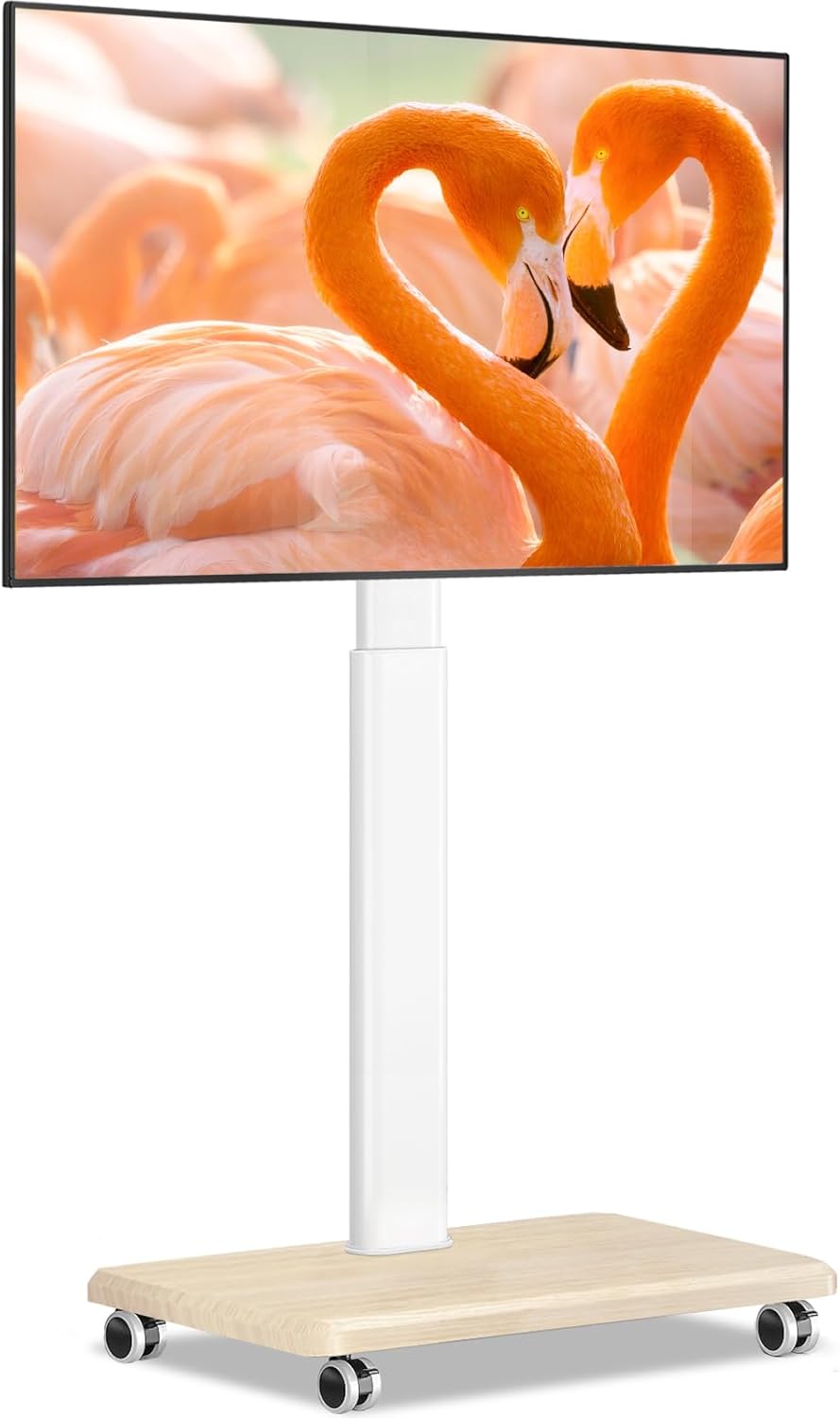
Image: The TVON Rolling TV Stand, featuring a white pole and a light wooden base with wheels, supporting a television.
Safety Information
Please read and understand all instructions before assembly and use. Failure to follow these instructions may result in property damage, serious injury, or death. If you have any questions, please contact TVON customer support.
- Weight Capacity: Do not exceed the maximum weight capacity of 88 lbs (40 kg). This stand is designed for TVs between 32 and 70 inches.
- VESA Compatibility: Ensure your TV's VESA mounting pattern is compatible (100x100mm to 400x400mm).
- Stability: Always ensure the TV is securely mounted and the stand is on a stable, level surface. Engage wheel locks when the stand is in a stationary position.
- Children and Pets: Keep children and pets away from the TV stand during assembly. Do not allow children to climb on or play with the TV stand or mounted television.
- Cable Management: Utilize the integrated cable management system to prevent tripping hazards and ensure cables are not pinched.
- Moving the Stand: Unlock the wheels before moving the stand. Move slowly and carefully, especially on uneven surfaces.
Package Contents
Verify that all components are present and undamaged before beginning assembly. If any parts are missing or damaged, please contact TVON customer service for assistance.
| Part | Description | Quantity |
|---|---|---|
| A | Wooden Base | 1 |
| B | Vertical Support Pole | 1 |
| C | TV Mounting Bracket | 1 |
| D | Wheels (with locks) | 4 |
| E | Hardware Kit (screws, washers, spacers) | 1 set |
| F | Cable Management Clips | Several |
| G | Tools (Allen wrench, small wrench) | 1 set |
Setup and Assembly
Follow these steps carefully to assemble your TVON Rolling TV Stand. It is recommended to have two people for certain steps, especially when mounting the TV.
Step 1: Attach Wheels to the Base
Place the wooden base (A) upside down on a soft, clean surface to prevent scratches. Attach the four wheels (D) to the designated holes on the base using the provided screws from the hardware kit (E). Ensure all screws are tightened securely.

Image: Illustrates the sturdy wooden base of the TV stand, contrasting it with fragile glass bases. This base provides stability and durability.
Step 2: Assemble the Vertical Support Pole
Connect the vertical support pole (B) to the center of the wooden base (A). Use the appropriate screws and tools from the hardware kit (E) to firmly secure the pole. Ensure the pole is upright and stable.

Image: Details of the TV stand's construction, including the safety lock for the TV mount, integrated cable management, and the robust alloy steel pole.
Step 3: Attach TV Mounting Bracket
Attach the TV mounting bracket (C) to the top of the vertical support pole (B). Follow the instructions provided with the bracket to ensure it is correctly oriented and securely fastened. This bracket allows for height adjustment and swivel.
Step 4: Prepare Your TV for Mounting
Before mounting, identify your TV's VESA pattern (the spacing of the mounting holes on the back of your TV). Select the correct screws, washers, and spacers from the hardware kit (E) that fit your TV. Attach the two vertical mounting arms (part of C) to the back of your TV. Ensure they are securely fastened and level.

Image: Technical diagram illustrating the stand's height range (41.5" - 53.3"), base dimensions (21.6" x 15" x 3.5"), and compatible VESA patterns for TV mounting.
Step 5: Mount the TV
With assistance, carefully lift your TV and hook the mounting arms onto the TV mounting bracket (C) on the stand. Ensure the TV is centered and level. Secure the TV to the bracket using the safety lock mechanism (refer to the detailed diagram in the package for specific locking instructions). This prevents accidental dislodgement.

Image: Visual confirmation of the TV stand's compatibility, showing it can accommodate TVs from 32 to 70 inches with a maximum weight of 88 lbs.
Operating Instructions
Height Adjustment
The TVON Rolling TV Stand offers 9 levels of height adjustment, allowing you to customize your viewing experience. To adjust the height, loosen the locking mechanism on the vertical support pole, carefully raise or lower the TV to your desired height, and then securely tighten the locking mechanism. Adjustments are typically in 50mm (2-inch) intervals.

Image: The TV stand positioned in a kitchen, illustrating its 9-level height adjustment capability for optimal viewing comfort in various environments.
Swivel Function
The TV mount allows for a ±30° swivel, enabling you to easily adjust the viewing angle. Gently rotate the TV to the left or right to achieve your preferred angle. No locking mechanism is required for the swivel function; it is designed for smooth, flexible adjustment.

Image: A visual representation of the TV stand's ability to swivel the television ±30 degrees, providing flexible viewing angles for different seating arrangements.
Mobility (Wheels)
The TV stand is equipped with four 360° swivel lockable wheels for easy movement. To move the stand, unlock all four wheels. Gently push or pull the stand to its desired location. Once positioned, engage the locks on all four wheels to ensure the stand remains stationary and stable.

Image: A person effortlessly moving the TV stand across a room, highlighting its smooth-rolling wheels and the convenience of repositioning the TV.
Cable Management
Utilize the integrated cable management clips along the vertical support pole to keep your TV and accessory cables neat and organized. This helps prevent tangles and creates a cleaner aesthetic.
Maintenance
- Cleaning: Wipe the stand with a soft, dry cloth. For stubborn marks, a slightly damp cloth can be used, followed by immediate drying. Avoid harsh chemicals or abrasive cleaners.
- Hardware Check: Periodically check all screws and connections to ensure they remain tight. Re-tighten if necessary.
- Wheel Care: Keep the wheels free of debris (hair, dust, etc.) to ensure smooth movement.
- Storage: If storing the stand for an extended period, ensure it is clean, dry, and stored in a safe place to prevent damage.
Troubleshooting
| Problem | Possible Cause | Solution |
|---|---|---|
| TV is not level after mounting. | Mounting arms not aligned or tightened unevenly. | Carefully re-adjust the TV on the bracket, ensuring both mounting arms are at the same height and securely fastened. Use a level if available. |
| Wheels are difficult to roll. | Wheels are locked, or debris is caught in them. | Ensure all wheel locks are disengaged. Check wheels for any obstructions and remove them. Clean wheels if necessary. |
| Stand feels unstable. | Screws are loose, or TV weight exceeds capacity. | Check and re-tighten all assembly screws. Verify your TV's weight does not exceed 88 lbs. Ensure the stand is on a flat, stable surface. |
| Cannot adjust TV height. | Locking mechanism is too tight or stuck. | Ensure the height adjustment locking mechanism is fully loosened before attempting to adjust. Do not force the adjustment. |
Specifications
- Brand: TVON
- Model: Floor TV Stand with Wheels
- Compatible TV Sizes: 32 to 70 Inches
- Maximum Load Capacity: 88 lbs (40 kg)
- VESA Compatibility: 100x100mm, 200x100mm, 200x200mm, 300x200mm, 300x300mm, 400x200mm, 400x300mm, 400x400mm
- Height Adjustment: 9 levels, from 41.5 inches to 53.3 inches (approx. 50mm/2-inch intervals)
- Swivel Angle: ±30°
- Base Dimensions: 21.6 x 14.9 x 3.5 inches (approx.)
- Item Weight: 17.3 pounds
- Material: Wood, Metal
- Color: WHITE
Warranty and Support
TVON stands behind the quality of its products. For warranty information, technical support, or to inquire about replacement parts, please contact TVON customer service. Please have your product model number and purchase date available when contacting support.
Contact Information: Refer to the contact details provided on the product packaging or the official TVON website.
Note: Specific warranty terms may vary by region and retailer. Please retain your proof of purchase for warranty claims.
Related documentsFloor TV Stand with Wheels

Ask a question about this manual
Ask about setup, troubleshooting, compatibility, parts, safety, or missing instructions. Manuals+ will review the question and use this page’s manual context to help answer it.