
Introduction
This manual provides detailed instructions for the installation, operation, and maintenance of your Yoidesu 7-Inch Retractable Car MP5 Multimedia Player. Please read this manual thoroughly before using the product to ensure proper function and to prevent damage.

Image: The Yoidesu 7-inch car MP5 player with its retractable screen extended, showing the main menu with various application icons.
What's in the Box
Carefully unpack the box and ensure all items are present:
- 1 x Car MP5 Player Unit
- 2 x Power Cords
- 2 x Disassembly Pieces
- 1 x Remote Control
- 1 x Reversing Video Cable
- 1 x Camera Assembly (12 LED Reversing Camera)
- 1 x Camera Connection Cable
- 2 x Screws
- 1 x Host User Manual (this document)
- 1 x Camera User Manual
Specifications
| Feature | Specification |
|---|---|
| Item Type | Car MP5 Player |
| Material | ABS, LCD, Metal |
| System | CE System |
| Radio Frequency | FM 87.5-108.0MHz, AM 522-1620KHz |
| Bluetooth Version | BT5.1 |
| Display Resolution | 800x480 |
| Screen Size | 7 inches |
| Screen Expansion Mode | Manual Retraction |
| Operating Voltage | 12-14.4V |
| Power Output | 4x60W |
| Installation Size | Approx. 178x53mm (7x2.08in) |
| Face Shell Size | Approx. 175x50mm (6.88x1.96in) |
| Host Depth | Approx. 145mm (5.7in) |
| Cell Phone Connectivity | MirrorLink, iOS, Android Auto |
| USB Ports | USB2.0 + PD Fast Charging + Type C Charging |
| Audio Formats | MP3/AAC/APE/OGG/M4A/RA/WAV |
| Video Formats | H263/H264/H265/DIVX/AVI/FLV/MKV/MPEG/MP4/WMV9/VC/ASF/TS/QT |
| Image Formats | JPEG/PNG/BMP/GIF/TIFF |
| Supported Languages | English, Chinese, Spanish, Portuguese, Russian, German, French, Polish, Turkish, Arabic, Hebrew, Italian, Czech |
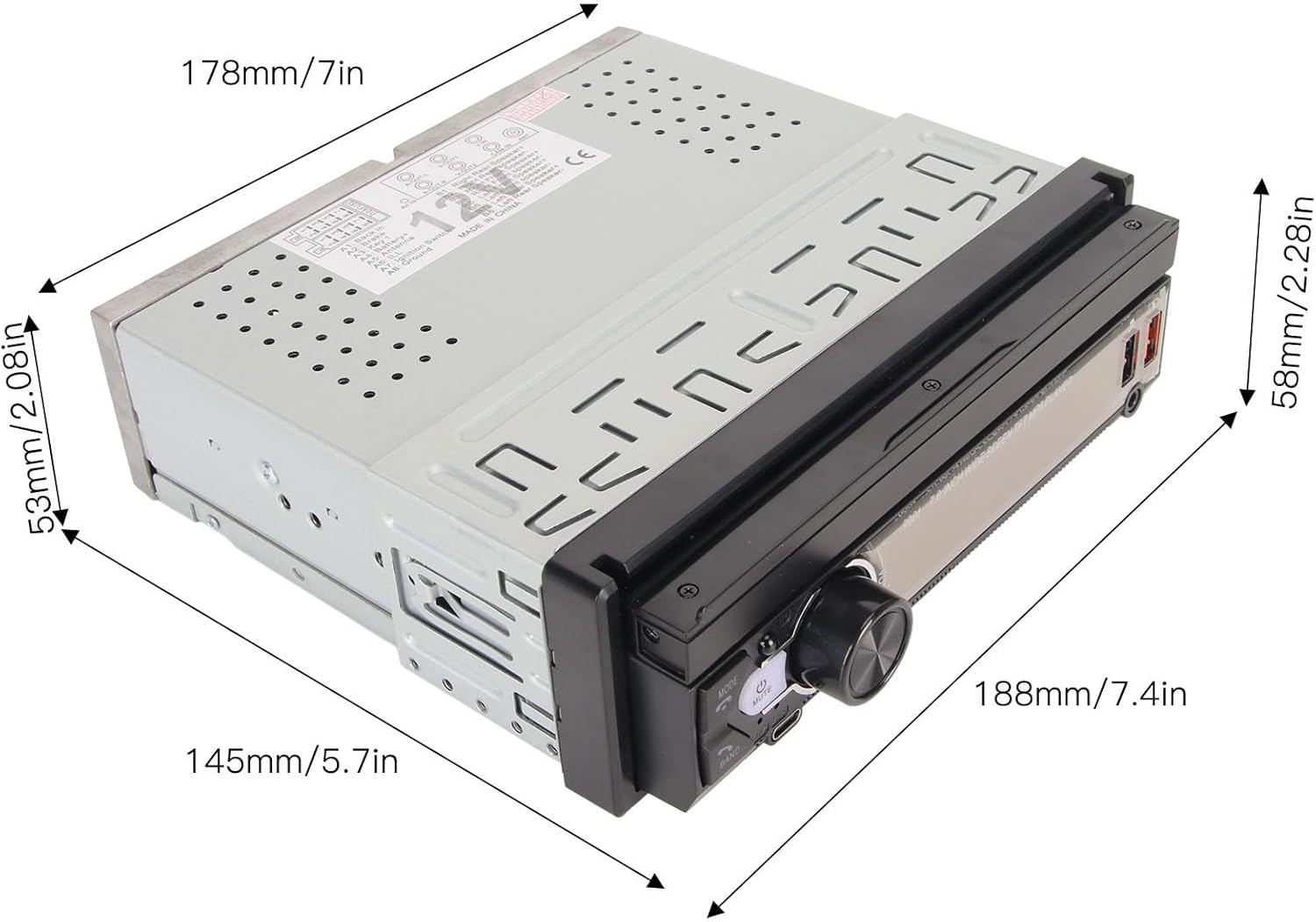
Image: Dimensional diagram of the car MP5 player, indicating measurements for installation planning.
Setup
1. Installation
The player is designed for a standard single-DIN car stereo slot. Ensure your vehicle's dashboard opening matches the installation dimensions (approximately 178x53mm). The screen is manually retractable, allowing adjustment for optimal viewing.

Image: The car MP5 player shown installed in a vehicle dashboard, demonstrating its retractable screen in both closed and open positions.
2. Wiring Connections
Refer to the panel description image for detailed wiring connections. Ensure all power, speaker, and accessory wires are connected correctly according to your vehicle's wiring diagram. Incorrect wiring can cause damage to the unit or vehicle electrical system.
- Power/Speaker: Connect the ISO plug for power and speaker outputs.
- Radio Antenna: Connect your car's radio antenna to the designated jack.
- Video Input/Output: Use Video Out-1 and Video Out-2 for external displays. Video Input is for auxiliary video sources.
- Reversing Camera Input: Connect the provided reversing camera cable to this input for automatic display when reversing.
- Audio Input/Output: Rear 3.5mm audio input and right/left audio output for external audio devices or amplifiers.

Image: A comprehensive diagram illustrating the functions of the front panel buttons and the various input/output ports on the rear of the car MP5 player.
Operating Instructions
1. Basic Functions
- Power On/Off: Press the power button (usually labeled 'MODE' or a power icon) to turn the unit on or off.
- Volume Control: Use the rotary knob or +/- buttons to adjust the volume.
- Mode Selection: Press the 'MODE' button to switch between functions like Radio, USB, Bluetooth, AV In, etc.
- Screen Retraction: Manually push or pull the screen to retract or extend it.
2. Bluetooth Connectivity
The unit supports Bluetooth 5.1 for hands-free calling and audio streaming.
- Enable Bluetooth on your mobile phone.
- On the MP5 player, navigate to the Bluetooth menu.
- Search for available devices on your phone and select "Yoidesu" or a similar device name.
- Confirm pairing on both devices if prompted.
- Once connected, you can make/receive calls and play music through the car speakers.
3. Mirror Link, Android Auto, and iOS Connectivity
The player supports MirrorLink, Android Auto, and iOS phone interconnection for seamless smartphone integration.
- Connect your smartphone to the player using a USB cable.
- Follow the on-screen prompts on the player and your phone to establish the connection.
- For Android Auto/iOS, ensure the respective apps are installed on your phone.
- For MirrorLink, enable the feature on your phone and the player.
4. Reversing Camera Function
When the vehicle is shifted into reverse gear, the player will automatically display the feed from the connected reversing camera, providing a clear view of the area behind your vehicle.

Image: The car MP5 player screen showing the live feed from the reversing camera, complete with colored parking assist lines.
5. Steering Wheel Control
The unit supports learning functions for your car's steering wheel controls.
- Access the steering wheel control settings in the player's menu.
- Select the desired function on the player (e.g., Volume Up).
- Press the corresponding button on your steering wheel.
- Repeat for all desired controls.

Image: The car MP5 player interface for setting up steering wheel controls, with close-ups of a steering wheel's buttons.
6. USB and Type-C Fast Charging
The player features USB2.0, PD fast charging, and Type-C charging ports. Connect your compatible mobile devices to these ports for rapid charging.
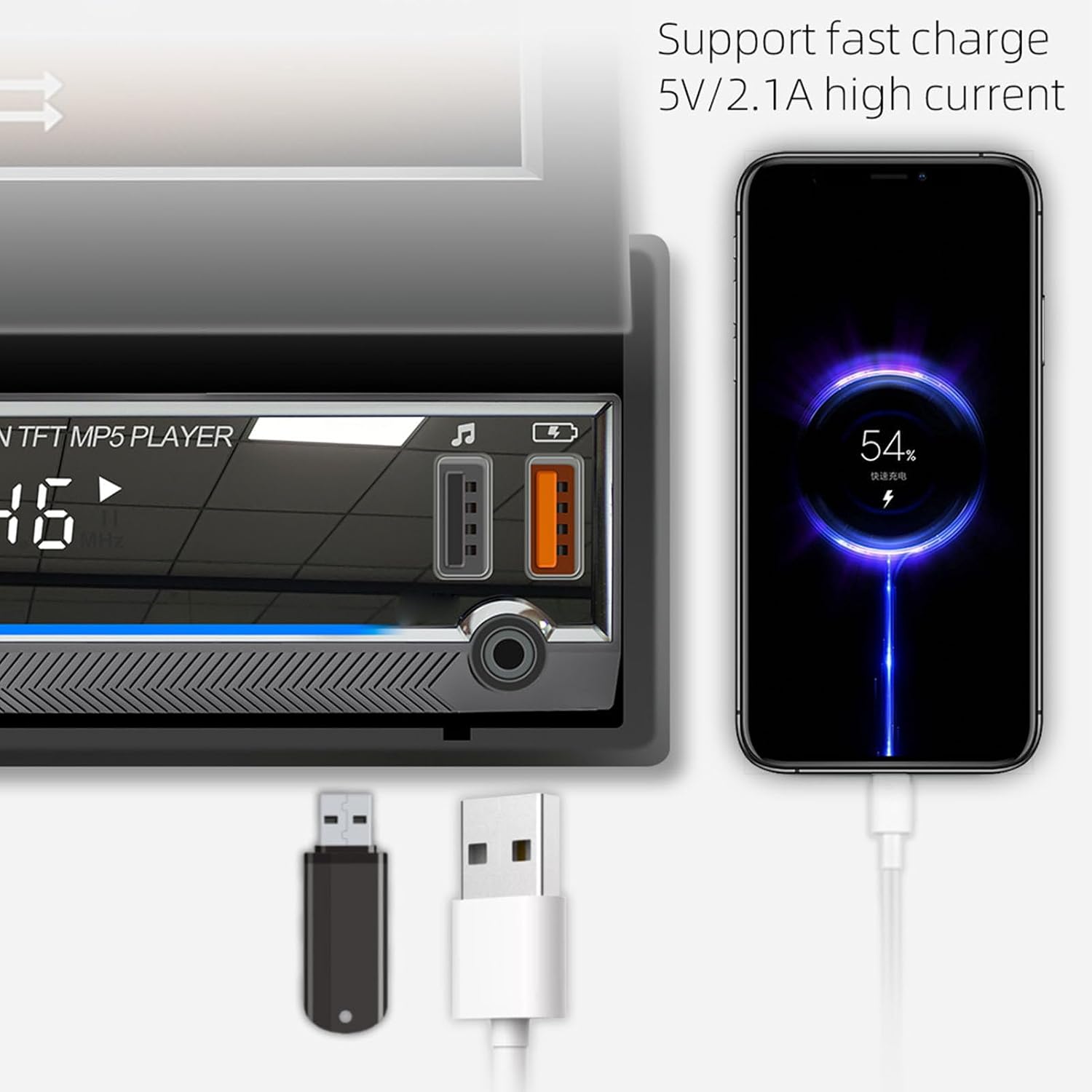
Image: The car MP5 player's USB and Type-C ports, demonstrating a smartphone connected and undergoing fast charging.
7. Mobile App Remote Control (iCar Find)
The unit supports mobile app remote control functionality, including a 'locate and find the car' feature.
- Enable Bluetooth on your mobile device.
- Install the 'iCar Find' app (or similar, as indicated by QR code on screen) on your smartphone.
- Open the app and allow it to search for the device.
- Select the player (e.g., 'CAR BT BLE') from the list.
- Ensure the app has location permissions. When the car is turned off, the app can record the coordinates.
- Use the app to locate your car if you are far away.

Image: The car MP5 player displaying instructions for the 'iCar Find' mobile app, alongside a smartphone showing a map with a car's location.
Maintenance
- Cleaning: Use a soft, dry cloth to clean the screen and unit. Avoid abrasive cleaners or solvents.
- Screen Care: When retracting the screen, do so gently to prevent damage to the mechanism.
- Temperature: Avoid exposing the unit to extreme temperatures, which can affect performance and lifespan.
Troubleshooting
| Problem | Possible Cause | Solution |
|---|---|---|
| No Power | Incorrect wiring, blown fuse, vehicle power issue. | Check power connections, inspect vehicle fuses, ensure proper voltage supply. |
| No Sound | Speaker wires disconnected, volume too low, incorrect audio source. | Verify speaker connections, increase volume, select correct audio input mode. |
| Bluetooth Not Connecting | Bluetooth not enabled, device not in pairing mode, interference. | Ensure Bluetooth is on for both devices, restart pairing process, move closer to the unit. |
| Reversing Camera Not Displaying | Camera not connected, reverse trigger wire not connected, faulty camera. | Check camera and video cable connections, ensure reverse trigger wire is correctly wired to the vehicle's reverse light circuit. |
| Screen Malfunction | Loose connection, software glitch. | Check ribbon cable connections (if accessible), perform a system reset (refer to panel description for reset button location). |
Warranty and Support
Your Yoidesu Car MP5 Player comes with a standard manufacturer's warranty. Please refer to the warranty card included in your packaging for specific terms and conditions, including warranty duration and coverage details.
For technical support, troubleshooting assistance beyond this manual, or warranty claims, please contact Yoidesu customer service through the retailer where you purchased the product or visit the official Yoidesu website for contact information.
Please retain your proof of purchase for warranty purposes.