
MAIMEIMI B0CG6GGMTL
MAIMEIMI 6-in-1 GPS Speedometer User Manual
Model: B0CG6GGMTL
Product Overview
The MAIMEIMI 6-in-1 GPS Speedometer is a multi-functional gauge designed for automotive and marine applications. It integrates a GPS speedometer, tachometer, voltmeter, fuel level gauge, water temperature gauge, and oil pressure gauge into a single unit, providing comprehensive monitoring capabilities. This device operates within a 9-32V power range and features an IP67 waterproof rating for durability in various environments.

Figure 1: Front view of the MAIMEIMI 6-in-1 GPS Speedometer displaying various metrics.
Key Features:
- 6-in-1 Functionality: GPS Speedometer, Tachometer, Voltmeter, Fuel Level, Water Temperature, Oil Pressure.
- Alarm Design: Integrated alarm for critical parameters.
- Wide Voltage Range: Compatible with 9-32V systems.
- IP67 Waterproof: Designed to withstand water immersion and harsh conditions.
- TFT Screen: Clear digital display for easy readability.
- Adjustable Units: Customizable units for speed (MPH, km/h, knots), water temperature (°F, °C), and pressure (psi, bar).
Installation Instructions
1. Mounting the Gauge:
- Ensure sufficient space behind the panel for the gauge (55mm / 2 3/16 inches depth).
- Cut an 85mm (3 3/8 inches) diameter hole in the mounting panel.
- Insert the gauge into the hole and secure it using the provided screw-down ring.
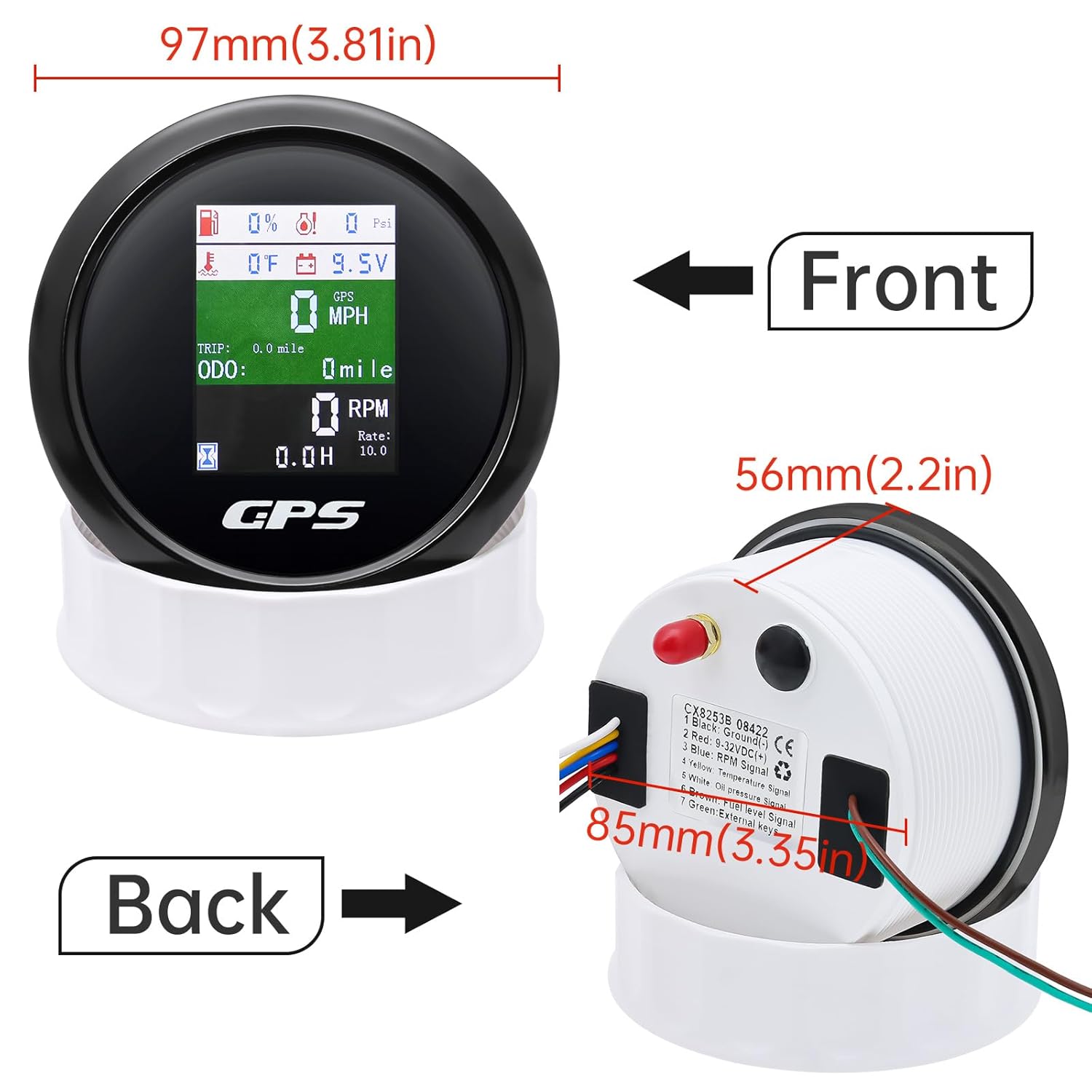
Figure 2: Gauge dimensions and mounting procedure.
2. GPS Antenna Installation:
For optimal GPS signal reception, install the GPS antenna in a location with a clear view of the sky.
- The antenna should be installed in front of the vehicle/boat, if possible.
- Avoid placing the antenna under metal surfaces or materials that can shield GPS signals.
- If necessary, reverse the GPS antenna installation to improve signal reception.

Figure 3: GPS antenna placement guidelines for best signal.
3. Wiring Connections:
Connect the wires according to the diagram below. Ensure all connections are secure and properly insulated.

Figure 4: Detailed wiring diagram for the gauge.
| Wire Color | Function |
|---|---|
| Black | Ground (-) |
| Red | 9-32VDC (+) |
| Blue | RPM Signal |
| Yellow | Temperature Signal |
| White | Oil Pressure Signal |
| Brown | Fuel Level Signal |
| Green | External Keys |
Operating Instructions
The MAIMEIMI 6-in-1 GPS Speedometer features a single button for unit switching and parameter settings.
1. Unit Switching:
- After powering on the device, briefly touch the button to cycle through and switch the units for speed (km/h, MPH, knots).
- The selected unit will be saved automatically.

Figure 5: Customizable unit display for various measurements.
2. Parameter Setting Mode:
To enter the parameter setting mode, press and hold the rubber button on the backside of the gauge for 3 seconds.
- RPM Ratio Setting:
- While in setting mode, press the button to increase the value. Release the button, then press again to decrease the value.
- The adjustable range for the RPM ratio is 1-360, with a minimum step value of 0.1.
- Once the desired RPM ratio is set, release the button. The tachometer will automatically save the setup after 3 seconds. If the setting does not meet requirements, re-enter the mode and adjust.
- Fuel Level Sensor & Temperature/Pressure Unit Selection:
- Press the button once after entering the parameter selection mode to select the fuel level sensor type (0-190ohm European standard or 240-33ohm American standard).
- Press the button twice to select the temperature unit (°F or °C) and pressure unit (psi or bar).
- The meter will save automatically after selection.
- Engine Hours Setting:
- Quick touch the button 5 times to enter the engine hours setting mode.
- Press the button to increase the engine hours value. Release and press again to decrease.
- After setting the desired value, release the button. The meter will auto-save after 3 seconds.
- ODO Setting:
- Quick touch the button 5 times again (after engine hours setting) to enter the ODO setting mode.
- Press the button to increase the ODO value. Release and press again to decrease.
- After setting the desired value, release the button. The meter will auto-save after 3 seconds.
Specifications
| Parameter | Value/Range |
|---|---|
| Product Dimensions (L x W x H) | 3.81 x 3.81 x 2.2 inches |
| Mounting Diameter | 85mm (3 3/8 inches) |
| Mounting Depth | 55mm (2 3/16 inches) |
| Weight | 11.46 ounces |
| Material | Plastics and Metals |
| Operating Voltage | 9-32V |
| GPS Speedometer Range | 0-600 (km/h, mph, knots available) |
| Tachometer Range | 0-9999 RPM |
| Voltmeter Range | 9-32V |
| Fuel Level Range | 0-100% |
| Water Temperature Range | 40-120°C / 100-250°F |
| Oil Pressure Range | 0-10 BAR / 0-145 PSI |
| Waterproof Rating | IP67 |
Maintenance
The MAIMEIMI 6-in-1 GPS Speedometer is designed for durability and minimal maintenance.
- Cleaning: Use a soft, damp cloth to clean the display and housing. Avoid abrasive cleaners or solvents that could damage the screen or finish.
- Waterproof Feature: The device is IP67 waterproof, meaning it is protected against dust and can withstand immersion in water up to 1 meter for 30 minutes. This ensures reliable operation in marine and outdoor environments.

Figure 6: The gauge is IP67 rated for water and dust resistance.
Troubleshooting
- Display Visibility in Bright Sunlight: Some users may find the display difficult to read in direct, bright sunlight. This is a characteristic of the TFT screen under certain lighting conditions. Consider installing the gauge in a shaded area or using a sun shield if visibility is consistently an issue.
- Inaccurate RPM Readings: If RPM readings are incorrect, verify the engine cylinder number and ensure the correct speed ratio value is set in the parameter setting mode. Refer to the "Operating Instructions" section for adjusting the RPM ratio. If your specific engine cylinder number is not listed in the manual's recommendations, further adjustment may be required.
- No GPS Signal: Ensure the GPS antenna is installed in a location with an unobstructed view of the sky, away from metal obstructions. Refer to the "GPS Antenna Installation" section for optimal placement.
- Incorrect Sensor Readings (Fuel, Water Temp, Oil Pressure): Check all wiring connections for the respective sensors as per the "Wiring Connections" diagram. Ensure the correct fuel level sensor type (0-190ohm or 240-33ohm) is selected in the parameter setting mode.
- Gauge Not Powering On: Verify the power (Red wire) and ground (Black wire) connections are secure and receiving the correct voltage (9-32V).
Warranty and Support
Warranty Information: Specific warranty details for this product are not provided in the available documentation. Please refer to the retailer or manufacturer's official website for current warranty terms and conditions.
Customer Support: For technical assistance, troubleshooting, or inquiries regarding your MAIMEIMI 6-in-1 GPS Speedometer, please contact MAIMEIMI customer service through their official channels or the retailer from whom the product was purchased.
Related documentsB0CG6GGMTL


Ask a question about this manual
Ask about setup, troubleshooting, compatibility, parts, safety, or missing instructions. Manuals+ will review the question and use this page’s manual context to help answer it.