
1. Introduction
This manual provides comprehensive instructions for the ALLIMITY BN59-00936A replacement remote control. This remote is designed to function as a direct replacement for your original Samsung remote, offering seamless compatibility with various Samsung LED LCD HDTV models.
Compatible Samsung TV Models include:
- UE32B6000VW
- UE40B6000VW
- UE40B6000VWXXC
- UE46B6000VWXXC
- UE32B6000VWXXC
No complex setup or programming is required for this replacement remote control.
2. Product Overview
The ALLIMITY BN59-00936A remote control is engineered for durability and user comfort. Constructed from robust ABS materials, it features an ergonomic design for a comfortable grip during use. This remote provides all essential functions found on the original Samsung remote.
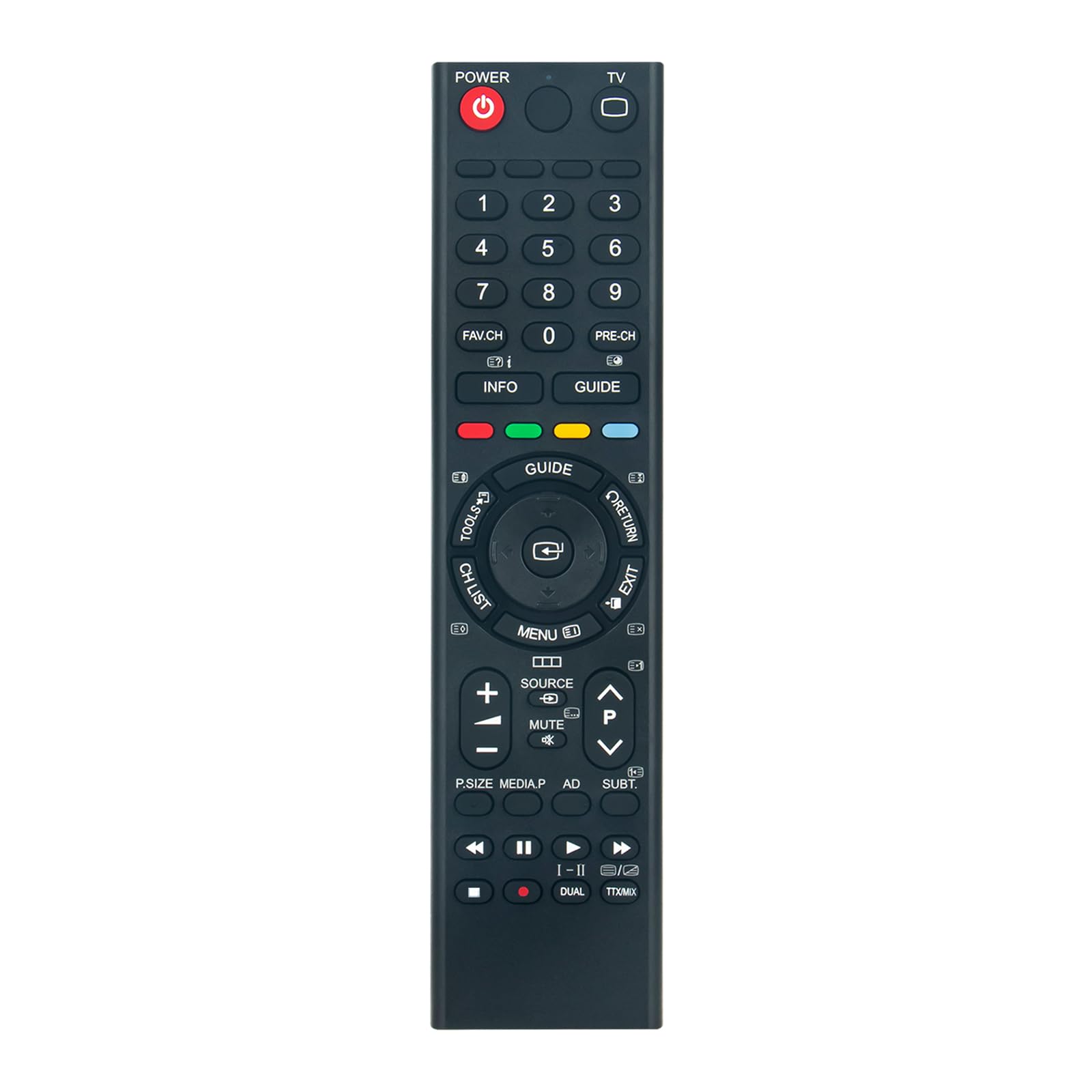
Image: A visual comparison between the ALLIMITY BN59-00936A replacement remote (left) and an original Samsung remote (right), highlighting their similar appearance and button configurations.
3. Setup
To begin using your ALLIMITY BN59-00936A remote control, simply install the batteries. No additional programming or pairing steps are necessary.
Battery Installation
- Locate the battery compartment on the back of the remote control.
- Slide the battery compartment cover downwards or outwards to open it.
- Insert two (2) AAA alkaline batteries, ensuring the positive (+) and negative (-) terminals align correctly with the markings inside the compartment.
- Replace the battery compartment cover by sliding it back into place until it clicks securely.

Image: The rear view of the remote control, illustrating the open battery compartment and the correct orientation for inserting two AAA batteries.
Your remote control is now ready for use.
4. Operating Instructions
Point the remote control directly towards the infrared (IR) receiver on your Samsung TV. The remote functions identically to the original remote control it replaces.
Key Functions:
- POWER: Turns the TV on or off.
- TV: Switches to TV mode.
- Number Buttons (0-9): Directly select channels.
- FAV.CH / PRE-CH: Access favorite channels or return to the previous channel.
- INFO: Displays information about the current program.
- MENU: Opens the TV's main menu.
- GUIDE: Accesses the electronic program guide.
- TOOLS: Provides quick access to common functions and settings.
- RETURN / EXIT: Returns to the previous screen or exits the current menu.
- Directional Pad (Up, Down, Left, Right) & Enter: Navigates menus and confirms selections.
- CH LIST: Displays the channel list.
- SOURCE: Selects input sources (HDMI, AV, etc.).
- VOL (+/-): Adjusts the volume level.
- MUTE: Mutes or unmutes the TV audio.
- CH (P/P): Changes channels up or down.
- P.SIZE / MEDIA.P / AD / SUBT: Accesses picture size, media playback, audio description, and subtitle options.
- Media Playback Controls (Play, Pause, Stop, Rewind, Fast Forward): Controls media playback.
- DUAL / TTX/MIX: Accesses dual audio or teletext/mix functions.
5. Troubleshooting
If you experience issues with your remote control, please refer to the following troubleshooting steps:
- Remote Not Responding:
- Ensure batteries are inserted correctly with the proper polarity (+/-).
- Replace old or weak batteries with new AAA alkaline batteries.
- Verify there is a clear line of sight between the remote control and the TV's infrared receiver. Obstructions can block the signal.
- Confirm that your TV model is listed as compatible in the 'Introduction' section of this manual.
- Intermittent Functionality:
- Check for any strong light sources (e.g., direct sunlight, fluorescent lights) that might interfere with the infrared signal.
- Ensure the remote is within the effective operating range of your TV.
If you are unsure about the compatibility of this remote with your specific TV model, please contact the seller with your TV's full model number for assistance.
6. Specifications
| Feature | Detail |
|---|---|
| Model Number | BN59-00936A |
| Product Dimensions | 6 x 2 x 0.6 inches |
| Item Weight | 3.49 ounces |
| Batteries Required | 2 AAA batteries (not included) |
| Brand | ALLIMITY |
| Special Feature | Ergonomic |
| Max Number of Supported Devices | 1 |
| Compatible Devices | Television |
| Connectivity Technology | Infrared |
7. Support
For any further questions, technical support, or assistance with your ALLIMITY BN59-00936A remote control, please refer to the contact information provided by your retailer or the product listing where you purchased the item.
