
1. Introduction
The Sonel P-6 is a state-of-the-art bipolar voltage indicator designed for professional electrical measurements. It offers a comprehensive range of functions including automatic AC/DC voltage detection up to 1000V, unique phase identification, continuity testing, RCD operational checks, and bipolar phase rotation testing. Engineered for safety and durability, the P-6 features a robust, IP65-rated housing, clear LCD and LED bar indications, and integrated safety alarms, making it an essential tool for electricians and technicians.
2. Safety Information
Always read and understand this manual before operating the Sonel P-6. Failure to follow safety instructions may result in injury or damage to the device.
- CAT IV 1000V Rating: This device is rated for CAT IV installations up to 1000V, indicating its suitability for measurements at the source of the low-voltage installation.
- IP65 Protection: The P-6 is protected against dust ingress and low-pressure water jets from any direction. Do not immerse the device in water.
- Dangerous Voltage Alarms: The device provides acoustic and visual alarms for voltages exceeding 50V AC and 120V DC. Always treat live circuits with extreme caution.
- Inspect Before Use: Before each use, inspect the device and test leads for any signs of damage. Do not use if damaged.
- Battery Safety: Ensure correct battery polarity during installation. Replace batteries when the low battery indicator appears.
- Qualified Personnel: Only qualified and trained personnel should perform electrical measurements.
3. Product Overview and Components
The Sonel P-6 voltage indicator consists of two main probes connected by a flexible cable. It features an LCD display, LED indicators, and control buttons for various functions.

Figure 3.1: Sonel P-6 Voltage Indicator with included accessories. This image shows the main unit with its two probes, four interchangeable probe tips, two protective caps for the tips, and two AAA batteries.
3.1 Main Components:
- Main Unit (Probe 1): Contains the LCD display, LED indicators, function buttons, and battery compartment.
- Secondary Probe (Probe 2): Connected to the main unit via a flexible cable.
- LCD Display: Shows numerical voltage readings, resistance, and other measurement data.
- LED Bar Indicators: Provide optical indication of voltage levels (e.g., 12V, 24V, 50V, 120V, 230V, 400V, 690V, 1000V).
- Function Buttons: For RCD test, HOLD function, and backlight.
- Probe Tips: Interchangeable tips for various applications.
- Protective Caps: For safe storage of probe tips.
3.2 Detailed Views:

Figure 3.2: Detailed views of the Sonel P-6, highlighting the secure connection points of the probes, the clear LCD and LED display area, and the robust cable attachment, ensuring durability and reliable performance.
4. Setup
4.1 Battery Installation:
The Sonel P-6 requires 2 AAA batteries (included). To install or replace batteries:
- Locate the battery compartment on the rear of the main unit.
- Open the battery cover.
- Insert 2 AAA batteries, ensuring correct polarity as indicated inside the compartment.
- Close the battery cover securely.
4.2 Attaching Probe Tips:
Select the appropriate probe tips for your measurement task and securely attach them to the probes.
5. Operating Instructions
5.1 Automatic AC/DC Voltage Measurement:
The P-6 automatically detects and displays AC or DC voltage. Connect the two probes to the circuit under test. The voltage will be indicated on the LCD display and by the LED bar.
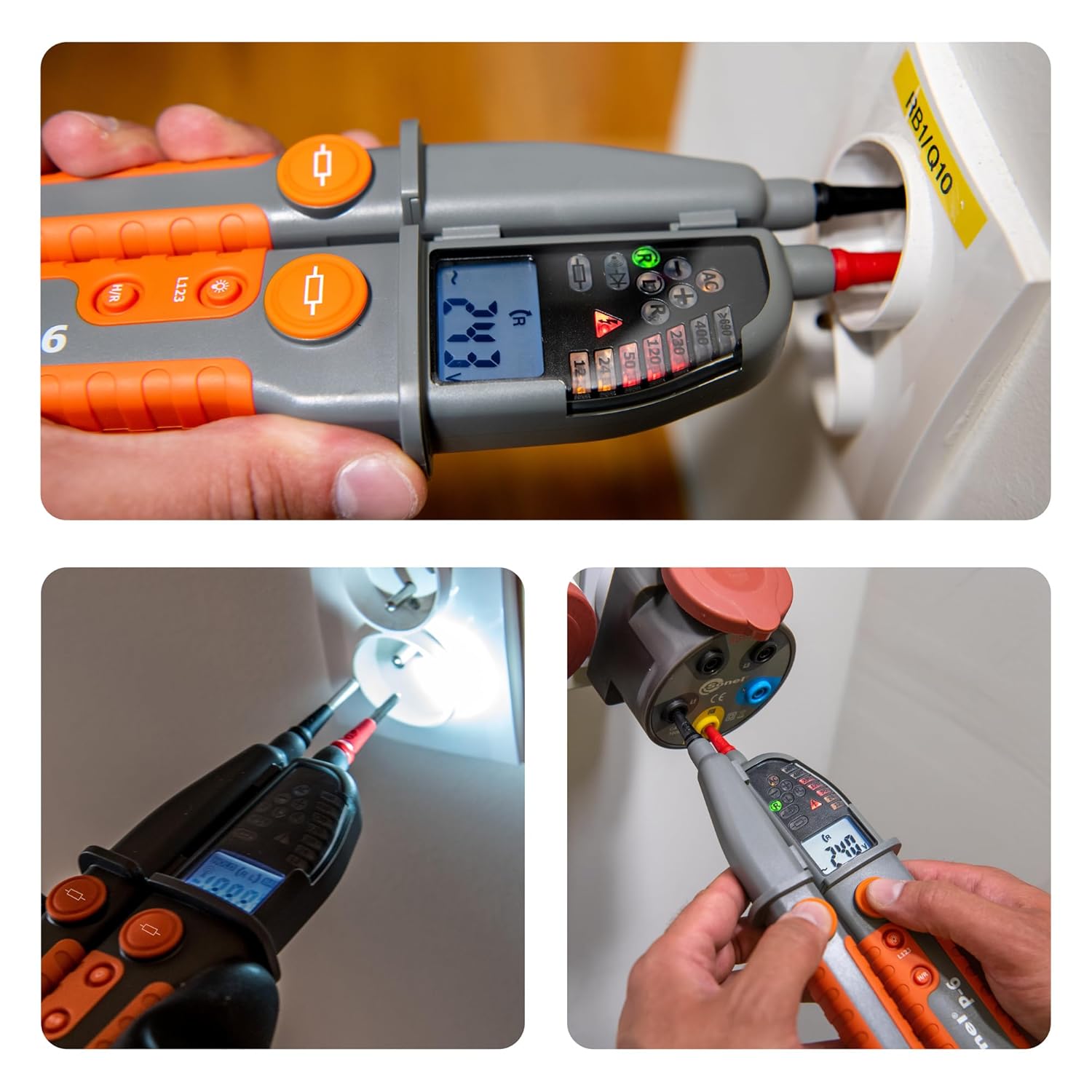
Figure 5.1: The Sonel P-6 in use, measuring voltage in a wall socket. The LCD displays the voltage reading, and the LED bar indicates the voltage range, providing clear and immediate feedback.
5.2 Phase Identification:
The Sonel P-6 is capable of unique phase identification. When measuring AC voltage, the device will indicate the phase line.
5.3 Continuity Test:
To test for continuity, connect the probes across the component or circuit path. The device will provide an audible and visual indication if continuity is detected.
5.4 RCD Function Test:
The P-6 includes a function for testing Residual Current Devices (RCDs) with an additional load. Refer to the on-screen prompts or specific instructions for this test.
5.5 Bipolar Phase Rotation Test:
For three-phase systems, the P-6 can perform a bipolar phase rotation test to determine the correct phase sequence.
5.6 HOLD Function:
Press the "HOLD" button to freeze the current measurement reading on the LCD display for easier recording or analysis.
5.7 Backlight:
Press the backlight button to illuminate the LCD display for better visibility in low-light conditions. The device also has an integrated flashlight.
6. Maintenance
6.1 Cleaning:
Clean the device with a soft, damp cloth. Do not use abrasive cleaners or solvents. Ensure the device is dry before storage or next use.
6.2 Storage:
Store the Sonel P-6 in a cool, dry place, away from direct sunlight and extreme temperatures. If storing for extended periods, remove the batteries to prevent leakage.
6.3 Battery Replacement:
Replace batteries promptly when the low battery indicator appears on the display to ensure accurate measurements and proper device function.
7. Troubleshooting
| Problem | Possible Cause | Solution |
|---|---|---|
| Device does not power on. | Dead or incorrectly installed batteries. | Check battery polarity; replace batteries. |
| Inaccurate readings. | Low battery; damaged probes/leads; incorrect measurement technique. | Replace batteries; inspect probes for damage; review operating instructions. |
| No continuity indication. | Open circuit; faulty probes. | Verify circuit integrity; check probes for damage. |
8. Technical Specifications
| Feature | Specification |
|---|---|
| Model Number | P-6 |
| Maximum Operating Voltage | 1000 Volts |
| Measurement Type | Voltmeter (AC/DC), Resistance, Continuity, Phase Rotation |
| Ingress Protection (IP) Rating | IP65 |
| Overvoltage Category | CAT IV |
| Power Source | 2 x AAA Batteries (included) |
| Dimensions | 33.1 x 9.3 x 5.6 cm (13.03 x 3.66 x 2.2 inches) |
| Weight | 430 g (0.95 lbs) |
| Color | Orange |
9. Warranty and Support
For warranty information and technical support, please contact Sonel customer service or visit the official Sonel website. Keep your purchase receipt as proof of purchase.
Manufacturer: Sonel


