
1. Introduction
This document provides essential information for the Tolxh N417861 N267567 Hammer Drill Selector replacement part. It is designed to assist users with understanding the product, its compatibility, installation considerations, and general maintenance practices. This part is a compatible replacement for specific DeWalt hammer drill and rotary hammer models.
2. Safety Information
Always prioritize safety when working with power tools and their components. Failure to follow safety instructions can result in serious injury or damage to equipment.
- Disconnect Power: Always ensure the power tool is unplugged or its battery removed before attempting any installation, maintenance, or repair.
- Wear Personal Protective Equipment (PPE): Use safety glasses, gloves, and other appropriate PPE.
- Professional Installation Recommended: If you are not experienced with power tool repair, it is recommended to seek assistance from a qualified technician.
- Inspect Components: Before installation, carefully inspect the replacement part and surrounding tool components for any damage.
- Use Correct Tools: Ensure you have the appropriate tools for disassembly and reassembly.
3. Product Overview
The Tolxh N417861 N267567 is a selector switch designed for hammer drills and rotary hammers. This component allows the user to switch between different operating modes, such as drilling, hammer drilling, or chiseling, depending on the tool's capabilities. It is a crucial part for controlling the tool's functionality.
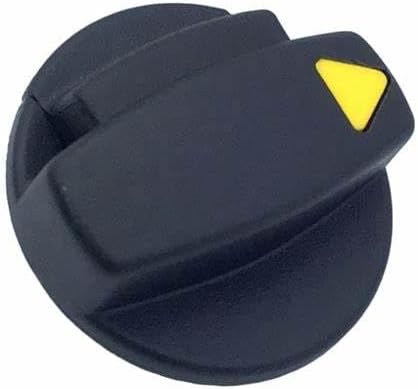
Figure 1: Angled view of the Tolxh N417861 N267567 Hammer Drill Selector. This black plastic component features a yellow triangular indicator for mode selection.
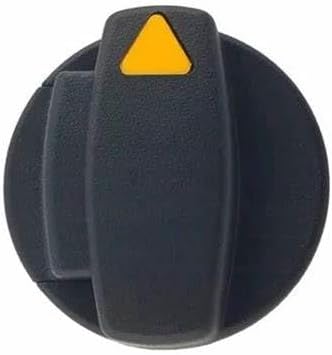
Figure 2: Top-down view of the Tolxh N417861 N267567 Hammer Drill Selector. The yellow triangular indicator is clearly visible at the top, indicating the selected mode.
4. Compatibility
This Tolxh selector part (N417861, N267567) is compatible with various DeWalt hammer drill and rotary hammer models. Please verify your tool's model number before purchasing and installing to ensure proper fit and function.
Compatible DeWalt Models:
- D25032
- D25033
- D25132
- D25133
- D25143
- D25144
- D25333K
- DCH133B
- DCH133M2
- DCH293X2
- DCH293B
- DCH293R2
- DCH263B
- DCH263R2
- D25260K
- D25262K
- D25263K
5. Setup and Installation
Replacing a selector switch requires careful disassembly and reassembly of the power tool. Refer to your specific DeWalt tool's service manual for detailed, model-specific instructions. The following are general guidelines:
- Preparation: Ensure the tool is disconnected from power. Clear a clean, well-lit workspace.
- Disassembly: Carefully open the tool casing, typically by removing screws. Note the position and orientation of all components, especially wires and springs connected to the selector switch. Taking photos during disassembly can be helpful.
- Remove Old Selector: Disconnect any electrical connections or mechanical linkages to the old selector switch and remove it.
- Install New Selector: Position the new Tolxh N417861 N267567 selector switch, ensuring all connections and linkages are correctly re-established. Verify that the switch moves freely and engages properly.
- Reassembly: Carefully close the tool casing, ensuring no wires are pinched and all screws are tightened securely.
- Testing: After reassembly, perform a functional test of the tool in a safe environment, verifying that all modes engage correctly and the tool operates as expected.
Note: Incorrect installation can lead to tool malfunction or safety hazards. If unsure, consult a professional.
6. Operating Instructions
The selector switch controls the operating mode of your hammer drill or rotary hammer. Once installed, operate the switch according to your tool's original design:
- Mode Selection: Rotate the selector switch to align the indicator (typically a yellow triangle) with the desired mode icon on your tool's housing. Common modes include:
- Drill Mode: For standard drilling without hammer action.
- Hammer Drill Mode: For drilling into masonry or concrete with hammer action.
- Chisel/Rotation Stop Mode: For chiseling applications, where the bit rotates to a specific position but does not spin freely.
- Engagement: Ensure the selector clicks firmly into place for each mode. Do not force the switch if it resists movement; check for obstructions.
- Operation: Once the desired mode is selected, operate the tool as per its original manufacturer's instructions.
Caution: Never attempt to change the selector mode while the tool is running or under load.
7. Maintenance
Proper maintenance extends the life of your power tool and its components. While the selector switch itself requires minimal maintenance, consider the following:
- Keep Clean: Regularly clean the exterior of the tool, including the selector switch area, to prevent dust and debris buildup that could impede its movement.
- Inspect for Wear: Periodically check the selector switch for signs of wear, cracking, or damage. If the switch becomes loose or difficult to operate, it may require replacement.
- Avoid Harsh Chemicals: Do not use harsh solvents or abrasive cleaners on the switch or tool housing, as these can damage the plastic.
8. Troubleshooting
If you encounter issues with your hammer drill's mode selection after installing the replacement selector switch, consider these troubleshooting steps:
- Switch Not Engaging:
- Ensure the switch is correctly seated and aligned with the internal mechanism.
- Check for any debris or obstructions preventing full engagement.
- Verify that any springs or detents associated with the selector mechanism are properly installed and functional.
- Tool Not Changing Modes:
- Confirm the selector switch itself is rotating freely and indicating the correct mode.
- If the switch moves but the tool's mode doesn't change, the issue might be with the internal mechanism that the selector actuates, rather than the selector switch itself.
- Re-open the tool (after disconnecting power) and inspect the internal linkages for proper connection and movement.
- Loose or Wobbly Switch:
- Ensure the switch is fully pressed into its housing and any retaining clips or screws are secure.
If problems persist after troubleshooting, it is advisable to consult a qualified power tool repair technician.
9. Specifications
| Part Numbers | N417861, N267567 |
| Brand | Tolxh |
| Color | Black |
| Item Weight | 0.32 ounces (9.07 g) |
| Package Dimensions | 1.42 x 1.42 x 1.11 inches |
| Manufacturer | Tolxh |
| OEM Part Numbers (Compatible) | D25333K, DCH133B, DCH133M2, DCH293X2, DCH293B, DCH293R2, DCH263B, DCH263R2, D25260K, D25262K, D25263K |
10. Warranty and Support
This product is a non-original compatible spare part. The manufacturer's name and part numbers are for reference only. Tolxh offers a one-month refund policy if errors during installation or replacement result in damage or inability to use the product.
For any concerns or dissatisfaction with the product, please contact the seller. They aim to provide a satisfactory solution and demonstrate their commitment to customer satisfaction.
It is important to confirm that the model you intend to purchase matches the required model for your tool before ordering.