
1. Introduction
This user manual provides essential information for the safe and effective installation, operation, and maintenance of your ZIPCOM Double Power Automatic Transfer Switch (ATS). This device is designed to automatically switch between a normal power source and a backup power source, ensuring continuous power supply to critical loads. Please read this manual thoroughly before installation and operation.
2. Safety Information
WARNING: Electrical shock hazard. Installation and maintenance should only be performed by qualified personnel. Always disconnect all power sources before working on the transfer switch.
- Ensure the main power supply is disconnected before any installation or maintenance procedures.
- The product is constructed from flame-retardant plastic material for enhanced safety.
- This device includes complete protective functions such as short circuit, overload, open phase, and loss-of-voltage protection.
- Do not operate the switch if it appears damaged.
- Verify all connections are secure and correctly wired according to local electrical codes.
3. Product Overview
The ZIPCOM Double Power Automatic Transfer Switch is a compact and reliable solution for managing power continuity. It features a robust design with high-quality components to ensure stable and safe operation.
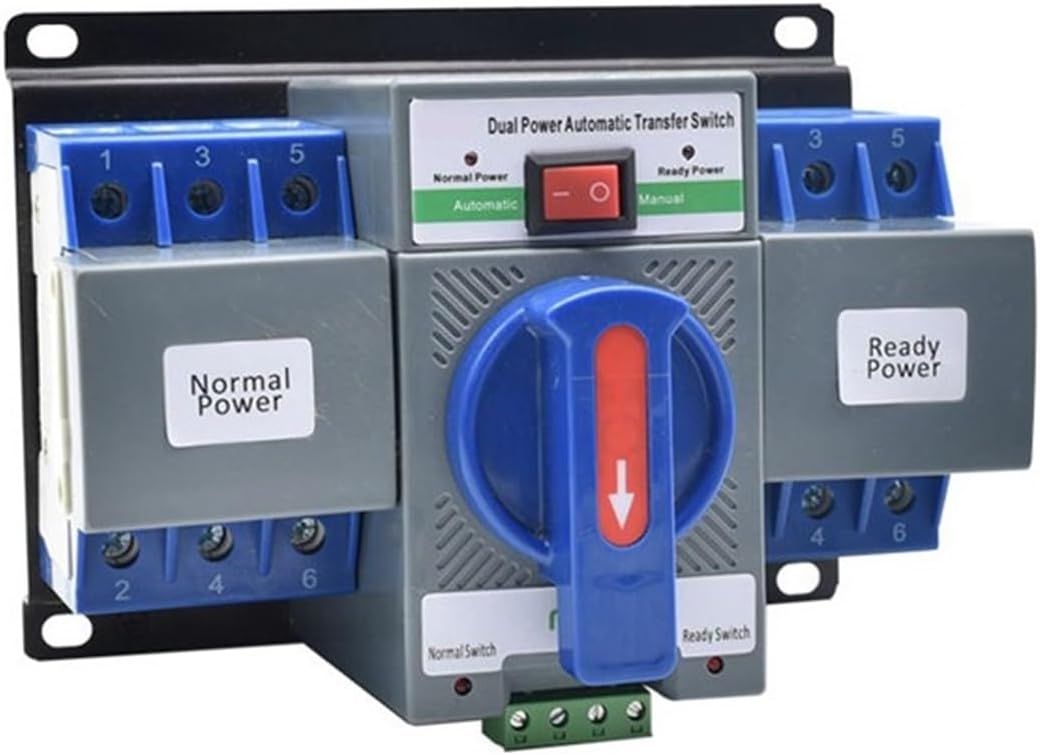
Figure 3.1: Front view of the ZIPCOM Double Power Automatic Transfer Switch. This image displays the compact design, the 'Normal Power' and 'Ready Power' input sections, and the central manual transfer handle. The red switch indicates the operational mode (Automatic/Manual).

Figure 3.2: Angled view of the ZIPCOM Double Power Automatic Transfer Switch. This perspective provides a clearer view of the screw terminals for electrical connections and the mounting bracket at the rear of the unit.
Key Features:
- Flame-Retardant Material: Constructed from flame-retardant plastic for good insulation, high temperature resistance, and enhanced safety.
- Comprehensive Protection: Supports short circuit, overload, phase loss, and under-voltage protection.
- Automatic Switching: Automatically transfers to backup power when the normal supply is abnormal and switches back when normal power is restored.
- High Conductivity: Features silver contacts for motion and static electricity, improving conductivity and product lifespan.
- Signal Output Port: Built-in standing open signal output port for connection with signal indicators.
- Durable Design: Handle designed for 3000 normal and ready conversions, contributing to a long electrical life.
4. Installation and Setup
IMPORTANT: Installation must be carried out by a certified electrician in compliance with all national and local electrical codes and regulations.
- Power Disconnection: Before beginning installation, ensure that all power sources (normal and backup) are completely disconnected and locked out.
- Mounting: Securely mount the ATS unit in a suitable enclosure or panel using appropriate fasteners. Ensure adequate ventilation and clearance around the unit.
- Wiring Connections:
- Connect the normal power source to the terminals labeled "Normal Power".
- Connect the backup (generator/ready) power source to the terminals labeled "Ready Power".
- Connect the load to the designated load terminals.
- Ensure all wire gauges are appropriate for the rated current (63A) and all connections are tight and secure.
- Control Wiring: If applicable, connect any remote control or signal indicator wiring to the designated control terminals.
- Verification: Double-check all wiring connections for correctness and tightness before restoring power.
- Power Restoration: Carefully restore power to the normal source first, then the backup source. Observe the ATS for proper operation.
5. Operation
The ZIPCOM Automatic Transfer Switch is designed for automatic operation, but also provides a manual override.
Automatic Mode:
- Ensure the red switch on the front panel is set to the "Automatic" position.
- When the normal power supply is stable, the ATS will connect the load to the normal power source.
- If the normal power supply becomes abnormal (e.g., power outage, under-voltage, phase loss), the ATS will automatically detect this and transfer the load to the backup power source within approximately 3 seconds.
- Once the normal power supply is restored and stable, the ATS will automatically switch the load back to the normal power source.
Manual Mode:
- The central blue handle allows for manual transfer between power sources.
- To manually switch, ensure the red switch is set to "Manual" (if available, or follow specific product instructions for manual override).
- Rotate the handle to select either "Normal Power" or "Ready Power" as needed.
- Caution: Only use manual mode when necessary and with full understanding of the power status of both sources.
6. Maintenance
Regular maintenance ensures the longevity and reliable operation of your ATS. Always disconnect power before performing any maintenance.
- Periodic Inspection: Annually inspect the ATS for any signs of physical damage, loose connections, or discoloration due to overheating.
- Cleaning: Keep the unit clean and free from dust and debris. Use a dry, soft cloth for cleaning. Do not use liquid cleaners.
- Terminal Tightness: Periodically check and re-tighten all electrical connections to ensure optimal conductivity and prevent arcing.
- Contact Integrity: The internal silver contacts are designed for durability. If the unit experiences frequent transfers, consider more frequent inspections of contact wear by a qualified technician.
7. Troubleshooting
If you encounter issues with your ATS, refer to the following common problems and solutions. For complex issues, contact a qualified electrician.
- No Power to Load:
- Check if both normal and backup power sources are active and stable.
- Verify all input and output connections are secure.
- Check for tripped circuit breakers upstream of the ATS.
- ATS Not Transferring:
- Ensure the ATS is in "Automatic" mode.
- Confirm that the normal power source is indeed abnormal (e.g., voltage outside acceptable range).
- Check the control voltage supply (AC230V) to the ATS.
- Overload/Short Circuit Protection Tripped:
- Identify and rectify the cause of the overload or short circuit in the connected load.
- Reset the ATS (if applicable, by cycling power or specific reset procedure).
- Unusual Noise or Smell:
- Immediately disconnect all power to the unit.
- Do not attempt to operate. Contact a qualified electrician for inspection.
8. Specifications
| Parameter | Value |
|---|---|
| Model | 3P 63A ATS |
| Rated Working Current | 63A |
| Rated Working Voltage | AC400V |
| Controlling Voltage | AC230V |
| Rated Short Circuit Breaking Capacity | 3KA |
| Rated Short Circuit Making Capacity | 3KA |
| Rated Insulation Voltage | AC500V |
| Transfer Time | 3S |
| Frequency | 50/60HZ |
| ATS Level | CB Class |
| Standard | IEC60947-1 |
| Operation Mode | Automatic |
| Contact Material | Silver, Copper |
| Item Weight | 1.76 pounds (0.8 kg) |
| Package Dimensions | 1.18 x 0.79 x 0.39 inches (3 x 2 x 1 cm) |
9. Warranty and Support
For information regarding warranty coverage, technical support, or service, please refer to the documentation provided at the time of purchase or contact your retailer/seller directly. Keep your purchase receipt as proof of purchase.