
1. Introduction
This manual provides detailed instructions for the installation, operation, and maintenance of your SHIWOJIA 4G 12X Zoom 3K PTZ Solar Wireless Outdoor Security Camera. Please read this manual thoroughly before using the product to ensure proper function and safety.
The SHIWOJIA 4G camera is a 100% wireless outdoor surveillance solution that operates on 4G network coverage, eliminating the need for Wi-Fi. It features a 12X zoom, 360° pan/tilt capabilities, PIR motion detection with red and blue light alarms, a built-in 12000 mAh rechargeable battery, and a 6W solar panel for continuous power. Two-way audio allows for clear communication.
2. Safety Information
- Ensure the camera is installed securely to prevent accidental falls.
- Do not point the camera lens directly at the sun or other strong light sources for extended periods, as this may damage the sensor.
- Use only the specified power adapter (5V/2A or 5V/1A) for charging if not relying solely on solar power.
- Keep the camera away from extreme temperatures, humidity, and corrosive environments.
- Do not attempt to disassemble or modify the camera, as this will void the warranty and may cause damage.
- Dispose of batteries and electronic components responsibly according to local regulations.
3. Product Overview
Key Features:
- 4G Wireless Connectivity: Operates independently of Wi-Fi, requiring only 4G network coverage with a compatible SIM card.
- 12X Zoom & 360° View: Features 12X zoom capability and a 355° pan, 90° tilt (PTZ) function for comprehensive area coverage.
- PIR Motion Detection & Alarms: Advanced PIR sensor detects human movement, triggering immediate alerts and activating red and blue warning lights.
- Solar Powered with Rechargeable Battery: Equipped with a 6W solar panel and a 12000 mAh built-in rechargeable battery for continuous operation.
- Two-Way Audio: Built-in microphone and speaker with noise cancellation for clear, real-time communication.
- 3K Resolution & Color Night Vision: Delivers high-definition video and supports both infrared and full-color night vision modes.
- IP65 Waterproof: Designed to withstand various outdoor weather conditions including rain, snow, and heat.
Product Components:
The camera system includes the main camera unit, a solar panel, mounting accessories, and a trial NANO SIM card (300MB).

Figure 1: Overview of the SHIWOJIA 4G PTZ Solar Camera system.

Figure 2: The solar panel ensures continuous power to the camera, eliminating the need for frequent charging.

Figure 3: The dual lens system allows for 12X zoom, capturing more detailed information from a distance.
4. Setup and Installation
4.1 Physical Installation
- Choose a Location: Select an outdoor location with good 4G network coverage and sufficient sunlight for the solar panel. Ensure the camera has a clear view of the area you wish to monitor.
- Mount the Camera: Use the provided mounting bracket and screws to securely attach the camera to a wall or pole.
- Mount the Solar Panel: Attach the solar panel to a location where it receives maximum direct sunlight throughout the day. The panel can be mounted separately from the camera using the extension cord if needed.
- Connect Solar Panel: Connect the solar panel cable to the camera's charging port.
- Insert SIM Card: Open the SIM card slot cover, insert the activated NANO SIM card (or your own compatible 4G SIM card), and close the cover securely.

Figure 4: Example of camera and solar panel installation, showing PTZ rotation capabilities.

Figure 5: The camera supports two-way audio, allowing communication with visitors or deterring intruders.
4.2 App Setup (GENBOLT CAM)
- Download App: Search for "GENBOLT CAM" in your smartphone's app store and download it.
- Power On Camera: Ensure the camera is powered on. Wait for the blue indicator light to flash, indicating 4G network configuration (this may take 1-3 minutes). A voice prompt will confirm "4G connection successful".
- Add Camera: Open the GENBOLT CAM app. Allow location and Bluetooth permissions. Tap the "+" icon to add a device. Select "Scan (4G LTE)" and scan the QR code on the camera or its packaging.
- Follow Prompts: The app will guide you through the remaining steps to connect the camera. Name your camera for easy identification.
Video 1: Detailed instructions on how to connect the 4G surveillance camera to the mobile application.
Video 2: Guide on how to install this security camera, covering physical mounting and initial setup.
Video 3: Instructions for installing an outdoor security camera, including best practices for placement.
Video 4: Demonstrates the installation of the outdoor solar camera, highlighting solar panel placement.
5. Operating Instructions
5.1 Live View and PTZ Control
- Open the GENBOLT CAM app and select your camera to access the live view.
- Use the on-screen joystick to pan (355° horizontal) and tilt (90° vertical) the camera.
- Pinch to zoom in or out, or use the 12X zoom control within the app to adjust the view.
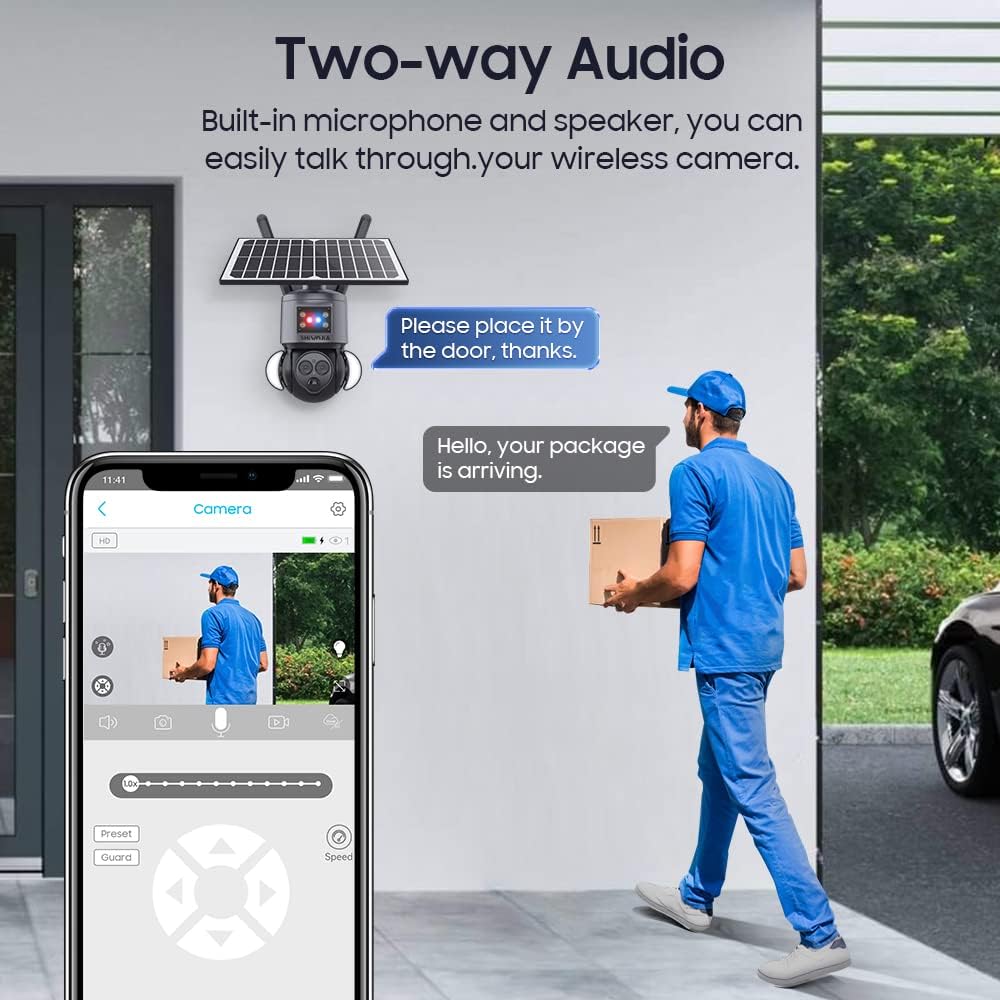
Figure 6: The mobile app interface provides intuitive controls for camera movement and two-way communication.
5.2 Motion Detection and Alarms
- The PIR motion sensor is active by default. When motion is detected, the camera will send an immediate warning notification to your phone.
- The camera will also activate its red and blue warning lights to deter intruders.
- Adjust motion sensitivity and alarm settings in the app's settings menu.
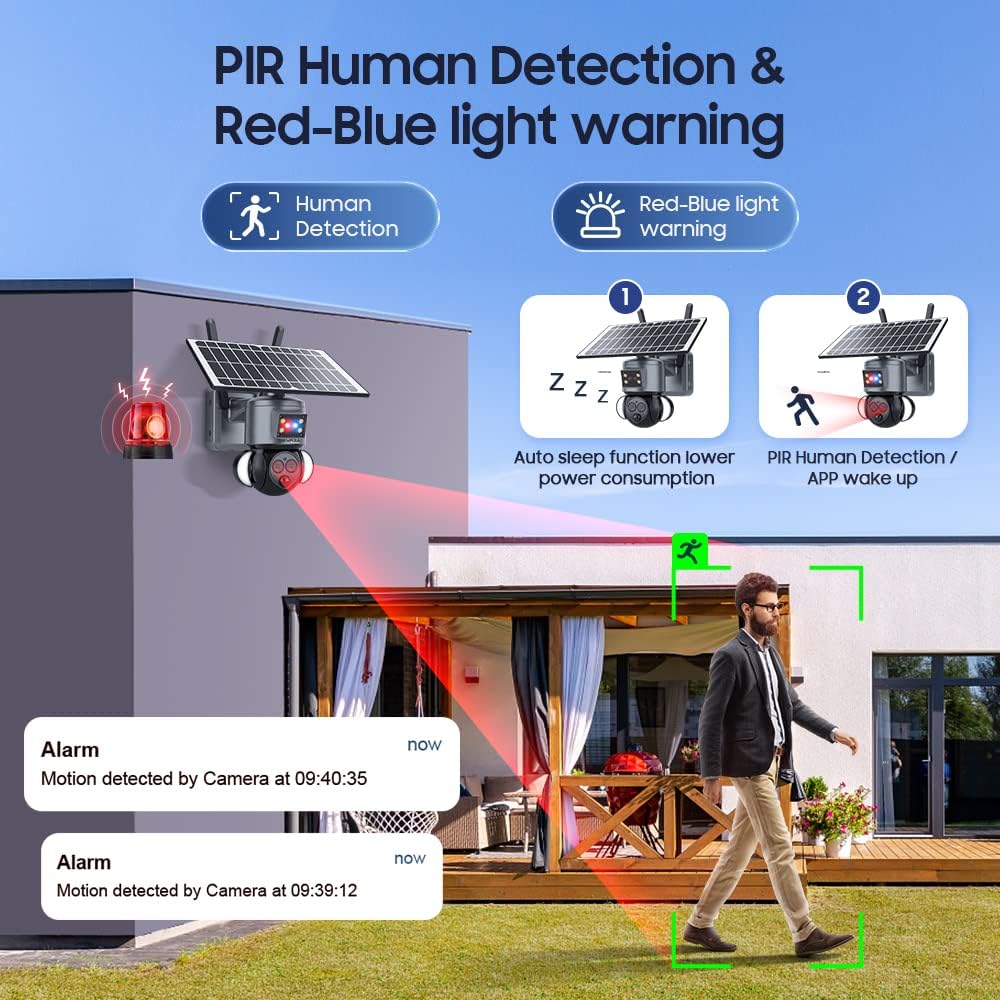
Figure 7: Visual representation of PIR human detection triggering red and blue light alarms and app notifications.
5.3 Night Vision Modes
- The camera supports both infrared (IR) night vision for clear black and white images in low light and full-color night vision using its built-in floodlights.
- Switch between night vision modes via the app settings.

Figure 8: Demonstrates the camera's ability to provide both color and infrared night vision for enhanced surveillance in darkness.
Video 5: A short demonstration of the camera's night vision capabilities.
6. Maintenance
- Cleaning: Regularly wipe the camera lens and solar panel with a soft, damp cloth to ensure clear vision and efficient charging. Do not use harsh chemicals.
- Firmware Updates: Check the app periodically for firmware updates to ensure optimal performance and security.
- Battery Health: While solar-powered, ensure the solar panel is clean and optimally positioned to maximize battery life.
- Connectivity Check: Periodically verify 4G signal strength in the app to ensure continuous surveillance.
7. Troubleshooting
Common Issues and Solutions:
- Camera not connecting to 4G:
- Ensure the SIM card is correctly inserted and activated.
- Verify 4G network coverage in the installation area.
- Restart the camera and try connecting again.
- Check if the SIM card requires APN settings to be manually configured (refer to your SIM provider).
- Poor image quality:
- Clean the camera lens.
- Ensure sufficient lighting for optimal image capture, especially at night.
- Check network signal strength; a weak 4G signal can affect streaming quality.
- Motion detection not working:
- Adjust PIR sensitivity settings in the app.
- Ensure there are no obstructions blocking the PIR sensor.
- Verify that motion alerts are enabled in the app.
- Battery not charging:
- Ensure the solar panel is clean and receiving direct sunlight.
- Check the connection between the solar panel and the camera.
- If using a power adapter, ensure it is 5V/2A or 5V/1A and functioning correctly.
8. Specifications
| Feature | Detail |
|---|---|
| Model | 558-4g-12x |
| Brand | SHIWOJIA |
| Connectivity Technology | 4G (Wireless) |
| Resolution | 3K (6MP video capture) |
| Zoom | 12X |
| PTZ Rotation | 355° Pan, 90° Tilt |
| Power Source | Battery, Solar Power |
| Battery Type | 3 Lithium Ion (12000 mAh integrated) |
| Solar Panel Wattage | 6 Watts |
| Special Features | Night Vision (Color & IR), PIR Motion Detection, Two-Way Audio |
| Water Resistance Level | IP65 (Water Resistant) |
| Material | Plastic |
| Dimensions (L x W x H) | 25 x 20 x 14 cm |
| Weight | 1.77 kg |
| Recommended Use | Outdoor Security |
Video 6: An overview of the key features of the SHIWOJIA 4G PTZ camera.
9. Warranty and Support
Your SHIWOJIA 4G 12X Zoom 3K PTZ Solar Wireless Outdoor Security Camera comes with a standard manufacturer's warranty. Please refer to the product packaging or the official SHIWOJIA website for specific warranty terms and conditions.
For technical support, troubleshooting assistance, or warranty claims, please contact SHIWOJIA customer service through their official channels. Keep your purchase receipt and product model number handy when contacting support.
Online Support: Visit the SHIWOJIA Brand Store for FAQs and contact information.


