
1. Introduction
The BoxWave PivotTrack360 Selfie Stand is an innovative device designed to automatically track faces and objects, providing a dynamic recording experience. This manual provides essential information for setting up, operating, and maintaining your PivotTrack360 Selfie Stand.
Key Features:
- Automatic Facial and Object Tracking: Utilizes an intelligent lens for precise tracking without app connectivity.
- 360-Degree Rotation: Ensures comprehensive coverage as you move.
- Easy to Use: No app required; simply power on and start recording.
- Versatile Device Mounting: Supports devices in both portrait and landscape modes.
- Stable Design: Padded tripod legs provide stability during movement.
- Portable: Foldable and compressible design for easy transport.
- Universal Compatibility: Adjustable phone grip fits most smartphones.
2. Setup
Follow these steps to set up your PivotTrack360 Selfie Stand for first use.
2.1 Unboxing and Components
Carefully remove all components from the packaging. Ensure you have the PivotTrack360 Selfie Stand unit. A Keyence DX-W600 device is not included with this product.
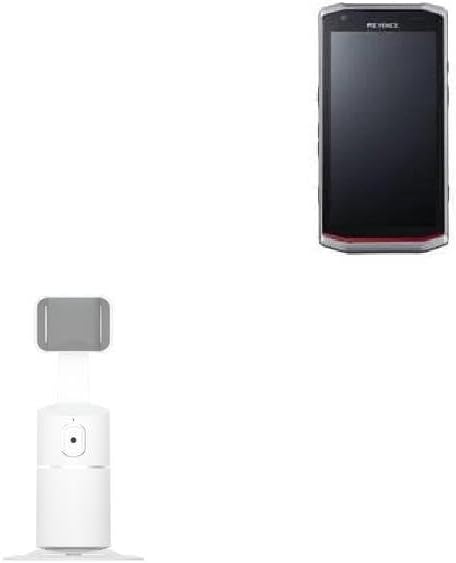
Image: The BoxWave PivotTrack360 Selfie Stand shown alongside a compatible device, illustrating its intended use.
2.2 Initial Placement
Place the stand on a flat, stable surface. The padded tripod legs are designed to provide stability.
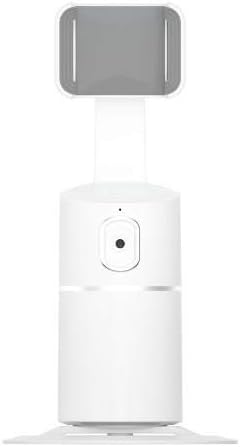
Image: A direct front view of the PivotTrack360 Selfie Stand, highlighting its compact design and phone grip.

Image: An angled view of the PivotTrack360 Selfie Stand, showing the side profile and the adjustable phone holder.

Image: A slightly different angled view of the PivotTrack360 Selfie Stand, emphasizing its base and the central tracking unit.
3. Operating Instructions
Learn how to use your PivotTrack360 Selfie Stand for optimal performance.
3.1 Powering On/Off
The PivotTrack360 Selfie Stand is designed for immediate use. Simply turn it on, and it is ready to operate. No app connection is required.
3.2 Mounting Your Device
The phone grip is adjustable to fit various smartphone dimensions. Gently expand the grip and securely place your device. You can mount your device in either portrait or landscape orientation.
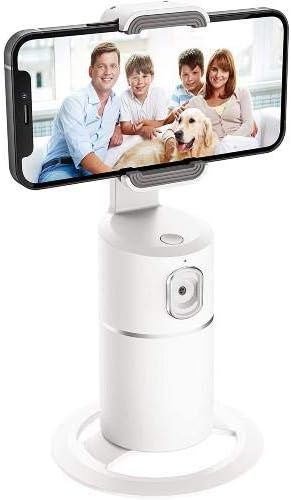
Image: The PivotTrack360 Selfie Stand holding a smartphone horizontally, displaying a family photo, demonstrating its use for capturing moments.
3.3 Automatic Tracking
Once powered on and with a device mounted, the intelligent lens will automatically detect and track faces or objects. The stand will rotate 360 degrees to follow your movement, ensuring you remain in the frame.

Image: A diagram illustrating the dimensions of the stand (7.75 inches height, 3.93 inches base width, 2-3.2 inches phone grip) and its 360-degree horizontal rotation and 315-degree vertical tilt capabilities.
3.4 Using with Tripods and Accessories
The base of the PivotTrack360 Selfie Stand includes a 1/4" screw thread, allowing it to be mounted on standard tripods or other compatible accessories for extended versatility.

Image: A close-up view of the bottom of the PivotTrack360 Selfie Stand, highlighting the 1/4-inch screw thread for tripod compatibility.
3.5 Orientation Flexibility
The stand supports both horizontal and vertical phone orientations, adapting to various content creation needs.

Image: A visual comparison showing the PivotTrack360 Selfie Stand holding a smartphone in both horizontal and vertical orientations, demonstrating its flexibility.

Image: A woman performing sit-ups, with the PivotTrack360 Selfie Stand tracking her movement, illustrating its automatic tracking feature during activities.
4. Maintenance
Proper care ensures the longevity and optimal performance of your PivotTrack360 Selfie Stand.
4.1 Cleaning
Wipe the stand with a soft, dry cloth. Avoid using abrasive cleaners or solvents that may damage the surface or internal components.
4.2 Storage
When not in use, store the stand in a cool, dry place away from direct sunlight and extreme temperatures. Its foldable design allows for compact storage.
5. Troubleshooting
If you encounter issues with your PivotTrack360 Selfie Stand, refer to the following common solutions.
5.1 Tracking Not Responding
- Ensure the stand is powered on.
- Verify that the subject is within the optimal tracking range and lighting conditions.
- Check for any obstructions blocking the intelligent lens.
5.2 Device Instability
- Ensure your smartphone is securely clamped within the adjustable phone grip.
- Place the stand on a flat, stable surface to prevent tipping.
6. Specifications
| Feature | Detail |
|---|---|
| Brand | BoxWave |
| Model | PivotTrack360 Selfie Stand |
| Color | Winter White |
| Material | Polycarbonate |
| Item Weight | 4 ounces |
| Recommended Uses | Desk |
| ASIN | B0CG2S5G63 |
| Date First Available | August 1, 2023 |
7. Support
For technical assistance with your BoxWave PivotTrack360 Selfie Stand, limited third-party technical support is available for Keyence DX-W600 compatibility inquiries (up to 3 inquiries via electronic messaging). Please note that this support is not affiliated with or endorsed by Keyence.
For general product inquiries or further assistance, please refer to the BoxWave official website or contact their customer service.