
BoxWave MagnetoSync mini Adapter
BoxWave MagnetoSync mini Adapter User Manual
Model: MagnetoSync mini Adapter
Introduction
The BoxWave MagnetoSync mini Adapter is designed to provide a convenient and versatile solution for charging and data transfer for various devices, including the RUIZU D19 Bluetooth MP3 Player. This adapter features a magnetic connection system with interchangeable tips (USB Type-C and Micro USB) to prevent wear on device ports and simplify connectivity. Its compact design supports simultaneous charging and data transfer.

Image: The BoxWave MagnetoSync mini Adapter shown with its magnetic tips and a compatible RUIZU D19 Bluetooth MP3 Player.
Setup Instructions
Follow these steps to set up your MagnetoSync mini Adapter:
- Identify the Correct Tip: Select the appropriate magnetic adapter tip (USB Type-C or Micro USB) for your device's charging port.
- Insert the Tip: Carefully insert the chosen magnetic tip into your device's charging port. This tip is designed to remain in the port for easy magnetic connection.
- Connect the Adapter: Plug the USB-A end of the MagnetoSync mini Adapter into a compatible USB power source (e.g., wall adapter, computer USB port) or a computer for data transfer.
- Attach Magnetically: Bring the magnetic end of the adapter close to the tip inserted in your device. The magnetic connection will automatically align and secure the adapter.
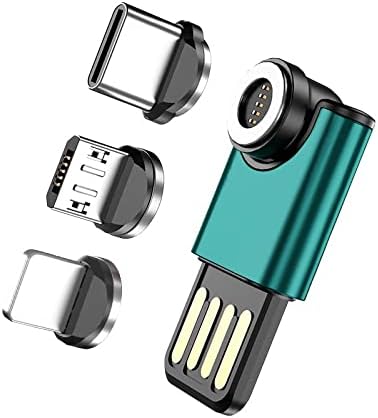
Image: The MagnetoSync mini Adapter body with its three distinct magnetic tips.

Image: A detailed view illustrating the magnetic connection between the adapter and its interchangeable tips.
Operating Instructions
Charging Your Device
Once the magnetic adapter is connected to your device and a power source, your device will begin charging. The adapter supports efficient power delivery.
Data Transfer
To transfer data, connect the USB-A end of the MagnetoSync mini Adapter to a computer's USB port. Ensure the magnetic connection to your device is secure. Your device should appear as a removable storage device on your computer, allowing you to transfer files.
The USB-A side of the adapter is reversible, allowing it to be plugged into a USB port in either orientation, reducing fumbling and potential wear on the port.
The MagnetoSync mini Adapter supports simultaneous charging and data transfer, enabling you to power your device while managing files.

Image: The MagnetoSync mini Adapter in use, connecting a smartphone to a laptop for charging and data transfer.

Image: A close-up demonstrating the reversible design of the USB-A connector for easy insertion.
Maintenance
- Cleaning: Use a soft, dry cloth to gently wipe the adapter and magnetic tips. Avoid using liquid cleaners or abrasive materials.
- Storage: Store the adapter and its tips in a clean, dry place when not in use. Keep magnetic tips free from metallic debris that could interfere with the connection.
- Handling: Avoid excessive force when inserting or removing the magnetic tips from your device's port to prevent damage.
Troubleshooting
- Device Not Charging:
- Ensure the USB-A end of the adapter is securely plugged into a functional power source.
- Verify that the magnetic connection between the adapter and the tip in your device is firm and clean.
- Check if the magnetic tip is correctly inserted into your device's charging port.
- Test with a different power source or USB port.
- Data Transfer Issues:
- Confirm the adapter is connected to a computer's USB port.
- Ensure the magnetic connection is stable.
- Check your device settings to ensure it is configured for data transfer when connected to a computer.
- Try a different USB port on your computer.
- Loose Magnetic Connection:
- Inspect the magnetic surfaces on both the adapter and the tips for any debris or obstructions. Clean if necessary.
- Ensure the magnetic tip is fully seated in your device's port.
Specifications
| Feature | Detail |
|---|---|
| Brand | BoxWave |
| Model | MagnetoSync mini Adapter |
| Connector Type | Micro USB, USB Type C |
| Cable Type | USB |
| Compatible Devices | Music Player (e.g., RUIZU D19 Bluetooth MP3 Player) and other devices with Micro USB or USB Type C ports |
| Color | Teal (adapter body) |
| Connector Gender | Male-to-Male |
| Shape | Round (magnetic connector) |
| Unit Count | 1.0 Count (adapter with tips) |
| Item Weight | 1.5 Ounces |
| Usage Environment | Indoor, Outdoor |
| Manufacturer | BoxWave |

Image: A visual representation of the product's technical specifications and dimensions.
Warranty Information
This product is covered by the standard manufacturer's warranty provided by BoxWave. For specific details regarding warranty terms, duration, and claims, please refer to the official BoxWave website or contact their customer support directly.
Customer Support
For technical assistance, product inquiries, or support, please visit the official BoxWave website or contact their customer service department. Contact information can typically be found on the manufacturer's website or product packaging.
Website: www.boxwave.com (Example link, actual link may vary)
Ask a question about this manual
Ask about setup, troubleshooting, compatibility, parts, safety, or missing instructions. Manuals+ will review the question and use this page’s manual context to help answer it.