
RUIMEN H1
RUIMEN Smart Watch User Manual
Model: H1
Introduction
Welcome to the RUIMEN Smart Watch user manual. This guide will assist you in setting up, operating, and maintaining your new smartwatch. The RUIMEN Smart Watch is designed to enhance your daily life with features like Bluetooth calling, comprehensive fitness tracking, and smart notifications. Please read this manual carefully to ensure optimal performance and longevity of your device.
What's in the Box
Upon opening your RUIMEN Smart Watch package, you should find the following items:
- RUIMEN Smart Watch (main unit)
- Charging Cable
- User Manual
- Two Watch Bands (one pre-attached, one extra replacement band)

Image: The RUIMEN Smart Watch, charging cable, and an extra watch band, as typically found in the product packaging.
Setup
Initial Charging
Before first use, fully charge your RUIMEN Smart Watch. Connect the charging cable to the watch's charging points and a USB power source. A full charge typically takes approximately 2.5 hours.
App Installation & Pairing
To unlock the full potential of your smartwatch, you need to install the companion app and pair it with your smartphone. The watch is compatible with iOS 9.0/Android 5.0 and Bluetooth 5.0 or above.
- Download the 'GloryFit' app from your phone's app store (App Store for iOS, Google Play Store for Android).
- Ensure Bluetooth is activated on your smartphone.
- Open the 'GloryFit' app and follow the on-screen prompts to add a new device. You may need to scan the QR code displayed on your watch's screen to initiate pairing.
- Confirm the pairing request on both your phone and the watch.
- Once paired, enable the desired functions and permissions within the app.

Image: A visual guide illustrating the five steps to connect the smartwatch to your phone via the GloryFit app, including QR code scanning and Bluetooth pairing.
Bluetooth Calling Function Setup
To enable the call answering and making features directly from your watch:
- On your phone, go to Bluetooth settings.
- Locate and connect to the device named 'H1(ID-43B1)' or similar, which is separate from the main app connection.
- Once connected, the call icon on your watch will light up, indicating the calling function is active.
- You can now make and answer calls directly from your watch.

Image: The smartwatch screen showing an incoming call notification and various app notification icons, demonstrating its communication capabilities.
Operating Your Smart Watch
Making and Answering Calls
Once the Bluetooth calling function is set up, you can make and answer calls directly from your wrist. The watch features a built-in speaker and microphone for clear communication, ideal for when your phone is not immediately accessible.

Image: A person interacting with the smartwatch to answer an incoming call, highlighting the convenience of the built-in speaker and microphone.
Message Notifications
Receive real-time notifications for SMS, emails, and various social media apps (e.g., Facebook, WhatsApp, Twitter) directly on your watch. This allows you to stay informed without needing to check your phone constantly.

Image: The smartwatch screen showing notifications from different messaging and social media applications, demonstrating its notification capabilities.
Customizing Watch Faces
Personalize your smartwatch with over 100 watch faces available through the app. You can also upload your own photos to create unique watch faces that express your personal style.

Image: The smartwatch showcasing a personalized watch face with a photo, alongside the app interface for selecting and customizing watch dials.
Music Control
Control music playback on your smartphone directly from your watch. Play, pause, skip tracks, and adjust volume without needing to take out your phone.
Remote Camera
Use your smartwatch as a remote shutter for your phone's camera, making it easier to capture group photos or selfies from a distance.
Weather Forecast
Access real-time weather forecasts directly on your watch, helping you plan your day effectively.
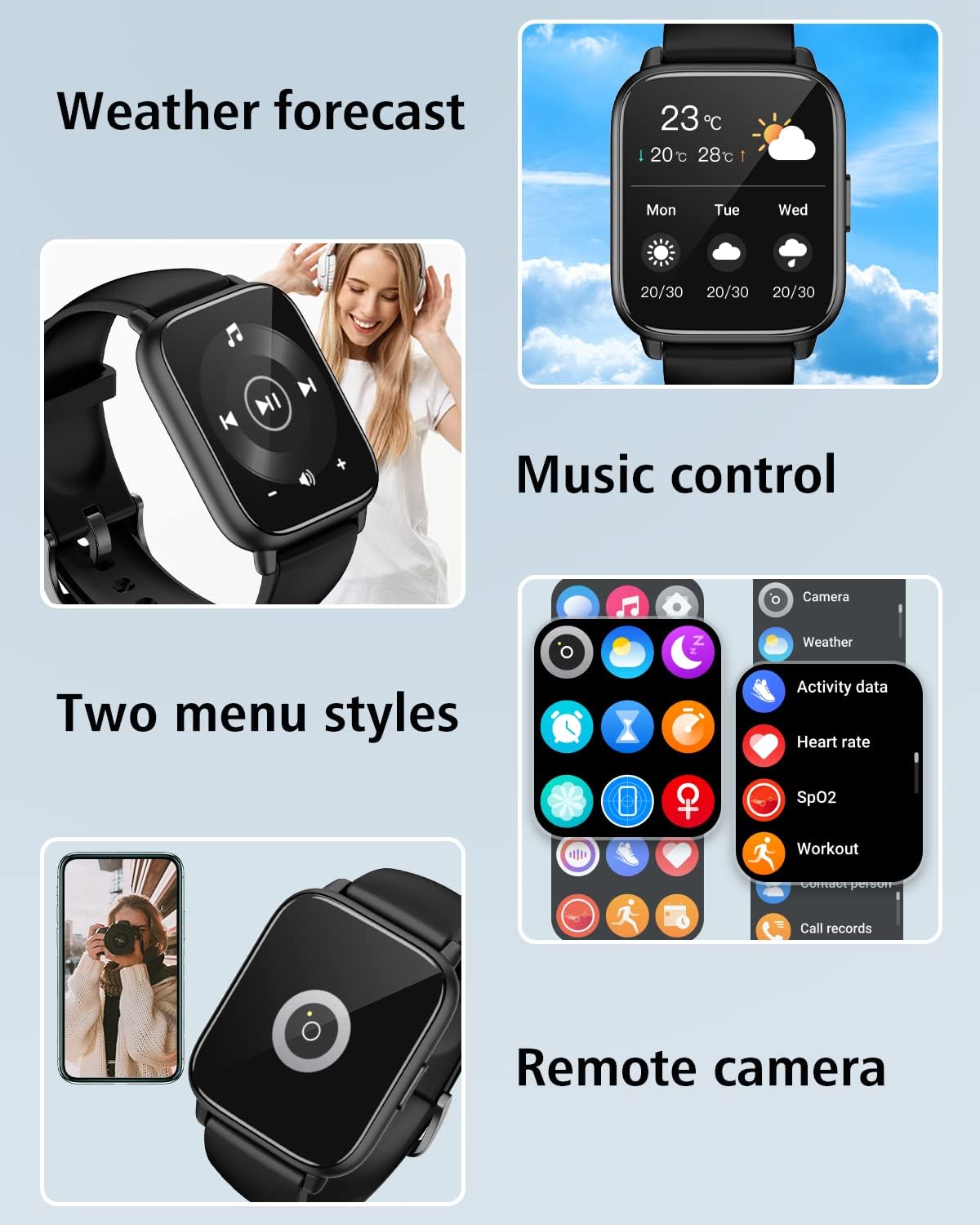
Image: The smartwatch screen showing the weather forecast, music control interface, and an icon for remote camera functionality.
Other Practical Tools
The RUIMEN Smart Watch is equipped with several other practical tools for daily convenience:
- Alarm Clocks: Set multiple alarms to manage your schedule.
- Timer: A convenient countdown timer for various activities.
- Sedentary Reminder: Get alerts to move after periods of inactivity.
- Find Watch/Phone: Locate your watch or phone if misplaced within Bluetooth range.
Health and Fitness Tracking
All-Day Fitness Tracking
The smartwatch accurately tracks your daily activity, including steps taken, distance covered, and calories burned, providing a comprehensive overview of your movement throughout the day.

Image: The smartwatch screen showing activity tracking data, including icons for calories, distance, and steps, indicating comprehensive fitness monitoring.
Sports Modes
With over 100 sports modes supported by the app, the RUIMEN Smart Watch can track a wide variety of activities, from running and cycling to more specific sports, providing detailed insights into your workouts.

Image: A graphic illustrating over 100 sport modes available on the smartwatch, with icons representing different activities like running, cycling, and swimming.
Heart Rate Monitoring
The watch continuously measures your heart rate, allowing you to monitor your cardiovascular health and optimize your exercise intensity.

Image: The smartwatch screen showing real-time heart rate data (top) and blood oxygen saturation (bottom), indicating continuous health monitoring.
Blood Oxygen Monitoring
Monitor your blood oxygen levels (SpO2) to gain insights into your respiratory health and overall well-being.
Sleep Monitoring
The smartwatch tracks your sleep patterns, including deep sleep, light sleep, REM sleep, and awake time, providing a detailed analysis of your sleep quality.

Image: The smartwatch app interface showing a detailed breakdown of sleep stages, including deep sleep, light sleep, and REM, along with total sleep duration.
Breathing Training
Utilize the guided breathing training feature to help you relax and manage stress, promoting a calm state of mind.

Image: The smartwatch displaying a breathing exercise interface, alongside a voice assistant feature, indicating tools for well-being and convenience.
Maintenance
Battery Life and Charging
The RUIMEN Smart Watch offers impressive battery performance, with up to 30 days of standby time and 7 days of regular usage on a single 2.5-hour charge. To charge, align the magnetic charging pins with the contacts on the back of the watch.

Image: A diagram showing the dimensions of the smartwatch and visual indicators for its long battery life, including standby time and normal use duration.
Waterproof Rating
The watch has an IP68 waterproof rating, meaning it is resistant to dust and can withstand immersion in water up to 1.5 meters for 30 minutes. This makes it suitable for daily activities like hand washing, showering, and light rain exposure. Avoid hot water, saunas, or diving.

Image: A close-up of a person's wrist wearing the smartwatch while washing hands, demonstrating its water resistance.
Cleaning and Care
To keep your smartwatch in optimal condition, regularly clean the watch body and bands with a soft, dry cloth. If necessary, use a slightly damp cloth and mild soap, then dry thoroughly. Avoid harsh chemicals or abrasive materials.
Changing Watch Bands
Your RUIMEN Smart Watch comes with two bands, allowing you to change them to suit different occasions or preferences. The bands feature quick-release pins for easy attachment and removal.

Image: An illustration showing multiple color variations of the smartwatch and highlighting that each package includes two interchangeable bands.
Troubleshooting
If you encounter any issues with your RUIMEN Smart Watch, please refer to the following common solutions:
| Problem | Possible Solution |
|---|---|
| Watch won't turn on | Ensure the watch is fully charged. Connect it to the charger for at least 30 minutes. |
| Cannot pair with phone | Make sure Bluetooth is enabled on your phone and the watch. Restart both devices. Ensure the app is installed and you are pairing through the app. |
| Bluetooth calling not working | Check if the 'H1(ID-43B1)' device is connected in your phone's Bluetooth settings, separate from the app connection. Restart the watch and phone. |
| Notifications not received | Ensure the watch is connected to the app. Check app permissions on your phone to allow notifications. Verify notification settings within the GloryFit app. |
| Inaccurate fitness data | Ensure the watch is worn snugly on your wrist. Calibrate steps in the app if available. Ensure personal information (height, weight) is accurate in the app. |
| Short battery life | Reduce screen brightness, turn off unnecessary notifications, and limit continuous heart rate monitoring if not needed. Ensure proper charging. |
Specifications
Detailed technical specifications for the RUIMEN Smart Watch:
| Feature | Detail |
|---|---|
| Screen Size | 1.85 Inches |
| Display Type | HD Touch Screen |
| Connectivity | Bluetooth 5.0 |
| Battery Capacity | 300 Milliamp Hours (Lithium Polymer) |
| Battery Life (Normal Use) | Up to 7 days |
| Battery Life (Standby) | Up to 30 days |
| Charging Time | Approx. 2.5 hours |
| Waterproof Rating | IP68 |
| Memory Storage Capacity | 128 MB |
| Operating System Compatibility | iOS 9.0+ and Android 5.0+ |
| Item Weight | 4.6 ounces |
| Dimensions | 10.63 x 3.35 x 0.67 inches (Package) |
| GPS | No GPS |
Warranty and Support
RUIMEN stands behind the quality of its products. Your Smart Watch comes with a 1-Year Warranty from the date of purchase. This warranty covers manufacturing defects and ensures your product functions as intended.
For any technical assistance or inquiries, RUIMEN provides Lifetime Technical Support. Please refer to the contact information provided in your product packaging or visit the official RUIMEN website for customer service details.

Image: A graphic highlighting key benefits of choosing RUIMEN, including superior quality, user-centric design, value for money, eco-friendly commitment, 24/7 customer support, 1-year warranty, and lifetime technical support.
Related documentsH1


Ask a question about this manual
Ask about setup, troubleshooting, compatibility, parts, safety, or missing instructions. Manuals+ will review the question and use this page’s manual context to help answer it.