
Emerson EAM-9000
Emerson EAM-9000 Professional Wired Microphone User Manual
Model: EAM-9000
Introduction
The Emerson EAM-9000 is a professional-grade wired microphone designed for clear and accurate vocal reproduction. Its durable metal construction and cardioid polar pattern make it ideal for various applications, including live performances, studio recording, public speaking, and karaoke. This manual provides essential information for setting up, operating, and maintaining your EAM-9000 microphone.
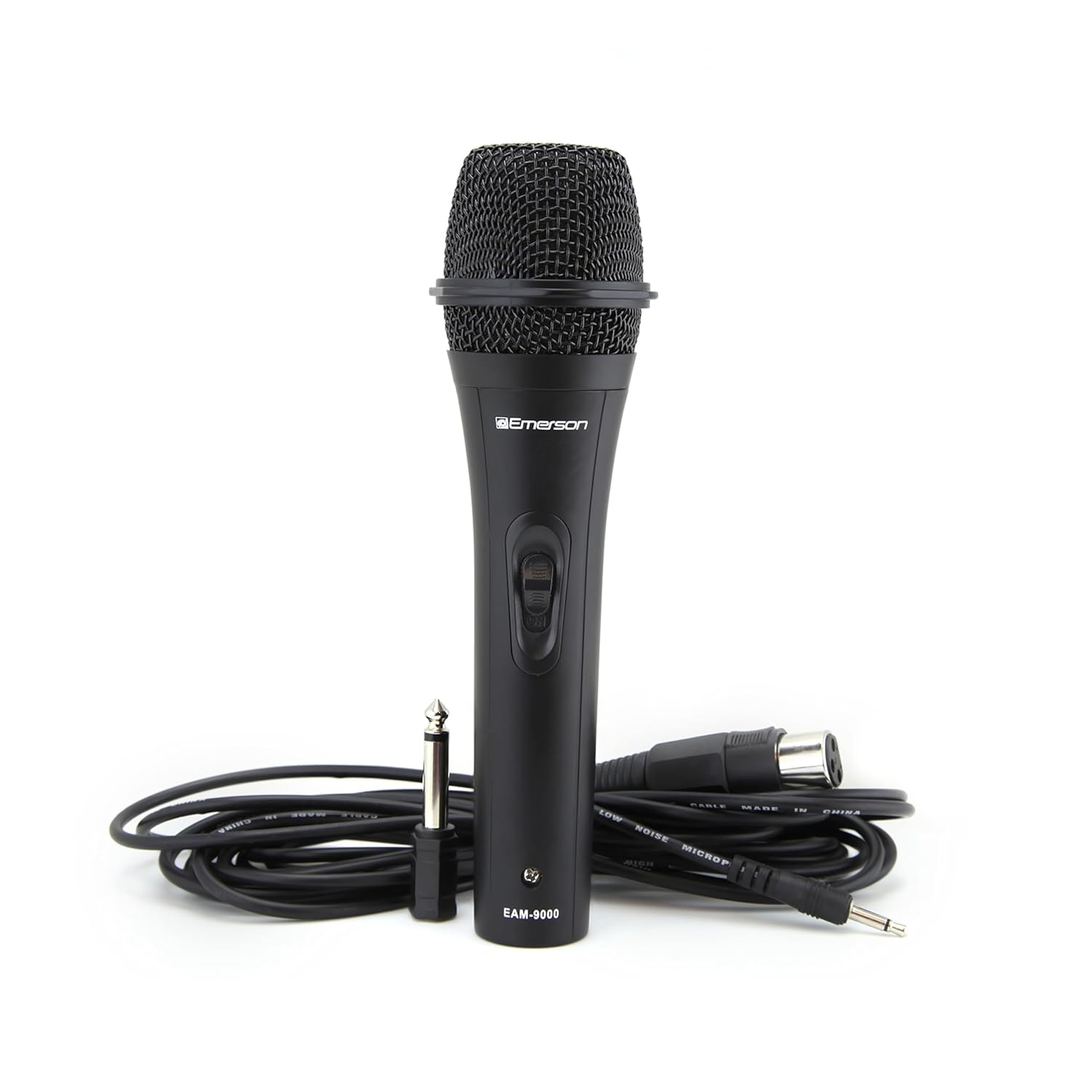
Figure 1: Emerson EAM-9000 Professional Wired Microphone with included accessories.
What's in the Box
- Emerson EAM-9000 Professional Wired Microphone
- XLR to 1/4" Audio Cable
- 1/8" to 1/4" Adapter
- User Manual (this document)

Figure 2: Front view of the EAM-9000 microphone, showing the on/off switch.
Setup
- Connect the Cable: Locate the XLR connector at the base of the microphone. Connect the XLR end of the provided audio cable to the microphone. Ensure it clicks securely into place.
- Connect to Audio Device: Connect the 1/4" (6.35mm) end of the audio cable to the microphone input of your audio mixer, amplifier, karaoke machine, or other compatible audio device.
- Use Adapter (if needed): If your audio device has a 1/8" (3.5mm) input, attach the 1/8" to 1/4" adapter to the 1/4" end of the audio cable before connecting it to your device.
- Position the Microphone: Place the microphone on a stand or hold it comfortably for your intended use. For optimal sound, position the microphone directly towards the sound source.

Figure 3: The detachable XLR (cannon-type) connector for secure and reliable signal transmission.
Operating Instructions
- Power On/Off: Locate the ON/OFF switch on the microphone body. Slide the switch to the "ON" position to activate the microphone. Slide it to "OFF" when not in use to prevent unwanted noise and preserve the microphone's lifespan.
- Adjust Volume: Adjust the input volume level on your connected audio device (mixer, amplifier, etc.) to achieve the desired sound level without distortion. Start with a low volume and gradually increase it.
- Microphone Placement: Due to its cardioid polar pattern, the EAM-9000 is most sensitive to sounds coming from the front. For best results and to minimize background noise, speak or sing directly into the top of the microphone.
- Feedback Prevention: To avoid audio feedback (a high-pitched squeal), keep the microphone away from speakers and monitors, and avoid pointing the microphone directly at them.

Figure 4: The EAM-9000's unidirectional dynamic design ensures crisp, focused sound by minimizing off-axis noise.

Figure 5: The sleek and practical design of the EAM-9000 makes it suitable for various uses, including home karaoke.
Maintenance
- Cleaning: Use a soft, dry cloth to wipe the microphone body. Do not use liquid cleaners or solvents, as they may damage the finish or internal components.
- Storage: When not in use, store the microphone in a dry, cool place, away from direct sunlight and extreme temperatures.
- Cable Care: Avoid sharp bends or kinks in the microphone cable. Coil the cable loosely when storing to prevent damage.
- Handling: Handle the microphone with care. Avoid dropping it or subjecting it to strong impacts, which can affect its performance.
Troubleshooting
| Problem | Possible Cause | Solution |
|---|---|---|
| No sound output | Microphone switch is OFF. Cable not properly connected. Audio device volume too low. Incorrect input selected on audio device. | Slide switch to "ON". Ensure cable is securely connected at both ends. Increase volume on audio device. Select the correct input channel. |
| Distorted sound | Audio device input volume too high. Microphone too close to sound source. | Decrease volume on audio device. Increase distance from sound source or reduce vocal intensity. |
| Feedback (squealing sound) | Microphone too close to speakers. Microphone pointed at speakers. Volume too high. | Move microphone further from speakers. Reposition microphone away from speakers. Reduce overall volume or microphone gain. |
| Intermittent sound | Loose cable connection. Damaged cable. | Check and secure all cable connections. Try a different cable if available. |
Specifications
| Feature | Detail |
|---|---|
| Model Number | EAM-9000 |
| Microphone Type | Dynamic |
| Polar Pattern | Cardioid (Unidirectional) |
| Frequency Response | 70 Hz - 12,000 Hz |
| Impedance | 600 Ohm |
| Audio Sensitivity | 81 dB (+/- 3dB) |
| Connection Type | XLR |
| Included Adapters | 1/8" to 1/4" Adapter |
| Construction Material | Durable Metal |
| Dimensions (L x W x H) | 9.2 x 1.8 x 1.8 inches |
| Item Weight | 0.55 Pounds (approx. 8.8 ounces) |

Figure 6: Dimensions and weight of the EAM-9000 microphone.
Warranty and Support
Emerson products are designed for reliability and performance. For information regarding warranty coverage, technical support, or service inquiries for your EAM-9000 microphone, please refer to the warranty card included with your purchase or visit the official Emerson website.
Online Support: www.emerson.com/contact-us (Example link, actual link might vary)
Manufacturer: Naxa Electronics, Inc.
Related documentsEAM-9000


Ask a question about this manual
Ask about setup, troubleshooting, compatibility, parts, safety, or missing instructions. Manuals+ will review the question and use this page’s manual context to help answer it.