
1. Introduction and Overview
This manual provides essential information for the safe and efficient operation of your Frigidaire FHWW124TE1 12,000 BTU Smart Window Air Conditioner. Designed to cool areas up to 550 sq. ft., this unit offers Wi-Fi connectivity for remote management via the Frigidaire app, adjustable fan speeds, multi-directional airflow, and a programmable 24-hour timer. It also features an easy-to-clean washable dust filter with a Clean Filter alert for simplified maintenance. Enjoy a cool and comfortable space with quiet performance.
2. Key Features
- Wi-Fi Enabled: Control your air conditioner remotely using the Frigidaire app, or integrate with Amazon Alexa and Google Home for voice control.
- Customizable Cooling: Achieve optimal comfort with custom temperature settings, 6-way directional airflow, and three fan speeds. Ideal for multi-use rooms up to 550 sq. ft.
- Easy Maintenance: Features a washable dust filter and Clean Filter alerts to ensure efficient operation and prolong unit lifespan.
- Energy-Efficient Performance: Includes Eco Mode to maintain temperature and save energy, Sleep Mode for quiet operation and energy conservation, and Dry Mode to remove excess moisture.
- Effortless Convenience: Set a 24-hour on/off timer to match your schedule and benefit from the Auto Restart feature, which restores previous settings after a power outage.
3. Setup & Installation
Your Frigidaire FHWW124TE1 air conditioner is designed for window installation and comes with a window kit, washable filter, and remote control. Please refer to the detailed installation instructions provided in the included manual for specific steps tailored to your window type.
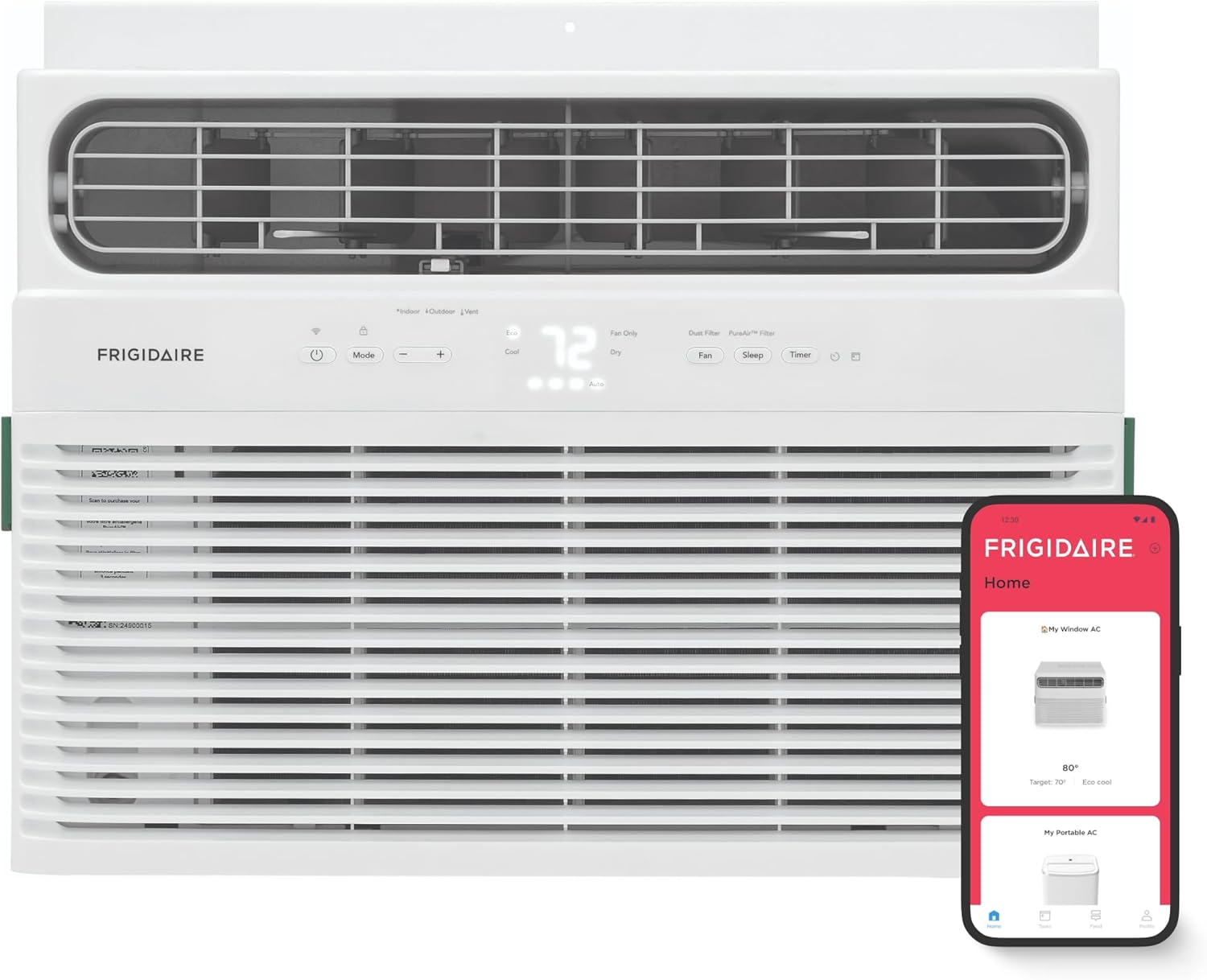
Figure 1: Front view of the Frigidaire FHWW124TE1 Smart Window Air Conditioner.

Figure 2: Product dimensions showing 21.9 inches depth, 19 inches width, and 14.5 inches height.
Installation Tips:
- Ensure the window opening is compatible with the unit's dimensions (21.9 x 19 x 14.5 inches).
- Use the provided window kit to secure the unit and minimize air leakage.
- The unit weighs approximately 63.5 pounds; consider having assistance for safe lifting and placement.
4. Operating Instructions
Your air conditioner offers various modes and settings for personalized comfort. All functions can be controlled via the unit's control panel, the included remote control, or the Frigidaire app on your smartphone.
Control Panel & Remote:

Figure 3: The unit's control panel and remote control, highlighting Wi-Fi, Eco, and Sleep modes.
- Power Button: Turns the unit on or off.
- Mode Selection: Cycle through Cool, Eco, Sleep, Dry, and Fan Only modes.
- Temperature Adjustment: Use the up/down arrows to set your desired temperature.
- Fan Speed: Select from Low, Medium, or High fan speeds.
- Timer: Program the unit to turn on or off at specific times within a 24-hour period.
- Auto Restart: In case of a power interruption, the unit will automatically resume operation with its previous settings once power is restored.
Wi-Fi Connectivity:

Figure 4: Control your Frigidaire air conditioner from anywhere using the Frigidaire app, compatible with Google Home and Amazon Alexa.
- Download the Frigidaire app from your device's app store.
- Follow the in-app instructions to connect your air conditioner to your home Wi-Fi network.
- Once connected, you can adjust settings, change modes, and set schedules from your smartphone.
5. Maintenance
Regular maintenance ensures your air conditioner operates efficiently and provides clean air.
Cleaning the Washable Filter:

Figure 5: The easy-to-clean washable filter being removed from the unit for maintenance.
- The unit features a Clean Filter alert that will illuminate when it's time to clean the filter.
- Gently pull out the filter from its designated slot.
- Wash the filter with warm, soapy water. Rinse thoroughly and allow it to air dry completely before reinserting.
- For enhanced air quality, consider purchasing the PureAir® Advanced Filter (sold separately).
6. Troubleshooting
If you experience issues with your air conditioner, please consult the full troubleshooting guide in your product manual. Common issues may include:
- Unit not turning on: Check power connection, circuit breaker, and ensure the unit is properly plugged in.
- Insufficient cooling: Verify temperature settings, ensure filters are clean, and check for obstructions to airflow.
- Unusual noises: Refer to the manual for common operating sounds and potential causes of abnormal noises.
7. Specifications
| Feature | Specification |
|---|---|
| Manufacturer | Frigidaire |
| Part Number | FHWW124TE1 |
| Item Weight | 63.5 pounds |
| Product Dimensions | 21.9 x 19 x 14.5 inches |
| Cooling Power | 12,000 British Thermal Units (BTU) |
| Floor Area Coverage | Up to 550 Square Feet |
| Voltage | 115 Volts (AC) |
| Wattage | 1100 watts |
| Sound Level | 57 Decibels |
| Special Features | Dust Filter, Filter Light Reminder, Remote Controlled, WiFi Enabled |
| Included Components | Window Kit, Washable filter, remote |
| Seasonal Energy Efficiency Ratio (SEER) | 10.9 |
8. Warranty & Support
Your Frigidaire FHWW124TE1 Smart Window Air Conditioner comes with a 1 Year Manufacturer Warranty. For warranty claims, technical assistance, or customer support, please contact Frigidaire customer service directly. Refer to your product packaging or the official Frigidaire website for contact information.