
Introduction
The Aoyygg SVP-916 Adjustable Over and Under Voltage Protector is an advanced electrical safety device designed to safeguard your household appliances and electrical circuits from voltage fluctuations and overcurrent conditions. This intelligent relay automatically monitors the circuit's voltage and current, disconnecting the power supply when values exceed or fall below pre-set safe limits, and reconnecting it once conditions normalize. It features a dual LED display for real-time monitoring of voltage and current, also functioning as a voltmeter and ammeter.
Safety Information
WARNING: Electrical shock hazard. Installation and maintenance should only be performed by qualified personnel. Always disconnect power before working with electrical circuits.
- Ensure the device is installed in a dry environment, away from moisture and direct sunlight.
- Verify that the rated current of the protector matches or exceeds the maximum current draw of the connected load.
- Do not attempt to open or repair the device. Refer to qualified service personnel.
- Ensure proper grounding according to local electrical codes.
Package Contents
- 1x Aoyygg SVP-916 Over Under Voltage Protection Relay
Product Features
- Automatic Protection: Automatically cuts off power during over-voltage, under-voltage, or over-current conditions.
- Automatic Recovery: Restores power automatically once voltage and current return to normal ranges.
- Adjustable Parameters: User-adjustable over-voltage, under-voltage, and over-current thresholds.
- Dual LED Display: Real-time display of current voltage and current, also functions as a voltmeter and ammeter.
- Durable Construction: Made from high-quality ABS and electronic components for long service life.
- Easy Installation: Designed for convenient installation in electrical panels.
Specifications
| Parameter | Value |
|---|---|
| Material | ABS, Electronic Components |
| Rated Voltage | 220V AC |
| Optional Rated Current | 40A / 63A / 80A |
| Over Voltage Range (Adjustable) | 221V - 300V |
| Under Voltage Range (Adjustable) | 150V - 219V |
| Over Current Range (Adjustable) | 1A - 40A (for 40A model) |
| Dimensions (Approx.) | 85mm (H) x 35mm (W) x 65mm (D) |
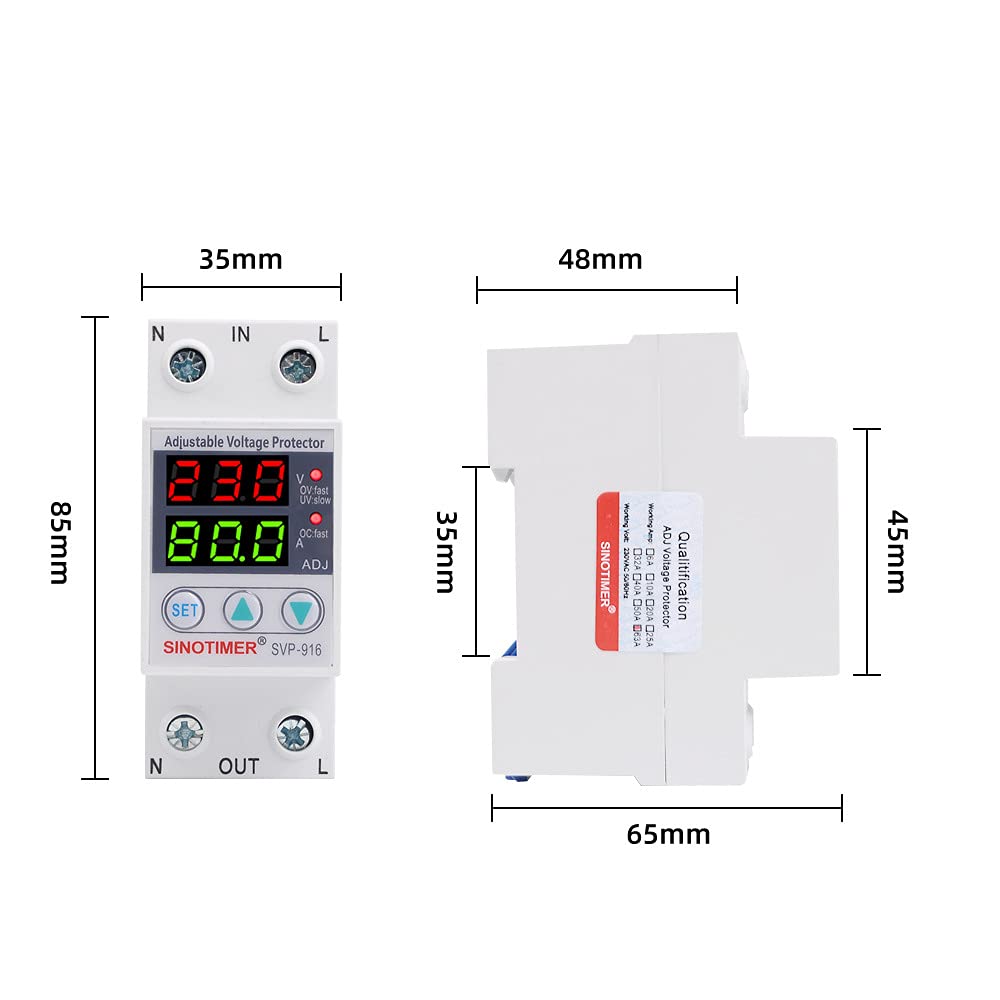
Image: Approximate dimensions of the Aoyygg SVP-916 voltage protector, showing height, width, and depth measurements.
Setup and Installation
The SVP-916 is designed for DIN rail mounting. Follow these steps for proper installation:
- Power Disconnection: Before starting any electrical work, ensure that the main power supply to the circuit is completely disconnected at the circuit breaker or fuse box.
- Mounting: Mount the SVP-916 protector onto a standard DIN rail within your electrical panel.
- Wiring: Connect the incoming live (L) and neutral (N) wires to the "IN" terminals of the protector. Connect the outgoing live (L) and neutral (N) wires to the "OUT" terminals, leading to your protected load. Refer to the wiring diagram below for correct connections.
- Secure Connections: Ensure all wire connections are tight and secure to prevent loose contacts and potential hazards.
- Verification: Double-check all wiring against the diagram before restoring power.

Image: Wiring diagram illustrating the connection of the SVP-916 voltage protector between a power switch and an air circuit breaker, showing live (L) and neutral (N) connections.
Operating Instructions
Once installed and power is restored, the SVP-916 will display the current voltage and current on its dual LED screens. The device is pre-set with default protection values, but these can be adjusted.
Adjusting Protection Parameters:
- Press the SET button to enter the setting mode. The display will show the current setting for over-voltage (OV).
- Use the ▲ (Up) and ▼ (Down) buttons to adjust the desired over-voltage threshold (221V-300V).
- Press SET again to cycle through other parameters: under-voltage (UV), and over-current (OC).
- Adjust each parameter using the ▲ and ▼ buttons to your desired values.
- After setting all parameters, press and hold the SET button for a few seconds until the display returns to normal operation mode, saving your settings.
Understanding the Display Indicators:
- Top LED Display: Shows current voltage (V).
- Bottom LED Display: Shows current amperage (A).
- OV.fast/OV.slow: Indicates over-voltage protection status (fast or slow trip).
- UV.fast/UV.slow: Indicates under-voltage protection status (fast or slow trip).
- OC.fast/OC.slow: Indicates over-current protection status (fast or slow trip).
- ADJ: Illuminates when in adjustment mode.

Image: Front view of the Aoyygg SVP-916 voltage protector, highlighting the dual LED display showing voltage and current, along with the SET, Up, and Down adjustment buttons.
Maintenance
The SVP-916 voltage protector is designed for minimal maintenance. However, periodic checks can ensure its optimal performance and longevity:
- Visual Inspection: Periodically inspect the device for any signs of physical damage, discoloration, or loose connections.
- Cleaning: If necessary, gently wipe the exterior of the device with a dry, soft cloth. Do not use abrasive cleaners or solvents. Ensure power is disconnected before cleaning.
- Connection Check: Annually, or if you suspect an issue, verify that all terminal connections are still tight and secure.
- Environmental Conditions: Ensure the operating environment remains within specified temperature and humidity ranges.
Troubleshooting
| Problem | Possible Cause | Solution |
|---|---|---|
| Device does not power on. | No input power; incorrect wiring; internal fault. | Check main power supply. Verify wiring connections. If problem persists, contact support. |
| Device trips frequently. | Voltage/current outside set limits; sensitive settings. | Check actual line voltage/current. Adjust protection thresholds if necessary, ensuring they are within safe operating parameters for your appliances. |
| Display shows erratic readings. | Loose connections; electrical interference. | Ensure all wiring connections are secure. Check for strong electromagnetic interference sources nearby. |
| Cannot adjust settings. | Not in setting mode; buttons not responding. | Press the SET button to enter setting mode. If buttons are unresponsive, power cycle the device. |
Warranty and Support
Aoyygg products are manufactured to high-quality standards. For warranty information and technical support, please refer to the documentation provided with your purchase or contact Aoyygg customer service through their official website or the retailer from whom you purchased the product.
Please have your model number (SVP-916) and purchase date ready when contacting support.