
1. Introduction
Thank you for choosing the FLEXISPOT L-Shaped Electric Standing Desk. This manual provides essential information for the safe assembly, operation, and maintenance of your new desk. Please read these instructions carefully before use and retain them for future reference. This desk is designed to provide a versatile and ergonomic workspace, allowing seamless transitions between sitting and standing positions.
2. Safety Instructions
To ensure safe operation and prevent injury or damage, please observe the following safety guidelines:
- Ensure all components are securely fastened before use.
- Keep children and pets away from the desk during operation.
- Do not place hands or other body parts near moving parts of the desk frame.
- Avoid overloading the desk. The maximum load capacity is 80 kg.
- Do not sit or stand on the desk.
- Only use the desk indoors in a dry environment.
- Disconnect power before cleaning or maintenance.
- If any parts are damaged or missing, contact customer support immediately. Do not attempt to repair the desk yourself.
3. Package Contents
Please verify that all parts are present and undamaged before beginning assembly. Refer to the assembly diagram for a complete list of components.
- L-Shaped Desktop (2 parts)
- 4-Leg Frame (Dual Motor Mechanism)
- Intelligent Control Panel
- Power Adapter and Cables
- Assembly Hardware (screws, tools, etc.)
- User Manual
4. Setup and Assembly
Assembly typically requires two people. Follow these steps carefully:
- Unpack Components: Carefully remove all parts from the packaging and lay them out on a soft, clean surface to prevent scratches.
- Assemble the 4-Leg Frame: Connect the frame components according to the included diagram. Ensure all bolts are tightened securely. The 4-leg design provides enhanced stability.
- Install Dual Motor Mechanism: The dual motor system is integrated into the frame. Ensure all motor connections are secure. This mechanism allows for smooth and precise height adjustments.
- Attach Desktop Panels: Carefully place the two desktop panels onto the assembled frame. Align the pre-drilled holes and secure the desktop to the frame using the provided screws. The L-shaped design offers ample workspace.
- Mount Control Panel: Attach the intelligent control panel to the underside of the desktop in an easily accessible location. Connect the control panel cable to the main control box.
- Connect Power: Plug the power adapter into the control box, then plug the power cord into a standard electrical outlet.
- Initial Reset: After connecting power, perform an initial reset. Press and hold the 'Reset' button (usually marked with a circular arrow) until the desk reaches its lowest position and then slightly rises. This calibrates the desk.
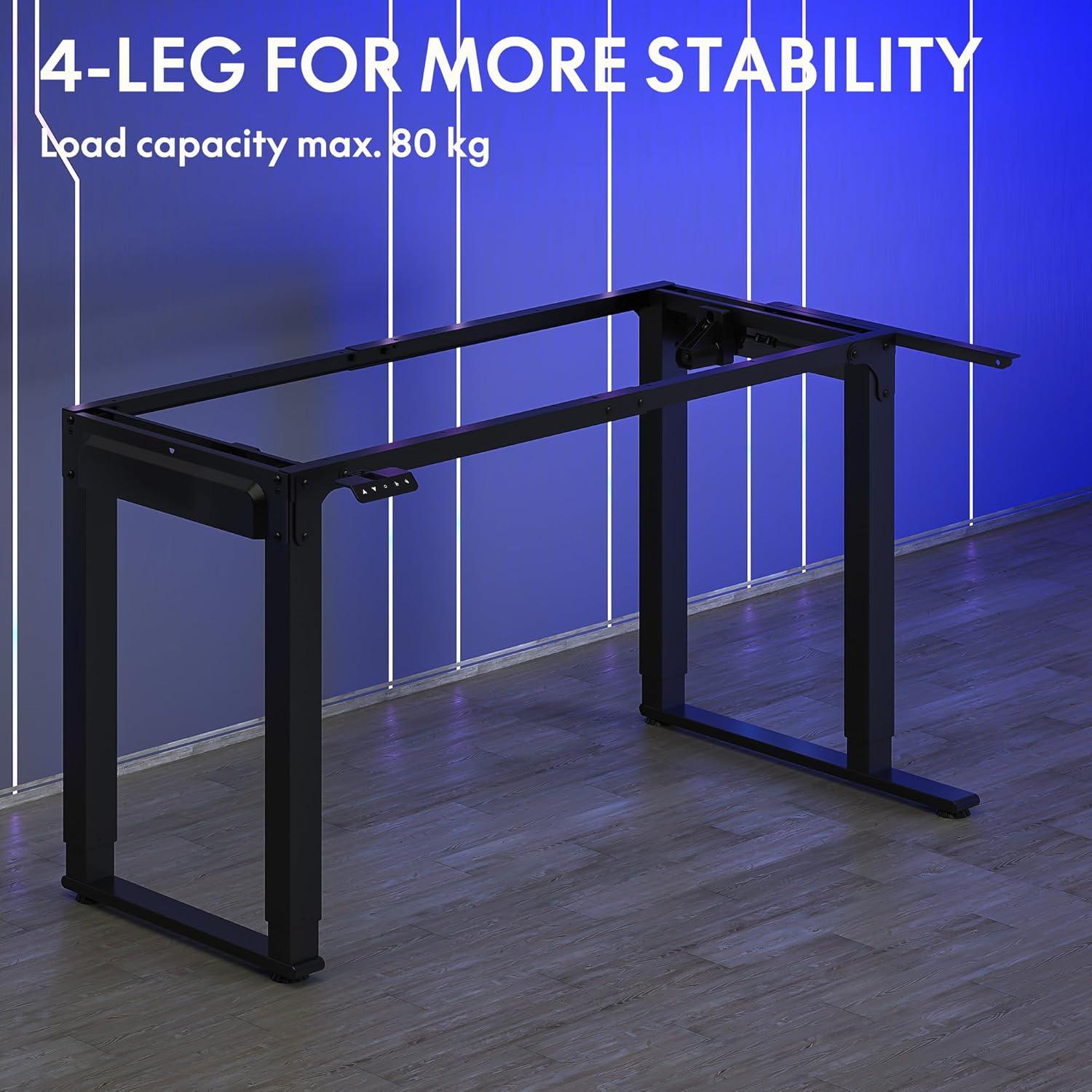
Image: The robust 4-leg frame provides superior stability for the L-shaped standing desk.

Image: Detail of the dual-motor mechanism, ensuring accurate and smooth height positioning.
5. Operating Instructions
Your FLEXISPOT L-Shaped Electric Standing Desk features an intelligent control panel for easy height adjustment and memory presets.
5.1 Control Panel Functions

Image: The intelligent control panel with clearly labeled buttons for desk operation.
- Up/Down Buttons (▲ / ▼): Press and hold to continuously adjust the desk height up or down. Release to stop at the desired height.
- Reset Button (↺): Used for initial calibration or to reset the desk if an error occurs. Press and hold until the desk moves to its lowest point and slightly rises.
- Sitting Preset Button (👭): Press to automatically move the desk to your programmed sitting height.
- Standing Preset Button (👭 with upward arrow): Press to automatically move the desk to your programmed standing height.
5.2 Setting Memory Presets
To save your preferred sitting or standing height:
- Adjust the desk to your desired height using the Up/Down buttons.
- Press and hold the desired preset button (Sitting or Standing) for approximately 3-5 seconds until you hear a beep or see the display flash. This indicates the height has been saved.

Image: The desk can be adjusted from a minimum height of 72cm to a maximum of 117cm.

Image: The spacious L-shaped desktop (180cm x 110cm) provides ample room for multiple computers and accessories.
6. Maintenance
Regular maintenance ensures the longevity and optimal performance of your desk.
- Cleaning: Wipe the desktop and frame with a soft, damp cloth. Avoid harsh chemicals or abrasive cleaners.
- Inspection: Periodically check all screws and connections to ensure they are tight. Retighten if necessary.
- Cable Management: Ensure power cables and other device cables are properly managed to prevent entanglement or damage during height adjustments.
- Motor Care: The dual motors are designed for durability. Avoid obstructing the desk's movement or exceeding the weight limit to prevent strain on the motors.

Image: The desk features safe and stylish rounded corners.
7. Troubleshooting
If you encounter issues with your desk, refer to the following common problems and solutions:
| Problem | Possible Cause | Solution |
|---|---|---|
| Desk does not move. | Power cable disconnected; Control panel cable loose; Overload protection activated. | Check power connections; Ensure control panel cable is secure; Reduce weight on desk and perform a reset. |
| Desk moves unevenly or makes unusual noise. | Unbalanced load; Loose connections; Obstruction. | Distribute weight evenly; Check and tighten all frame connections; Remove any obstructions. Perform a reset. |
| Height presets are not working. | Presets not saved correctly. | Re-save the desired height by holding the preset button until confirmation. |
| Desk stops mid-movement. | Overload protection; Overheating protection. | Reduce weight on the desk. Allow the desk to cool down for 20-30 minutes if it has been used continuously. |
If the problem persists after attempting these solutions, please contact FLEXISPOT customer support.
8. Specifications
| Feature | Detail |
|---|---|
| Model Number | QS2LB-1811 |
| Brand | FLEXISPOT |
| Desk Type | L-Shaped Electric Standing Desk |
| Motor Type | Dual Motor |
| Frame Type | 4-Leg Frame |
| Height Adjustment Range | 72 cm to 117 cm |
| Desktop Dimensions (L x W) | 180 cm x 110 cm |
| Maximum Load Capacity | 80 kg |
| Noise Level | < 50 dB |
| Material | Alloy Steel (Frame) |
| Color | Black |
| Item Weight | 30 Kilograms |
9. Warranty and Support
FLEXISPOT products are designed for quality and durability. For specific warranty information, please refer to the warranty card included with your purchase or visit the official FLEXISPOT website. If you require technical assistance, have questions about assembly, or need to report a missing/damaged part, please contact FLEXISPOT customer support directly. Ensure you have your model number (QS2LB-1811) and purchase details available when contacting support.
Contact Information: Please refer to the contact details provided on the FLEXISPOT official website or your purchase documentation for the most up-to-date support channels.


