
1. Introduction
Thank you for choosing the FLEXISPOT QS+180 80cm 4-Leg Dual Motor Height Adjustable Standing Desk. This manual provides detailed instructions for assembly, operation, maintenance, and troubleshooting to ensure safe and optimal use of your new desk. Please read this manual thoroughly before installation and retain it for future reference.

Image: The FLEXISPOT QS+180 80cm 4-Leg Dual Motor Height Adjustable Standing Desk in a modern office setting, featuring a white desktop, two computer monitors, a keyboard, and a mouse. A brown office chair is positioned to the right.
2. Safety Information
Please observe the following safety precautions to prevent injury and damage to the product:
- Anchoring: Ensure the desk is securely anchored to the floor to prevent tipping, especially when adjusting height or if heavy items are placed on it.
- Moving Parts: Exercise caution when adjusting the desk height to avoid injuries from moving parts. Keep hands and objects clear of the lifting mechanism.
- Weight Limit: Adhere strictly to the maximum weight limit of 80 kg (176 lbs) to ensure stability and safety. Overloading the desk can cause damage and pose a safety risk.
- Power Supply: Use only the provided power adapter and ensure it is connected to a grounded outlet. Do not operate the desk with a damaged power cord or plug.
- Children and Pets: Keep children and pets away from the desk during operation to prevent accidents.
- Environment: Do not expose the desk to excessive moisture, direct sunlight, or extreme temperatures.
The desk structure has undergone 20,000 fatigue test cycles, meeting international industry standards and holding CE/ROHS/FCC certification for safety and durability.

Image: Close-up of the desk surface showing CARB and TSCA Title VI certifications, indicating compliance with environmental and safety standards.
3. Package Contents
Before assembly, please verify that all components are present and undamaged. If any parts are missing or damaged, contact customer support.
- Desktop (180 x 80 cm, White)
- 4-Leg Dual Motor Frame
- LED Control Panel with One-Touch Memory
- Power Adapter and Cable
- Assembly Hardware Kit
- User Manual (this document)
4. Setup and Assembly
Assembly is required for this desk. While the manufacturer suggests one person for assembly, two people are recommended for easier and safer installation, especially when handling the desktop.
- Unpack Components: Carefully remove all parts from the packaging and lay them out on a clean, soft surface to prevent scratches.
- Assemble Frame: Follow the included assembly instructions to connect the 4 legs to the main frame structure. Ensure all screws are tightened securely.
- Attach Desktop: Carefully place the desktop onto the assembled frame. Align the pre-drilled holes and secure the desktop to the frame using the provided screws.
- Install Control Panel: Mount the LED control panel to the underside of the desktop in the designated location. Connect the control panel cable to the motor system.
- Connect Power: Plug the power adapter into the control box, then connect the power cable to a grounded electrical outlet.
- Cable Management: Use the included cable ties or management accessories to organize and secure all cables, preventing entanglement and damage.
Refer to the detailed assembly instructions provided in the box for step-by-step diagrams and specific hardware usage.

Image: The FLEXISPOT QS+180 80cm 4-Leg Dual Motor Height Adjustable Standing Desk, showcasing its stable structure and ample workspace.
5. Operating Instructions
The FLEXISPOT QS+180 desk features a smooth and quiet dual-motor lifting mechanism for effortless height adjustment.
5.1. Control Panel Functions
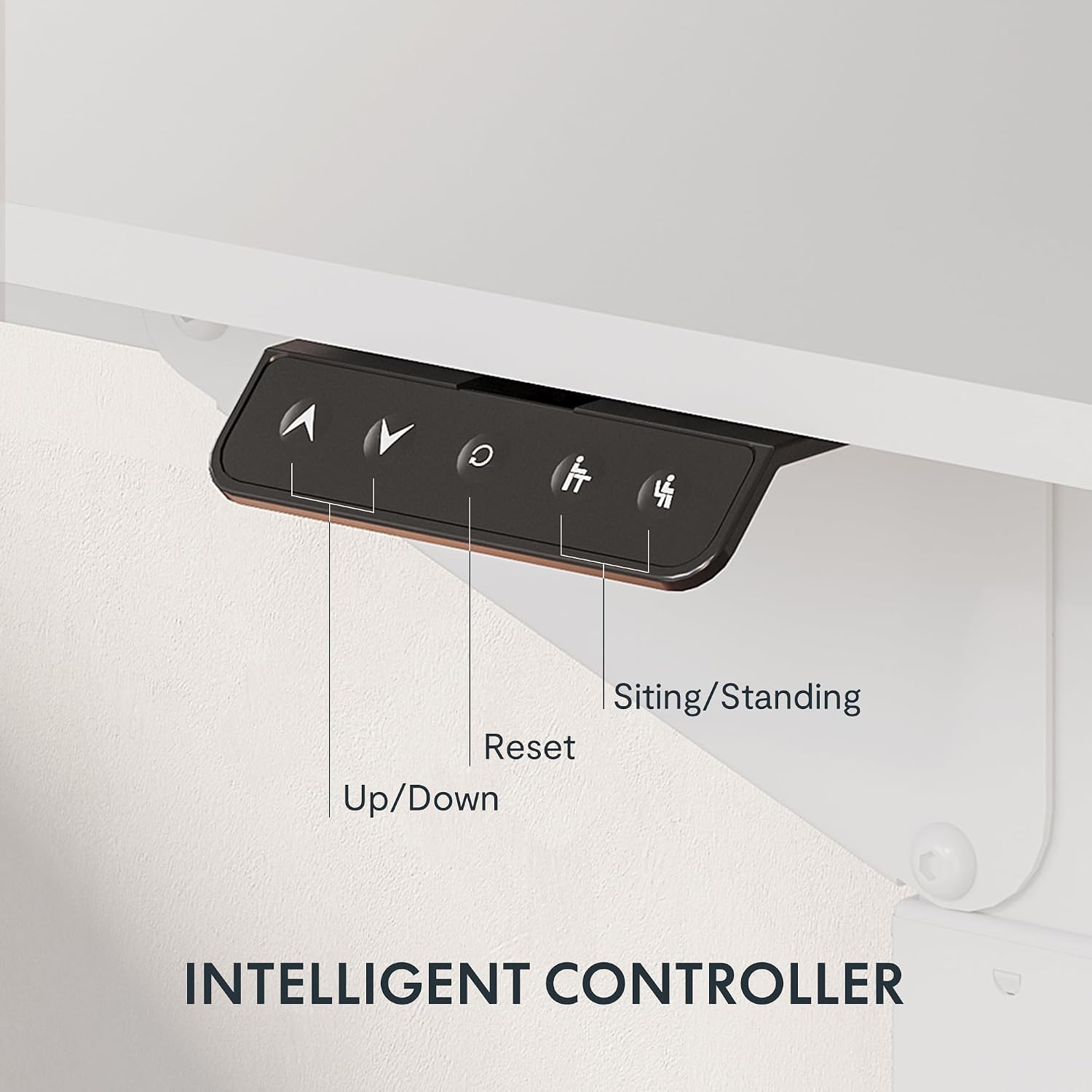
Image: A close-up view of the intelligent control panel, showing buttons for Up, Down, Reset, and two memory presets for sitting and standing positions.
- Up/Down Buttons (▲ / ▼): Press and hold these buttons to manually adjust the desk height upwards or downwards. Release the button to stop at the desired height.
- Memory Presets (1, 2): The control panel allows you to save two preferred height settings. To save a height:
- Adjust the desk to your desired height using the Up/Down buttons.
- Press the 'M' button (Memory) followed by either '1' or '2'. The display will show 'S-1' or 'S-2' to confirm the setting is saved.
- Reset Button (R): If the desk encounters an error or does not move smoothly, press and hold the 'R' button for approximately 5 seconds until the desk moves to its lowest position and then slightly rises. This indicates a successful reset.
5.2. Height Adjustment Range
The desk features dual-stage legs, providing a continuous height adjustment range from 72 cm (28.3 inches) to 117 cm (46 inches).

Image: The desk's dual-stage legs are shown, illustrating the continuous height adjustment capability from 72 cm to 117 cm.
6. Maintenance
Regular maintenance ensures the longevity and optimal performance of your FLEXISPOT desk.
- Cleaning: Clean the desktop surface with a damp cloth. For the metal frame, use a soft, dry cloth. Avoid abrasive cleaners or harsh chemicals that may damage the finish.
- Cable Inspection: Periodically check all cables for any signs of wear, cuts, or damage. Replace any damaged cables immediately.
- Fastener Check: Every few months, inspect all screws and fasteners to ensure they are tight. Re-tighten if necessary to maintain desk stability.
- Weight Distribution: Ensure weight is evenly distributed on the desktop. Avoid placing excessively heavy items on one side.
7. Troubleshooting
If you encounter any issues with your desk, refer to the following troubleshooting guide:
| Problem | Possible Cause | Solution |
|---|---|---|
| Desk does not move or respond to controls. | Power cable disconnected; control panel cable loose; overload protection activated. | Check power connections. Ensure all cables are securely plugged in. Reduce weight on the desk. Perform a reset (see Operating Instructions). |
| Desk moves unevenly or makes unusual noises. | Uneven weight distribution; loose fasteners; obstruction in lifting mechanism. | Distribute weight evenly. Check and tighten all assembly fasteners. Inspect for any obstructions under the desk. Perform a reset. |
| Height memory function not working. | Incorrect saving procedure. | Refer to the "Memory Presets" section in Operating Instructions to correctly save height settings. |
| Desk stops mid-movement. | Overload protection; thermal protection (after continuous use). | Reduce weight on the desk. Allow the desk to cool down for 20-30 minutes if it has been used continuously. |
If the problem persists after attempting these solutions, please contact FLEXISPOT customer support.
8. Specifications
| Feature | Detail |
|---|---|
| Brand | FLEXISPOT |
| Model Number | QS+180 |
| UPC | 810072843098 |
| Product Dimensions (D x W x H) | 80 cm x 180 cm x 110 cm |
| Desktop Size | 180 cm x 80 cm |
| Height Adjustment Range | 72 cm - 117 cm (28.3" - 46") |
| Maximum Load Capacity | 80 kg (176 lbs) |
| Lifting Mechanism | Dual Electric Motor |
| Noise Level | < 55 dB |
| Frame Material | Alloy Steel |
| Desktop Material | Acacia (with white finish) |
| Color | White |
| Special Features | Height Adjustable, 4-Leg Design, LED Control Panel with Memory Presets |
| Assembly Required | Yes (1 person recommended, 2 for ease) |
| Certifications | CE/ROHS/FCC, CARB, TSCA Title VI |

Image: Technical diagram illustrating the desktop size (70.9"x31.5") and the adjustable height range of the desk frame (28.3"-46").
9. Warranty and Support
9.1. Limited Warranty
This FLEXISPOT QS+180 desk comes with a limited warranty. Please refer to the warranty card included in your package for specific terms, conditions, and duration of coverage. The warranty typically covers manufacturing defects and malfunctions under normal use.
9.2. Customer Support
For any questions, technical assistance, or warranty claims, please contact FLEXISPOT customer support. Contact information can typically be found on the FLEXISPOT official website or on the warranty card provided with your product.
When contacting support, please have your model number (QS+180) and proof of purchase readily available.


