
Behringer 0718-AAM
Behringer Solina String Ensemble Analog Synthesizer Module User Manual
Model: 0718-AAM
Brand: Behringer
Introduction
The Behringer Solina String Ensemble is an all-analog synthesizer module designed to faithfully recreate the classic string sounds of the 1970s. This module offers a rich sonic array with six instrument presets, a multi-stage bucket brigade device ensemble chorus, and a Small Stone-style phase shifter. Its flexible design includes expanded I/O for versatile integration into various setups, including Eurorack systems. This manual provides essential information for setting up, operating, maintaining, and troubleshooting your Solina String Ensemble module.
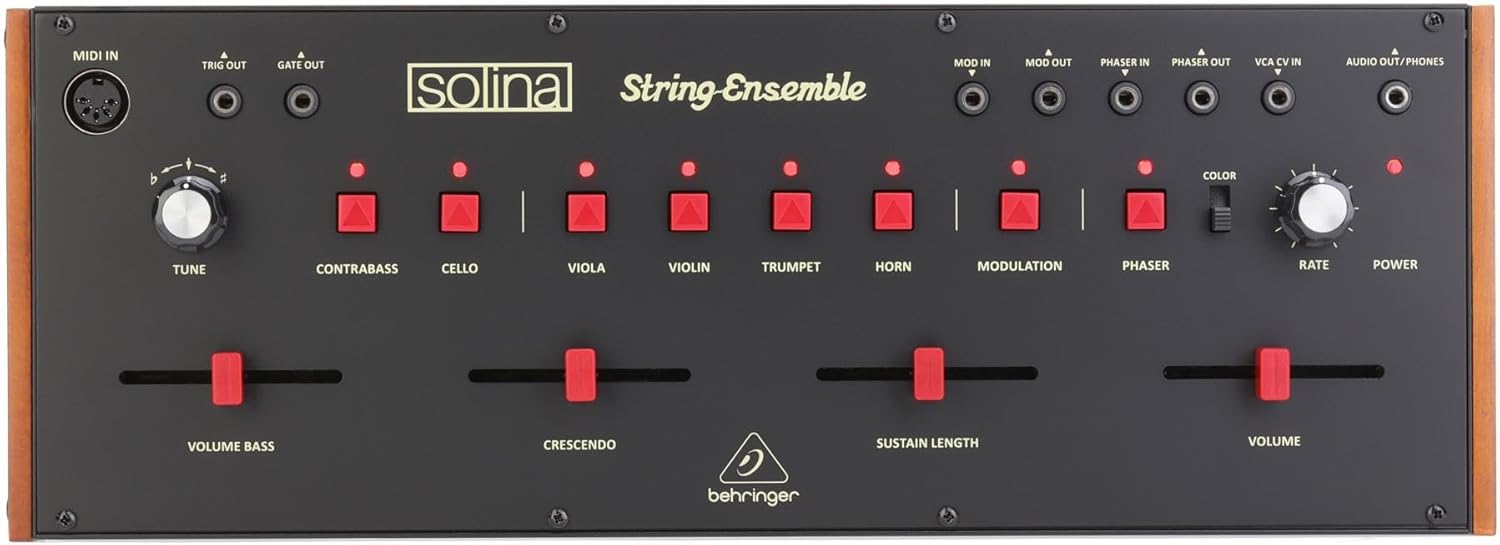
Image: Front panel of the Behringer Solina String Ensemble Analog Synthesizer Module, showing all controls and connections. From left to right, top row: MIDI In, Trig Out, Gate Out, Mod In, Mod Out, Phaser In, Phaser Out, VCA CV In, Audio Out/Phones. Middle row: Tune knob, red buttons for Contrabass, Cello, Viola, Violin, Trumpet, Horn, Modulation, Phaser, Color switch, Rate knob, Power indicator. Bottom row: Sliders for Volume Bass, Crescendo, Sustain Length, and Volume.
Setup
Before operating your Solina String Ensemble, ensure proper connections are made. The module is designed for desktop use or integration into a Eurorack system.
Power Connection
- Connect the included DC power supply to the "DC IN" port on the rear of the module.
- Plug the power supply into a suitable electrical outlet. The "POWER" indicator on the front panel will illuminate when power is supplied.
Audio Connections
- Audio Out/Phones: Connect headphones or an audio cable from this 3.5mm jack to your mixer, audio interface, or amplifier for sound output.
MIDI Connections
- MIDI In: Use a standard 5-pin MIDI cable to connect your MIDI controller or sequencer to this port for note and control data input.
- MIDI Thru: This port passes through the incoming MIDI data, allowing you to daisy-chain other MIDI devices.
Control Voltage (CV) Connections
- Trig Out: Outputs a trigger signal.
- Gate Out: Outputs a gate signal.
- Mod In/Out: Modulation input and output jacks for external modulation sources.
- Phaser In/Out: Input and output jacks for the internal phaser effect, allowing external processing or routing.
- VCA CV In: Voltage Control Amplifier Control Voltage input for dynamic control over the VCA.
Eurorack Integration
The Solina String Ensemble module features a removable housing, allowing it to be integrated into a Eurorack modular synthesizer system. Refer to the Eurorack mounting instructions provided with your Eurorack case for proper installation.
Operating the Solina String Ensemble
This section details the functions of the front panel controls and how to use them to create and shape sounds.
Front Panel Controls
- TUNE Knob: Adjusts the overall pitch of the synthesizer. Rotate clockwise to increase pitch, counter-clockwise to decrease.
- Instrument Presets (Contrabass, Cello, Viola, Violin, Trumpet, Horn): These red buttons activate the corresponding instrument voices. Multiple voices can be active simultaneously to create rich ensemble sounds. An illuminated LED above each button indicates its active status.
- MODULATION Button: Engages or disengages the internal modulation effect.
- PHASER Button: Activates or deactivates the built-in phase shifter effect.
- COLOR Switch: Modifies the tonal character of the ensemble effect. Experiment with both positions to find the desired timbre.
- RATE Knob: Controls the speed of the internal modulation and phaser effects. Turn clockwise for faster rates.
- POWER Indicator: A red LED that illuminates when the unit is receiving power.
- VOLUME BASS Slider: Adjusts the volume level of the bass section of the ensemble.
- CRESCENDO Slider: Controls the attack time of the notes. Moving the slider up increases the time it takes for notes to reach full volume, creating a "crescendo" effect.
- SUSTAIN LENGTH Slider: Determines how long notes are sustained after the key is released. Moving the slider up increases the sustain time.
- VOLUME Slider: Controls the overall output volume of the Solina String Ensemble.
Basic Sound Creation
- Ensure the module is powered on and connected to an audio output.
- Connect a MIDI controller to the MIDI In port.
- Set the VOLUME slider to a moderate level.
- Press one or more of the instrument preset buttons (e.g., VIOLIN, CELLO).
- Play notes on your MIDI controller.
- Experiment with the CRESCENDO and SUSTAIN LENGTH sliders to shape the envelope of the sound.
- Engage the MODULATION and PHASER effects and adjust the RATE knob to add movement and texture.
- Adjust the TUNE knob for fine pitch adjustments.
Maintenance
Proper care will ensure the longevity and optimal performance of your Solina String Ensemble.
Cleaning
- Always disconnect power before cleaning.
- Use a soft, dry cloth to wipe down the exterior of the module.
- For stubborn dirt, a slightly damp cloth with mild soap can be used, followed by a dry cloth. Avoid abrasive cleaners or solvents.
- Do not allow liquids to enter the module through openings or controls.
Storage
- Store the module in a cool, dry place away from direct sunlight, extreme temperatures, and high humidity.
- If storing for extended periods, consider using a dust cover to protect the controls and jacks.
Troubleshooting
If you encounter issues with your Solina String Ensemble, refer to the following common problems and solutions.
| Problem | Possible Cause | Solution |
|---|---|---|
| No sound output. |
|
|
| Unexpected pitch changes. |
|
|
| Effects (Modulation/Phaser) not working. |
|
|
If the problem persists after trying these solutions, please contact Behringer customer support or visit their official website for further assistance.
Specifications
| Model Name | Solina String Ensemble |
| Item Model Number | 0718-AAM |
| Brand | Behringer |
| Instrument Type | Synthesizer |
| Polyphony | 49-tone Polyphony |
| Connectivity Technology | USB, MIDI (5-pin DIN) |
| Connector Type | 3.5mm Jack (Audio Out/Phones, Mod In/Out, Phaser In/Out, VCA CV In, Trig Out, Gate Out), USB Type B, 5-pin MIDI |
| Power Source | DC power supply |
| Item Weight | 5.08 pounds (2.3 kg) |
| Product Dimensions | 19.35 x 7.5 x 5.15 inches (49.15 x 19.05 x 13.08 cm) |
| Body Material | Plastic |
| Color | Black |
| Skill Level | Professional |
| Special Feature | Portable, Eurorack-compatible Removable Housing |
| Date First Available | June 6, 2023 |
| UPC | 644216641802 |
Warranty and Support
For detailed warranty information and technical support, please refer to the official Behringer website or contact their customer service department. Warranty terms and conditions may vary by region and retailer.
You can typically find support resources, FAQs, and contact information on the Behringer Official Website.
Ask a question about this manual
Ask about setup, troubleshooting, compatibility, parts, safety, or missing instructions. Manuals+ will review the question and use this page’s manual context to help answer it.