
Mibro sol-me3
Mibro 3 True Wireless Bluetooth Earbuds User Manual
Model: sol-me3 | Brand: Mibro
Introduction
This manual provides comprehensive instructions for the Mibro 3 True Wireless Bluetooth Earbuds. It covers essential information regarding setup, operation, maintenance, troubleshooting, and product specifications to ensure optimal performance and longevity of your device. The Mibro 3 earbuds offer a perfect blend of style and functionality, featuring an attractive design, long battery life, an LED display, and impressive sound quality.
Product Overview
Familiarize yourself with the components of your Mibro 3 True Wireless Bluetooth Earbuds.
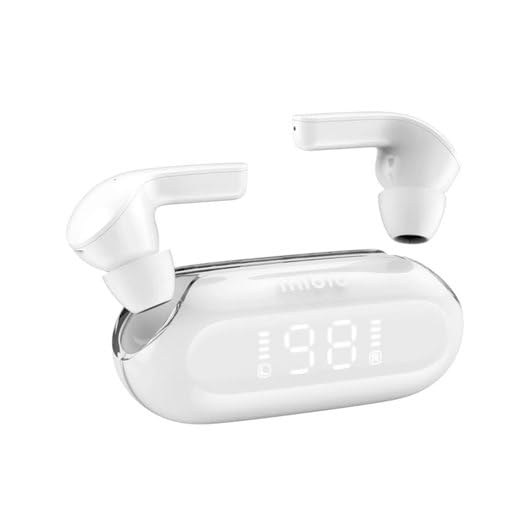
Figure 1: Mibro 3 True Wireless Bluetooth Earbuds and Charging Case. This image displays the white earbuds, one removed from the charging case and one partially visible, alongside the sleek white charging case which features a clear lid and an LED display showing '98', indicating battery percentage.
Components:
- Earbuds: Left and Right True Wireless Earbuds.
- Charging Case: Portable case for charging and storing earbuds, with an integrated LED display.
- Charging Cable: (Typically USB-C, though not specified) For charging the case.
- Eartips: (Various sizes, though not specified) For comfortable fit.
Setup
1. Initial Charging
- Place both earbuds into the charging case.
- Connect the charging cable (not included in product details, but standard) to the charging port on the case and a power source.
- The LED display on the charging case will indicate the charging status. Ensure the case and earbuds are fully charged before first use.
2. Pairing with a Device
- Open the charging case. The earbuds will automatically enter pairing mode (indicated by a flashing light on the earbuds, if applicable).
- On your device (smartphone, tablet, computer), enable Bluetooth.
- Search for "Mibro 3" or a similar name in the list of available Bluetooth devices.
- Select "Mibro 3" to connect. Once connected, a voice prompt or indicator light will confirm successful pairing.
- If pairing fails, place the earbuds back in the case, close the lid, wait a few seconds, and then repeat the steps.
Operating Instructions
Power On/Off
- Power On: Open the charging case, and the earbuds will automatically power on and connect to the last paired device. Alternatively, press and hold the touch control area on both earbuds for 2-3 seconds.
- Power Off: Place the earbuds back into the charging case and close the lid. They will automatically disconnect and power off. Alternatively, press and hold the touch control area on both earbuds for 5 seconds.
Touch Controls (Typical Functions)
The Mibro 3 earbuds feature intuitive touch controls. Specific functions may vary slightly, but common operations include:
- Play/Pause: Single tap on either earbud.
- Next Track: Double tap on the right earbud.
- Previous Track: Double tap on the left earbud.
- Answer/End Call: Single tap on either earbud during an incoming call.
- Reject Call: Press and hold on either earbud for 2 seconds during an incoming call.
- Activate Voice Assistant: Triple tap on either earbud.
- Volume Control: (If supported) Tap and hold on the right earbud to increase volume, tap and hold on the left earbud to decrease volume.
Wearing the Earbuds
Gently insert the earbuds into your ear canal. Rotate them slightly until they fit snugly and comfortably. Ensure the microphone is pointing towards your mouth for optimal call quality.
Maintenance
Cleaning
- Use a soft, dry, lint-free cloth to wipe the earbuds and charging case.
- For stubborn dirt, slightly dampen the cloth with water or a mild, non-abrasive cleaner.
- Do not use harsh chemicals, alcohol, or abrasive materials.
- Regularly clean the eartips and the mesh covers to prevent wax buildup, which can affect sound quality.
Storage
- Always store the earbuds in their charging case when not in use to protect them and keep them charged.
- Store the device in a cool, dry place, away from direct sunlight, extreme temperatures, and humidity.
Battery Care
- Avoid fully discharging the battery frequently.
- Charge the device regularly, even if not in frequent use, to maintain battery health.
- Do not expose the device to extreme heat or cold, as this can degrade battery performance.
Troubleshooting
If you encounter issues with your Mibro 3 earbuds, try the following solutions:
| Problem | Possible Solution |
|---|---|
| Earbuds not pairing with device. |
|
| Only one earbud is working. |
|
| No sound or low volume. |
|
| Charging case not charging. |
|
Specifications
Key technical specifications for the Mibro 3 True Wireless Bluetooth Earbuds:
| Feature | Detail |
|---|---|
| Model Number | sol-me3 |
| Brand | Mibro |
| Connectivity Technology | Wireless (Bluetooth) |
| Form Factor | In-Ear |
| Color | White |
| Material | Plastic |
| Item Weight | 100 Grams |
| Special Features | Lightweight |
| Rechargeable Battery | Yes |
| Control Type | Volume Control (and touch controls for playback/calls) |
Warranty and Support
Warranty Information
The Mibro 3 True Wireless Bluetooth Earbuds are covered by a standard manufacturer's warranty. Please refer to the warranty card included with your purchase or visit the official Mibro website for detailed terms and conditions regarding warranty coverage and duration.
Customer Support
For technical assistance, product inquiries, or warranty claims, please contact Mibro customer support. Contact information can typically be found on the official Mibro website or within the product packaging. When contacting support, please have your product model number (sol-me3) and purchase details ready.
Related documentssol-me3


Ask a question about this manual
Ask about setup, troubleshooting, compatibility, parts, safety, or missing instructions. Manuals+ will review the question and use this page’s manual context to help answer it.