
1. Introduction
The PQWT-GT300A is a professional geophysical instrument designed for accurate underground water detection. Utilizing advanced sensor technology, it provides efficient and reliable data for well drilling, geological exploration, and other subsurface investigations. This manual provides detailed instructions for the setup, operation, maintenance, and troubleshooting of your device.
2. Product Overview
2.1 Included Components
The PQWT-GT300A package includes the main detector unit, various cables, electrodes, a charger, and a protective carrying case. Familiarize yourself with all components before operation.

Figure 2.1: PQWT-GT300A complete kit components.

Figure 2.2: Numbered diagram of the PQWT-GT300A components for easy identification.
2.2 Key Features
- Accurate Detection and Automatic Mapping: Detects underground structures with precision and analyzes abnormal areas. Automatically generates curve maps, profile maps, and 3D renderings.
- Impressive Depth and Distance Range: Capable of detecting groundwater targets up to 300 meters below the surface.
- Efficient Data Collection: Features efficient one-time wiring to quickly collect 18 points of data.
- Convenient Data Storage: Stores over 999 survey lines worth of curve maps, profile maps, and 3D renderings.
- Supplementary Measurement Function: Allows for additional measurements at the front and rear of survey lines to analyze geological structures.
3. Setup
3.1 Initial Preparation
- Unpack all components from the carrying case and verify that all items listed in Section 2.1 are present.
- Ensure the main detector unit is fully charged. Connect the charger to the device and a power source. The charging indicator will show the status.
- Select a suitable survey area, ensuring it is clear of major obstructions and electrical interference.
3.2 Connecting the Device
- Connect the main measurement cables to the designated ports on the PQWT-GT300A unit.
- Lay out the electrodes in the chosen survey line according to your measurement plan. Ensure proper spacing and secure contact with the ground.
- Connect the electrodes to the measurement cables.
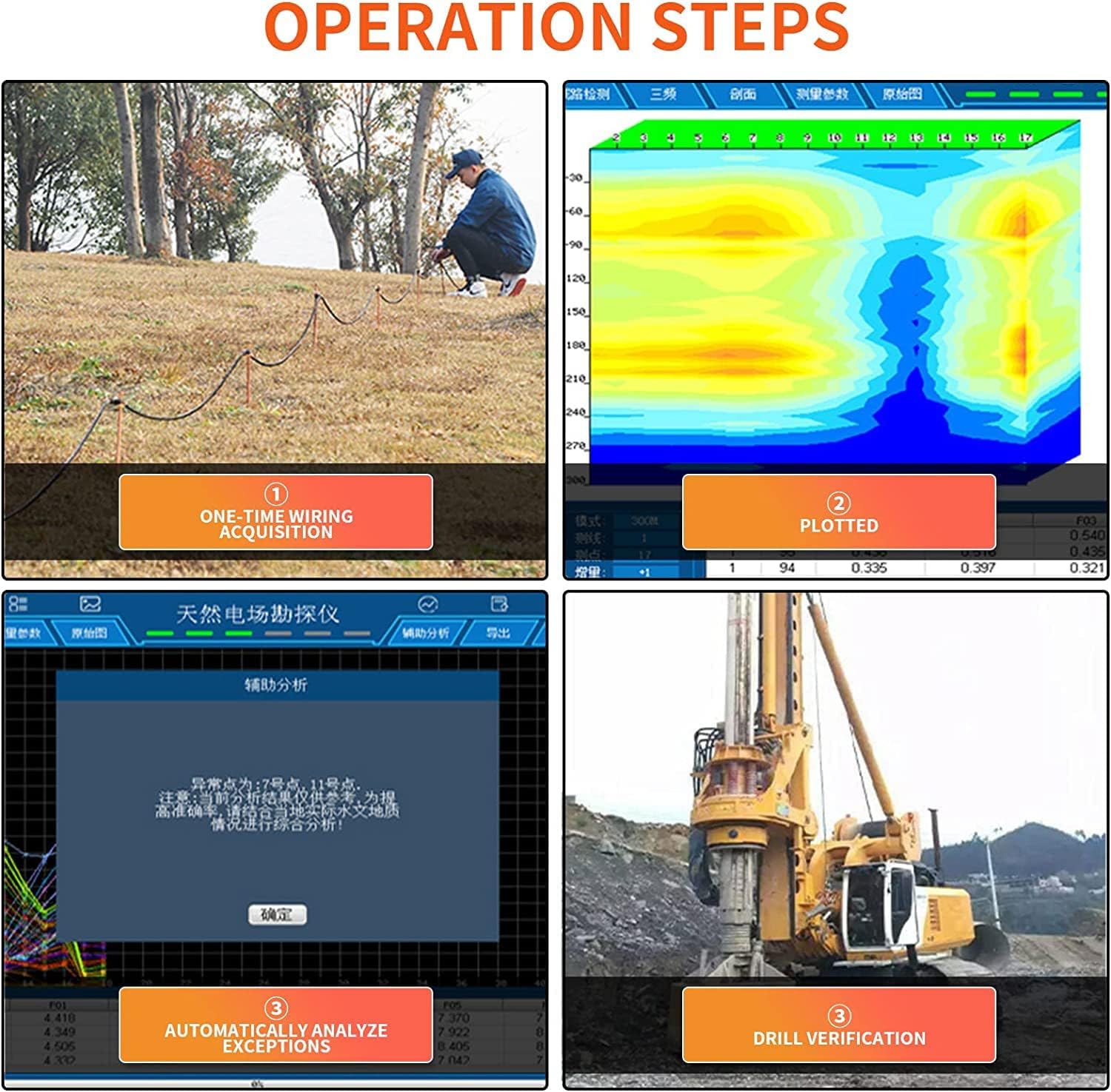
Figure 3.1: Illustration of the wiring acquisition process in the field.
4. Operating Instructions
4.1 Power On/Off
- To power on, press and hold the power button located on the device until the screen illuminates.
- To power off, press and hold the power button until a shutdown prompt appears, then confirm.
4.2 Data Acquisition
- Once powered on, navigate to the 'Measurement' or 'Acquisition' mode on the touch screen interface.
- Configure the measurement parameters such as depth, line number, and point increment as required for your survey.
- Initiate the data acquisition process. The device will automatically collect data from the 18 connected points.
- Monitor the progress on the screen. The device will indicate when data collection for the current line is complete.
4.3 Real-time Monitoring
During data acquisition, the device's display provides real-time feedback, allowing you to monitor the measurement process and ensure data quality. Any anomalies or errors will be indicated on the screen.
5. Data Analysis and Mapping
5.1 Automatic Mapping
After data acquisition, the PQWT-GT300A automatically processes the collected data to generate various visual representations:
- Curve Maps: Display variations in geophysical parameters along the survey line.
- Profile Maps: Provide a cross-sectional view of the subsurface, highlighting potential water-bearing zones.
- 3D Renderings: Offer a comprehensive three-dimensional visualization of underground structures and water distribution.
5.2 Supplementary Measurements
The device supports supplementary measurements at the front and rear of your primary survey line. This feature is crucial for gaining a more comprehensive understanding of complex geological structures and refining the interpretation of potential water sources.
5.3 Data Storage and Export
The PQWT-GT300A can store over 999 survey lines of data, including all generated maps and renderings. Data can be easily retrieved for further analysis or exported for reporting purposes.
6. Application Scenarios
The PQWT-GT300A is suitable for a wide range of applications:

Figure 6.1: Various applications of the PQWT-GT300A detector.
- Groundwater Source Detection
- Geological Structure Analysis
- Mineral Exploration
- Mine Tunnel Detection
- Cavity Detection
- Cave Detection
- Dam Piping Detection
- Engineering Exploration
- Gob Detection
- Landslide Investigation
- Underground Ant Nest Detection
- Underground Archaeology
7. Maintenance
7.1 Cleaning
Regularly clean the main unit and accessories with a soft, dry cloth. Avoid using abrasive cleaners or solvents that could damage the device's surface or internal components.
7.2 Battery Care
To prolong battery life, charge the device fully before long-term storage. If storing for extended periods, recharge the battery every three months to prevent deep discharge.
7.3 Storage
Store the PQWT-GT300A in its protective carrying case in a cool, dry place, away from direct sunlight and extreme temperatures. Ensure all cables are neatly coiled to prevent damage.
8. Troubleshooting
If you encounter issues with your PQWT-GT300A, please refer to the following common troubleshooting steps:
- Device not powering on: Ensure the battery is fully charged. Check the power button for proper function.
- Inaccurate readings: Verify that all electrode connections are secure and making good contact with the ground. Ensure the survey area is free from significant electrical interference.
- Screen not responding: Restart the device. If the issue persists, contact customer support.
- Data acquisition errors: Check cable connections and electrode placement. Ensure the ground conditions are suitable for measurement.
For persistent issues, please contact PQWT customer support.
9. Technical Specifications
The following table outlines the technical specifications for the PQWT-GT300A and related models:

Figure 9.1: Technical specifications for PQWT-GT series models.
| Specification | Detail |
|---|---|
| Model Number | GT300 |
| Detection Depth | Up to 300 meters |
| Measuring Time | 6-8 minutes (for 18 points) |
| Maximum Number of Channels | 18 channels |
| Minimum Resolution | 0.001mV |
| Controller | 32-bit high-speed CPU |
| AD Conversion | 16 bits 1Msps |
| Working Temperature | -20°C ~ 50°C |
| Power Consumption | 9W |
| Display Screen Unit | 10.1 inch industrial-level high-definition display (resolution 1024*600) |
| Standby Time | 8 hours |
| Cable Length | 2.5m point pitch, 10m line pitch, 54.7m total length |
| Electrodes | Standard with 22 pieces |
| Host Weight | 1.95kg |
| Product Dimensions | 22.05 x 11.81 x 19.69 inches |
| Power Source | Battery Powered (Lithium-Ion) |
| Control Method | App, Touch |
10. Warranty and Support
PQWT offers comprehensive after-sales service for the GT300A:
- Host Machine: Two-year warranty.
- Cables: One-year warranty.
- Charger and Charging Stand: One-month warranty.
Our dedicated support team is available to assist you with any questions or issues you may encounter. Please refer to the contact information provided with your product for support inquiries.