
CAT DX29
CAT DX29 1750W Demolition Hammer Instruction Manual
Model: DX29 | Brand: CAT
1. Important Safety Instructions
Always read and understand all safety warnings, instructions, illustrations, and specifications provided with this power tool. Failure to follow all instructions listed below may result in electric shock, fire, and/or serious injury.
1.1 General Power Tool Safety Warnings
- Work Area Safety: Keep work area clean and well lit. Cluttered or dark areas invite accidents. Do not operate power tools in explosive atmospheres, such as in the presence of flammable liquids, gases or dust.
- Electrical Safety: Power tool plugs must match the outlet. Never modify the plug in any way. Do not use any adapter plugs with earthed (grounded) power tools. Unmodified plugs and matching outlets will reduce risk of electric shock.
- Personal Safety: Stay alert, watch what you are doing and use common sense when operating a power tool. Do not use a power tool while you are tired or under the influence of drugs, alcohol or medication. Always wear appropriate personal protective equipment, including eye protection, hearing protection, dust mask, and heavy-duty gloves.
1.2 Demolition Hammer Specific Safety Warnings
- Hold power tool by insulated gripping surfaces when performing an operation where the cutting accessory may contact hidden wiring or its own cord.
- Wear ear protectors when operating. Exposure to noise can cause hearing loss.
- Use auxiliary handles supplied with the tool. Loss of control can result in personal injury.
- Always ensure the chisel is securely locked in the chuck before operation.
2. Product Overview
The CAT DX29 is a powerful 1750W demolition hammer designed for heavy-duty breaking and chiseling tasks. It features a robust construction and user-friendly design for efficient operation.
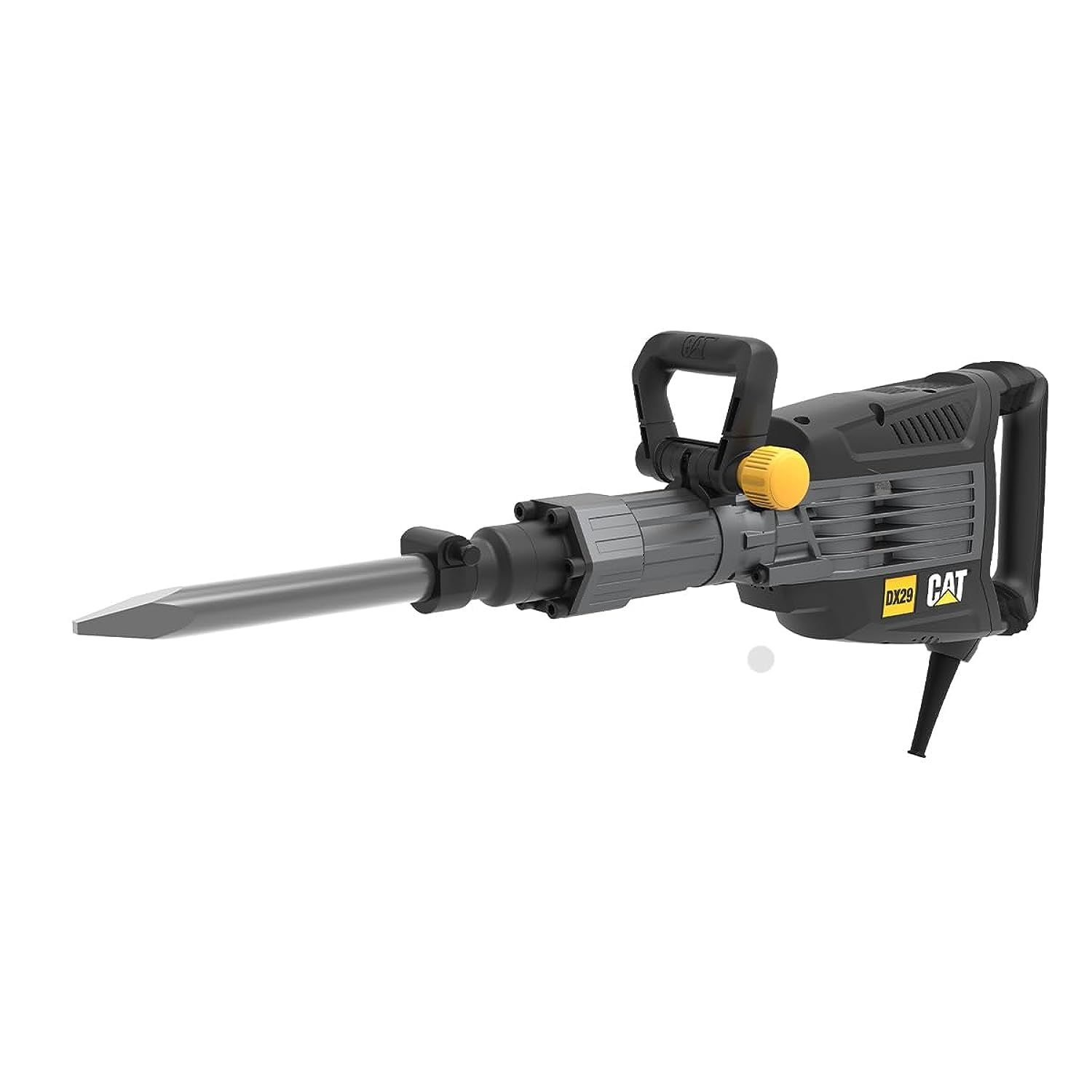
Figure 2.1: CAT DX29 Demolition Hammer with pointed chisel attachment.
2.1 Key Features
- Excellent impact force for efficient material removal.
- Constant speed control to prolong motor life and maintain performance under load.
- Carbon brushes with an auto-stop feature for motor protection and extended tool lifespan.
- Hex chuck with a wide soft grip for enhanced user comfort and reduced fatigue.
- Lock-on switch for continuous operation.
- Anti-vibration triple magnesium gear box for maximum comfort during prolonged use.
2.2 Included Components
- CAT DX29 Demolition Hammer Unit
- Auxiliary Handle (x1)
- Point Chisel (x1)
- Flat Chisel (x1)
- Wiping Cloth (x1)
- Grease Tube (x1)
3. Setup
3.1 Unpacking
Carefully remove the demolition hammer and all accessories from the packaging. Inspect the tool for any signs of damage. Do not operate the tool if any damage is observed. Keep packaging materials for future storage or transport.
3.2 Attaching the Auxiliary Handle
- Loosen the auxiliary handle clamp by turning it counter-clockwise.
- Slide the auxiliary handle onto the front barrel of the demolition hammer.
- Adjust the handle to a comfortable and secure position for your work.
- Tighten the clamp by turning it clockwise until the handle is firmly secured.
3.3 Installing/Removing Chisels
The DX29 uses a hex chuck system for quick and secure chisel changes.
- To Install: Pull back the chuck sleeve, insert the chisel shank into the chuck until it clicks into place. Release the sleeve. Pull on the chisel to ensure it is securely locked.
- To Remove: Pull back the chuck sleeve and pull the chisel out.

Figure 3.1: Proper handling of the demolition hammer during operation.
3.4 Power Connection
Ensure the power switch is in the "OFF" position before plugging the tool into a suitable power outlet. The tool requires a 1750W power supply. Use an extension cord rated for the tool's power requirements if necessary.
4. Operating Instructions
4.1 Starting and Stopping
- To Start: Press the ON/OFF trigger switch.
- For Continuous Operation: Press the ON/OFF trigger switch and then press the lock-on button.
- To Stop (from continuous operation): Press the ON/OFF trigger switch again.
4.2 Demolition Techniques
- Always hold the tool firmly with both hands using the main handle and the auxiliary handle.
- Position the chisel tip against the material to be broken.
- Apply moderate pressure. Do not force the tool; allow the hammer action to do the work.
- For optimal performance, work at an angle to the material, allowing the chisel to chip away rather than drill straight down.
- Take breaks during extended use to prevent overheating and reduce user fatigue.

Figure 4.1: The DX29 delivering powerful impact for demolition tasks.
5. Maintenance
Regular maintenance ensures the longevity and safe operation of your CAT DX29 Demolition Hammer. Always disconnect the tool from the power supply before performing any maintenance.
5.1 Cleaning
- After each use, clean the tool's ventilation openings and housing with a soft brush or compressed air.
- Use the provided wiping cloth to clean the exterior surfaces. Do not use harsh chemicals or abrasive cleaners.
- Keep the chuck free from dust and debris to ensure proper chisel insertion and removal.
5.2 Lubrication
The gear mechanism requires periodic lubrication. Use the provided grease tube or a suitable high-quality grease for demolition hammers. Refer to the tool's service diagram (not provided here, typically in a full manual) for grease points. Generally, apply a small amount of grease to the chisel shank before insertion into the chuck to reduce wear.
5.3 Carbon Brush Replacement
The carbon brushes are designed to stop the motor automatically when they are worn out, protecting the motor from damage. When the tool stops, the carbon brushes need to be replaced. This procedure should ideally be performed by a qualified service technician to ensure proper installation and tool function.
5.4 Storage
Store the demolition hammer in a clean, dry place, out of reach of children. If storing for extended periods, ensure it is clean and lightly lubricated.
6. Troubleshooting
| Problem | Possible Cause | Solution |
|---|---|---|
| Tool does not start. | No power supply; Faulty switch; Worn carbon brushes. | Check power connection; Contact service for switch replacement; Replace carbon brushes. |
| Reduced impact force. | Insufficient lubrication; Worn chisel; Internal wear. | Apply grease; Replace chisel; Contact service. |
| Excessive vibration. | Loose chisel; Internal component issue. | Ensure chisel is locked; Contact service. |
| Tool stops during operation. | Overload protection activated; Worn carbon brushes. | Allow tool to cool; Replace carbon brushes. |
7. Specifications
| Feature | Value |
|---|---|
| Model Number | DX29 |
| Brand | CAT |
| Rated Power | 1750 W |
| Impact Rate (Max) | 1620 bpm (blows per minute) |
| Impact Energy | 50 Joules |
| Chuck Size | 30 mm |
| Tool Weight | 14.9 kg |
| Power Source | Corded Electric |
| Material | Metal |
| Color | Black and Orange |
| Special Feature | Variable Speed |
| Product Dimensions | 90 x 21.5 x 40 cm |
8. Warranty and Support
This CAT DX29 Demolition Hammer comes with a standard manufacturer's warranty. For specific warranty terms and conditions, please refer to the warranty card included with your product or visit the official CAT power tools website. For technical support, service, or spare parts, please contact your authorized CAT service center or the retailer where the product was purchased.
Note: Unauthorized repairs or modifications may void the product warranty.
Related documentsDX29


Ask a question about this manual
Ask about setup, troubleshooting, compatibility, parts, safety, or missing instructions. Manuals+ will review the question and use this page’s manual context to help answer it.