
1. Introduction
Thank you for choosing the ISE SY-6826-DE 2-in-1 Recumbent Exercise Bike. This manual provides essential information for the safe assembly, operation, and maintenance of your new fitness equipment. Please read it thoroughly before use and retain it for future reference.

Figure 1: Overview of the ISE SY-6826-DE Recumbent Exercise Bike.
2. Important Safety Instructions
To reduce the risk of serious injury, please observe the following safety precautions:
- Consult a physician before starting any exercise program.
- Keep children and pets away from the equipment.
- Place the exercise bike on a stable, level surface. Ensure adequate space around the equipment.
- Inspect the equipment before each use for loose parts or signs of wear. Do not use if damaged.
- The maximum user weight for this device is 100 kg (220 lbs). Do not exceed this limit.
- Wear appropriate exercise clothing and footwear. Avoid loose clothing that could get caught.
- Stop exercising immediately if you feel faint, dizzy, or experience pain.
- Ensure all bolts and nuts are securely tightened before use.
3. Package Contents
Please verify that all components are present before assembly. If any parts are missing or damaged, contact customer support.
- Main Frame Assembly
- Seat and Backrest
- Pedals (Left and Right)
- Handlebars with Pulse Sensors
- LCD Display Console
- Stabilizer Bars
- Assembly Hardware (screws, washers, nuts)
- Assembly Tools (wrenches, Allen keys)
- User Manual
4. Assembly Instructions
Assembly typically takes approximately 30 minutes. It is recommended to have a second person assist with certain steps. Follow the numbered steps below:
- Attach Stabilizer Bars: Secure the front and rear stabilizer bars to the main frame using the provided bolts and washers. Ensure they are firmly tightened.
- Install Pedals: Identify the left (L) and right (R) pedals. The left pedal screws counter-clockwise, and the right pedal screws clockwise. Tighten securely.
- Mount Seat and Backrest: Attach the seat and backrest to the seat post. Then, slide the seat post into the main frame and secure it with the adjustment knob.
- Connect Handlebars and Console: Attach the handlebars to the upright post. Connect the sensor cables from the handlebars to the LCD display console. Mount the console onto the handlebar post.
- Insert Batteries: Open the battery compartment on the back of the LCD display and insert the required batteries (not included).
- Final Check: Review all connections and ensure all bolts and nuts are tightened. Test the stability of the bike before first use.

Figure 2: Key components including comfortable seat, anti-slip footrests, heart rate sensors, removable seat, transport wheels, and electrolytic crank.
5. Operating Instructions
5.1 Adjusting the Seat
The seat can be adjusted forward and backward to accommodate different user heights. Locate the adjustment lever or knob beneath the seat. Pull or turn it to release the seat, slide it to the desired position, and then secure it firmly.

Figure 3: Product dimensions and seat adjustment range (23 cm).
5.2 Adjusting Resistance
The exercise bike features 8 levels of magnetic resistance. To increase or decrease the workout intensity, turn the resistance adjustment knob located on the main frame. Turn clockwise for higher resistance and counter-clockwise for lower resistance.

Figure 4: Resistance adjustment knob with 8 levels.
5.3 Using the LCD Display
The multifunctional LCD display tracks your workout data. It shows:
- PULSE: Your heart rate (measured via hand pulse sensors).
- TIME: Duration of your workout.
- SPEED: Current cycling speed.
- DISTANCE: Total distance covered during the current session.
- CALORIES: Estimated calories burned.
- ODO (Odometer): Total accumulated distance.
- SCAN: Automatically cycles through all display functions.
Use the three buttons (SET, MODE, RESET) below the display to navigate and control functions:
- MODE: Press to select a specific display function or to activate the SCAN mode.
- SET: Used to set target values for time, distance, or calories (if applicable).
- RESET: Press and hold to clear all current workout data.
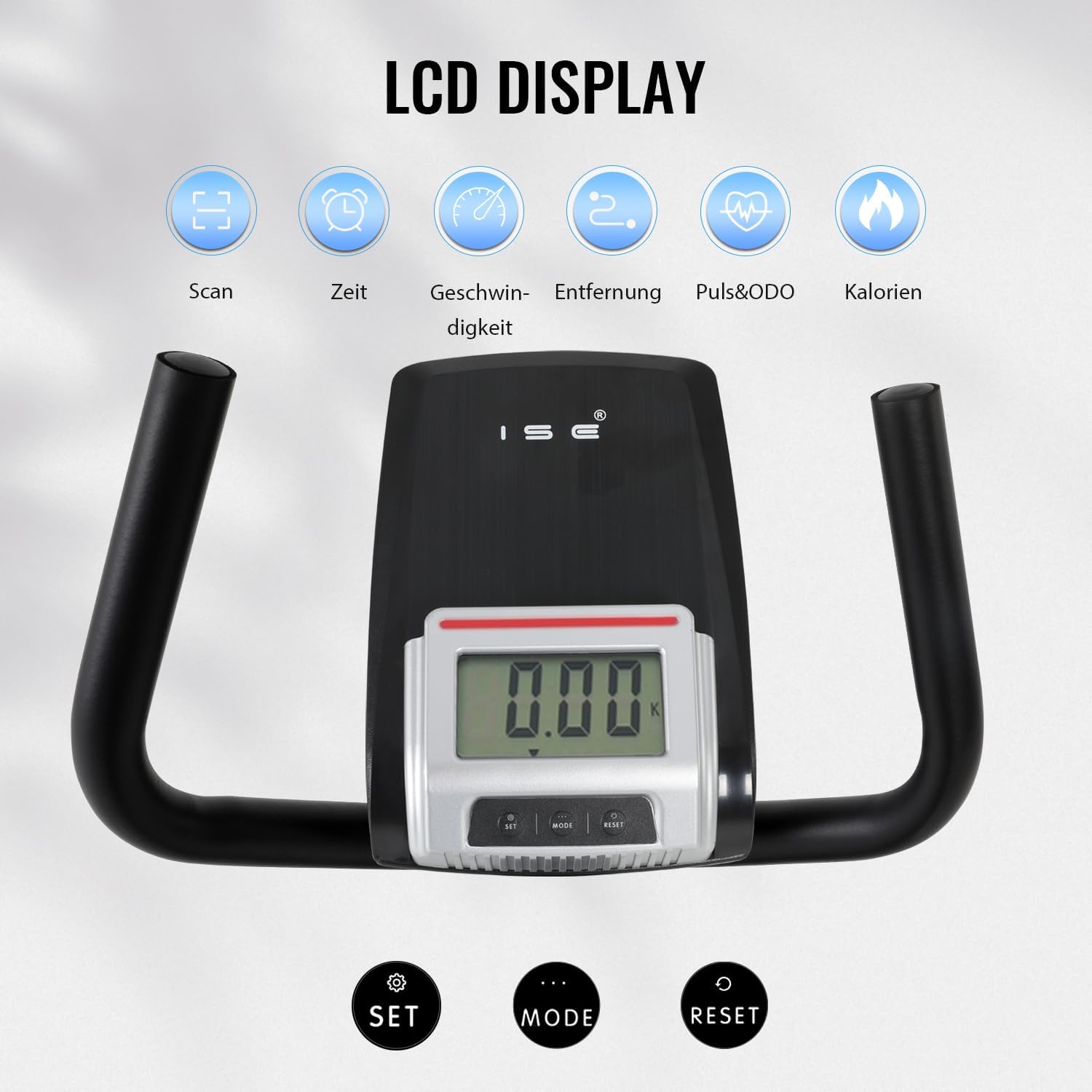
Figure 5: LCD display and control buttons.
5.4 Pulse Sensors
Grip the pulse sensors on the handlebars firmly with both hands to measure your heart rate. The PULSE reading will appear on the LCD display after a few seconds.
6. Maintenance
Regular maintenance ensures the longevity and safe operation of your exercise bike.
- Cleaning: Wipe down the equipment with a damp cloth after each use to remove sweat and dust. Do not use abrasive cleaners.
- Inspection: Periodically check all bolts, nuts, and moving parts for tightness and wear. Tighten any loose fasteners.
- Lubrication: The magnetic resistance system is generally maintenance-free. Do not lubricate internal components unless specifically instructed by customer support.
- Storage: Store the exercise bike in a dry, cool place away from direct sunlight and extreme temperatures. The integrated transport wheels allow for easy relocation.

Figure 6: Transport wheels for convenient storage and movement.
7. Troubleshooting
If you encounter issues with your exercise bike, refer to the following common problems and solutions:
| Problem | Possible Cause | Solution |
|---|---|---|
| LCD display not working | Dead or incorrectly installed batteries | Replace batteries or ensure correct polarity. |
| No heart rate reading | Loose sensor connection, improper grip | Check sensor cables. Ensure both hands firmly grip the sensors. |
| Bike wobbles during use | Loose fasteners, uneven surface | Tighten all assembly bolts. Ensure the bike is on a level surface. Adjust foot levelers if present. |
| Resistance not changing | Resistance cable issue | Check if the resistance cable is properly connected and not obstructed. Contact customer support if the issue persists. |
8. Product Specifications
| Feature | Specification |
|---|---|
| Model Number | SY-6826-DE |
| Brand | ISE |
| Color | Black |
| Material | Alloy Steel |
| Drive System | Belt |
| Resistance Mechanism | Magnetic |
| Resistance Levels | 8 adjustable levels |
| Power Source | Battery-powered (for display) |
| Product Dimensions (L x W x H) | 140 x 58 x 110 cm (55.1 x 22.8 x 43.3 inches) |
| Item Weight | 24 kg (52.9 lbs) |
| Maximum User Weight | 100 kg (220 lbs) |
| Special Features | Distance monitor, adjustable seat, pulse sensors, transport wheels |
9. Warranty and Support
For warranty information and customer support, please refer to the documentation included with your purchase or contact ISE GmbH directly. Keep your proof of purchase for any warranty claims.