
Introduction
This manual provides essential information for the proper setup, operation, and maintenance of your ZdalaMit RMT-AH514U Replacement Remote Control. This remote is specifically designed as a direct replacement for the Sony HT-A3000 3.1ch Dolby Atmos Soundbar Surround Sound Home Theater System.
The RMT-AH514U remote control requires no programming; simply install the batteries, and it is ready for immediate use with your compatible Sony Soundbar system.
Setup: Battery Installation
To begin using your remote control, you must first install the batteries. The remote requires two (2) 1.5V AAA Alkaline batteries (not included).
- Locate the battery compartment cover on the back of the remote control.
- Slide the cover downwards or press the latch (if present) to open the compartment.
- Insert two AAA batteries, ensuring the positive (+) and negative (-) terminals align correctly with the markings inside the compartment.
- Slide the battery compartment cover back into place until it clicks securely.

Image: Back view of the RMT-AH514U remote control, illustrating the location of the battery compartment. The compartment is typically located on the lower half of the remote's rear side and slides open to reveal slots for two AAA batteries.
Operating Instructions
The RMT-AH514U remote control is pre-programmed and ready for use with compatible Sony Soundbar systems immediately after battery installation. No additional setup or pairing is required.
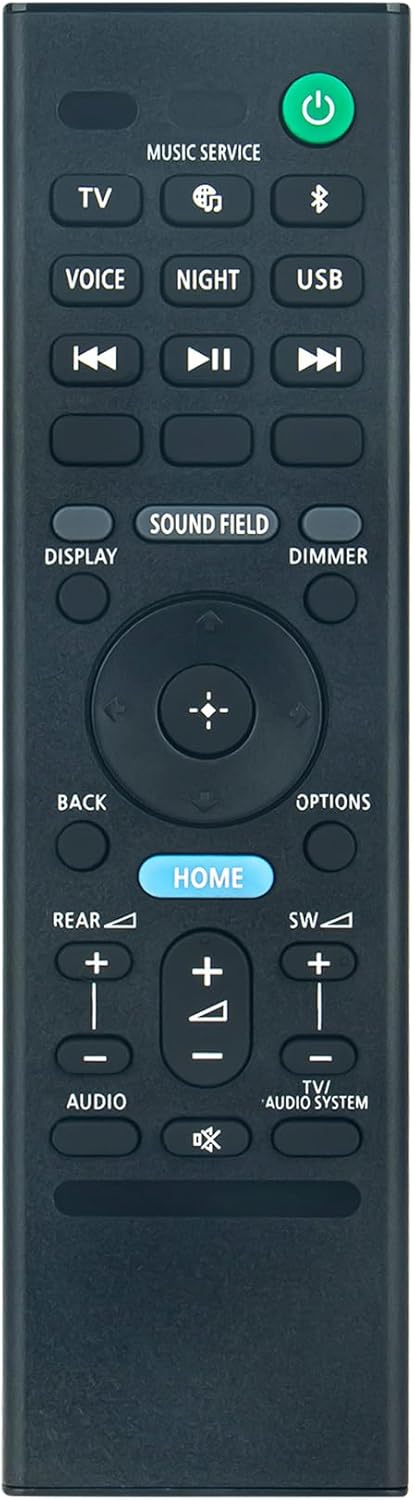
Image: Front view of the RMT-AH514U remote control, displaying all functional buttons. Key buttons include Power (green), TV, Music Service, Voice, Night, USB, Display, Sound Field, Dimmer, navigation pad with central select button, Back, Options, Home (blue), Rear, SW, Audio, and TV/Audio System controls.
Key Functions:
- Power Button (Green): Turns the soundbar system on or off.
- TV: Switches input to TV.
- Music Service / USB: Selects respective audio sources.
- Voice / Night: Activates specific sound modes.
- Display / Dimmer: Controls display information and brightness.
- Sound Field: Adjusts the sound field settings.
- Navigation Pad (Up, Down, Left, Right, Center): Used for menu navigation and selection.
- Back / Options: Navigates back in menus or accesses additional options.
- Home (Blue): Returns to the main home screen.
- Rear / SW (Subwoofer): Adjusts rear speaker and subwoofer levels.
- Audio / TV/Audio System: Controls audio settings and switches between TV and audio system output.
For detailed functionality of each button, please refer to the original user manual of your Sony HT-A3000 Soundbar system.
Compatibility
This RMT-AH514U replacement remote control is compatible with the following Sony Soundbar models:
- Sony HT-A3000
- Sony RMT-AH514J (original remote model)
Ensure your soundbar model matches one of the listed compatible models for proper functionality.
Specifications
| Feature | Detail |
|---|---|
| Model Number | HT-A3000 (Remote Control RMT-AH514U) |
| Product Dimensions | 5.9 x 1.57 x 0.55 inches |
| Item Weight | 1.41 ounces |
| Power Supply | 2 x 1.5V AAA Alkaline Batteries (Not Included) |
| Color | Black |
| Special Feature | Pre-Programmed (No setup required) |
| Max Number of Supported Devices | 1 (Sony Soundbar System) |
| Compatible Devices | Home Theater (Sony HT-A3000 Soundbar) |
Troubleshooting
- Remote Not Responding:
- Ensure batteries are inserted correctly with proper polarity (+/-).
- Replace old or depleted batteries with new 1.5V AAA Alkaline batteries.
- Verify that there are no obstructions between the remote control and the soundbar's infrared receiver.
- Confirm that your soundbar model is listed under the "Compatibility" section.
- Specific Buttons Not Working:
- Check for any physical damage or debris around the button.
- Ensure the remote is pointed directly at the soundbar.
Maintenance
To ensure the longevity and proper functioning of your remote control, follow these maintenance guidelines:
- Clean the remote control regularly with a soft, dry cloth. Do not use liquid cleaners or abrasive materials.
- Avoid exposing the remote to extreme temperatures, direct sunlight, or high humidity.
- Do not drop the remote control or subject it to strong impacts.
- If the remote will not be used for an extended period, remove the batteries to prevent leakage and potential damage.
Support
If you encounter any issues or have questions regarding your ZdalaMit RMT-AH514U Replacement Remote Control that are not addressed in this manual, please do not hesitate to contact our customer support for assistance.
Contact information is typically provided by your retailer or on the product packaging.


