
Introduction
This manual provides instructions for the setup, programming, and operation of your JKZTJOF K-1028E Universal Air Conditioner Remote Control. This remote is designed for compatibility with over 1000 brands of air conditioners. Please note, it is not compatible with window or portable air conditioner units.

Front view of the K-1028E Universal Air Conditioner Remote Control, highlighting its compatibility with over 1000 brands.
Setup
1. Battery Installation
The remote control requires two (2) AAA batteries (not included). To install:
- Open the battery compartment cover located on the back of the remote control.
- Insert two AAA batteries, ensuring correct polarity (+ and -).
- Close the battery compartment cover securely.
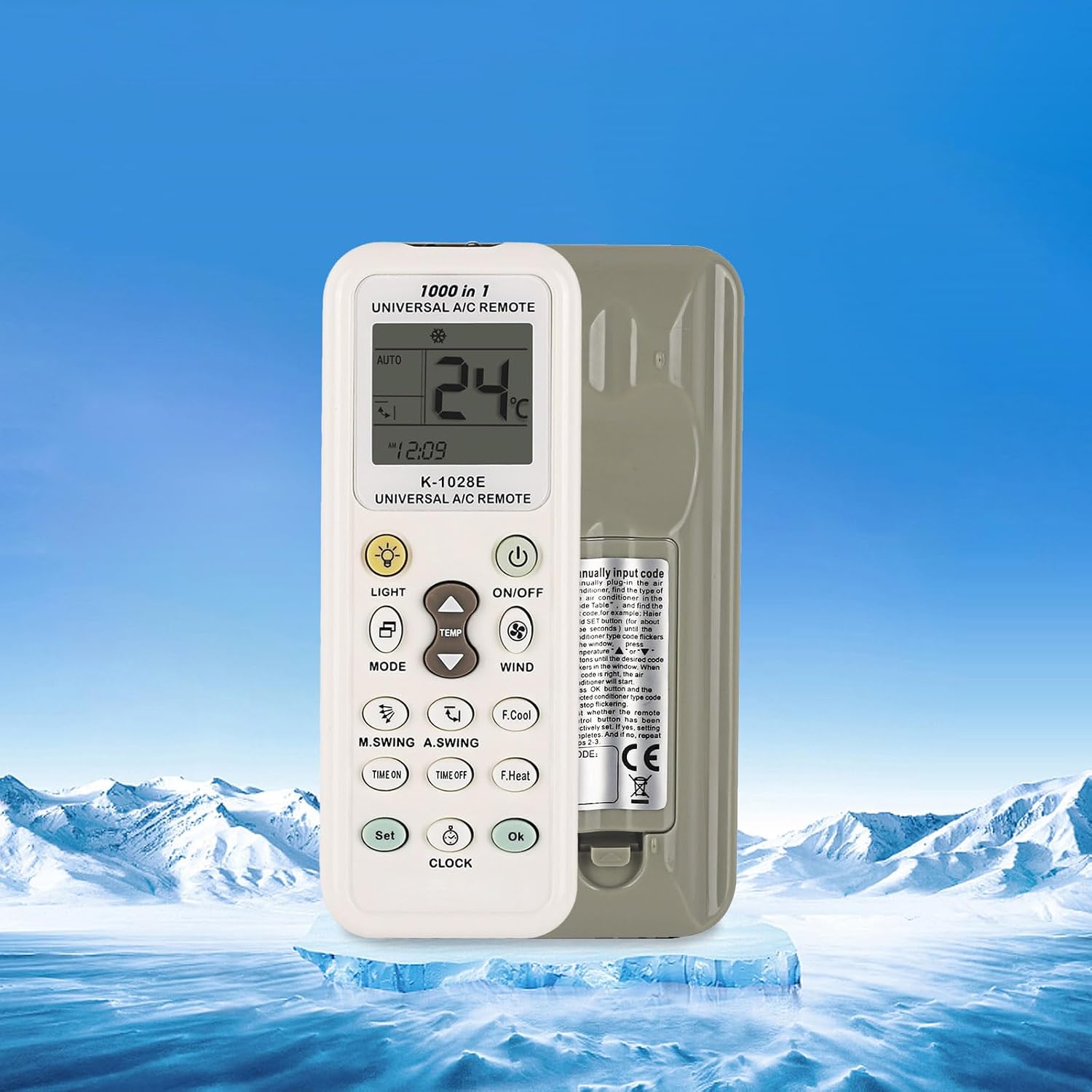
Rear view of the K-1028E remote control, indicating the battery compartment location.
Programming Methods
The K-1028E remote control offers four methods for programming to your air conditioner. If the remote does not work directly, follow one of these programming procedures.
1. Brand Button Programming
This method uses a dedicated button for specific brands.
- Ensure your air conditioner is powered on.
- Press and hold the brand-specific button (if available for your AC brand) on the remote.
- Release the button when your air conditioner responds (e.g., beeps or turns on/off).
- Test basic functions like ON/OFF and temperature adjustment. If successful, programming is complete.
2. Automatic Search Programming
This method scans through codes automatically.
- Ensure your air conditioner is powered on.
- Press and hold the 'SET' button for approximately 3-5 seconds until the code on the remote's display starts flashing.
- The remote will automatically transmit codes. Point the remote at your air conditioner.
- When your air conditioner responds (e.g., beeps or turns on/off), immediately press the 'OK' button to confirm the code.
- Test basic functions. If successful, programming is complete.
3. Manual Code Input Programming
This method requires you to manually enter a known code for your AC brand.
- Ensure your air conditioner is powered on.
- Refer to the code list provided with your remote (not included in this manual) to find the code(s) for your air conditioner brand.
- Press and hold the 'SET' button for approximately 3-5 seconds until the code on the remote's display starts flashing.
- Use the 'Temperature +' or 'Temperature -' buttons to input the 3-digit code.
- Once the code is entered, press the 'OK' button to confirm.
- Test basic functions. If successful, programming is complete. If not, try the next code for your brand.
4. Manual Code Search Programming
This method allows you to manually cycle through codes.
- Ensure your air conditioner is powered on.
- Press and hold the 'SET' button for approximately 3-5 seconds until the code on the remote's display starts flashing.
- Repeatedly press the 'SET' button (or 'Temperature +' button) to advance through the codes one by one. Point the remote at your air conditioner.
- When your air conditioner responds (e.g., beeps or turns on/off), immediately press the 'OK' button to confirm the code.
- Test basic functions. If successful, programming is complete.
Operating Instructions
Familiarize yourself with the remote's buttons and display for optimal use.

Detailed diagram of the K-1028E remote control, labeling each button and display element for easy identification and operation.
Button Functions:
- ON/OFF: Powers the air conditioner on or off.
- MODE: Cycles through operating modes (e.g., Auto, Cool, Dry, Fan, Heat).
- TEMP ▲/▼: Adjusts the temperature setting up or down.
- WIND: Adjusts fan speed.
- LIGHT: Turns the remote's backlight or AC display light on/off.
- F.Cool (Fast Cool): Activates a rapid cooling function.
- F.Heat (Fast Heat): Activates a rapid heating function.
- TIME ON: Sets a timer for the air conditioner to turn on.
- TIME OFF: Sets a timer for the air conditioner to turn off.
- SET: Used for programming and setting various functions.
- CLOCK: Sets the current time on the remote.
- OK: Confirms selections or settings.
- M.SWING (Manual Swing): Controls the horizontal swing of the air conditioner's louvers.
- A.SWING (Auto Swing): Activates or deactivates automatic vertical swing of the air conditioner's louvers.
Display Indicators:
- Temperature Display: Shows the current or set temperature.
- Wind Strength Display: Indicates the fan speed setting.
- Machine Code: Displays the currently selected or programmed code.
- Clock: Shows the current time.
- Mode Icons: Indicate the active operating mode (e.g., snowflake for cool, sun for heat).

The K-1028E remote control operating an air conditioner, illustrating its cooling and heating functionalities.
Maintenance
Battery Replacement:
Replace batteries when the remote's display becomes dim or the remote stops responding. Always replace both batteries at the same time with new AAA batteries. Do not mix old and new batteries or different types of batteries.
Cleaning:
Wipe the remote control with a soft, dry cloth. Do not use liquid cleaners or abrasive materials, as these can damage the remote's surface or internal components.
Troubleshooting
- Remote not responding to AC unit:
- Check if the batteries are correctly installed and have sufficient power. Replace if necessary.
- Ensure there are no obstructions between the remote and the air conditioner's receiver.
- Verify that the remote is programmed to the correct code for your air conditioner. Re-attempt programming if unsure.
- Display is dim or blank:
- Replace the batteries with new ones.
- Air conditioner responds incorrectly to commands:
- The remote may be programmed with an incorrect or partially compatible code. Try re-programming using a different code for your brand.
Specifications
| Model Number | K-1028E |
| Brand | JKZTJOF |
| Compatible Devices | Universal Air Conditioners (over 1000 brands) |
| Incompatible Devices | Window and Portable Air Conditioners |
| Power Source | 2 x AAA Batteries (not included) |
| Item Weight | 1.76 ounces |
| Package Dimensions | 5.12 x 0.79 x 0.47 inches |
| Special Feature | Ergonomic Design, Large Screen Display, LED Light |
Warranty and Support
For warranty inquiries or product support, please contact the manufacturer or your point of purchase. If you have any questions, please feel free to reach out for assistance.