
1. Overview
The Atomos Ninja 5.2" 4K HDMI Recording Monitor is a lightweight, tough, and reliable device designed to enhance your video production workflow. It features a new, modern interface and is compatible with a wide range of HDMI-output cameras. This monitor allows for high-resolution recording and offers advanced monitoring tools to ensure optimal image quality.

Image: The Atomos Ninja monitor showcasing vibrant underwater coral reef footage, demonstrating its display capabilities.
2. Key Features
- High-Resolution Recording: Record up to 4Kp60 in Apple ProRes, Avid DNxHD, and H.265 (HEVC). Supports up to 6Kp30 in Apple ProRes RAW.
- Advanced Operating System: Features the new AtomOS 11 for improved memory management, boosted responsiveness, and new functionalities.
- Remote Viewing: Share your Atomos screen content with other Atomos Connect users, Shogun Connect, iPads, Macs, and Apple TVs wirelessly via Atomos RemoteView.
- Workflow Efficiency: Utilize new tools like RecordAssist and PlayBackAssist for advanced recording and playback scheduling.
- Durable Design: A lightweight, tough, and reliable device with a clean and modern interface.
3. Setup
Follow these steps to set up your Atomos Ninja monitor:
- Power Connection: Insert a compatible 12V battery into the battery slot on the back of the monitor. Alternatively, connect the monitor to an external power source using the appropriate power adapter.
- HDMI Input: Connect your camera's HDMI output to the HDMI IN port on the side of the Atomos Ninja using a high-quality HDMI cable.
- HDMI Output (Optional): If you wish to monitor your footage on a larger display, connect an external monitor to the HDMI OUT port.
- Storage: Insert a compatible SSD into the drive slot for recording. Ensure the SSD is properly formatted by the monitor for optimal performance.
- Audio/Remote Connections: Use the MIC/LINE, Headphone, and REMOTE ports on the side for audio input, monitoring, and remote control functionalities as needed.

Image: Front view of the Atomos Ninja monitor, showing the display and control interface.

Image: Side view of the Atomos Ninja monitor, highlighting the HDMI input and output ports.
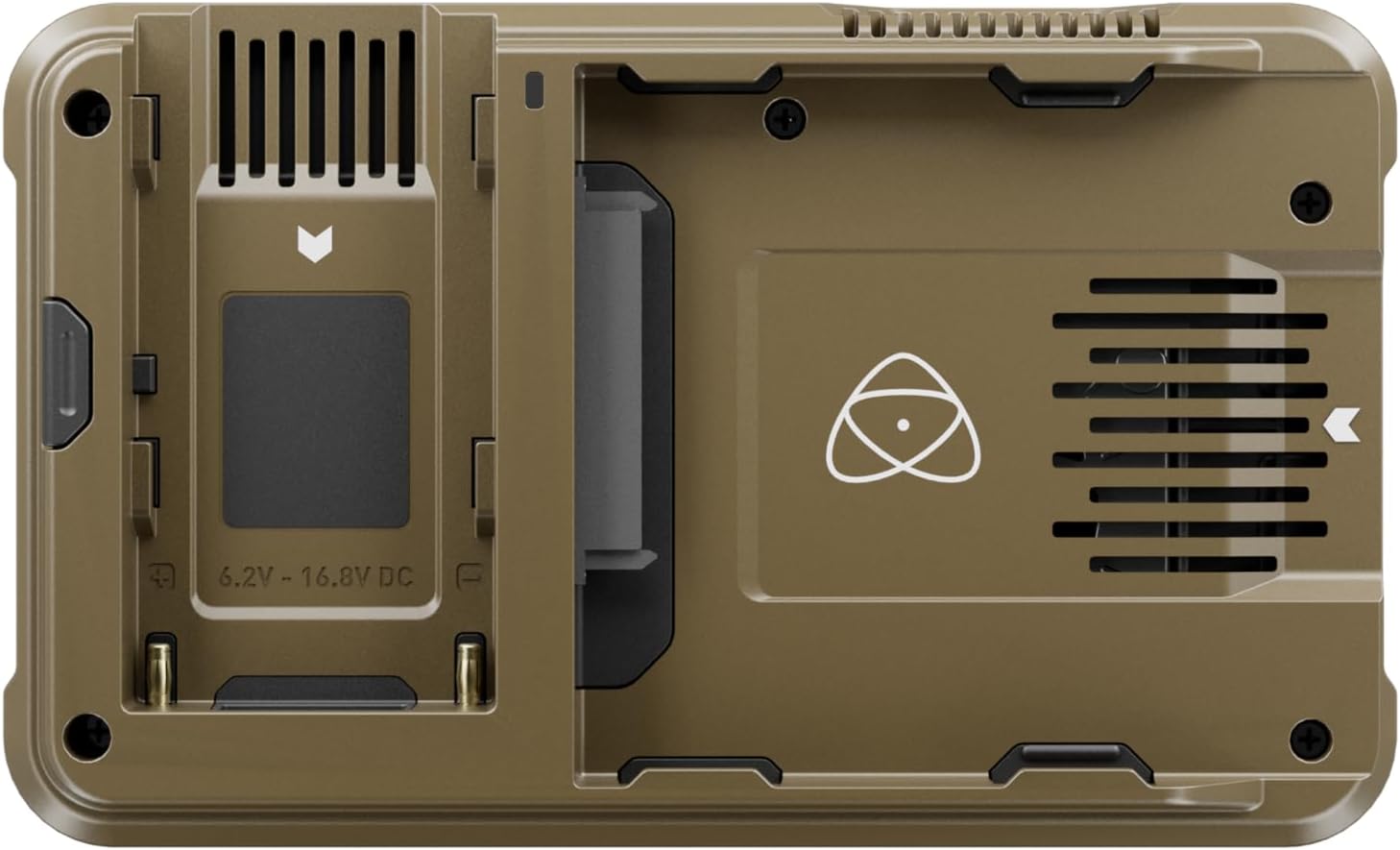
Image: Back view of the Atomos Ninja monitor, showing the battery plate and ventilation.
4. Operating Instructions
The Atomos Ninja operates on AtomOS 11, providing an intuitive and responsive user experience. Here are key operational aspects:
4.1 Recording and Codecs
The monitor supports various recording formats and resolutions:
- Record up to 4Kp60 in Apple ProRes, Avid DNxHD, and H.265 (HEVC).
- Capture up to 6Kp30 in Apple ProRes RAW for maximum flexibility in post-production.
4.2 Monitoring Tools
AtomOS 11 includes enhanced monitoring tools to help you achieve perfect exposure and focus. These tools are designed to provide critical visual feedback during shooting.
4.3 RemoteView and Workflow Features
Leverage the connectivity features of your Atomos Ninja:
- RemoteView: Share your monitor's screen with collaborators or clients remotely across various devices.
- RecordAssist & PlayBackAssist: Pre-arrange recording and playback schedules for streamlined production.
4.4 Visualizing Output Quality
The Atomos Ninja provides a clear and accurate representation of your camera's output. Below is a video demonstrating the picture quality when connected to a gaming console, showcasing the monitor's capabilities.
Video: A comparison of picture quality between a Sony PS5 output and the Atomos Ninja monitor. This demonstrates the monitor's ability to display high-fidelity video signals.
5. Maintenance
To ensure the longevity and optimal performance of your Atomos Ninja, follow these maintenance guidelines:
- Cleaning: Regularly clean the screen and body of the monitor with a soft, lint-free cloth. Avoid abrasive materials or harsh chemicals.
- Firmware Updates: Keep your AtomOS 11 firmware updated to access the latest features, improvements, and bug fixes. Check the official Atomos website for new releases.
- Storage Care: Handle SSDs carefully. Ensure they are properly ejected before removal to prevent data corruption.
6. Troubleshooting
Here are solutions to common issues you might encounter:
- Monitor Runs Hot: It is normal for the monitor to generate heat during extended use, especially when recording 4K or 6K footage. Ensure adequate ventilation around the device.
- Battery Drains Quickly: High-resolution recording and bright screen settings consume significant power. Use fully charged NPF batteries or connect to an external power source for longer sessions.
- No Input Signal: Verify that your HDMI cable is securely connected to both the camera and the monitor. Check your camera's output settings to ensure it's sending a compatible signal.
- SSD Not Recognized: If an SSD is not detected, try re-inserting it. If the issue persists, navigate to the STORAGE menu on the monitor and attempt to format the drive. Note that formatting will erase all data on the SSD.
- Unwanted Focus Point Recorded: Ensure that any on-screen display elements, such as focus peaking or guides, are disabled if you do not wish them to be part of the recorded footage.
7. Specifications
| Feature | Detail |
|---|---|
| Brand | Atomos |
| Model Number | ATOMNJXXX |
| Screen Size | 5.2 Inches |
| Resolution | FHD 1080p |
| Aspect Ratio | 4:3 |
| Item Weight | 7.4 ounces |
| Product Dimensions | 5.94 x 1.22 x 3.6 inches |
| Special Features | 4K recording and better memory management |
| Batteries Required | 1 12V battery (not included) |
8. Warranty & Support
For detailed warranty information and technical support, please refer to the official Atomos website or contact their customer service.
- Protection Plans: Extended protection plans are available for purchase, such as a 4-Year Protection Plan or Complete Protect monthly plans. Refer to your retailer for details.
- Online Resources: Visit the Atomos Store for additional product information and support.
