
1. Introduction
This manual provides comprehensive instructions for the setup, operation, and maintenance of your TOMLOV DM9 Pro Digital Microscope. This device is designed for detailed observation and analysis, suitable for various applications including circuit board soldering, watch/clock repair, plant observation, jewelry appraisal, and coin identification.
2. Safety Information
- Ensure the microscope is placed on a stable, level surface to prevent tipping.
- Do not expose the device to extreme temperatures, humidity, or dusty environments.
- Use only the provided power adapter.
- Avoid direct eye exposure to the LED lights.
- Keep the device out of reach of children unless under adult supervision.
- Do not attempt to disassemble or repair the microscope yourself. Contact customer support for assistance.
3. Package Contents
Verify that all items are present in the package:
- TOMLOV DM9 Pro Digital Microscope Unit (with 7-inch IPS Screen)
- Adjustable Metal Stand with Base
- Lens L (60-200X)
- Lens A (2X-700X)
- Lens D (1000X-1500X)
- HDMI Cable
- USB Cable
- Power Adapter
- User Manual (this document)
- Prepared Slides (up to 10 pcs, for Lens D)
4. Product Overview
The TOMLOV DM9 Pro Digital Microscope features a 7-inch IPS screen, an adjustable stand, and multiple lenses for various magnification needs. It is equipped with both top and side LED lights for optimal illumination.
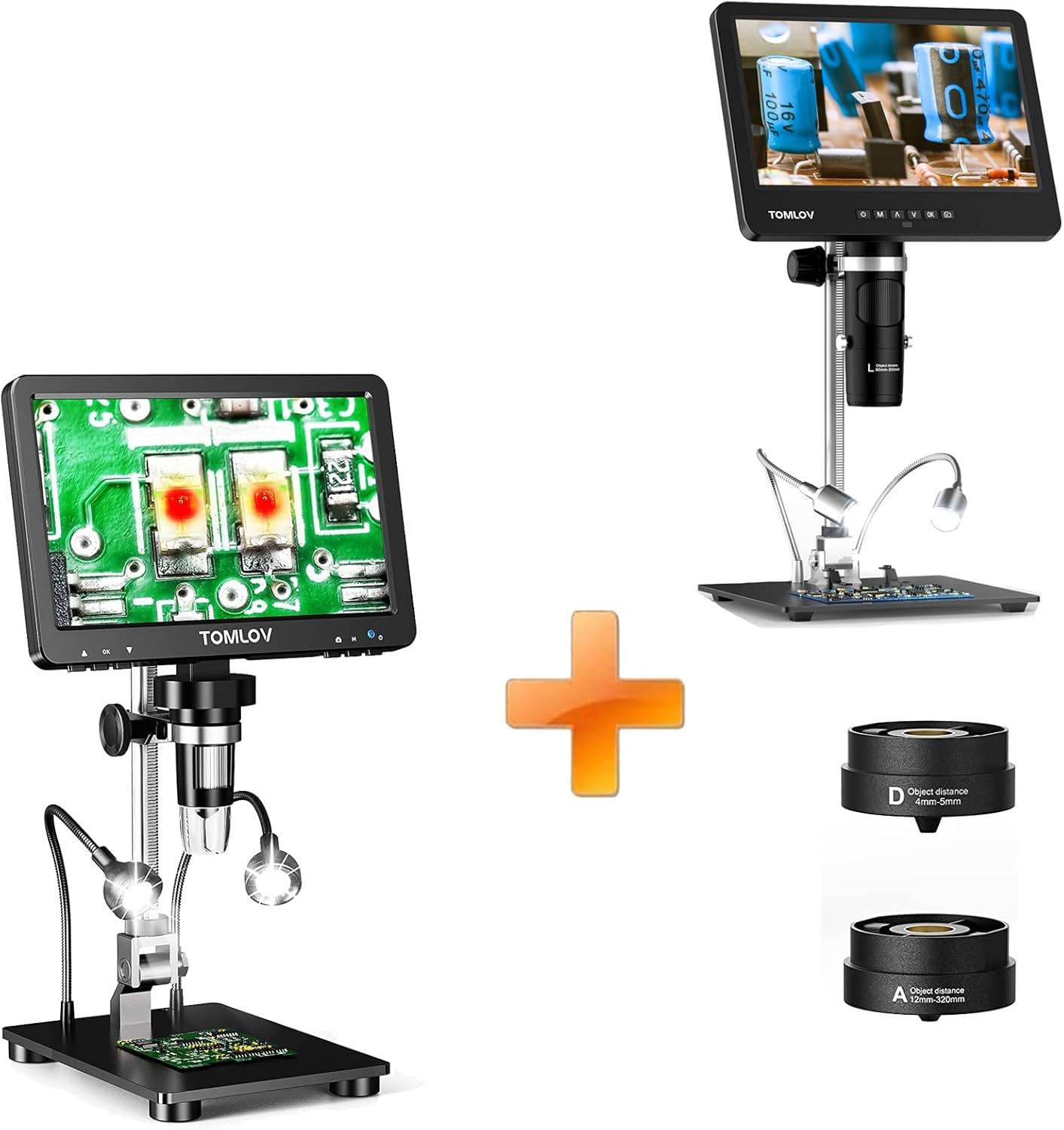
Image: Overview of the TOMLOV DM9 Pro Digital Microscope system, showing the main unit, adjustable stand, and the three interchangeable lenses (Lens L, Lens A, Lens D).
Key components include the main microscope body with integrated screen, the focusing knob, the adjustable metal stand, the base, and the interchangeable lenses.
5. Setup
5.1 Assembly
- Carefully unpack all components from the box.
- Attach the main microscope unit to the adjustable metal stand. Secure it firmly using the provided screws or locking mechanism.
- Place the assembled stand onto the base. Ensure it is stable.
- Select the desired lens (Lens L, A, or D) and screw it onto the microscope's lens mount.
- Position the flexible gooseneck side lights as needed.
5.2 Powering On/Off
- Connect the power adapter to the microscope's power input port and then to a power outlet.
- Press and hold the power button on the microscope unit to turn it on. The screen will illuminate.
- To turn off, press and hold the power button again until the screen shuts down.
5.3 Connecting to External Displays (HDMI/USB)
The microscope supports simultaneous output via HDMI and USB for a larger view on external monitors or computers.

Image: The TOMLOV DM9 Pro Digital Microscope connected via HDMI to a large monitor and via USB to a laptop, demonstrating simultaneous output for expanded viewing.
- HDMI Output: Connect the provided HDMI cable from the microscope's HDMI port to an HDMI input on your TV or monitor. Select the correct HDMI input on your display.
- USB Output: Connect the provided USB cable from the microscope's USB port to a USB port on your computer (Windows or Mac). No additional software is required.
- For Windows: Open the default "Windows Camera" application.
- For Mac: Open the "Photo Booth" application.
6. Operating Instructions
6.1 Basic Operation: Magnification and Focus
The microscope offers a magnification range of 10X to 1200X, depending on the lens used and the distance between the lens and the object.

Image: Visual representation of different magnification levels (10X, 500X, 1200X) achievable with the TOMLOV DM9 Pro, showing increasing detail of a flower's stamen.
- Adjusting Magnification: Magnification is primarily controlled by adjusting the distance between the microscope lens and the object. Move the microscope unit up or down on the stand to change the working distance.
- Focusing: Use the large focusing knob on the side of the microscope unit to achieve a clear image. Rotate it slowly until the object appears sharp on the screen.
6.2 Screen Features
The 7-inch IPS screen provides a 1920x1080P resolution with a 178° super wide viewing angle, ensuring a clear and true-to-life color visual experience.

Image: The 7-inch IPS screen of the TOMLOV DM9 Pro displaying a detailed image of an ant, highlighting the FHD 1080P resolution and immersive image quality compared to other screens.
6.3 Lighting Adjustment
The microscope is equipped with 8 LED lights around the lens and 2 adjustable side lights to provide optimal illumination for various objects.

Image: A user adjusting the brightness of the TOMLOV DM9 Pro microscope using the dedicated brightness adjustment switch, showing how it affects the clarity of a coin image.
- Ring LED Lights: Use the dedicated brightness adjustment switch on the microscope unit to control the intensity of the 8 LED lights around the lens.
- Side Lights: The two flexible gooseneck side lights can be positioned manually to illuminate specific areas or reduce shadows. Their brightness can also be adjusted via their inline control.
6.4 Using the Interchangeable Lenses
The DM9 Pro comes with three specialized lenses, each designed for different magnification ranges and working distances.

Image: The three interchangeable lenses (Lens L, Lens D, Lens A) for the TOMLOV DM9 Pro microscope, with examples of what each lens is best suited for: Lens L for soldering, Lens D for biological slides, and Lens A for coin viewing.
- Lens L (60-200X): Designed for soldering and tasks requiring a longer working distance (90mm-300mm) with moderate magnification.
- Lens A (2X-700X): Ideal for viewing entire coins or larger objects, offering a wide range of magnification with a working distance of 12mm-320mm.
- Lens D (1000X-1500X): For inspecting biological slides and extremely tiny details, with a very short working distance of 4mm-5mm.
6.5 Specific Applications
6.5.1 Coin Collection Viewing (with Lens A)
The DM9 Pro, especially with Lens A and its 8.5-inch longer metal bracket, is well-suited for viewing entire coins.

Image: Two individuals observing a coin using the TOMLOV DM9 Pro microscope with Lens A, demonstrating its capability to view entire coins and details for collectors.
Place the coin on the base. Adjust the microscope height and focus using Lens A to capture the entire coin or zoom in on specific details.
6.5.2 Soldering and Circuit Board Inspection (with Lens L)
Lens L provides a suitable working distance and magnification for soldering tasks and inspecting electronic components.
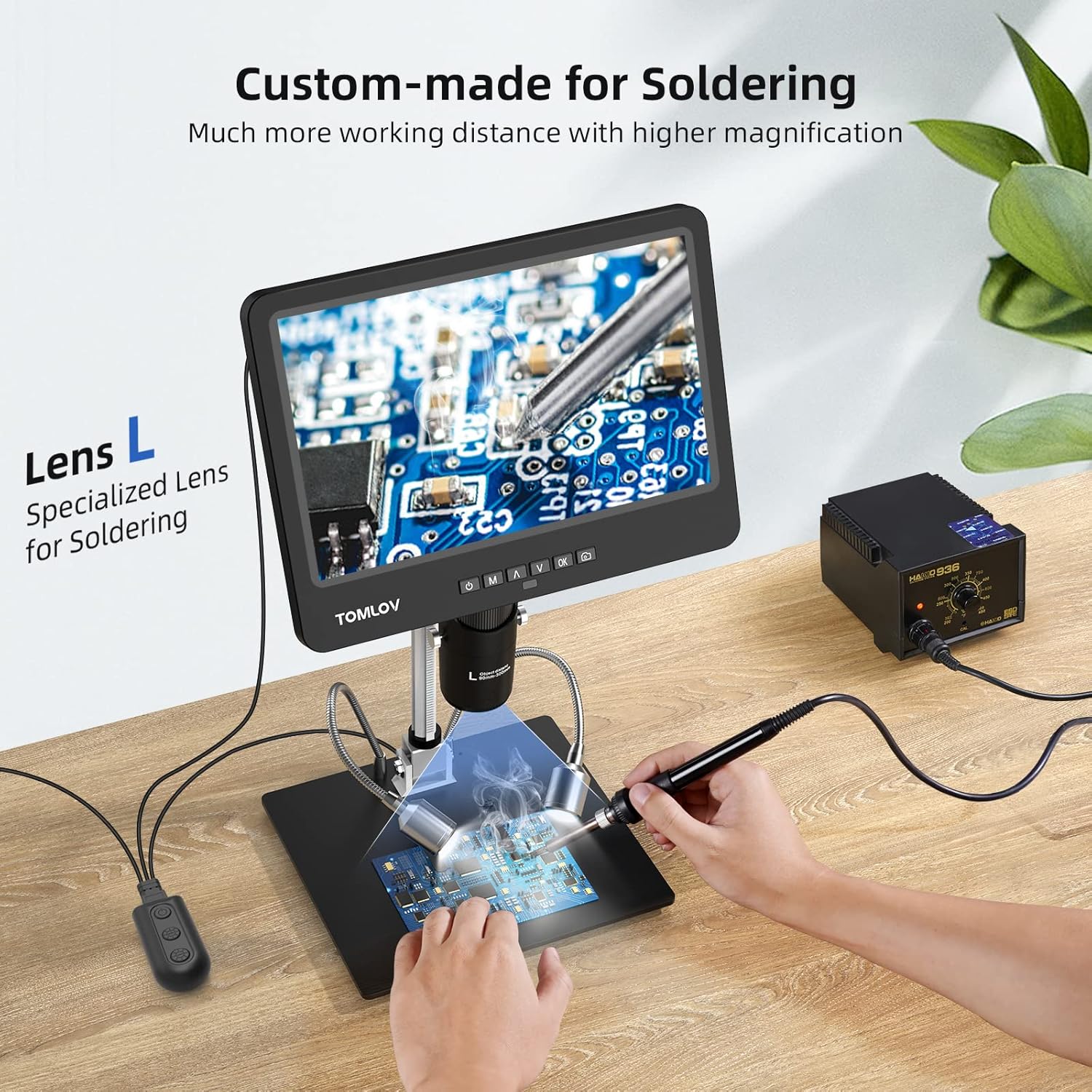
Image: A person performing soldering work on a circuit board under the TOMLOV DM9 Pro microscope, utilizing Lens L for increased working distance and magnification, with the side lights illuminating the workspace.
Position the circuit board under the microscope. Use Lens L and adjust the height to achieve the desired working distance. Utilize the side lights for shadow-free illumination during soldering.
6.5.3 Biological Slide Inspection (with Lens D)
For high magnification observation of biological specimens, use Lens D.

Image: A child observing a biological slide under the TOMLOV DM9 Pro microscope with Lens D, demonstrating its use for educational purposes and detailed inspection of microscopic samples.
Place a prepared slide on the base directly under Lens D. Due to the very short working distance of Lens D, carefully lower the microscope until the slide is almost touching the lens, then fine-tune focus. Adjust lighting for clarity.
7. Maintenance
- Cleaning the Screen and Lenses: Use a soft, lint-free cloth to gently wipe the screen and lens surfaces. For stubborn smudges, a small amount of lens cleaning solution can be applied to the cloth (not directly to the lens/screen).
- General Cleaning: Wipe the microscope body and stand with a dry or slightly damp cloth. Do not use abrasive cleaners or solvents.
- Storage: When not in use, store the microscope in a clean, dry, and dust-free environment. It is recommended to cover the microscope to prevent dust accumulation on the lenses and screen.
8. Troubleshooting
| Problem | Possible Cause | Solution |
|---|---|---|
| Microscope does not power on. | Power adapter not connected or faulty. | Ensure power adapter is securely connected to the microscope and a working power outlet. Try a different outlet. |
| Image is blurry or out of focus. | Incorrect focus adjustment or working distance. | Rotate the focusing knob slowly. Adjust the height of the microscope unit on the stand to change the working distance. Ensure the correct lens is used for the object. |
| Screen is too dark or too bright. | LED brightness not adjusted. | Use the brightness adjustment switch for the ring LEDs and the inline control for the side lights. |
| No image on external monitor/computer. | Incorrect cable connection or display input. | Verify HDMI/USB cable connections. Ensure the external display is set to the correct input source (HDMI 1, USB camera, etc.). For PC, ensure "Windows Camera" or "Photo Booth" is open. |
| Side lights not working. | Cable disconnected or inline control off. | Check the connection of the side lights to the main unit. Ensure their inline power/brightness control is on. |
9. Specifications
| Model | DM9 Pro |
| Screen Size | 7-inch IPS Screen |
| Resolution | 1920x1080P (Video), 16MP (Photo) |
| Magnification Range | 10X - 1200X |
| Light Source Type | LED (8 ring LEDs + 2 adjustable side lights) |
| Material | Metal (Stand and Base) |
| Color | Black |
| Compatible Devices | Laptop, Television (via HDMI/USB) |
| Power Source | Corded Electric |
10. Warranty and Support
TOMLOV products are designed for reliability and performance. This product comes with a standard manufacturer's warranty. For detailed warranty terms and conditions, please refer to the warranty card included in your package or visit the official TOMLOV website.
If you encounter any issues or have questions regarding your TOMLOV DM9 Pro Digital Microscope, please contact TOMLOV customer support. Provide your model number and a detailed description of the issue for prompt assistance.
TOMLOV Official Website: www.tomlov.com

