
1. Introduction
Thank you for purchasing the Sofirn SP36 BLF Rechargeable EDC Flashlight. This high-performance flashlight is designed for versatility and durability, featuring a powerful 5600 lumen output, Anduril 2.0 user interface, and IPX8 waterproofing. This manual provides essential information for safe and effective operation, setup, and maintenance of your device.
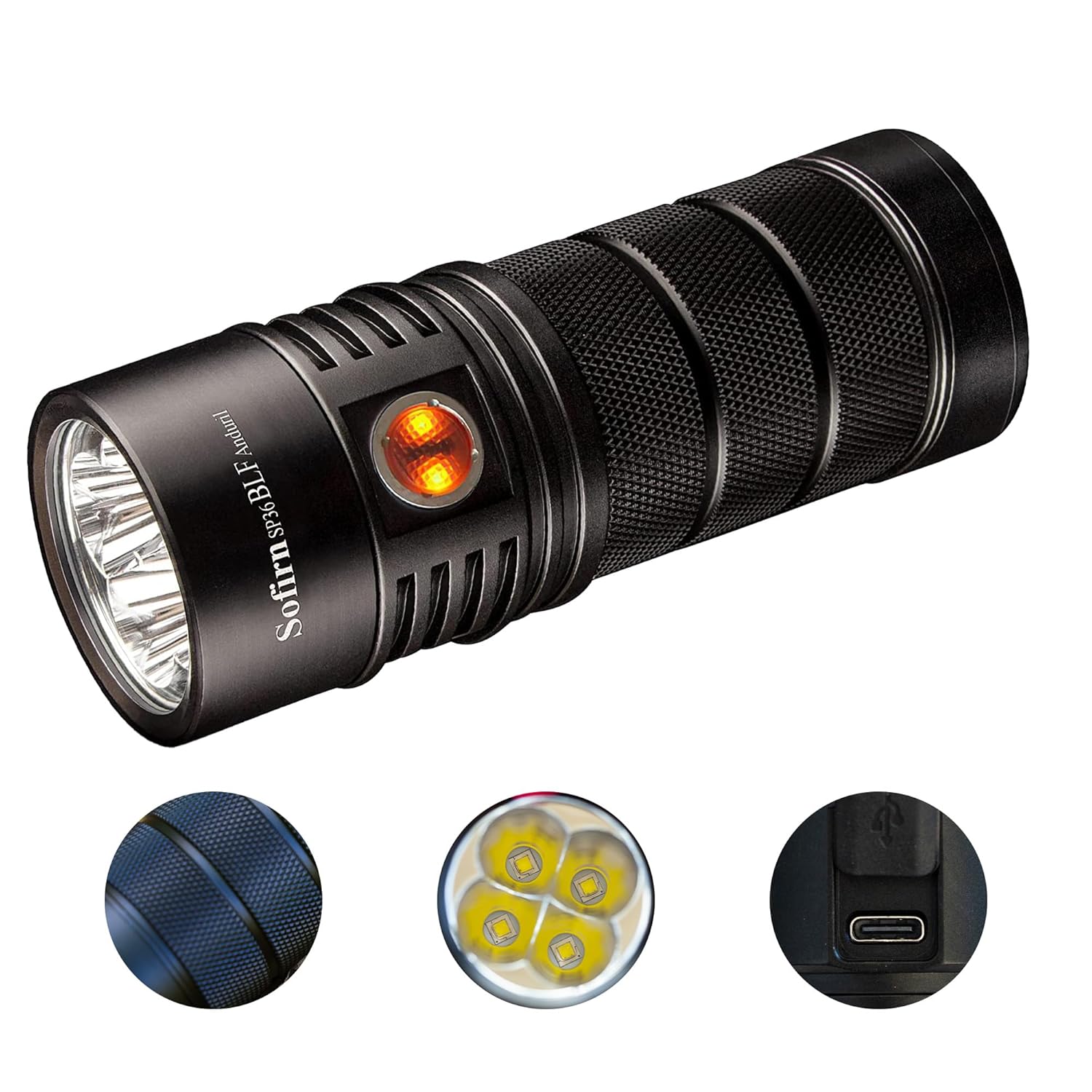
Image 1.1: The Sofirn SP36 BLF flashlight, showcasing its compact design and textured grip. The image also highlights the LED emitters, the side switch, and the USB-C charging port.
2. Package Contents
- Sofirn SP36 BLF Flashlight
- 3 x Lithium Polymer Batteries (included)
- USB-C Charging Cable
- User Manual (this document)
- Lanyard
- Spare O-rings
3. Specifications
| Model | SP36 BLF |
| Light Source | 4 x High-Power LEDs |
| Maximum Output | 5600 Lumens |
| Maximum Throw | 350 Meters |
| User Interface | Anduril 2.0 |
| Water Resistance | IPX8 (Submersible up to 2 meters for 30 minutes) |
| Impact Resistance | 1 Meter |
| Battery Type | 3 x Lithium Polymer (included) |
| Charging | USB-C Port |
| Material | Aerospace-grade Aluminum Alloy with HA III Anodizing |
| Dimensions | 132mm (Length) x 38mm (Head Diameter) |
| Weight | 204g (without batteries) |
| CRI | 90+ |

Image 3.1: The Sofirn SP36 BLF flashlight demonstrating its powerful 5600 lumen output and 350-meter throw, lighting up a dark path.
4. Setup
4.1 Battery Installation
- Unscrew the tail cap of the flashlight.
- Insert the three Lithium Polymer batteries with the positive (+) terminal facing towards the head of the flashlight.
- Carefully screw the tail cap back on, ensuring it is tightened securely to maintain water resistance.
4.2 Initial Charging
Before first use, it is recommended to fully charge the flashlight. Connect the provided USB-C cable to the charging port on the flashlight and to a compatible USB power source (e.g., wall adapter, computer USB port). The indicator light on the side switch will show charging status.

Image 4.1: Close-up view of the Sofirn SP36 BLF flashlight's USB-C charging port, indicating its convenient recharging capability.
5. Operating Instructions (Anduril 2.0 UI)
The Sofirn SP36 BLF utilizes the advanced Anduril 2.0 user interface, offering both a simple mode for basic operation and an advanced mode for extensive customization. The side switch controls all functions.
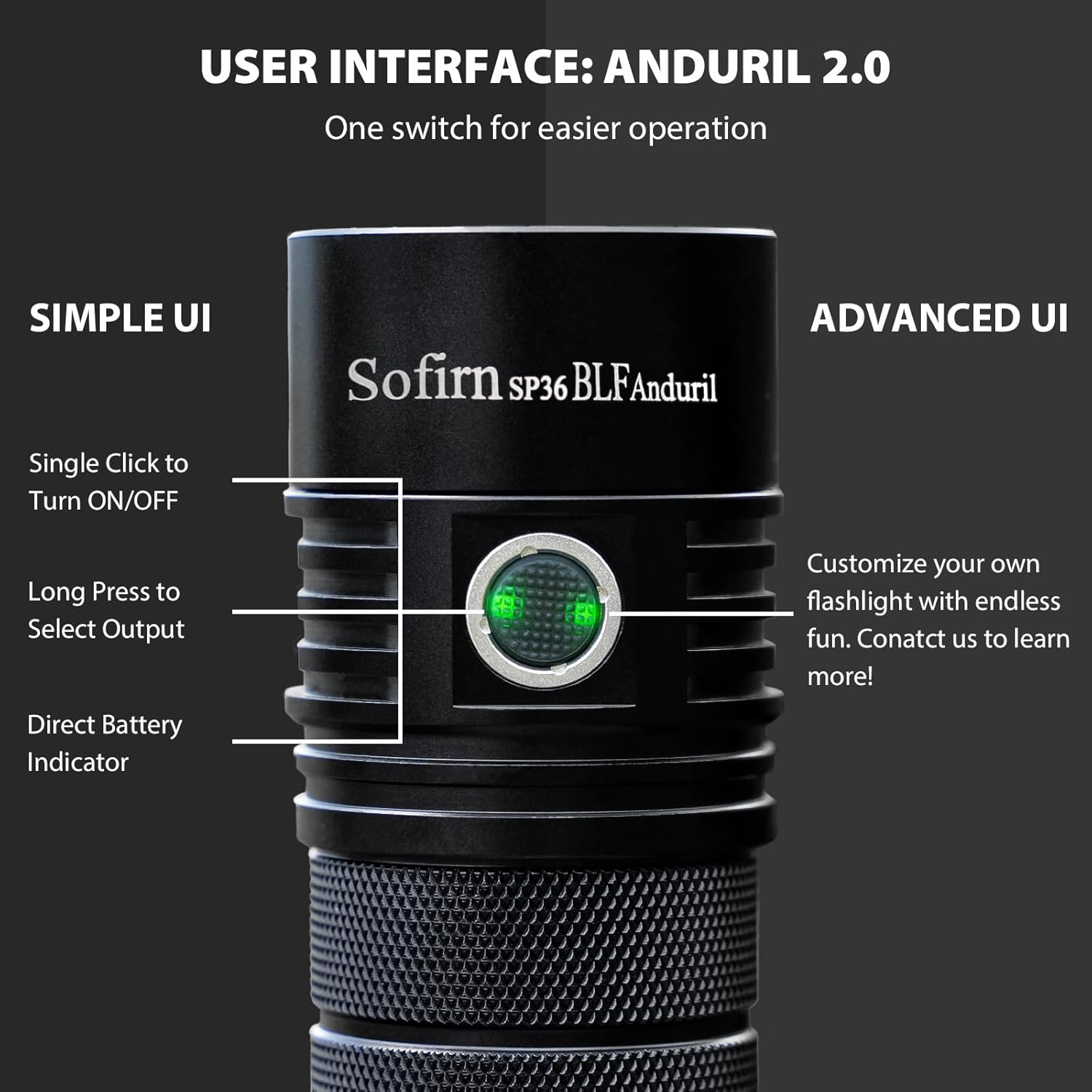
Image 5.1: Diagram illustrating the basic functions of the Anduril 2.0 user interface on the Sofirn SP36 BLF, including single-click for ON/OFF and long-press for output selection.
5.1 Simple UI (Default Mode)
- Turn ON/OFF: Single click the side switch.
- Change Brightness: While ON, press and hold the side switch to ramp up or down. Release and press again to change direction.
- Turbo Mode: Double click from ON to activate Turbo. Double click again to return to previous brightness.
- Battery Check: Three clicks from OFF. The indicator LED will flash out the voltage (e.g., 3 flashes, pause, 8 flashes = 3.8V).
- Lockout Mode: Four clicks from OFF. Repeat four clicks to unlock.
5.2 Advanced UI
The Advanced UI offers extensive control over brightness levels, special modes (strobe, beacon, lightning), temperature configuration, and more. To switch from Simple UI to Advanced UI, from OFF, click 10 times and hold on the 10th click. Release when the light flashes.
Due to the complexity of Anduril 2.0 Advanced UI, a full description is beyond the scope of this basic manual. For detailed instructions on Advanced UI features, please refer to the comprehensive Anduril 2.0 manual available online or contact Sofirn customer support.
6. Charging
The SP36 BLF features an integrated USB-C charging port for convenient recharging of its internal batteries.
- Connect the USB-C cable to the flashlight's charging port.
- Plug the other end of the cable into a 5V USB power adapter.
- The indicator LED on the side switch will glow red during charging and turn green when charging is complete.
- Charging time varies depending on the power source and battery depletion level.
The flashlight can operate for up to 45 days in Eco mode on a full charge, providing extended utility.
7. Maintenance
- Cleaning: Clean the flashlight body with a soft, damp cloth. Do not use harsh chemicals or abrasives.
- Threads: Periodically lubricate the threads of the tail cap with silicone grease to ensure smooth operation and maintain water resistance.
- O-rings: Inspect O-rings regularly for wear and tear. Replace them if damaged to maintain the IPX8 waterproof rating.
- Battery Care: If the flashlight will not be used for an extended period, it is recommended to remove the batteries to prevent potential leakage. Store batteries in a cool, dry place.

Image 7.1: The Sofirn SP36 BLF flashlight partially submerged in water, demonstrating its IPX8 waterproof capability.
8. Troubleshooting
| Problem | Possible Cause | Solution |
|---|---|---|
| Flashlight does not turn on. |
|
|
| Light output is dim or flickers. |
|
|
| Flashlight gets hot quickly. |
|
|
9. Safety Information
- Do not shine the flashlight directly into eyes. The high output can cause temporary vision impairment.
- Keep out of reach of children.
- Do not disassemble the sealed head of the flashlight, as this may damage the LEDs and void the warranty.
- Use only recommended batteries. Improper battery use can lead to fire, explosion, or injury.
- Avoid exposing the flashlight to extreme temperatures or direct sunlight for prolonged periods.
- Ensure the tail cap is fully tightened before exposing the flashlight to water to maintain its waterproof rating.
10. Warranty and Support
Sofirn products are manufactured with high-quality materials and craftsmanship. For warranty information, technical support, or service inquiries, please contact Sofirn customer support through their official website or your point of purchase. Please retain your proof of purchase for warranty claims.
Contact Information: Please refer to the Sofirn official website for the most up-to-date contact details.

