
Introduction
This user manual provides comprehensive instructions for the PERFASCIN N2QAYB000777 replacement remote control. This remote is designed to function with various Panasonic Smart LCD LED TV models without the need for programming or pairing. Please read this manual carefully to ensure proper use and to maximize your viewing experience.
Product Overview
The PERFASCIN N2QAYB000777 is an infrared replacement remote control. It offers direct functionality for compatible Panasonic TV models upon battery installation.
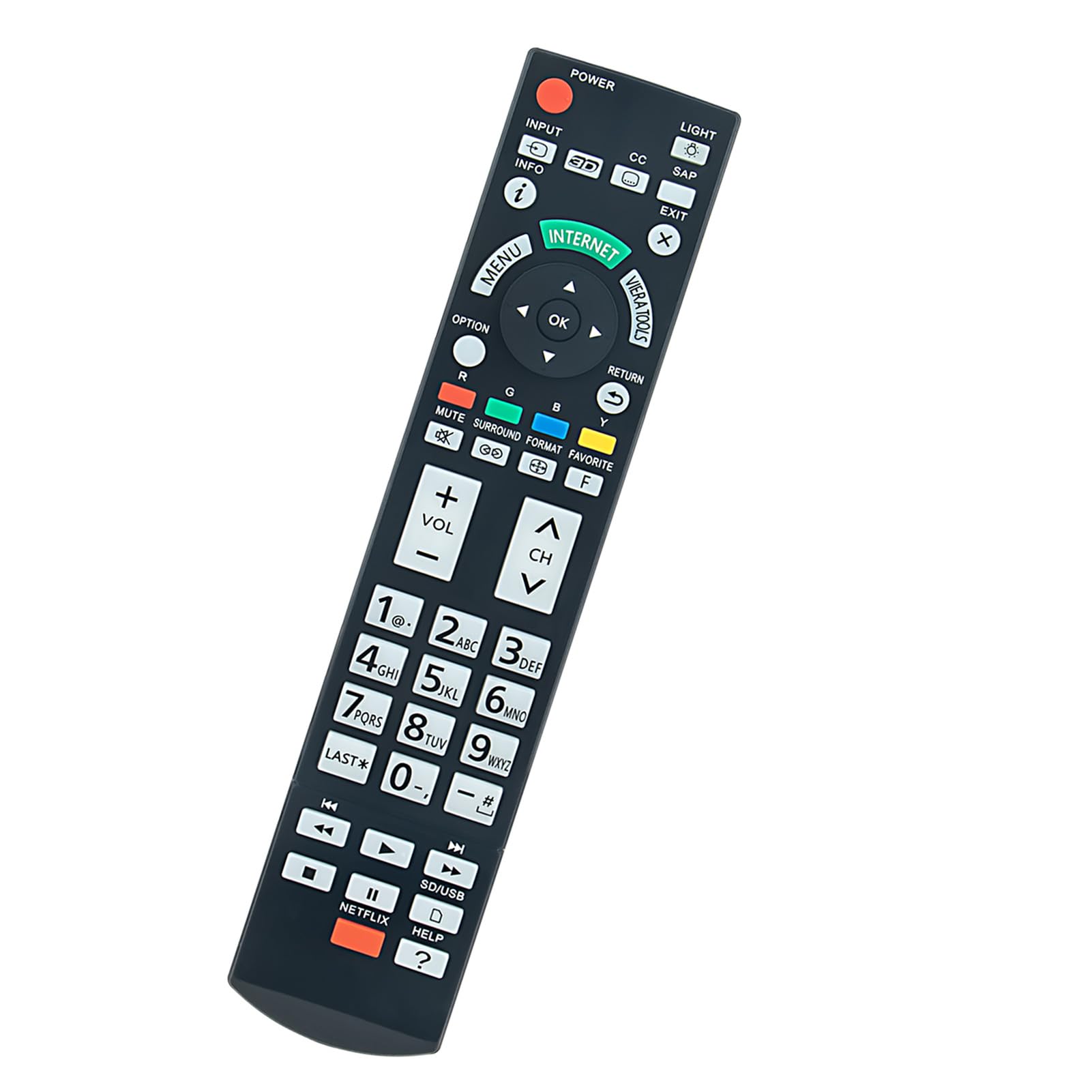
This image displays the front view of the PERFASCIN N2QAYB000777 replacement remote control, highlighting its button layout and ergonomic design.
Setup
1. Battery Installation
The PERFASCIN N2QAYB000777 remote control requires two AAA alkaline batteries (not included).
- Locate the battery compartment cover on the back of the remote control.
- Press down on the tab and slide the cover off.
- Insert two new AAA alkaline batteries, ensuring the positive (+) and negative (-) terminals match the diagrams inside the compartment.
- Slide the battery compartment cover back into place until it clicks securely.
The remote is ready for use immediately after battery installation. No programming or pairing is required.

This image shows a side angle of the remote, indicating the general location of the battery compartment on the rear.
Operating Instructions
This remote control is designed to replicate the functions of your original Panasonic TV remote. Point the remote directly at your television's infrared receiver for optimal performance.
Key Functions Overview
- POWER: Turns the TV on or off.
- INPUT: Selects video input sources (e.g., HDMI 1, AV).
- INFO: Displays on-screen information about the current program or input.
- MENU: Accesses the TV's main menu.
- OK: Confirms selections within menus.
- Directional Pad (Up/Down/Left/Right): Navigates through menus and options.
- EXIT: Exits the current menu or screen.
- RETURN: Returns to the previous screen or menu.
- VOLUME (+/-): Adjusts the TV's volume level.
- CHANNEL (CH Up/Down): Changes TV channels.
- MUTE: Mutes or unmutes the TV's audio.
- NETFLIX: Direct access button for the Netflix application.
- HELP: Accesses the TV's help menu or features.
- Number Pad (0-9): Directly enters channel numbers.
- INTERNET: Accesses smart TV internet features.
- VIERA TOOLS: Accesses Panasonic's Viera Tools menu.
- LIGHT: Activates backlight on some remote models (if applicable).
- CC: Activates or deactivates Closed Captions.
- SAP: Selects Secondary Audio Program.
- 3D: Activates or deactivates 3D mode (for compatible TVs).
- SD/USB: Selects SD card or USB input.

This image provides a detailed view of all buttons on the remote control, illustrating their layout and labels for easy identification.
Maintenance
Cleaning the Remote
To clean the remote control, gently wipe it with a soft, dry cloth. For stubborn dirt, slightly dampen the cloth with water or a mild, non-abrasive cleaner. Avoid using harsh chemicals or abrasive materials, as these can damage the remote's surface or internal components.
Battery Replacement
Replace batteries when the remote's response becomes sluggish or stops working. Always replace both batteries at the same time with new AAA alkaline batteries. Do not mix old and new batteries, or different types of batteries, as this can lead to leakage or malfunction.
Storage
When not in use for extended periods, it is recommended to remove the batteries to prevent leakage and potential damage to the remote control. Store the remote in a cool, dry place away from direct sunlight and extreme temperatures.
Troubleshooting
Remote Not Responding
- Check Batteries: Ensure batteries are inserted correctly with the correct polarity (+/-). Replace with fresh AAA alkaline batteries.
- Line of Sight: Make sure there are no obstructions between the remote control and the TV's infrared sensor.
- Distance: Ensure you are within the effective operating range (up to 33 feet or 10 meters).
- TV Sensor: Verify that the TV's infrared sensor is clean and not blocked.
Specific Buttons Not Working
- Clean Buttons: Sometimes dirt or debris can get under buttons. Gently press and release the button multiple times. If necessary, clean around the button with a soft, slightly damp cloth.
- Battery Level: Low batteries can sometimes cause intermittent button functionality. Replace batteries.
Remote Control Does Not Require Programming
This remote control is a direct replacement and does not require any programming or pairing. If it is not working, the issue is likely related to batteries, line of sight, or the TV's IR receiver.
Specifications
| Feature | Detail |
|---|---|
| Model Name | N2QAYB000777 |
| Brand | PERFASCIN |
| Compatible Devices | Panasonic Smart LCD LED Televisions (Specific models: TC-P55VT50, TC-65PS64, TCP50ST50X, TCP60ST50X) |
| Connectivity Technology | Infrared (IR) |
| Battery Type | 2 x AAA Alkaline Batteries (not included) |
| Maximum Range | 33 Feet (10 meters) |
| Special Features | Ergonomic Design, No Programming Required |
| Item Weight | 1.4 Ounces (approximately 40 grams) |
| Dimensions (L x W x H) | 6"L x 1.8"W x 0.45"H (approximately 15.24cm x 4.57cm x 1.14cm) |
Warranty and Support
For any questions or issues regarding your PERFASCIN N2QAYB000777 remote control, please contact the seller directly through your purchase platform. This product is typically covered by a standard return policy. Please refer to your purchase details for specific warranty information and support contacts.