
Introduction
Thank you for choosing the Sanag K20 5000mAh Portable Charger. This compact power bank is designed to provide convenient and efficient charging for your mobile devices. Featuring a built-in Lightning connector and a USB-C cable, it offers versatile compatibility and portability. Please read this manual carefully to ensure proper use and optimal performance of your device.
Key Features
- Compact and Lightweight Design: Weighs only 100g and is 8cm long, making it highly portable for travel.
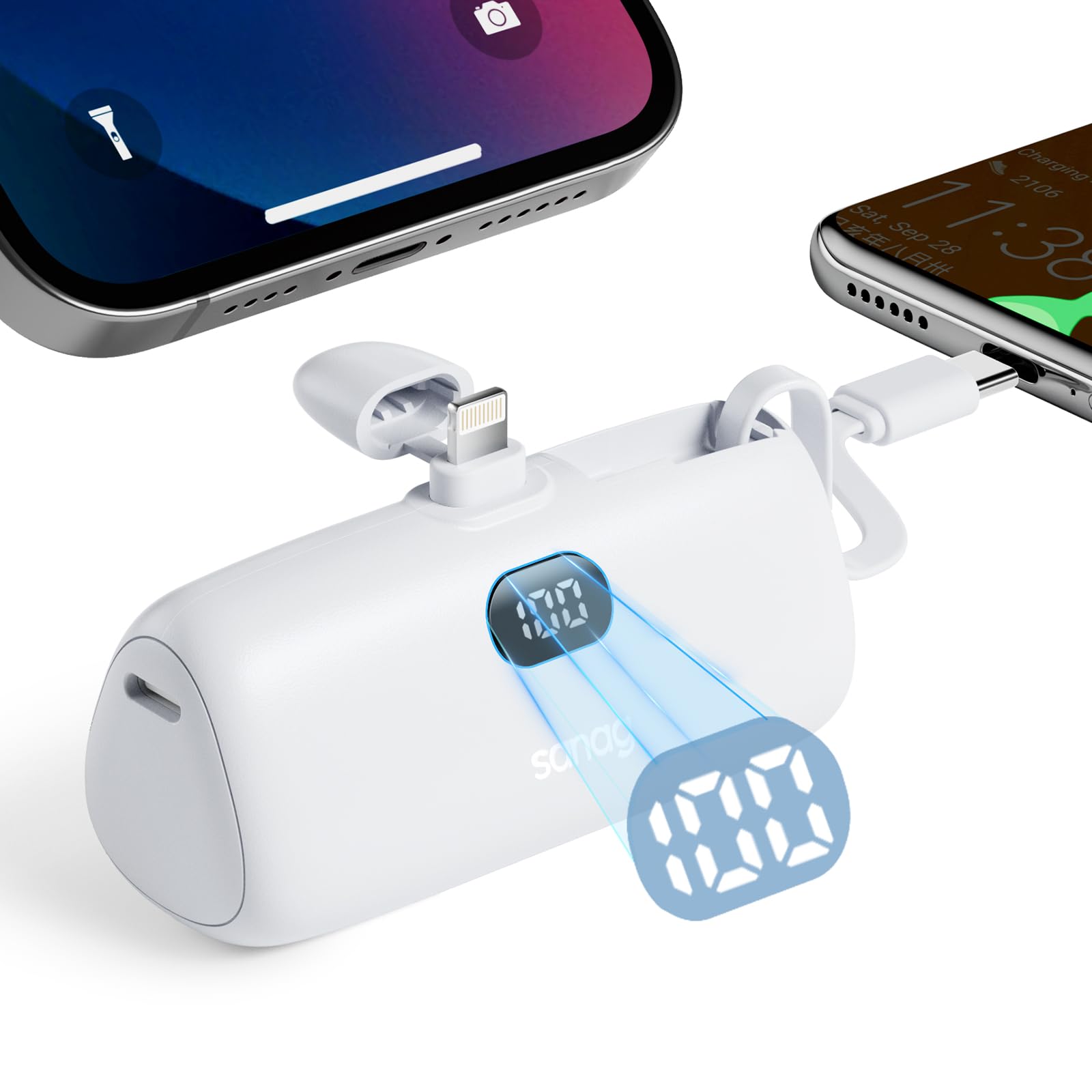
- Integrated Connectors: Equipped with a built-in Lightning connector and a USB-C cable for direct charging of Apple and Android devices without extra cables.
- 12W Fast Charging: Delivers 12W output for efficient charging, capable of charging an iPhone 14 to 60% in 1 hour.
- Broad Compatibility: Supports charging for iPhones, iPads, iPods, Android phones, tablets, headphones, and small fans.
- Dual Charging Capability: The built-in USB-C cable allows for simultaneous charging of two devices.
- Safety Protection: Features flame-retardant materials and an intelligent temperature control system for safe charging.
- Integrated Kickstand: Includes a hidden, dual-use bracket for hands-free viewing at a 45° angle.
- Case-Friendly Charging: Extended charging head design allows charging of devices with cases up to 4mm thick.
- Digital Power Display: An LED display shows the remaining battery percentage.
What's in the Box
- Sanag K20 Mini Power Bank (5,000mAh)
- User Manual
Product Overview
Familiarize yourself with the components of your Sanag K20 portable charger:

- USB-C Input/Output: Used for recharging the power bank and charging USB-C compatible devices.
- Brackets: Hidden foldable stand for propping up your device.
- Power Display On/Off: Button to activate the power display and initiate charging.
- LED Display: Digital screen showing the remaining battery percentage.
- Type-C Cable Output: Integrated USB-C cable for charging compatible devices.
- iPhone Output (Lightning Connector): Integrated Lightning connector for charging Apple devices.
Setup
Initial Charging of the Power Bank
Before first use, fully charge your Sanag K20 portable charger. This ensures optimal battery performance.
- Locate the USB-C Input/Output port on the side of the power bank.
- Connect the provided USB-C charging cable (or your own PD fast charging cable) to the power bank's USB-C port.
- Connect the other end of the cable to a compatible USB wall adapter (not included) or a computer's USB port.
- The LED display will show the charging progress. The power bank is fully charged when the display shows '100'. Charging typically takes approximately 1.5 hours.

Operating Instructions
Checking Battery Level
Press the Power Display On/Off button once to activate the LED display and view the current battery percentage.

Charging Your Devices
The Sanag K20 offers multiple ways to charge your devices:
- Using the Built-in Lightning Connector:
Carefully plug the integrated Lightning connector into your Apple device's charging port. The power bank will automatically begin charging. - Using the Built-in USB-C Cable:
Unfold the integrated USB-C cable and plug it into your USB-C compatible device's charging port. The power bank will automatically begin charging. - Simultaneous Charging:
You can charge two devices concurrently by utilizing both the Lightning connector and the USB-C cable.

Using the Integrated Kickstand
The Sanag K20 features a hidden kickstand for convenient hands-free viewing:
- Locate the foldable bracket on the back of the power bank.
- Gently pull out the bracket until it locks into place.
- Place your phone or device onto the stand. The 45° angle provides stable support for viewing videos or making calls while charging.

Case-Friendly Charging
The extended design of the Lightning connector allows charging even when your device has a protective case, provided the case thickness is less than 4mm.

Maintenance
- Cleaning: Use a soft, dry cloth to clean the surface of the power bank. Avoid using liquids or abrasive cleaners.
- Storage: Store the power bank in a cool, dry place away from direct sunlight and extreme temperatures.
- Battery Care: To prolong battery life, fully charge the power bank at least once every three months if not in regular use.
Troubleshooting
- Power Bank Not Charging:
Ensure the charging cable is securely connected to both the power bank and the power source. Try a different cable or wall adapter. - Device Not Charging:
Ensure the power bank is sufficiently charged. Verify that the Lightning connector or USB-C cable is properly inserted into your device. Press the power button on the power bank to initiate charging if it doesn't start automatically. - Slow Charging:
Ensure you are using a compatible fast-charging wall adapter for optimal speed. Check if your device supports 12W fast charging. - LED Display Not Working:
Press the Power Display On/Off button. If it still doesn't light up, the power bank might be completely discharged or require service.
Specifications
| Feature | Detail |
|---|---|
| Model Number | K20 |
| Battery Capacity | 5000 Milliamp Hours |
| Output Power | 12W PD |
| Connectors | Built-in Lightning, Built-in USB Type-C |
| Product Dimensions | 3.15 x 1.69 x 1.18 inches |
| Item Weight | 3.53 ounces |
| Special Features | Built-in Cable, Digital Display, Fast Charging, LED Indicator Lights, Integrated Kickstand |
Safety Information
- Do not expose the power bank to extreme temperatures (hot or cold), direct sunlight, or fire.
- Avoid dropping, hitting, or disassembling the device.
- Keep out of reach of children.
- Do not use the power bank if it is damaged, swollen, or leaking.
- Use only compatible charging cables and adapters.
- Do not short-circuit the power bank.
- Dispose of the power bank responsibly according to local regulations.
Official Product Video
Watch this official video for a visual guide on the Sanag K20 Portable Charger's features and usage:
Video: An official product video showcasing the Sanag K20 Portable Charger, highlighting its compact design, built-in cables, digital display, and integrated stand.
Warranty and Support
For warranty information or technical support, please refer to the product packaging or contact Sanag customer service directly. Keep your purchase receipt for any warranty claims.
