Introduction
Welcome to the user manual for your W&O X9 Pro Smartwatch. This guide provides essential information for setting up, operating, maintaining, and troubleshooting your device. The X9 Pro Smartwatch features a vibrant 2.02-inch Super AMOLED display, an aircraft-grade aluminum body, and comes with both silicone and fabric straps. It offers advanced health monitoring, comprehensive fitness tracking, Bluetooth calling, and convenient wireless charging.
Please read this manual thoroughly to ensure proper use and to fully utilize all the features of your new smartwatch.
Setup
1. Initial Charging
Before first use, fully charge your smartwatch. The X9 Pro supports wireless charging.

Image: The X9 Pro Smartwatch being charged wirelessly on its charging pad. This illustrates the wireless charging capability.
Place the back of the smartwatch onto the wireless charging pad. Ensure the watch is correctly aligned for charging to begin. The screen will indicate charging status.
2. App Installation
To unlock the full potential of your smartwatch, download and install the companion application. The recommended application is Wear Fit Pro, available on Google Play Store for Android devices and the App Store for iOS devices.
- System Requirements: Android 5.0+ or iOS 10.0+
3. Device Pairing
After installing the app, follow these steps to pair your smartwatch with your smartphone:
- Ensure Bluetooth is enabled on your smartphone.
- Open the Wear Fit Pro application.
- Navigate to the 'Device' or 'Add Device' section within the app.
- The app will search for available devices. Select 'X9 Pro' from the list.
- Confirm the pairing request on both your smartphone and smartwatch.
Operating Your Smartwatch
Basic Navigation
- Touch Screen: Swipe left, right, up, or down to navigate through menus and notifications. Tap to select items.
- Side Button: Typically used to return to the home screen, access the app menu, or power the device on/off.
- Action Button: Can be customized for quick access to specific functions or emergency features.
Communication Features
The X9 Pro Smartwatch supports Bluetooth calls, allowing you to make and receive calls directly from your wrist when connected to your smartphone.
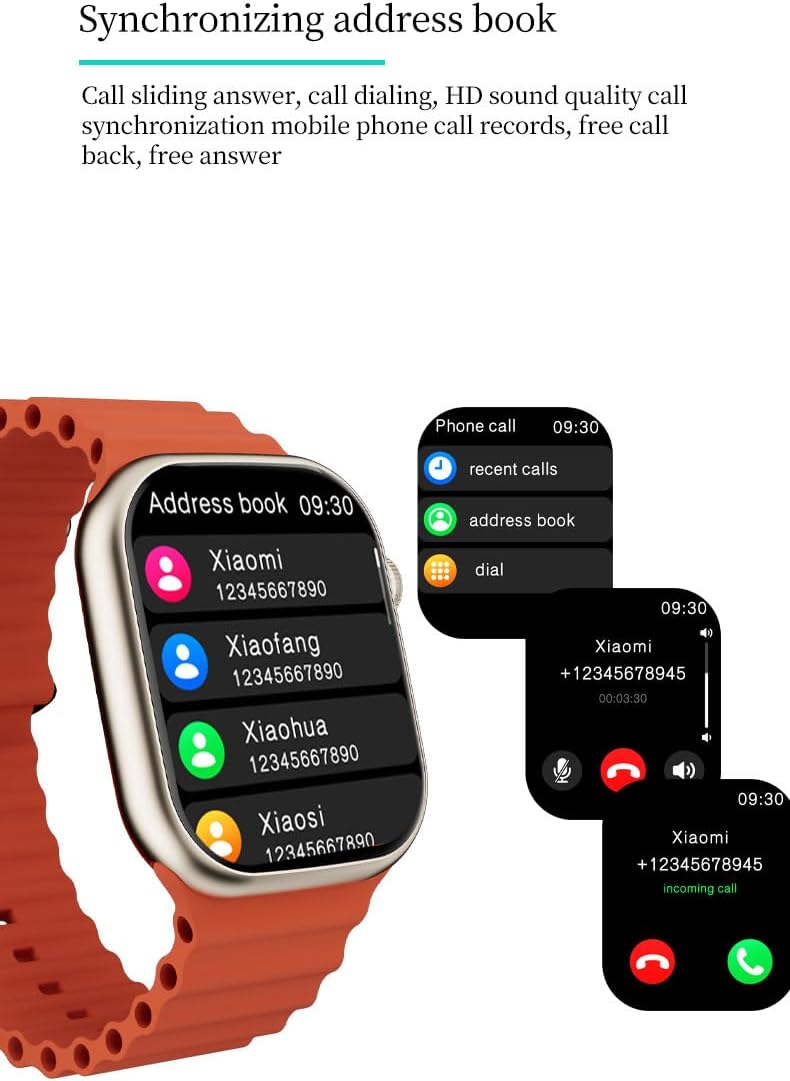
Image: The X9 Pro Smartwatch screen showing options for recent calls, address book, and dial pad, along with an incoming call notification. This demonstrates the Bluetooth call and address book synchronization features.
- Making Calls: Access the dial pad or synchronized address book from the watch.
- Receiving Calls: Answer or reject incoming calls directly from the watch screen.
- Voice Assistant: Utilize the integrated voice assistant for hands-free control, playing music, checking weather, and more.

Image: The X9 Pro Smartwatch screen showing the weather forecast and the AI voice assistant interface, ready to receive commands. This highlights the AI intelligence and voice assistant functionality.
Customization
Personalize your smartwatch experience with various dial options.

Image: Several X9 Pro Smartwatches with different watch faces displayed, showcasing the dial switching and style customization options.
- Dial Switching: Change your watch face through the settings menu on the watch or via the companion app.
Health Monitoring
The X9 Pro Smartwatch is equipped with advanced sensors to monitor various health metrics.

Image: Three X9 Pro Smartwatches showing different health metrics: heart rate (bpm), blood pressure (mmHg), and blood oxygen saturation (%). This illustrates the health monitoring capabilities.
- Heart Rate: Real-time heart rate tracking.
- Blood Oxygen: Monitor blood oxygen saturation levels.
- Blood Pressure: Measure blood pressure (for reference only, not a medical device).
- ECG Test: Perform an electrocardiogram test (for reference only).
- Sleep Monitoring: Track sleep patterns and quality.
- Stress Analysis: Analyze stress levels.
- Body Temperature: Measure body temperature.
- Female Cycle: Track and predict menstrual cycles.
Fitness Tracking
The smartwatch supports various sports modes and tracks your activity.
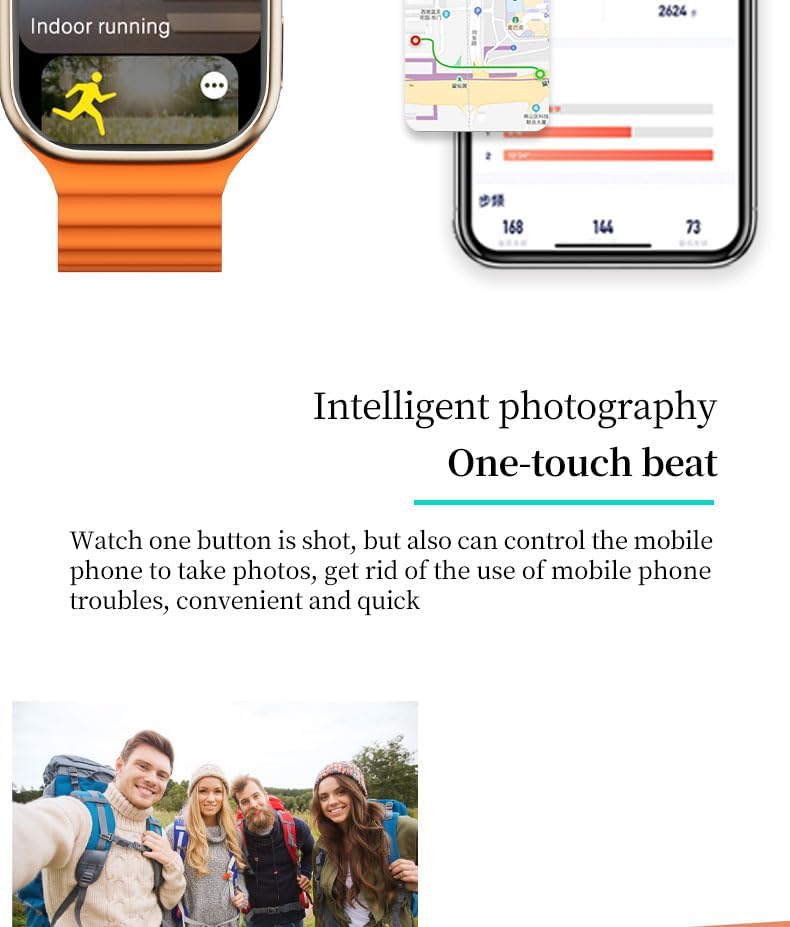
Image: The X9 Pro Smartwatch displaying 'Indoor running' mode, with a smartphone screen showing a GPS map and activity statistics. This highlights the fitness tracking and GPS capabilities.
- Multi-sport Mode: Select from various exercise modes for accurate tracking.
- Pedometer: Counts steps taken throughout the day.
- Calories: Estimates calories burned.
- Distance: Tracks distance covered.
- Movement Patterns: Analyzes your activity trends.
- Built-in GPS: Provides accurate location and route tracking for outdoor activities.
Additional Features
- Music Playback: Control music on your connected smartphone.
- Remote Camera Control: Use the watch to remotely trigger your phone's camera.
- Weather Reminders: Get weather updates directly on your watch.
- NFC: Near Field Communication technology for various functions (specific uses may vary by region and app).
- Emergency Features: Fall detection and crash detection can automatically alert emergency services. An alarm siren can be activated via the action button, audible up to 600 feet.
- Alarm Clock & Stopwatch: Standard timekeeping functions.
- Breathing Training: Guided breathing exercises for relaxation.
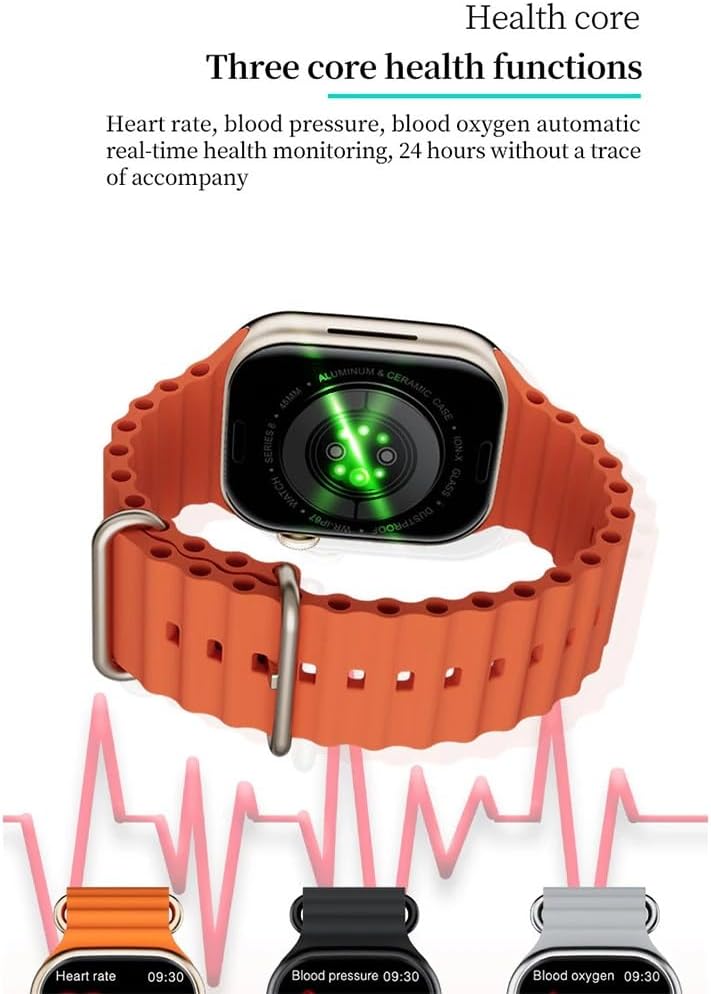
Image: A group of friends taking a photo, suggesting the use of the smartwatch for remote camera control. This illustrates the intelligent photography feature.
Maintenance
Cleaning Your Smartwatch
To maintain the appearance and functionality of your X9 Pro Smartwatch:
- Wipe the screen and body with a soft, lint-free cloth.
- For stubborn dirt, slightly dampen the cloth with water. Avoid using harsh chemicals or abrasive materials.
- Clean the charging contacts regularly to ensure efficient charging.
Water Resistance
The X9 Pro Smartwatch has an IP67 water and dust resistance rating. This means it is resistant to splashes and brief immersion in shallow water.
- Do NOT use the watch for swimming, diving, or high-speed water sports.
- Avoid exposing the watch to hot water, steam, or strong jets of water.
- If the watch gets wet, dry it thoroughly before charging or using any buttons.
Troubleshooting
If you encounter issues with your X9 Pro Smartwatch, try the following solutions:
Device Not Turning On
- Ensure the watch is fully charged. Place it on the wireless charger for at least 30 minutes.
- Press and hold the side button for several seconds to attempt a power-on.
Cannot Pair with Smartphone
- Verify Bluetooth is enabled on your smartphone and the watch.
- Ensure the Wear Fit Pro app is updated to the latest version.
- Restart both your smartphone and the smartwatch.
- If previously paired, try unpairing the device from your phone's Bluetooth settings and then re-pairing through the app.
- Ensure the watch is within Bluetooth range of your phone.
Inaccurate Health Readings
- Ensure the watch is worn snugly on your wrist, but not too tight.
- Clean the sensors on the back of the watch.
- Note that these readings are for reference and not intended for medical diagnosis.
Charging Issues
- Ensure the wireless charging pad is connected to a working power source.
- Check that the watch is correctly positioned on the charging pad.
- Clean the charging area on both the watch and the pad.
Specifications
| Feature | Detail |
|---|---|
| Model Name | X9 Pro |
| Display Size | 2.02 inches |
| Display Type | Super AMOLED, HD TFT |
| Display Resolution | 320 x 385 pixels |
| Refresh Rate | 60 Hz |
| Main Chipset | SF32LB551 |
| Bluetooth Version | 5.2 |
| NFC Support | Yes |
| Battery Capacity | 300 mAh |
| Water Resistance Rating | IP67 (Splash resistant, not for swimming/diving) |
| System Requirements | Android 5.0+ / iOS 10.0+ |
| Operating System | Watch OS |
| GPS | Built-in GPS |
| Dimensions | 4.5 x 4 x 1.2 cm |
| Weight | 37 grams |
Warranty and Support
For warranty information and customer support, please refer to the documentation provided with your purchase or contact your retailer. Specific warranty terms and support channels may vary by region.


