
1. Product Overview
The NALsa Android Car Stereo is an advanced multimedia navigation system designed to upgrade the in-car entertainment and connectivity for specific vehicle models. This manual provides instructions for its installation, operation, and maintenance.

The NALsa Android Car Stereo unit, featuring a large touchscreen display and an included rearview camera for enhanced functionality.
2. Compatibility and Pre-Installation Check
This car stereo is specifically designed for Toyota Corolla Verso AR10 models manufactured between 2004 and 2009 that do not have an existing screen in the original car console. Before proceeding with installation, it is crucial to verify compatibility.
- Vehicle Model: Toyota Corolla Verso AR10
- Model Years: 2004, 2005, 2006, 2007, 2008, 2009
- Original Console: Must be a model without a factory-installed screen.
If you are uncertain about compatibility, it is recommended to consult with a professional or contact customer support with a picture of your original center console for technical identification.
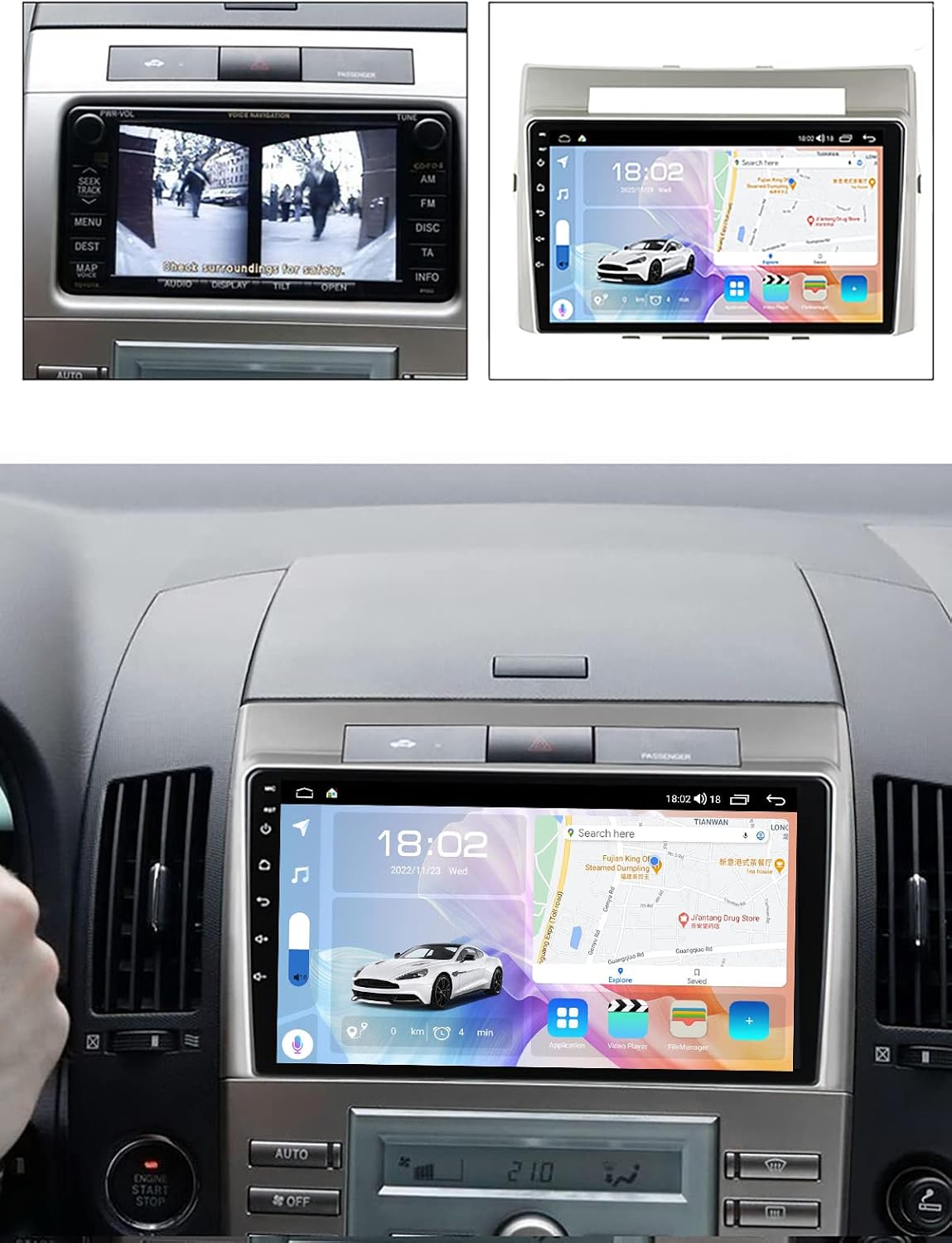
This image illustrates the difference between the original car stereo console and the NALsa Android Car Stereo unit after installation in a Toyota Corolla Verso AR10 (2004-2009).
3. Setup and Installation
Installation of the NALsa Android Car Stereo requires specific technical skills and knowledge of car audio systems. It is highly recommended to seek professional installation services from a qualified auto repair store to ensure correct and safe setup.
3.1 Package Contents
Before beginning installation, verify that all components are present in the package:

A visual representation of all items included in the product package, such as the main Android host, power cord, microphone, GPS antenna, AHD 720P reversing camera, and various RCA/USB cables depending on the model.
- Android Host (Screen Unit)
- Power Cord
- Microphone (Gift)
- GPS Antenna
- AHD 720P Reversing Camera (Gift)
- RCA Cable Set (Varies by model)
- USB Cables (2x, Varies by model)
- Audio Out Cable (For M200S-700S models)
- 4G Antenna (For M200S-700S models)
3.2 Basic Installation Steps (Professional Installation Recommended)
- Remove Original Unit: Carefully remove the existing car stereo and trim panels from your vehicle's dashboard.
- Connect Wiring Harness: Connect the provided power cord and other necessary wiring harnesses to the vehicle's existing connectors. Ensure all connections are secure.
- Install GPS Antenna: Mount the GPS antenna in a location with a clear view of the sky, typically on the dashboard or under the windshield.
- Install Reversing Camera: Route the camera cable to the rear of the vehicle and mount the AHD 720P reversing camera. Connect its video output to the designated input on the stereo unit.
- Connect USB and RCA Cables: Connect any additional USB or RCA cables as needed for external devices or amplifiers.
- Mount Android Host: Securely mount the NALsa Android Host into the dashboard opening.
- Test Functionality: Before reassembling all trim panels, power on the unit and test all primary functions (radio, navigation, Bluetooth, camera, steering wheel controls).
- Reassemble: Once all functions are verified, carefully reassemble the dashboard trim panels.
4. Operating Instructions
The NALsa Android Car Stereo operates on an Android 10.0 or Android 12.0 (API 29) system, offering a user-friendly interface similar to a tablet or smartphone.
4.1 Touch Screen Interface
The unit features a 9-inch or 10-inch 2.5D IPS high-resolution multi-touch screen (1024*600 or 1280*720 pixels). Navigate through menus, applications, and settings by tapping, swiping, and pinching gestures.

This image details the ability to customize the user interface, the presence of a cooling fan for thermal management, advanced DSP sound adjustment options, and the benefits of the IPS screen for wider viewing angles and better color reproduction.
4.2 Navigation System
The built-in GPS module supports both online and offline navigation maps. Access the navigation application from the main screen. Ensure the GPS antenna is properly installed for optimal signal reception.
4.3 Connectivity Features
- Bluetooth (4.0/5.0): Pair your smartphone for hands-free calling and audio streaming. Access contacts, call history, and music directly from the stereo.
- Wi-Fi (5GHz): Connect to a Wi-Fi hotspot (e.g., from your smartphone) for internet access, app downloads, and online services.
- 4G LTE: (M200S-700S models) Insert a 4G SIM card for direct internet connectivity.
- CarPlay & Android Auto: (Wired and Wireless, 8-core models M200S-700S) Connect your smartphone to access compatible apps, navigation, and media through the stereo interface.
- Mirror Link: Project your smartphone screen onto the car stereo display.

An overview of the stereo's connectivity options, including Bluetooth for hands-free calls and music, steering wheel control integration, 4G LTE support for internet access, and 5GHz WiFi for faster data transfer.
4.4 Multimedia Playback
The unit supports various digital media formats including MP3, MP4, MP5, WMA, and JPEG. Play music and videos from USB drives or internal storage. It supports 1080P video recording and playback, and 4K video playback.
4.5 Audio Features
- DSP (Digital Signal Processor): Built-in DSP (on M200S-700S models) allows for advanced sound adjustments, including surround sound, bass enhancement, and treble filtering.
- FM/AM Radio: Utilize the built-in radio tuner with RDS support for local broadcasts.

This image highlights key features such as the octa-core CPU, support for DSP audio processing, 1080P video playback capabilities, and customizable button illumination colors.
4.6 Steering Wheel Control (SWC)
The unit supports integration with your vehicle's existing steering wheel controls, allowing you to manage audio playback, volume, and calls without taking your hands off the wheel.
4.7 External Device Support
The system supports various optional external connections:
- ADAS DVR
- TPMS (Tire Pressure Monitoring System)
- OBD2 (On-Board Diagnostics)
- DAB+ (Digital Audio Broadcasting)
- Dash Cam
5. Maintenance
To ensure the longevity and optimal performance of your NALsa Android Car Stereo, follow these general maintenance guidelines:
- Screen Cleaning: Use a soft, lint-free cloth slightly dampened with water or a screen-cleaning solution. Avoid harsh chemicals or abrasive materials that could damage the screen.
- Dust Removal: Regularly wipe down the unit to prevent dust accumulation, especially around vents if applicable.
- Software Updates: Periodically check for and install available software updates to ensure system stability and access to new features.
- Temperature Management: Avoid exposing the unit to extreme temperatures for extended periods. The M200S-700S models include an aluminum heat sink and a powerful cooling fan to manage internal temperatures.
6. Troubleshooting
If you encounter issues with your NALsa Android Car Stereo, consider the following basic troubleshooting steps:
- No Power: Check all power connections and fuses. Ensure the vehicle's ignition is on.
- No Sound: Verify speaker connections, volume settings, and audio source selection. Check if the mute function is active.
- GPS Signal Issues: Ensure the GPS antenna is correctly installed and has a clear view of the sky. Move the vehicle to an open area if necessary.
- Bluetooth Pairing Problems: Ensure Bluetooth is enabled on both the stereo and your device. Delete previous pairings and attempt to re-pair.
- Touch Screen Unresponsive: Try restarting the unit. If the issue persists, a factory reset might be necessary (note: this will erase personal data and settings).
- System Lag/Freezing: Close unnecessary applications. If the issue persists, a system restart or factory reset may be required.
For complex issues or if troubleshooting steps do not resolve the problem, professional technical support is available. Please refer to the 'Support' section for contact information.
7. Specifications
The NALsa Android Car Stereo is available in several configurations. The M500S model features an 8-core CPU with 4GB RAM and 64GB ROM.
| Parameter | M100S | M150S | M200S | M300S | M400S | M500S | M600S | M700S |
|---|---|---|---|---|---|---|---|---|
| Internet | WiFi | WiFi | 4G LTE/5G WiFi | 4G LTE/5G WiFi | 4G LTE/5G WiFi | 4G LTE/5G WiFi | 4G LTE/5G WiFi | 4G LTE/5G WiFi |
| OS | Android 11 | Android 11 | Android 12 | Android 12 | Android 12 | Android 12 | Android 12 | Android 12 |
| API | 29 | 29 | 29 | 29 | 29 | 29 | 29 | 29 |
| Core | 4-Core | 4-Core | 8-Core | 8-Core | 8-Core | 8-Core | 8-Core | 8-Core |
| RAM/ROM | 1G+32G | 2G+32G | 2G+32G | 3G+32G | 4G+64G | 4G+64G | 6G+128G | 8G+128G |
| Carplay/Android Auto | Optional | Optional | Wireless + Wired | Wireless + Wired | Wireless + Wired | Wireless + Wired | Wireless + Wired | Wireless + Wired |
| BT module | 4.0 | 4.0 | 5.0 | 5.0 | 5.0 | 5.0 | 5.0 | 5.0 |
| Resolution | 1024*600 | 1024*600 | 1280*720 | 1280*720 | 1280*720 | 1280*720 | 1280*720 | 1280*720 |
| Screen | HD Screen | HD Screen | IPS Screen | IPS Screen | IPS Screen | IPS Screen | IPS Screen | IPS Screen |
| Cooling fan | X | X | YES | YES | YES | YES | YES | YES |
| Full AV Output | X | X | Optional | Optional | Optional | Optional | Optional | Optional |
| DSP | X | X | ✔ | ✔ | ✔ | ✔ | ✔ | ✔ |
| RDS | X | X | ✔ | ✔ | ✔ | ✔ | ✔ | ✔ |
General Specifications:
- Manufacturer: NALsa
- ASIN: B0CFFP61ZQ
- UPC: 758327310035
- Vehicle Service Type: Car
- Connectivity Technology: Bluetooth, Cellular, USB, Wi-Fi
- Map Type: Satellite
- Audio Output Mode: AUX, Speaker, Stereo
- Human Interface Input: Microphone, Touchscreen
- Special Feature: Bluetooth, Touchscreen
- Digital Media Formats: MP3, MP4, MP5, WMA, JPEG
- Amplifier IC: Toshiba 7851/7850/7838 (M300S, M500S, M600S, M700S), TDA7388 (M200S, M400S)
- Receiver IC: 7708 (M200S-700S)
- Language Support: Supports most languages in the world
8. Warranty and Support
NALsa provides professional pre and post-sales technical support for its products.
8.1 Technical Support
If you require assistance with installation, operation, or troubleshooting, please contact NALsa customer service. Online technical support is available to guide you through any issues.
When contacting support, please be prepared to provide:
- Your product model (e.g., M500S)
- A detailed description of the issue
- Photos or videos if relevant to the problem
- For compatibility inquiries, a photo of your car's dashboard center console, model, and year of manufacture.
8.2 Warranty Information
Specific warranty terms and duration may vary. Please refer to your purchase documentation or contact the seller directly for detailed warranty information regarding your NALsa Android Car Stereo.