
Introduction
Thank you for choosing the Milex 24L Deluxe Rotisserie Air Fryer. This appliance is designed to provide a versatile cooking experience, combining air frying, rotisserie, baking, broiling, dehydrating, roasting, and steaming functions. Please read this manual thoroughly before first use to ensure safe and optimal operation.
This manual contains important information regarding the safe use, operation, and maintenance of your air fryer. Keep it in a safe place for future reference.
Important Safety Instructions
When using electrical appliances, basic safety precautions should always be followed to reduce the risk of fire, electric shock, and injury to persons, including the following:
- Read all instructions before using the appliance.
- Do not touch hot surfaces. Use handles or knobs.
- To protect against electrical shock, do not immerse cord, plugs, or the appliance in water or other liquid.
- Close supervision is necessary when any appliance is used by or near children.
- Unplug from outlet when not in use and before cleaning. Allow to cool before putting on or taking off parts.
- Do not operate any appliance with a damaged cord or plug, or after the appliance malfunctions or has been damaged in any manner.
- The appliance features Over-heat protection and an Auto shut-off function for enhanced safety.
- Do not use outdoors.
- Do not let cord hang over edge of table or counter, or touch hot surfaces.
- Do not place on or near a hot gas or electric burner, or in a heated oven.
- Extreme caution must be used when moving an appliance containing hot oil or other hot liquids.
- Always attach plug to appliance first, then plug cord into the wall outlet. To disconnect, turn any control to "off", then remove plug from wall outlet.
- Do not use appliance for other than intended use.
Product Overview
The Milex 24L Deluxe Rotisserie Air Fryer is a versatile kitchen appliance designed for various cooking methods. It features a spacious 24-liter capacity, making it suitable for preparing meals for families.

Image: Front view of the Milex 24L Deluxe Rotisserie Air Fryer, showcasing its sleek design and digital control panel.
Key components include the main unit, cooking racks, drip tray, and rotisserie accessories. The appliance is constructed with a durable Stainless Steel material and features a Galvanized sheet interior.
Setup and First Use
Unpacking
- Carefully remove the air fryer and all its accessories from the packaging.
- Remove any packaging materials, stickers, or labels.
- Inspect the appliance for any damage. Do not use if damaged.
Placement
- Place the air fryer on a stable, level, heat-resistant surface.
- Ensure there is adequate space around the appliance for proper ventilation (at least 10 cm on all sides).
- The product dimensions are approximately 42.8D x 53W x 44.6H centimetres. Consider these dimensions for placement.
- The appliance features Non-Slip Feet for stability.
Initial Cleaning
- Wipe the exterior of the appliance with a damp cloth.
- Wash all removable accessories (cooking racks, drip tray, rotisserie parts) with warm, soapy water. Rinse thoroughly and dry completely.
- Do not immerse the main unit in water.
Power Connection
- Plug the power cord into a grounded 220-240V, 50/60Hz electrical outlet.
- Ensure the outlet is compatible with the appliance's power requirements (2000W Motor Power).
Operating Instructions
Control Panel Overview
The digital control panel allows for easy selection of cooking functions, temperature, and time. Refer to the image below for a visual guide to the control panel and its various presets.
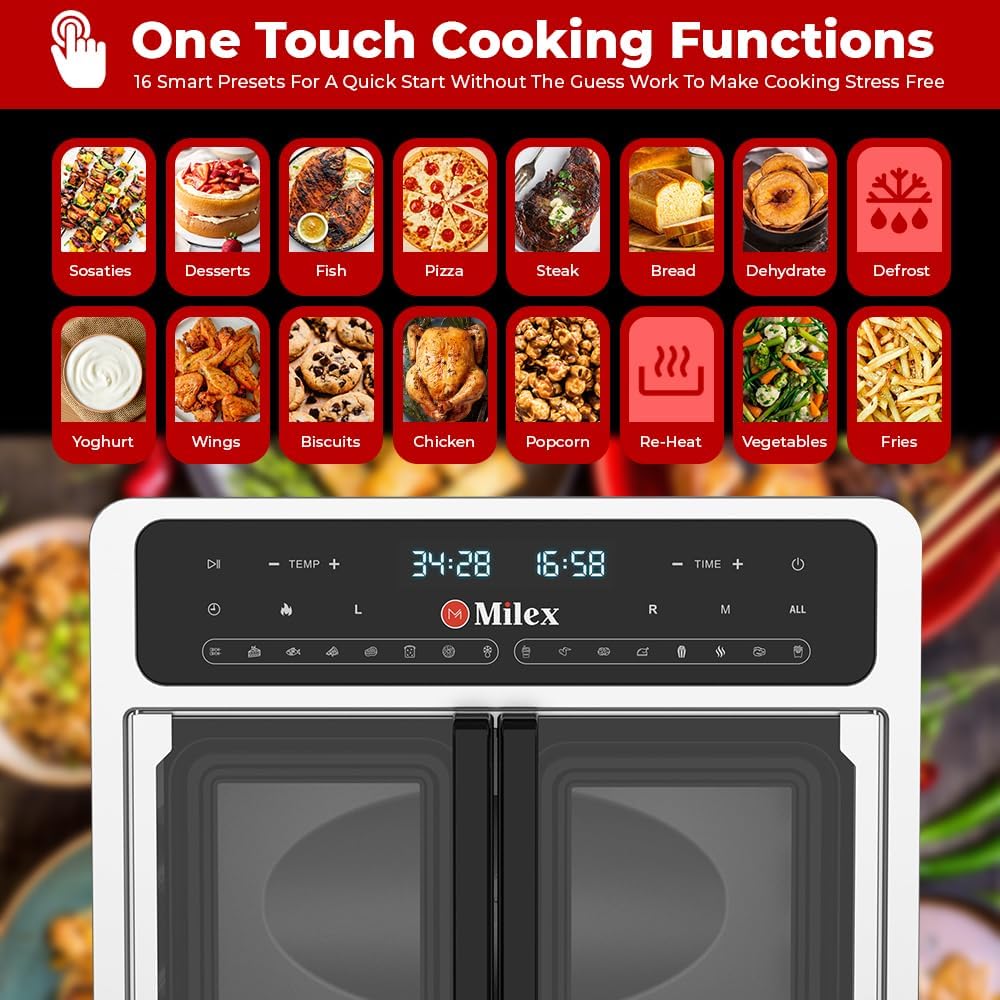
Image: Close-up of the air fryer's control panel, displaying 16 smart presets for various food types.
Basic Air Frying
- Place food on the cooking rack or in the air fry basket.
- Insert the rack/basket into the air fryer.
- Close the door.
- Press the Power button to turn on the appliance.
- Select the desired cooking function or manually set the temperature (40-200°C) and time using the +/- buttons. The 60-minute timer ensures precise cooking.
- Press the Start/Pause button to begin cooking.
- The appliance will automatically shut off when the timer expires.

Image: The air fryer in operation, showing food cooking inside and the digital timer set to 60 minutes.
Using Smart Presets
The air fryer features 16 Smart Presets for convenient cooking:
- Sosaties, Desserts, Fish, Pizza, Steak, Bread, Dehydrate, Defrost, Yoghurt, Wings, Biscuits, Chicken, Popcorn, Re-Heat, Vegetables, Fries.
To use a preset, simply select the corresponding icon on the control panel. The appliance will automatically set the optimal temperature and time for that food type.
Rotisserie Function
For rotisserie cooking, assemble the rotisserie spit with your food (e.g., whole chicken). Insert the spit into the designated slots inside the air fryer. Select the rotisserie function on the control panel and set the desired time and temperature. The rotisserie feature allows for even cooking and browning.

Image: The Milex 24L Deluxe Rotisserie Air Fryer displayed in a kitchen setting with various cooked meals, emphasizing its generous 24-liter cooking space.
Care and Maintenance
Cleaning
- Always unplug the air fryer and allow it to cool completely before cleaning.
- Wipe the exterior with a clean, damp cloth. Do not use abrasive cleaners.
- The interior can be wiped with a damp cloth and mild detergent.
- Wash removable accessories (racks, drip tray, rotisserie parts) in warm, soapy water. Rinse and dry thoroughly.
- Note: The appliance is not dishwasher safe. Hand wash all parts.
- Ensure all parts are completely dry before reassembling or storing.
Storage
Store the air fryer in a cool, dry place. Ensure the appliance is clean and dry before storage. Do not wrap the power cord tightly around the appliance.
Troubleshooting
| Problem | Possible Cause | Solution |
|---|---|---|
| Appliance does not turn on. | Not plugged in; Power outlet malfunction; Power button not pressed. | Ensure the power cord is securely plugged into a working outlet. Press the Power button. |
| Food is not cooked evenly. | Overcrowding; Incorrect temperature/time; Food not rotated. | Do not overcrowd the cooking space. Adjust temperature and time as needed. For best results, turn or shake food halfway through cooking. Utilize the rotisserie function for even cooking of larger items. |
| White smoke coming from the appliance. | Grease/oil residue; Fatty food. | Clean the drip tray and interior thoroughly. For fatty foods, ensure the drip tray is in place to catch excess oil. |
| Appliance suddenly stops during operation. | Auto shut-off activated; Over-heat protection activated. | This is a safety feature. Allow the appliance to cool down before restarting. Check for any obstructions to ventilation. |
Product Specifications

Image: Diagram illustrating the dimensions and key technical specifications of the Milex 24L Deluxe Rotisserie Air Fryer.
- Brand: Milex
- Model Name: 24L Deluxe Rotisserie Air Fryer
- Capacity: 24 Liters
- Motor Power: 2000W
- Voltage: 220-240V, 50/60Hz
- Cooking Temperature Range: 40-200°C
- Product Dimensions (D x W x H): 42.8D x 53W x 44.6H centimetres
- Colour: Black & Silver
- Material: Stainless Steel (Housing)
- Special Features: Automatic Shut-Off, Dual Zone Features, Stain Resistant, Temperature Control, Over-heat protection, Non-Slip Feet.
- Recommended Uses: Bake, Broil, Dehydrate, Roast, Steam, Air Fry.
- Dishwasher Safe: No
Warranty and Support
For warranty information and customer support, please refer to the warranty card included with your product or contact Milex customer service directly. Keep your proof of purchase for warranty claims.
For further assistance or inquiries, please visit the official Milex website or contact their customer support line.


