
QCY QCY H3 ANC
Contents
QCY H3 ANC Bluetooth Headphones User Manual
Model: QCY H3 ANC
1. Introduction
Thank you for choosing the QCY H3 ANC Bluetooth Headphones. This manual provides detailed instructions on how to set up, operate, and maintain your headphones to ensure optimal performance and longevity. The QCY H3 ANC headphones feature advanced Active Noise Cancellation (ANC) technology, Hi-Res Audio certification, multipoint connectivity, and an extended battery life, designed to deliver a superior audio experience.

Image: QCY H3 ANC Bluetooth Headphones in black, showcasing their sleek design.
2. Package Contents
Please verify that all items are present in your package:
- QCY H3 ANC Bluetooth Headphones
- USB Type-C Charging Cable
- 3.5mm Audio Cable
- User Manual (this document)

Image: Contents of the QCY H3 ANC package, including the headphones, charging cable, audio cable, and user manual.
3. Product Overview
Familiarize yourself with the various components and controls of your QCY H3 ANC headphones.

Image: Diagram illustrating the control buttons on the QCY H3 ANC headphones, including MFB (Multi-Function Button), Volume Up/Down, and ANC button.
Key Components:
- MFB (Multi-Function Button): Power On/Off, Play/Pause, Answer/End Calls, Activate Voice Assistant.
- Volume Buttons (+/-): Adjust volume, Skip tracks.
- ANC Button: Toggle Active Noise Cancellation modes (ANC On, ANC Off, Transparency Mode).
- USB Type-C Port: For charging the headphones.
- 3.5mm Audio Jack: For wired connection.
- Microphones: Integrated for clear calls and ANC functionality.
- Earcups: Ultra-soft protein leather with memory foam for comfort.
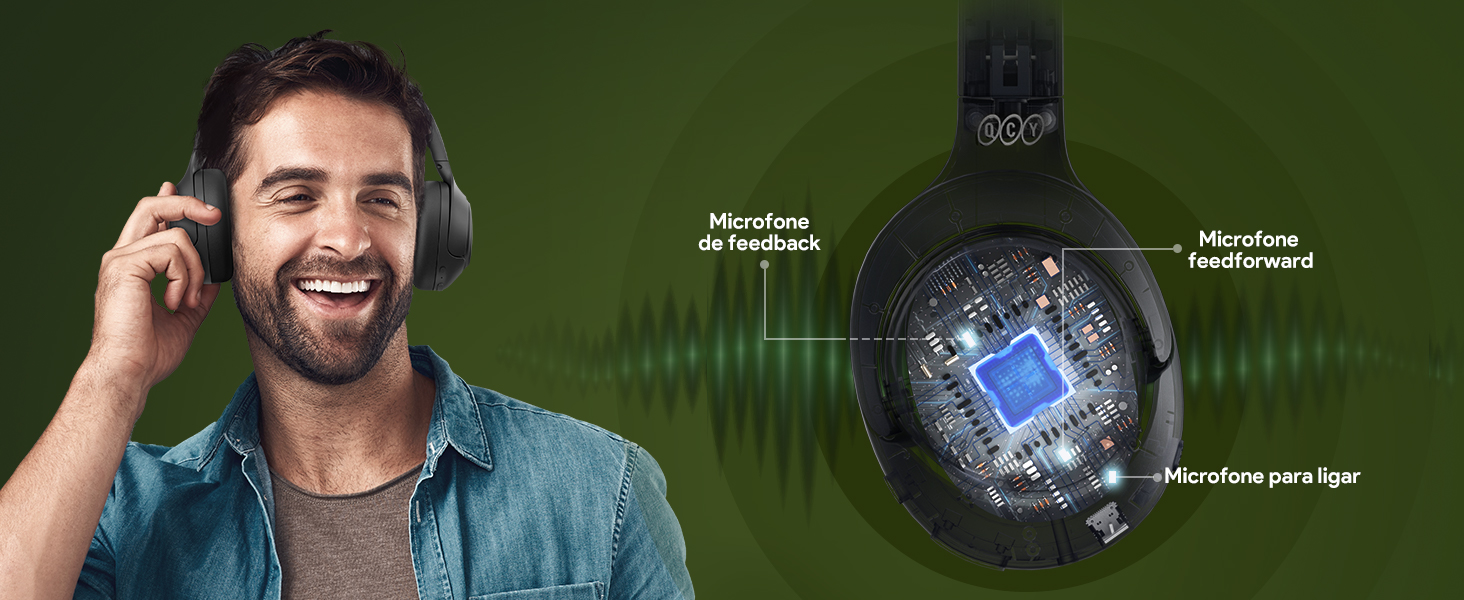
Image: Close-up of the QCY H3 ANC earcup, highlighting its soft, comfortable material.
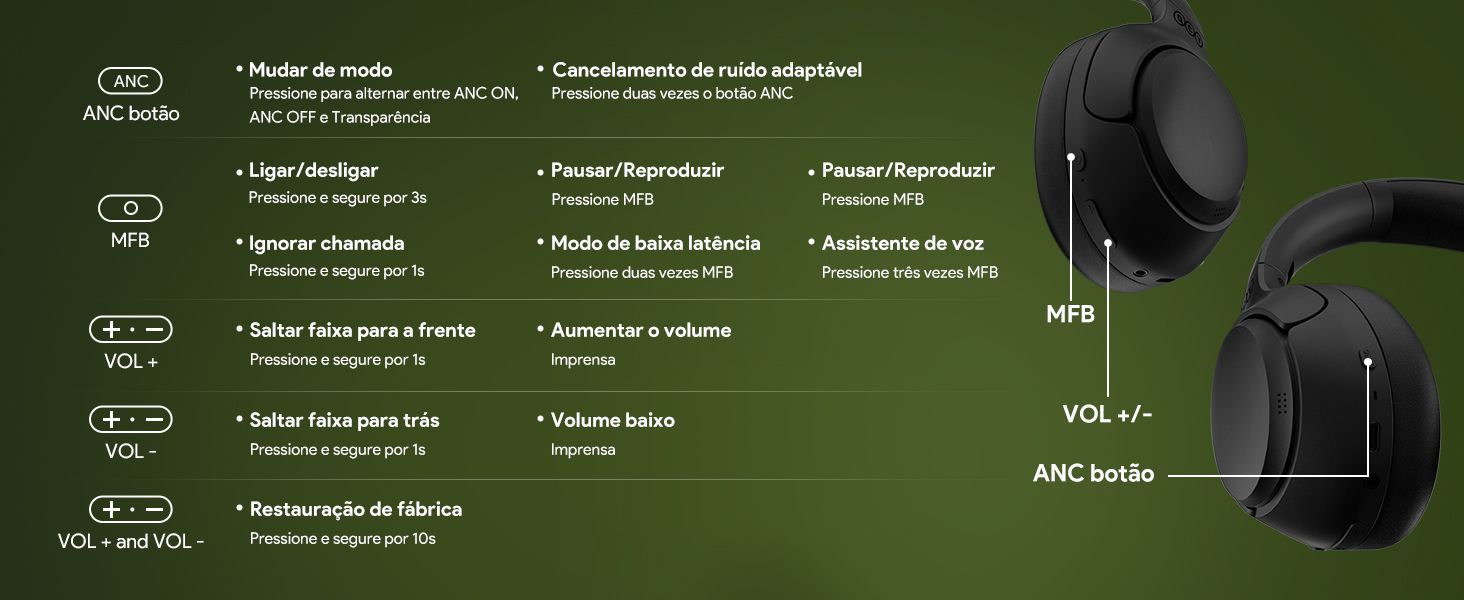
Image: View of the charging port (USB-C) and 3.5mm audio jack on the QCY H3 ANC headphones.
4. Setup Guide
4.1 Charging the Headphones
Before first use, fully charge your QCY H3 ANC headphones.
- Connect the USB Type-C charging cable to the charging port on the headphones.
- Connect the other end of the cable to a USB power source (e.g., wall adapter, computer USB port).
- The LED indicator will show charging status. It will turn off or change color when fully charged.
A full charge provides up to 60 hours of playback with ANC off, or 35 hours with ANC on.

Image: Graphic illustrating the impressive battery life of the QCY H3 ANC headphones: 60 hours with ANC off and 35 hours with ANC on.
4.2 Bluetooth Pairing
To connect your headphones to a device via Bluetooth:
- Ensure the headphones are charged and powered off.
- Press and hold the MFB for approximately 3 seconds until the LED indicator flashes blue and red, indicating pairing mode.
- On your device (smartphone, tablet, computer), enable Bluetooth and search for "QCY H3 ANC" in the list of available devices.
- Select "QCY H3 ANC" to connect. Once connected, the LED indicator will turn solid blue or off, depending on the model.
4.3 Multipoint Connection
The QCY H3 ANC supports multipoint connection, allowing you to connect to two devices simultaneously.
- Connect the headphones to the first device as described in section 4.2.
- Disable Bluetooth on the first device. The headphones will re-enter pairing mode.
- Connect the headphones to the second device.
- Re-enable Bluetooth on the first device. The headphones should automatically connect to both devices.
You can now seamlessly switch between audio sources from the two connected devices.

Image: Visual representation of the QCY H3 ANC headphones connected to both a smartphone and a tablet simultaneously, demonstrating multipoint connectivity.
4.4 Wired Connection
For a wired connection, use the included 3.5mm audio cable.
- Plug one end of the 3.5mm audio cable into the audio jack on the headphones.
- Plug the other end into the 3.5mm audio output of your device.
- The headphones will automatically switch to wired mode.
5. Operating Instructions
5.1 Basic Controls
| Action | Button/Gesture | Function |
|---|---|---|
| Power On/Off | Press and hold MFB for 3s | Turns headphones on or off. |
| Play/Pause | Press MFB once | Plays or pauses audio playback. |
| Volume Up | Press VOL+ once | Increases volume. |
| Volume Down | Press VOL- once | Decreases volume. |
| Next Track | Press and hold VOL+ for 1s | Skips to the next song. |
| Previous Track | Press and hold VOL- for 1s | Skips to the previous song. |
| Answer/End Call | Press MFB once | Answers an incoming call or ends an active call. |
| Reject Call | Press and hold MFB for 1s | Rejects an incoming call. |
| Activate Voice Assistant | Press MFB three times | Activates your device's voice assistant (Siri, Google Assistant, etc.). |
| Low Latency Mode | Press MFB twice | Enters/exits low latency mode, ideal for gaming. |
5.2 Active Noise Cancellation (ANC)
The QCY H3 ANC features powerful noise cancellation up to 43dB. Press the ANC button to cycle through the following modes:
- ANC On: Blocks out ambient noise for an immersive listening experience.
- Transparency Mode: Allows you to hear your surroundings while still enjoying your audio, useful for awareness in busy environments.
- ANC Off: Disables noise cancellation.

Image: Illustration of the four noise cancellation modes available on the QCY H3 ANC headphones: Boosted, Anti-wind noise, Commuting, and Indoor.
5.3 Hi-Res Audio
The QCY H3 ANC headphones are Hi-Res Audio certified, providing a superior sound experience with a wider frequency range and higher sampling rate than standard audio.

Image: A person enjoying music with QCY H3 ANC headphones, with a "Hi-Res Audio" logo indicating high-fidelity sound.
5.4 Clear Call Technology
Equipped with multiple microphones, the QCY H3 ANC ensures crystal-clear voice calls by effectively picking up your voice and reducing background noise.

Image: Internal diagram showing the placement of feedback, feedforward, and talk microphones within the QCY H3 ANC headphones for enhanced call clarity.
5.5 QCY App Integration
Enhance your experience by downloading the official QCY app. The app allows for custom equalizer settings, firmware updates, and personalized control configurations.
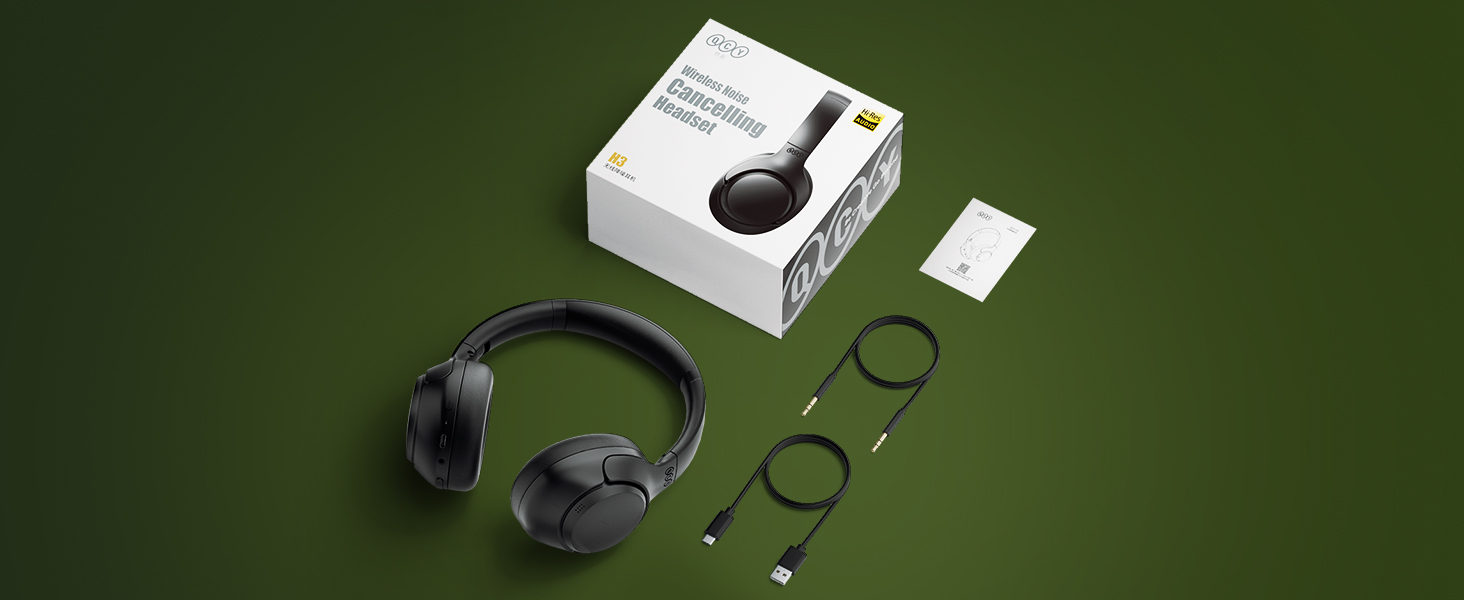
Image: Screenshots of the QCY mobile application interface, showing options for sound effects, noise canceling modes, and device settings.
6. Maintenance
Proper care will extend the life of your headphones.
- Cleaning: Use a soft, dry cloth to clean the earcups and headband. Do not use harsh chemicals or abrasive materials.
- Storage: Store the headphones in a cool, dry place, away from direct sunlight and extreme temperatures. If possible, use the original packaging or a protective case.
- Water Resistance: The headphones are water-resistant, but not waterproof. Avoid submerging them in water or exposing them to heavy rain.
- Battery Care: To preserve battery life, avoid fully discharging the headphones frequently. Charge them regularly, even if not in use for extended periods.
7. Troubleshooting
If you encounter issues with your QCY H3 ANC headphones, try the following solutions:
| Problem | Possible Cause | Solution |
|---|---|---|
| Headphones won't turn on. | Low battery. | Charge the headphones fully. |
| Cannot pair via Bluetooth. | Headphones not in pairing mode; device Bluetooth off; interference. | Ensure headphones are in pairing mode (flashing red/blue LED). Turn device Bluetooth off/on. Move closer to the device. |
| No sound or low volume. | Volume too low; incorrect audio source; headphones not connected. | Increase volume on headphones and device. Check Bluetooth connection. Ensure correct audio output is selected on your device. |
| ANC not working effectively. | Incorrect ANC mode; earcups not sealed properly. | Cycle through ANC modes. Adjust headphones for a snug fit over your ears. |
| Intermittent connection. | Distance from device; interference. | Move headphones closer to the connected device. Avoid obstacles between headphones and device. |
| Factory Reset | Software glitch or persistent issues. | Press and hold VOL+ and VOL- simultaneously for 10 seconds until the LED flashes, indicating a reset. Re-pair after reset. |
8. Specifications
| Feature | Detail |
|---|---|
| Model Name | QCY H3 ANC |
| Connectivity Technology | Wireless (Bluetooth 5.4) |
| Headphone Connector | 3.5 mm Jack |
| Noise Control | Active Noise Cancellation (ANC) up to 43 dB |
| Battery Life (ANC Off) | Up to 60 Hours |
| Battery Life (ANC On) | Up to 35 Hours |
| Charging Port | USB Type-C |
| Impedance | 32 Ohm |
| Sound Responsiveness | 99 dB |
| Microphone Technology | Omnidirectional |
| Material | Plastic |
| Weight | 390 g |
| Water Resistance Level | Water Resistant |
9. Warranty and Support
The QCY H3 ANC headphones come with a manufacturer's warranty. For specific warranty terms and conditions, please refer to the warranty card included in your package or visit the official QCY website.
For technical support, troubleshooting assistance, or any inquiries regarding your product, please contact QCY customer service through their official channels. Ensure you purchase from authorized sellers like "QCY BR Direct" on Amazon.com.br for valid warranty coverage.
Manufacturer: QCY
Warranty: 12 months manufacturer warranty (as per product specifications)
Official Store: QCY Store on Amazon.com.br
Ask a question about this manual
Ask about setup, troubleshooting, compatibility, parts, safety, or missing instructions. Manuals+ will review the question and use this page’s manual context to help answer it.