
KAPOEFAN FX5661H
KAPOEFAN FX5661H 60 Inch Low Profile Ceiling Fan with Light User Manual
Model: FX5661H
1. Introduction
This manual provides detailed instructions for the installation, operation, and maintenance of your KAPOEFAN FX5661H 60-inch low profile ceiling fan with integrated LED light. Please read this manual thoroughly before installation and use to ensure safe and efficient operation.
The KAPOEFAN FX5661H features a modern design with three solid wood blades, a quiet DC motor, and a dimmable LED light. It offers six wind speeds, a reversible motor for year-round use, and a timer function, all controllable via a remote.

Image 1.1: KAPOEFAN FX5661H Ceiling Fan in a living room setting.
2. Safety Information
Always follow basic safety precautions when installing and operating electrical appliances to reduce the risk of fire, electric shock, and personal injury.
- Ensure the power is turned off at the circuit breaker before installation or servicing.
- All electrical wiring must be performed by a qualified electrician and comply with local codes and regulations.
- The mounting structure must be capable of supporting the weight of the fan (approximately 15 pounds).
- Do not bend the blade holders during installation, balancing, or cleaning.
- Keep hands, tools, and other objects away from the fan blades when the fan is operating.
- This fan is designed for indoor and outdoor usage, but ensure it is protected from direct water exposure if used outdoors.
3. What's in the Box
Verify that all components are present before beginning installation:
- 1 x Reversible DC Motor
- 3 x Wooden Blades
- 1 x LED Integrated Light Kit
- 1 x Receiver and Accessory Kit
- 1 x Remote Control
- Instruction Manual
- Mounting Screws
- Acrylic Lampshade
- Canopy
- Lamp Plate

Image 3.1: Included components of the KAPOEFAN FX5661H ceiling fan.
4. Specifications
| Brand | KAPOEFAN |
| Model Name | FX5661H-60-OB-Ceiling Fan |
| Product Dimensions | 60"L x 60"W x 12.17"H |
| Item Weight | 15 Pounds |
| Material | Metal, Wood, Acrylonitrile Butadiene Styrene (Shade) |
| Number of Blades | 3 |
| Power Source | DC |
| Voltage | 120 Volts (DC) |
| Wattage | 35 watts |
| Light Source Type | LED |
| Brightness | 1600 Lumen (Max) |
| Color Temperature | Adjustable (3000K, 4000K, 6000K) |
| Control Method | Remote Control |
| Installation Type | Flush Mount |
| Special Features | 6 Wind Speeds, Adjustable Color Temperature, Remote Controlled, Reversible Wind Direction, Timer |
| Air Flow Capacity | 4821 Cubic Feet Per Minute |
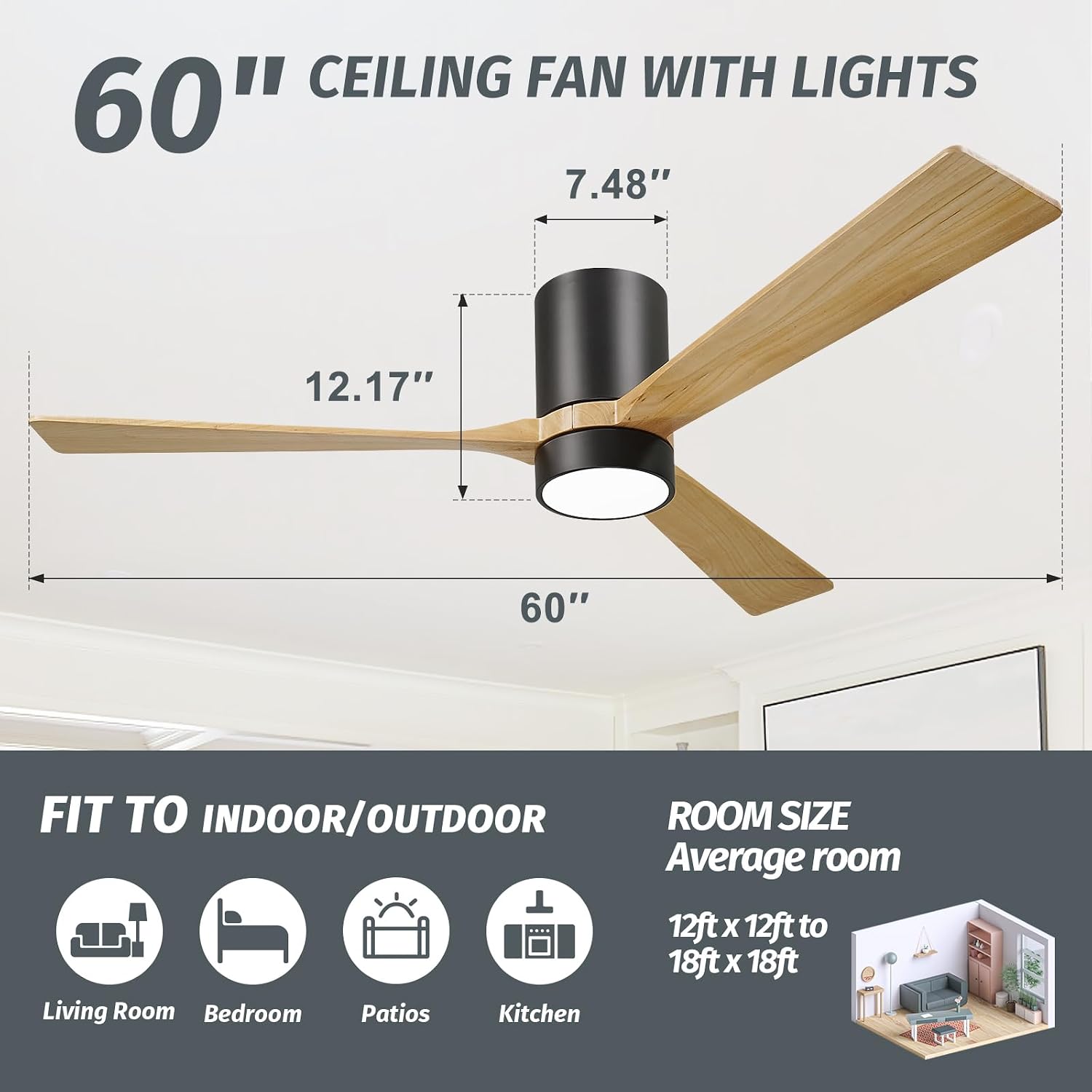
Image 4.1: Product dimensions and recommended room sizes.

Image 4.2: DC Motor power saving illustration.
5. Setup and Installation
Refer to the detailed installation instructions included in the packaging for step-by-step guidance. Ensure all safety precautions are followed.
5.1 Mounting
This fan is designed for flush mount installation. It is not compatible with sloped ceilings.

Image 5.1: Flush mount installation only; not suitable for sloped ceilings.
5.2 Wiring
The ceiling plate includes a hook and the motor assembly has a braided wire to support the fan during electrical connections, simplifying the wiring process. Connect the wires according to the provided wiring diagram in the instruction manual.
5.3 Blade Attachment
Attach the three wooden blades securely to the motor housing. Each blade is inspected for consistent shape and weight to prevent imbalance.

Image 5.2: Real wooden blades, balanced for optimal performance.
6. Operating Instructions
The KAPOEFAN FX5661H ceiling fan is operated using the included remote control.
6.1 Remote Control Functions

Image 6.1: Remote control functions overview.
- Fan Speed: Select from 6 wind speeds (1-2 for sleep, 3-4 for work, 5-6 for sport/high airflow).
- Light Control: Turn the LED light on/off and cycle through three color temperatures (3000K Warm Light, 4000K Neutral Light, 6000K Cold Light). The light will restore to its last setting if turned off for 10 seconds and then on again.
- Brightness Control: Adjust the light brightness from 10% to 100%.
- Timer: Set the fan to turn off automatically after 1, 2, 4, or 8 hours.
- Summer/Winter Mode (Reversible Motor): Change the direction of the fan blades to optimize airflow for different seasons. In summer, the fan rotates counter-clockwise to push air down, creating a cooling effect. In winter, it rotates clockwise to draw cool air up, circulating warm air.

Image 6.2: Summer and Winter airflow modes.

Image 6.3: Customizable light with three color temperatures.

Image 6.4: Recommended fan speeds for various activities.

Image 6.5: Ultra-quiet operation with DC motor.
7. Maintenance
Regular maintenance ensures the longevity and optimal performance of your ceiling fan.
- Cleaning: To clean the fan, wipe with a soft, damp cloth. Do not use abrasive cleaners or solvents, as these may damage the finish or electrical components.
- Blade Inspection: Periodically check the fan blades for any signs of damage or looseness. Ensure all screws are tightened.
- Light Fixture: The LED light kit is integrated. If the light malfunctions, contact customer support.
8. Troubleshooting
If you encounter issues with your ceiling fan, refer to the following common problems and solutions:
| Problem | Possible Cause | Solution |
|---|---|---|
| Fan does not start | No power, loose wiring, remote control issue. | Check circuit breaker. Ensure all connections are secure. Replace remote batteries. |
| Light does not work | Loose wiring, LED module failure. | Check light kit wiring. If issue persists, contact customer support. |
| Fan wobbles | Loose blades, unbalanced blades, improper mounting. | Ensure all blade screws are tight. Verify mounting bracket is secure. |
| Remote control not responding | Dead batteries, signal interference. | Replace remote batteries. Ensure no obstructions between remote and receiver. |
| Fan makes clicking noise | Loose components, motor issue. | Check for any loose screws or parts. If noise persists, contact customer support. |
9. Warranty and Support
This KAPOEFAN ceiling fan comes with a Limited Warranty. Please refer to the warranty card included in your packaging for specific terms and conditions.
For any installation, operation, or troubleshooting assistance not covered in this manual, please contact KAPOEFAN customer support. Contact information can typically be found on the product packaging or the official KAPOEFAN website.
Ask a question about this manual
Ask about setup, troubleshooting, compatibility, parts, safety, or missing instructions. Manuals+ will review the question and use this page’s manual context to help answer it.