
Introduction
This manual provides essential information for the safe and efficient operation, installation, and maintenance of your Big Ass Fans i6 Smart Indoor Ceiling Fan. Please read all instructions carefully before installation and use. Retain this manual for future reference.
Safety Information
WARNING: To reduce the risk of fire, electric shock, or injury to persons, observe the following:
- Installation must be performed by a qualified electrician in accordance with all local and national electrical codes.
- Disconnect power at the circuit breaker before installation or servicing.
- Ensure the mounting structure can support the weight of the fan.
- Do not operate the fan with damaged blades or any visible defects.
- Keep hands, clothing, and other objects clear of rotating fan blades.
- This fan is designed for indoor use only.
Package Contents
Verify that all components are present before beginning installation:
- Fan Motor Assembly
- Fan Blades (3)
- Downrod and Canopy
- Mounting Bracket
- Remote Control
- Wall Control (optional, may be included)
- Hardware Pack (screws, washers, wire nuts)
- Installation Manual
Setup and Installation
Professional installation is recommended for optimal safety and performance. Refer to the detailed installation guide included in your fan packaging for step-by-step instructions.
- Prepare the Mounting Location: Ensure the ceiling joist or support structure is capable of supporting the fan's weight.
- Install the Mounting Bracket: Securely attach the mounting bracket to the ceiling electrical box and support structure.
- Assemble the Downrod and Fan Motor: Attach the downrod to the fan motor assembly.
- Wire the Fan: Connect the electrical wiring according to the provided wiring diagram.
- Attach the Fan Blades: Securely fasten the three fan blades to the motor housing.
- Install the Canopy: Slide the canopy up to cover the mounting bracket and wiring.
- Power On and Test: Restore power and test all fan functions.

Figure 1: The Big Ass Fans i6 Smart Indoor Ceiling Fan (72", White) installed on a ceiling.

Figure 2: A top-down view showcasing the three aerodynamic blades of the i6 fan.
Operating Instructions
Your i6 fan can be controlled via the included remote control, an optional wall control, or through the SenseME™ app on your smartphone.
Remote Control / Wall Control
The remote and wall control (if applicable) allow for direct adjustment of fan speed and light settings.

Figure 3: The wall-mounted control panel for the i6 fan, featuring fan speed and light controls, including 'Auto' modes.
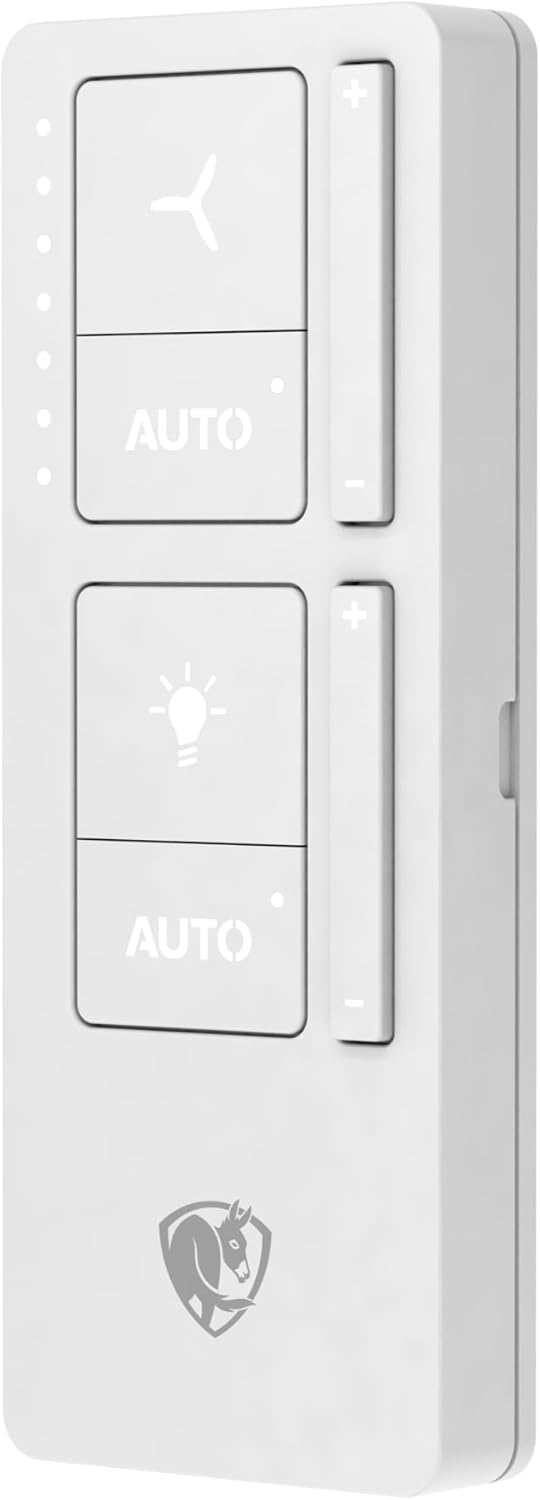
Figure 4: The handheld remote control for the i6 fan, providing convenient access to fan speed and light adjustments.
- Fan Speed: Use the '+' and '-' buttons next to the fan icon to increase or decrease fan speed. The LED indicators show the current speed level.
- Light Control: Use the '+' and '-' buttons next to the light bulb icon to adjust light brightness.
- Auto Mode (Fan/Light): Press the 'AUTO' button below the fan or light icon to enable SenseME™ technology, which automatically adjusts fan speed or light based on occupancy and environmental conditions.
SenseME™ App Control
Download the SenseME™ app from your device's app store to unlock advanced features and control your fan from anywhere.
- Pairing: Follow the in-app instructions to pair your fan with your smartphone.
- Customization: Set schedules, adjust fan direction (forward/reverse), and fine-tune SenseME™ preferences.
- Voice Control: Integrate with smart home systems for voice-activated control.
Maintenance
Regular maintenance ensures optimal performance and longevity of your fan.
- Cleaning: Dust the fan blades and motor housing periodically with a soft, damp cloth. Do not use abrasive cleaners.
- Blade Inspection: Check blades for any cracks or damage. Replace damaged blades immediately.
- Tightness of Fasteners: Periodically check all screws and fasteners to ensure they are tight.
- No Lubrication Required: The fan's motor is permanently lubricated and does not require additional oiling.
Troubleshooting
| Problem | Possible Cause | Solution |
|---|---|---|
| Fan does not start | No power to the fan; Loose wiring; Remote/wall control battery low. | Check circuit breaker; Verify wiring connections; Replace batteries. |
| Fan wobbles | Loose blades; Improper mounting; Unbalanced blades. | Tighten blade screws; Re-check mounting; Use balancing kit (if provided). |
| Light does not work | Loose wiring; Faulty LED module. | Check light wiring; Contact customer support for replacement. |
| Remote/App not responding | Interference; Not paired; App issue. | Move closer to fan; Re-pair remote/app; Restart app/device. |
Specifications
- Brand: Big Ass Fans
- Model Name: i6 By Big Ass Fans
- Model Number: i6
- Size: 72"
- Color: White
- Electric Fan Design: Ceiling Fan
- Power Source: DC
- Style: Modern
- Product Dimensions: 60"D x 60"W x 28.8"H (Note: The 72" refers to the blade span, while the listed dimensions may represent the fan body or a different configuration.)
- Room Type: Living Room (Suitable for various indoor spaces)
- Special Feature: SenseME™ Technology
- Mounting Type: Ceiling Mount (Hardwired)
- Controller Type: Remote Control
- Wattage: 42.2 watts
- Number of Blades: 3
- Indoor Outdoor Usage: Indoor
- Motor Type: Brushless DC Motor
- Material: Plastic (Blades)
- UPC: 810013333350
About Big Ass Fans
Big Ass Fans is dedicated to engineering fans that are uncompromising in quality, durability, and performance. Our mission is to build fans that create safer, healthier, and more productive environments with cool and comforting airflow.
Video 1: An overview of Big Ass Fans' commitment to quality, engineering, and manufacturing processes, highlighting their dedication to creating superior air movement solutions.
Warranty and Support
Big Ass Fans products are backed by a manufacturer's warranty. For specific warranty details, registration, or technical support, please visit the official Big Ass Fans website or contact their customer service department.
Online Support: www.bigassfans.com/support
Contact: Refer to the Big Ass Fans website for current contact information.


