
1. Introduction
The BSIDE S30 is a new generation smart digital multimeter designed for enhanced convenience, functionality, and efficiency in electrical measurements. It features an intelligent mode for automatic detection of measurement types, a high-speed chip for faster testing, and a large color LCD for clear readability.
Key features include:
- Automatic and manual measurement of AC/DC Voltage, AC/DC Current, Resistance, Frequency, and Continuity.
- High-voltage and low-voltage diode testing.
- Fast capacitance measurement.
- Integrated infrared thermometer for non-contact temperature measurement.
- Non-Contact Voltage (NCV) detection and Live Wire identification.
- Dual power system: rechargeable lithium battery and AAA batteries.
- Built-in ceramic anti-burn fuse for safety.
- Laser pointer and flashlight for convenience.

Figure 1: The BSIDE S30 Multimeter features a vibrant color LCD display, enhancing the reading experience with large, stable, and accurate measurements, even in challenging lighting conditions.
2. What's in the Box
Please check the package contents upon receipt:
- BSIDE S30 Digital Multimeter (Red)
- Test Leads (Red and Black)
- Charging Cable
- Protective Case
- User Manual

Figure 2: The BSIDE S30 Multimeter package includes the device, test leads, charging cable, protective case, and user manual.
3. Safety Information
WARNING: Read and understand all safety information and operating instructions before using this multimeter. Failure to follow these instructions may result in electric shock, fire, or serious injury.
- Always ensure the test leads are properly connected and in good condition before use.
- Do not exceed the maximum input values specified for each function.
- Exercise extreme caution when working with voltages above 30V AC RMS, 42V peak, or 60V DC. These voltages pose a shock hazard.
- Do not use the multimeter if it appears damaged or if the protective case is removed.
- Replace the battery immediately when the low battery indicator appears.
- Ensure the correct function is selected for the measurement being performed.
- Do not attempt to measure current on circuits with voltage exceeding the maximum input for current measurement.
- Use caution when using the infrared thermometer; do not point the laser directly at eyes.
4. Setup
4.1. Unboxing and Protective Case Installation
Carefully remove the multimeter from its packaging. The device comes with a protective silicone case. To install, gently slide the multimeter into the case, ensuring all buttons and ports align correctly.
4.2. Powering the Device
The BSIDE S30 features a dual power system:
- Rechargeable Lithium Battery: The device includes a built-in 1200mAh rechargeable lithium battery. Use the provided charging cable to charge the device via a standard USB power source.
- AAA Batteries: In case the rechargeable battery is low or depleted, the multimeter can automatically switch to using 2 AAA batteries (not included). To install AAA batteries, open the battery compartment on the back of the device and insert them with correct polarity.

Figure 3: The BSIDE S30 Multimeter supports a dual power system, allowing operation with its internal rechargeable lithium battery or external AAA alkaline batteries.
4.3. Connecting Test Leads
Insert the black test lead into the 'COM' (Common) input jack. Insert the red test lead into the 'INPUT' jack for voltage, resistance, frequency, capacitance, and diode measurements. For current measurements, insert the red test lead into the 'A' (Ampere) jack.
4.4. Power On/Off
Press and hold the power button (⏻) located at the top of the device to turn it on or off. The device will enter 'AUTO' mode upon startup.
Video 1: This video demonstrates the unboxing, installation of the protective case, connection of test leads, and initial power-on sequence of the BSIDE S30 Multimeter.
5. Operating Modes
The BSIDE S30 offers both automatic and manual measurement modes. In 'AUTO' mode, the multimeter intelligently identifies the measurement type (voltage, resistance, continuity) and displays the result.
5.1. Automatic Measurement (AUTO)
When powered on, the multimeter defaults to 'AUTO' mode. In this mode, it automatically detects and measures AC/DC voltage, resistance, and continuity. Simply connect the test leads to the circuit or component, and the device will display the appropriate reading.
5.2. Voltage Measurement (AC/DC)
To measure voltage, ensure the red test lead is in the 'INPUT' jack and the black lead in 'COM'. The multimeter will automatically detect AC or DC voltage in 'AUTO' mode. For manual selection, press the 'SEL' button to cycle through modes until the voltage icon (V) is displayed.

Figure 4: The BSIDE S30 Multimeter performing an AC voltage measurement, displaying both voltage and frequency. This is ideal for electrician maintenance tasks.
5.3. Current Measurement (AC/DC)
For current measurement, move the red test lead to the 'A' (Ampere) jack and the black lead to 'COM'. The S30 can automatically switch to AC/DC ampere test mode when the leads are plugged into the amp port. Connect the multimeter in series with the circuit to measure current.
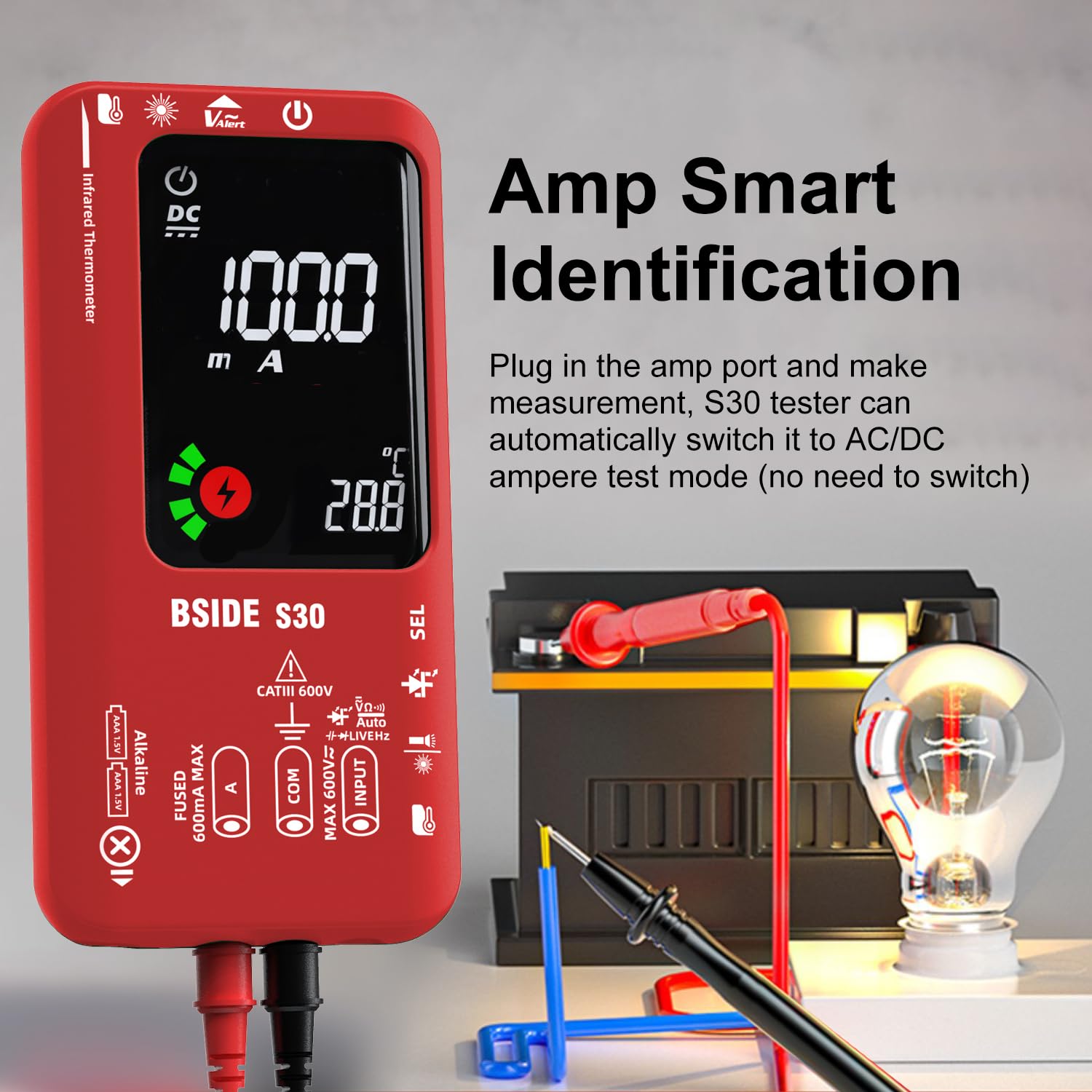
Figure 5: The BSIDE S30 Multimeter demonstrating its Amp Smart Identification feature, automatically switching to AC/DC ampere test mode when the test leads are connected to the appropriate ports for current measurement.
5.4. Resistance Measurement
In 'AUTO' mode, the multimeter will automatically measure resistance when the test leads are connected across a component. For manual selection, press 'SEL' until the Ohm (Ω) symbol appears.
5.5. Capacitance Measurement
The S30 can measure capacitance quickly. Connect the test leads to the capacitor terminals. The device will display the capacitance value in microfarads (μF). For manual selection, press 'SEL' until the capacitance symbol (μF) appears.

Figure 6: The BSIDE S30 Multimeter measuring capacitance, a common task in electronic maintenance and repair.
5.6. Frequency Measurement
Frequency can be measured in conjunction with AC voltage. The frequency (Hz) will be displayed alongside the AC voltage reading. For manual selection, press 'SEL' until the frequency symbol (Hz) appears.
5.7. Diode Test
The S30 supports both low-voltage (less than 2V) and high-voltage (up to 15V) diode testing. Connect the test leads across the diode. The device will display the forward voltage drop. This feature is useful for testing rectifiers, Zener diodes, and even powering small LEDs.

Figure 7: The BSIDE S30 Multimeter performing a high-voltage diode test, capable of testing diodes up to 15V.
5.8. NCV (Non-Contact Voltage) and Live Wire Detection
The NCV function allows for non-contact detection of AC voltage, indicated by a buzzer and visual alert. The live wire detection feature uses a single probe to identify live electrical wires.
5.9. Infrared Thermometer
The integrated infrared thermometer allows for non-contact temperature measurement. Point the device towards the object, and it will display both real-time and maximum temperatures. The laser pointer assists in targeting. This is useful for checking hot spots in electrical systems or components.

Figure 8: The BSIDE S30 Multimeter utilizing its integrated infrared thermometer function to measure temperature without physical contact, displaying the real-time and maximum temperature readings.
6. Maintenance
6.1. Cleaning
Wipe the device with a damp cloth and mild detergent. Do not use abrasives or solvents. Ensure the device is completely dry before use.
6.2. Battery Charging and Replacement
Charge the internal lithium battery regularly using the provided USB cable. If using AAA batteries, replace them when the low battery indicator appears on the display. Always use new batteries of the correct type and polarity.
6.3. Fuse Replacement
The BSIDE S30 is equipped with a ceramic anti-burn fuse. If the current measurement function stops working, the fuse may need replacement. Refer to the full user manual for detailed instructions on accessing and replacing the fuse. Always use a fuse with the specified rating (600mA MAX).
7. Troubleshooting
- Device does not power on: Check if the rechargeable battery is charged or if the AAA batteries are correctly installed and not depleted.
- "OL" displayed: This indicates an over-range condition. The measured value exceeds the device's maximum range for the selected function.
- Inaccurate readings: Ensure test leads are properly connected, the correct function is selected, and the component/circuit is within the device's measurement range. Clean test lead tips if corroded.
- No current measurement: Check the fuse. If blown, replace it with a fuse of the correct rating.
- Infrared thermometer not working: Ensure the laser pointer is enabled (if applicable) and the target is within the specified distance-to-spot ratio (4:1).
8. Specifications
| Feature | Specification |
|---|---|
| Display | 9999 Counts, EBTN Color LCD |
| DC Voltage | 0-620V, 0.001V ±(1.0%+3) |
| AC Voltage | 0-620V, 0.001V ±(1.0%+3) |
| DC Current | 1-610mA, 0.1mA ±(1.5%+3) |
| AC Current | 1-610mA (40-200Hz), 0.1mA ±(2.0%+3) |
| Resistance | 0-9.999MΩ, 0.1Ω ±(1.2%+3) |
| Infrared Thermometer | -20°C to 400°C, 0.1°C ±(3.0%+2°C), D:S Ratio 4:1 |
| Capacitance | 0.5μF-9999μF, 0.1μF ±(3.5%+8) |
| Frequency | 10-1000Hz, 0.1Hz ±(1.0%+5) |
| NCV | Yes |
| Live Wire Check | Yes |
| Continuity | Yes |
| Diode Test | Low Voltage (<2V), High Voltage (up to 15V) |
| Power Supply | 3.7V Rechargeable Lithium Battery / AAA Batteries |
| Dimensions | 16.1 x 7.8 x 2.2 cm |
| Weight | 245 g |
| Material | ABS and Silicone |
9. Warranty and Support
BSIDE products are manufactured to high-quality standards. For warranty information, technical support, or service inquiries, please refer to the contact details provided with your purchase or visit the official BSIDE website. Keep your purchase receipt as proof of purchase.


