
Introduction
Thank you for choosing the SENTRY OSH140 Wired USB-C Over-Ear Headphones. These headphones are designed to provide a high-quality audio experience with the convenience of a direct USB-C connection. Featuring 40mm drivers and studio-grade earpads for noise isolation, they deliver clear, balanced sound. The integrated inline microphone allows for hands-free communication, and the collapsible design with an included protective case ensures portability and durability.
What's in the Box
- SENTRY OSH140 Wired USB-C Over-Ear Headphones
- Deluxe Hard Case

Figure 1: Front view of SENTRY OSH140 Wired USB-C Over-Ear Headphones.

Figure 2: SENTRY OSH140 headphones showing the inline controls on the cable.

Figure 3: SENTRY OSH140 headphones folded, next to the included protective hard case.
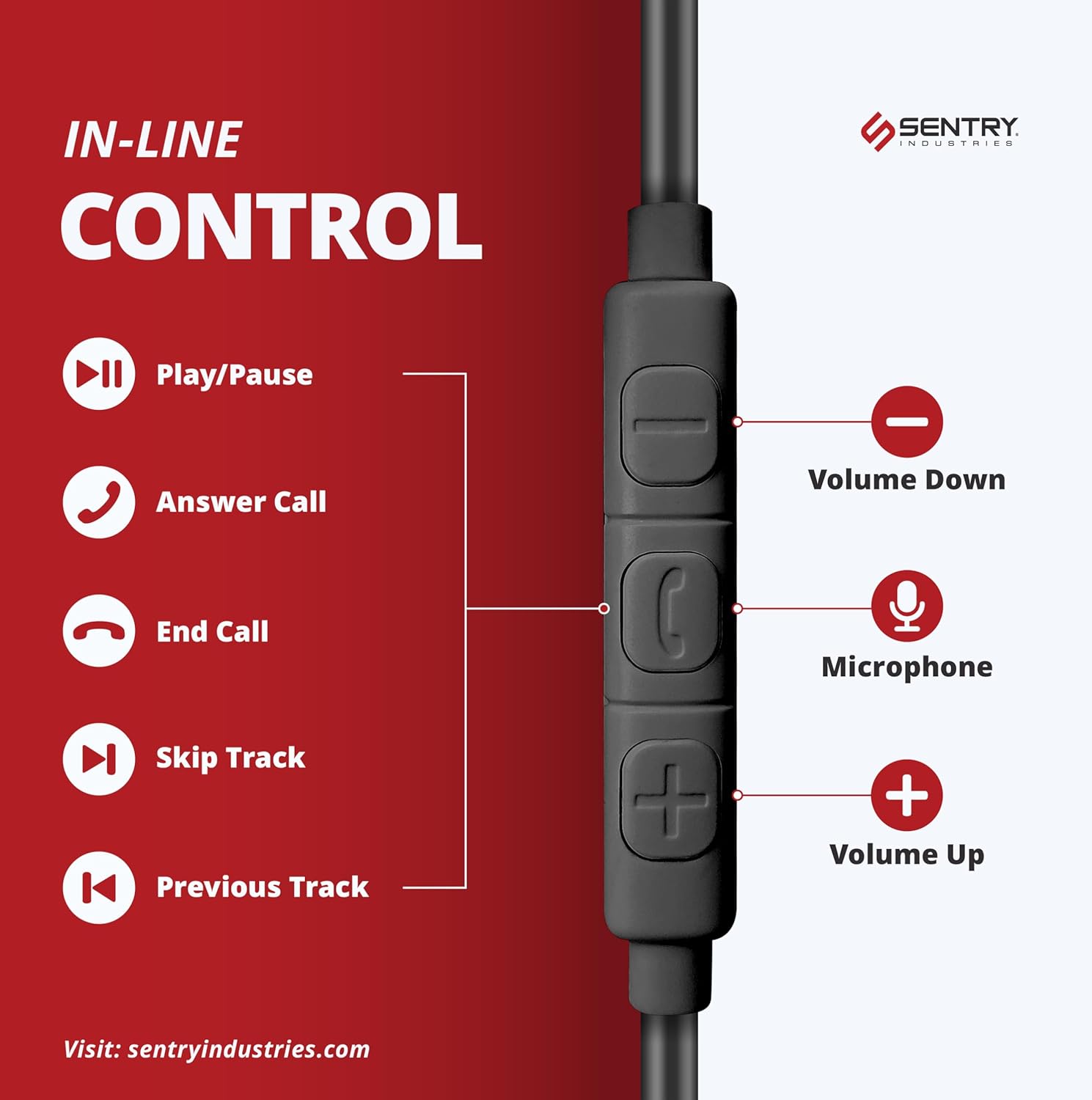
Figure 4: SENTRY OSH140 headphones neatly stored inside their deluxe hard case.
Setup
- Unpack: Carefully remove the headphones and the deluxe hard case from the packaging.
- Unfold: Gently unfold the earcups from their collapsed position until the headband is fully extended.
- Connect: Insert the USB-C connector of the headphone cable directly into the USB-C port of your compatible device (e.g., cellphone, desktop, Mac, iPad, Switch, MP3 player). No additional drivers or software are typically required for basic audio functionality.
- Adjust: Place the headphones over your ears, ensuring the soft earpads fully cover them. Adjust the headband for a comfortable and secure fit.
Operating Instructions
The SENTRY OSH140 headphones feature an inline remote with a built-in microphone for convenient control of your audio and calls.

Figure 5: Diagram illustrating the functions of the inline control buttons.
Audio Control:
- Play/Pause: Press the center button once.
- Next Track: Press the center button twice quickly.
- Previous Track: Press the center button three times quickly.
- Volume Up: Press the '+' button.
- Volume Down: Press the '-' button.
Call Control:
- Answer/End Call: Press the center button once during an incoming call or to end an active call.
- Reject Call: Press and hold the center button for approximately 2 seconds during an incoming call.
- Microphone: The built-in microphone is automatically active during calls.
Maintenance
- Cleaning: Use a soft, dry cloth to clean the headphones. Do not use liquid cleaners or sprays.
- Storage: When not in use, fold the headphones and store them in the provided deluxe hard case to protect them from dust, scratches, and damage.
- Cable Care: Avoid sharp bends or excessive pulling on the USB-C cable to prevent internal damage.
- Water Resistance: These headphones are not water resistant. Avoid exposure to moisture or liquids.
Troubleshooting
| Problem | Solution |
|---|---|
| No sound from headphones. |
|
| Microphone not working. |
|
| Sound quality is poor. |
|
Specifications
| Feature | Detail |
|---|---|
| Model Name | OSH140 |
| Connectivity Technology | Wired USB-C |
| Headphones Jack | USB-C |
| Audio Driver Type | Dynamic Driver |
| Driver Size | 40mm |
| Impedance | 32 Ohms |
| Frequency Response | 20 KHz (Note: The provided data states 20 KHz, which is typically the upper limit of human hearing. A full range would be 20Hz-20kHz) |
| Sensitivity | 110 dB |
| Noise Control | Sound Isolation (via Studio Grade Earpads) |
| Microphone | Inline Mic |
| Control Type | Media Control (Inline Remote) |
| Earpiece Shape | Over-Ear |
| Material | Plastic (Headphones), Nylon (Carrying Case) |
| Color | Black |
| Product Dimensions | 3.75 x 0.75 x 6.75 inches |
| Item Weight | 1.5 Ounces |
| Water Resistance Level | Not Water Resistant |
| Compatible Devices | Cellphones, Desktop, Mac, iPad, Switch, MP3 |
Warranty and Support
Sentry Industries provides an extensive 90-day warranty on all products, offering free replacements within this period. For any product inquiries, technical support, or warranty claims, please contact Sentry Industries customer service through their official website or the retailer where the product was purchased.
For additional information, please visit the SENTRY Store on Amazon.
Product Overview Video
Video 1: An official product overview of the Sentry OSH140 Over-Ear USB-C Headphones, provided by Amazon Videos (Seller).