
1. Introduction
Thank you for choosing the EuropAce EPU 5550Z Smart WiFi Air Purifier. This manual provides essential information for the safe and efficient use of your air purifier. Please read it thoroughly before operation and retain it for future reference.
2. Safety Information
To reduce the risk of fire, electric shock, or injury, always follow basic safety precautions:
- Ensure the power supply voltage matches the rating label on the appliance.
- Do not operate the air purifier with a damaged cord or plug.
- Keep the air inlet and outlet clear of obstructions.
- Do not immerse the appliance in water or other liquids.
- Unplug the air purifier before cleaning or performing any maintenance.
- This appliance is not intended for use by persons with reduced physical, sensory, or mental capabilities unless supervised.
3. Product Overview
Familiarize yourself with the components of your EuropAce EPU 5550Z air purifier.

Figure 3.1: Front View. This image displays the front of the EuropAce EPU 5550Z air purifier, highlighting its control panel with digital display and air intake grille.

Figure 3.2: Side View. This image shows a side profile of the EuropAce EPU 5550Z air purifier, illustrating its compact design and the integrated handle.

Figure 3.3: Back View. This image presents the rear of the EuropAce EPU 5550Z air purifier, showing the power cord connection point and the overall casing.
Control Panel Functions:
- Power Button: Turns the unit on or off.
- Mode Button: Cycles through different operating modes (e.g., Auto, Sleep, Manual Fan Speed).
- Timer Button: Sets the operating duration.
- WiFi Indicator: Shows the status of the WiFi connection.
- Filter Reset Indicator: Illuminates when filter replacement is needed.
- Digital Display: Shows air quality readings, fan speed, and timer settings.
4. Setup
4.1 Unpacking
- Carefully remove the air purifier from its packaging.
- Remove all protective plastic films and packaging materials.
- Inspect the unit for any damage. If damaged, do not operate and contact customer support.
4.2 Filter Installation
The EPU 5550Z uses a Medical Grade HEPA 13 filtration system. The filter may come pre-installed but wrapped in protective plastic. Ensure this plastic is removed before first use.
- Turn the air purifier upside down.
- Twist the base cover counter-clockwise to unlock and remove it.
- Carefully remove the filter assembly.
- Remove any plastic packaging from the filter.
- Insert the filter back into the unit, ensuring it is seated correctly.
- Replace the base cover and twist clockwise to lock it securely.
4.3 Placement
Place the air purifier on a firm, level surface. For optimal performance, ensure there is at least 20 cm (8 inches) of clear space around the air inlet and outlet.
4.4 Power Connection
Plug the power cord into a suitable electrical outlet. The unit will enter standby mode.
4.5 WiFi Setup (Smart WiFi Function)
To utilize the smart features, download the EuropAce Smart app from your mobile app store. Follow the in-app instructions to connect your air purifier to your home WiFi network. This allows for remote control and monitoring.
5. Operating Instructions
5.1 Power On/Off
Press the Power Button once to turn the unit on. Press it again to turn the unit off.
5.2 Mode Selection
Press the Mode Button to cycle through the available operating modes:
- Auto Mode: The air purifier automatically adjusts fan speed based on detected air quality.
- Sleep Mode: Operates at the lowest fan speed with reduced light output for quiet operation.
- Manual Fan Speed: Allows you to manually select a desired fan speed level.
5.3 Timer Function
Press the Timer Button repeatedly to set the desired operating time (e.g., 1 hour, 2 hours, 4 hours, 8 hours). The unit will automatically turn off after the set time.
5.4 Child Lock
To activate the child lock, press and hold the Mode Button for 3 seconds. The control panel will be locked to prevent accidental changes. Repeat the action to deactivate.
5.5 Filter Reset Indicator
When the Filter Reset Indicator illuminates, it signifies that the filter needs replacement. After replacing the filter, press and hold the Filter Reset Button (if available, or a combination of buttons as per specific model instructions) for 3-5 seconds to reset the filter lifetime counter.
6. Maintenance
Regular maintenance ensures optimal performance and extends the lifespan of your air purifier.
6.1 Filter Replacement
The HEPA 13 filter has a limited lifespan. Replace the filter when the filter reset indicator illuminates, typically every 6-12 months depending on usage and air quality.
- Unplug the air purifier from the power outlet.
- Follow the steps in Section 4.2 to remove the old filter.
- Dispose of the old filter responsibly.
- Install a new, genuine EuropAce replacement filter, ensuring all packaging is removed.
- Replace and lock the base cover.
- Plug in the unit and reset the filter indicator as described in Section 5.5.
6.2 Cleaning the Exterior
Wipe the exterior of the air purifier with a soft, dry cloth. Do not use abrasive cleaners, waxes, or solvents.
6.3 Sensor Cleaning
Periodically clean the air quality sensor (usually located on the side or back of the unit) with a dry cotton swab to ensure accurate readings.
7. Troubleshooting
If you encounter issues, refer to the following table for common problems and solutions.
| Problem | Possible Cause | Solution |
|---|---|---|
| Unit does not power on. | No power supply. Power cord not connected. | Check power cord connection. Ensure outlet is functional. |
| Poor air purification. | Filter is dirty or clogged. Air inlets/outlets blocked. | Replace filter. Clear any obstructions. |
| Unusual noise. | Foreign object inside. Unit not on a level surface. | Unplug and check for obstructions. Place on a stable surface. |
| WiFi connection fails. | Incorrect WiFi password. Router too far. App issue. | Verify password. Move unit closer to router. Restart app/router. |
| Filter indicator remains on after replacement. | Filter reset not performed. | Perform filter reset as per Section 5.5. |
8. Specifications
Detailed technical specifications for the EuropAce EPU 5550Z Smart WiFi Air Purifier:
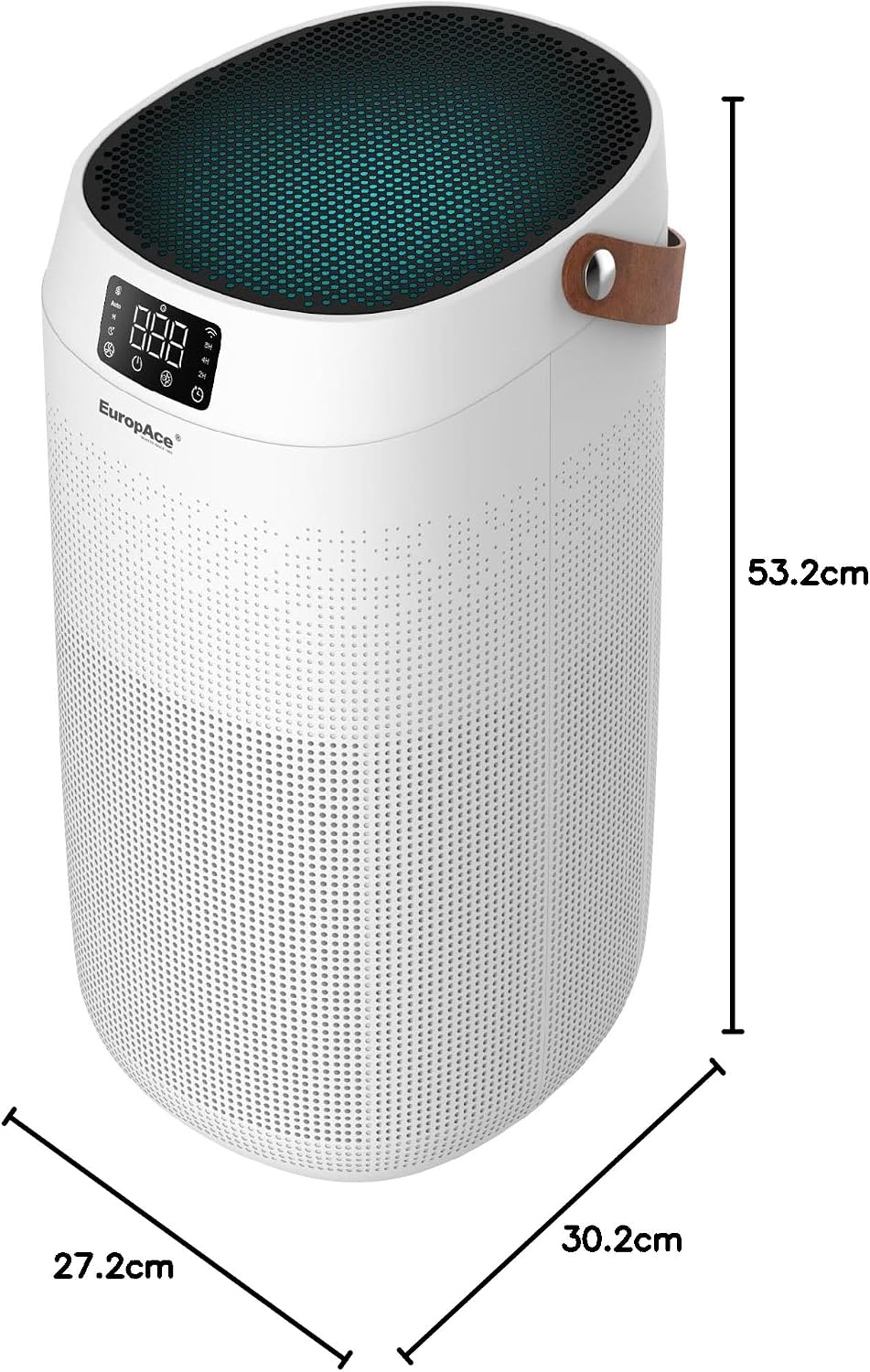
Figure 8.1: Product Dimensions. This image illustrates the height, width, and depth measurements of the EuropAce EPU 5550Z air purifier.
- Model Number: EPU 5550Z
- Brand: EuropAce
- Colour: White
- Product Dimensions (D x W x H): 27.2D x 30.2W x 53.2H centimetres
- Item Weight: 5 Kilograms
- Filter Type: HEPA 13 (Medical Grade)
- Floor Area Coverage: Up to 1420 Square Feet
- CADR (Clean Air Delivery Rate): 550 m³/h
- Included Components: Air Purifier, HEPA Filter
9. Warranty and Support
EuropAce products are designed for reliability and performance. For warranty information, please refer to the warranty card included with your purchase or visit the official EuropAce website. For technical support or service inquiries, please contact EuropAce customer service through their official channels.
