
Redragon HL360
Redragon HL360 ARGB Liquid Cooling System User Manual
Model: HL360
Introduction
This manual provides detailed instructions for the installation, operation, and maintenance of your Redragon HL360 ARGB Liquid Cooling System. Designed for high-performance CPU cooling, this system features a powerful pump, efficient radiator, and customizable ARGB lighting.

Image: Overview of the Redragon HL360 ARGB Liquid Cooling System, showcasing the radiator, three 120mm fans, and the CPU pump with its distinctive infinity mirror design.
Key Features
- High-Efficiency Pump: Equipped with a ceramic-bearing FDB pump and a high-torque motor, delivering robust cooling performance.
- Quiet Operation: Engineered for low noise levels, with the pump operating quietly and fans designed for minimal acoustic output (20 dBA).
- ARGB Illumination: Features an addressable infinity mirror effect on the pump and ARGB PWM fans for customizable lighting synchronization with compatible motherboards.
- FDB PWM Fans: Three 120mm fans with Fluid Dynamic Bearings (FDB) offer adjustable speed (up to 2000 RPM) and efficient airflow.
- Wide Compatibility: Supports various Intel (LGA 1700) and AMD (AM5) motherboard platforms.
- Reinforced Tubing: Durable EPDM tubing with black outer sleeving ensures flexibility, durability, and anti-leak protection.

Image: Detailed specifications for the pump and fans, highlighting efficiency, noise level, and airflow capabilities.

Image: The pump head displaying its splendid infinity mirror effect with addressable dynamic RGB lighting, compatible with major motherboard RGB synchronization software.
Package Contents
Verify that all components are present before proceeding with installation:
- Radiator (360mm)
- Cooling Fans (3 x 120mm PWM ARGB FDB Fans)
- CPU Water Block/Pump Assembly
- Mounting Hardware Kit (for Intel LGA 1700 and AMD AM5 platforms)
- Thermal Paste
- User Manual
Installation Guide
Before beginning installation, ensure your system is powered off and disconnected from the power source. Refer to your motherboard manual for specific CPU cooler mounting instructions if necessary.
1. Preparation
- Identify the correct mounting brackets for your CPU socket (Intel LGA 1700 or AMD AM5).
- Clean the CPU surface thoroughly to remove any old thermal paste.
- Apply a small amount of thermal paste to the center of the CPU's integrated heat spreader (IHS).
2. Mounting the Radiator and Fans
Attach the three 120mm fans to the radiator using the provided screws. Ensure the fan orientation is correct for desired airflow (intake or exhaust) within your PC case. Mount the radiator assembly to an available 360mm fan mount location in your PC case (e.g., top, front, or side).
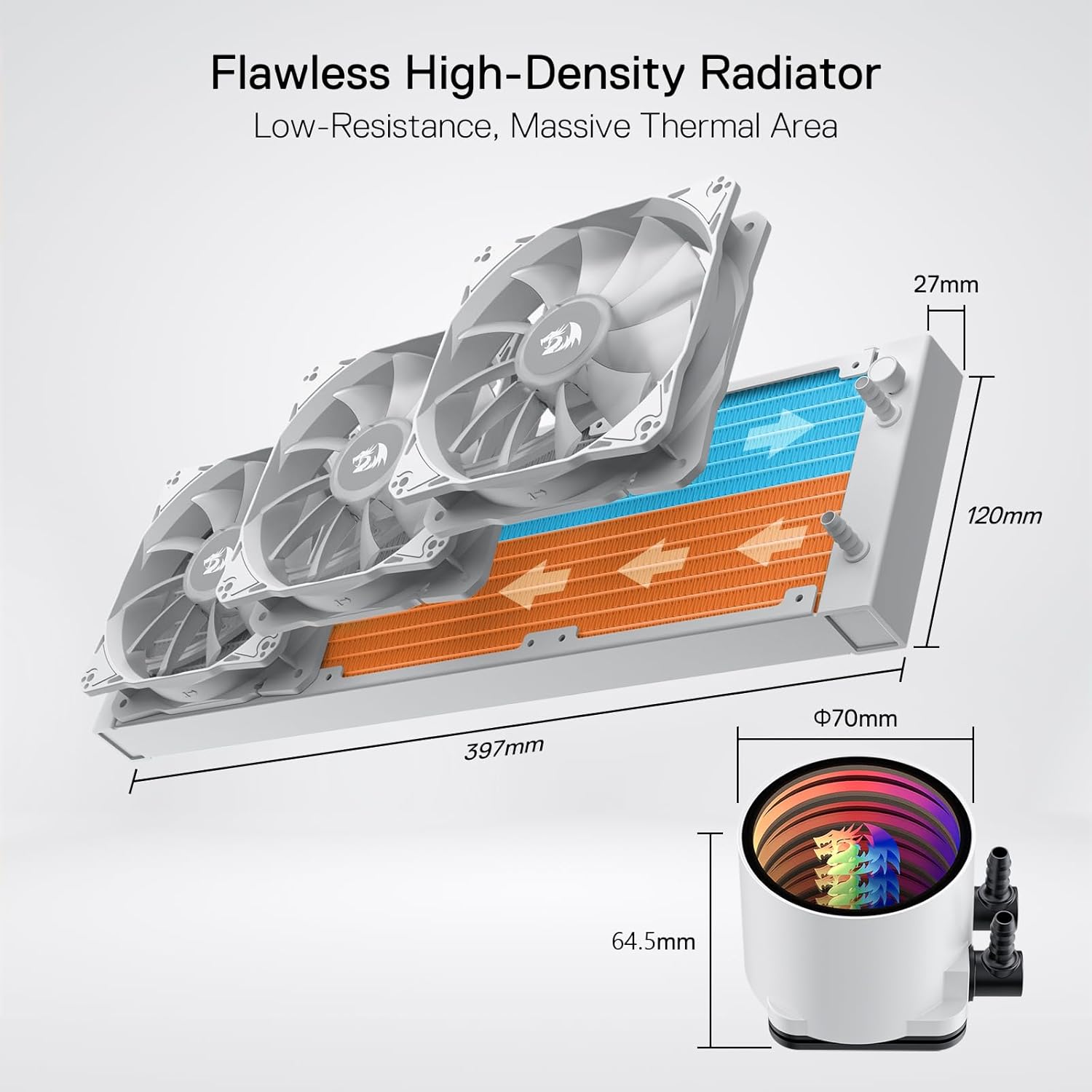
Image: Radiator and pump dimensions for installation planning.
3. Mounting the Pump/Cold Plate
Secure the CPU water block/pump assembly onto the CPU socket using the appropriate mounting hardware. Tighten screws evenly in a cross pattern to ensure proper contact and pressure.

Image: The delicate copper base craftsmanship of the water block, designed with micro-flow channels for rapid heat transfer.
4. Connecting Cables
Connect the pump's 3-pin power connector to the CPU_FAN or AIO_PUMP header on your motherboard. Connect the fan PWM cables to available fan headers, and the ARGB cables to a compatible 3-pin 5V ARGB header on your motherboard. Ensure all connections are secure.

Image: Fan and ARGB cable connections for proper power and lighting control.

Image: The Redragon HL360 ARGB Liquid Cooling System fully installed within a computer chassis, demonstrating its aesthetic integration and cable routing.
Operation
ARGB Control
The ARGB lighting on the pump and fans can be controlled via your motherboard's RGB synchronization software (e.g., ASUS Aura Sync, Gigabyte RGB Fusion, MSI Mystic Light Sync, ASRock Polychrome RGB). Ensure the ARGB cables are correctly connected to the 3-pin 5V ARGB header on your motherboard. Consult your motherboard manual for software installation and usage.
Fan Speed Control
The PWM fans' speed can be adjusted through your motherboard's BIOS settings or dedicated fan control software. This allows for optimization between cooling performance and noise levels. The pump operates at a constant high efficiency for consistent cooling.
Maintenance
- Dust Removal: Periodically clean the radiator fins and fan blades to prevent dust buildup, which can impede airflow and reduce cooling efficiency. Use compressed air or a soft brush.
- Inspect Tubing: Regularly check the EPDM tubing for any signs of wear, kinks, or leaks. While designed for durability, routine inspection is recommended.
- Thermal Paste: Reapplying thermal paste is generally not required unless the cooler is removed from the CPU. If reinstallation occurs, clean old paste and apply new thermal paste.
Troubleshooting
- No Power/Fans Not Spinning/No RGB:
- Ensure all power and ARGB cables are securely connected to the motherboard headers.
- Check BIOS settings to confirm fan headers are enabled and configured correctly.
- Verify that your motherboard's ARGB software is installed and configured.
- High CPU Temperatures:
- Confirm the pump is running (you may feel a slight vibration or hear a low hum).
- Ensure the CPU water block is making proper contact with the CPU IHS. Re-seat if necessary, reapplying thermal paste.
- Check for dust buildup on the radiator fins and clean if necessary.
- Verify fan orientation for optimal airflow within your case.
- Unusual Noise:
- Inspect fans for any obstructions or loose cables.
- Ensure the radiator and fans are securely mounted to prevent vibration.
Specifications
| Model | HL360 |
| Product Dimensions | 14.96 x 4.72 x 1.06 inches (Radiator) |
| Weight | 5.14 Pounds |
| Cooling Method | Liquid |
| Fan Size | 3 x 120mm |
| Maximum Rotational Speed | 2000 RPM (Fans) |
| Air Flow Capacity | 78.73 CFM (Fans) / 600 Milliliters Per Minute (Pump) |
| Noise Level | 20 dBA (Fans) / 30 Decibels (Pump) |
| Pump Efficiency | 3300 RPM |
| Compatible Devices | Intel LGA 1700, AMD AM5 |
| Power Connector Type | 3-Pin (Pump), 4-Pin PWM (Fans) |
| Voltage | 12 Volts |
| Wattage | 4.68 watts |
| Material | Polycarbonate (Housing), Copper (Cold Plate) |
Warranty and Support
The Redragon HL360 ARGB Liquid Cooling System is covered by a 5-year warranty, which includes protection against liquid leakage. For technical assistance, warranty claims, or any product-related inquiries, please contact Redragon customer support. Contact information can typically be found on the official Redragon website or through your point of purchase.

Image: Representation of the 5-year warranty and available customer support.
Related documentsHL360


Ask a question about this manual
Ask about setup, troubleshooting, compatibility, parts, safety, or missing instructions. Manuals+ will review the question and use this page’s manual context to help answer it.