
EONON GA2193SE
EONON GA2193SE Car Navigation System User Manual
Model: GA2193SE
1. Product Overview
The EONON GA2193SE is a 2DIN Android car navigation system designed for an enhanced in-car multimedia experience. It features a 10.1-inch QLED touchscreen display, an 8-core processor, 2GB RAM, and 32GB ROM, ensuring smooth operation. Key functionalities include wireless and wired Apple CarPlay and Android Auto compatibility, HDMI input for high-definition media, Bluetooth 5.0 for seamless connectivity, and a built-in DSP for superior audio quality. This unit is specifically designed for right-hand drive vehicles and supports various advanced features like multi-window display, steering wheel control, and external device integration.

Figure 1.1: Front view of the EONON GA2193SE Car Navigation System, showing its 10.1-inch QLED touchscreen display with a modern user interface.

Figure 1.2: Overview of key features including HDMI input, right-hand drive compatibility, 10.1-inch QLED panel, Android 10, 8-core CPU, 2GB RAM, 32GB ROM, 1280x720 resolution, 4G module, DSP, Wide FM, AHD backup camera support, and steering wheel remote control.
2. Setup and Installation
2.1 Package Contents
Before installation, please verify that all components are present in the package:
- GPS Antenna (x1)
- Power Cable (x1)
- AV Cable (x2)
- Backup Camera Input Cable (x1)
- USB Cable (x1)
- CarPlay & Android Auto USB Cable (x1)
- 4G Antenna (x1)
- Microphone (x1)
- Mounting Screws (x8)
- 10A Fuse (x1)
- SIM Card Holder (x1)
- Japanese Instruction Manual (x1)
2.2 Dimensions and Mounting
Ensure the console panel size and shape in your vehicle are compatible with the unit's dimensions. If the product size does not match, please contact our service center directly.

Figure 2.1: Panel size (252mm top, 241mm bottom, 147mm height) and mounting size (178mm width, 80mm depth, 100mm height) of the EONON GA2193SE. Also shows the included accessories and a wiring diagram.
The LCD panel can be adjusted by approximately 35mm, with vertical adjustment of up to 60mm upwards and 40mm downwards.
2.3 Wiring Diagram
The wiring diagram illustrates the connections for power, speakers, antennas, and various input/output ports. The included wiring harness features pre-attached terminals, simplifying the connection process and eliminating the need for cutting wires or stripping insulation.

Figure 2.2: Detailed wiring diagram for the EONON GA2193SE, showing connections for power, speakers, GPS, 4G antenna, USB, and other peripherals.
3. Operating Instructions
3.1 Display and User Interface
The unit features a 10.1-inch QLED touchscreen with a super high resolution of 1280x720, providing vivid and clear images with a wide viewing angle. The user interface (UI) is customizable, allowing you to personalize the home screen and overall look to your preference.

Figure 3.1: Illustration of the 8-core processor for smooth performance and the 1280x720 QLED touchscreen for high-resolution display.
3.2 Smartphone Integration (CarPlay & Android Auto)
Connect your smartphone easily via wireless or wired connection to access navigation, make calls, and enjoy music through voice commands or touch screen interaction. Wireless Android Auto requires a smartphone compatible with 5GHz Wi-Fi and the latest Android Auto app. Wired Android Auto requires a smartphone with Android 6.0 or higher and the latest Android Auto app.

Figure 3.2: Demonstrates wireless and wired connectivity for Apple CarPlay and Android Auto, allowing seamless smartphone integration.
3.3 Mirroring Function
The built-in 'Carbitlink' app allows you to synchronize photos, music, and videos from your smartphone to the unit. Both wireless and wired connections are supported for mirroring.
3.4 Bluetooth 5.0
Bluetooth 5.0 offers faster data transfer speeds, a wider communication range, and enhanced anti-interference capabilities. It supports music streaming from apps like Spotify and Apple Music, and enables hands-free calling while driving.
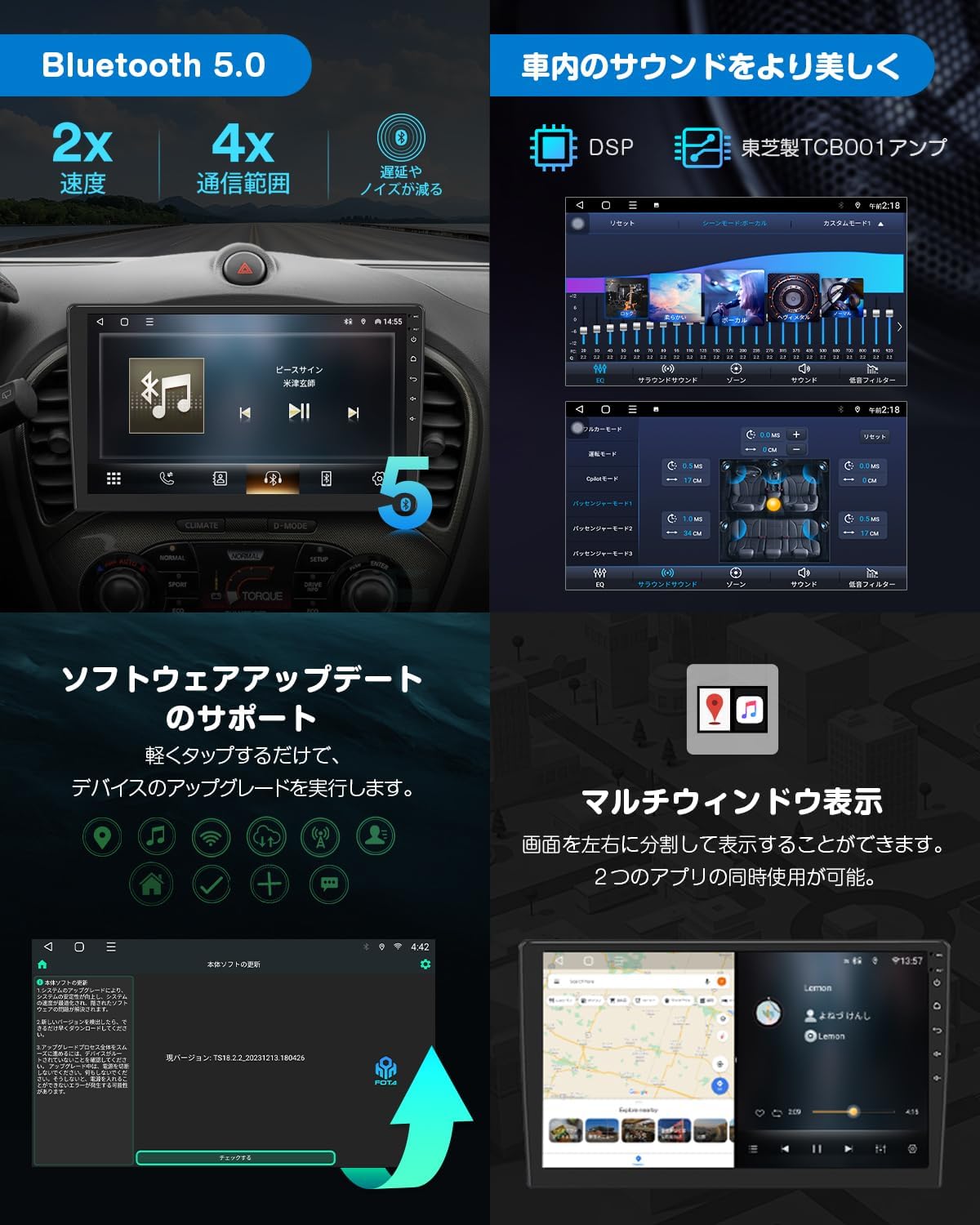
Figure 3.3: Highlights Bluetooth 5.0 features (2x speed, 4x communication range, reduced interference) and the Digital Sound Field Processing (DSP) for enhanced in-car audio.
3.5 Audio Enhancement (DSP)
The Digital Sound Field Processing (DSP) with a full digital processing chip and powerful 56-bit double-precision mode allows for precise adjustment of audio signals from various angles. With a maximum output of 4 x 48W, it delivers a wide and realistic sound. Features include a 48-band graphic equalizer and optimal sound field selection.
3.6 Network Connectivity (Wi-Fi/4G)
The built-in Wi-Fi and 4G modules allow for various methods of internet access. You can connect to the internet by creating a Wi-Fi hotspot with your smartphone or by directly inserting a SIM card into the unit.
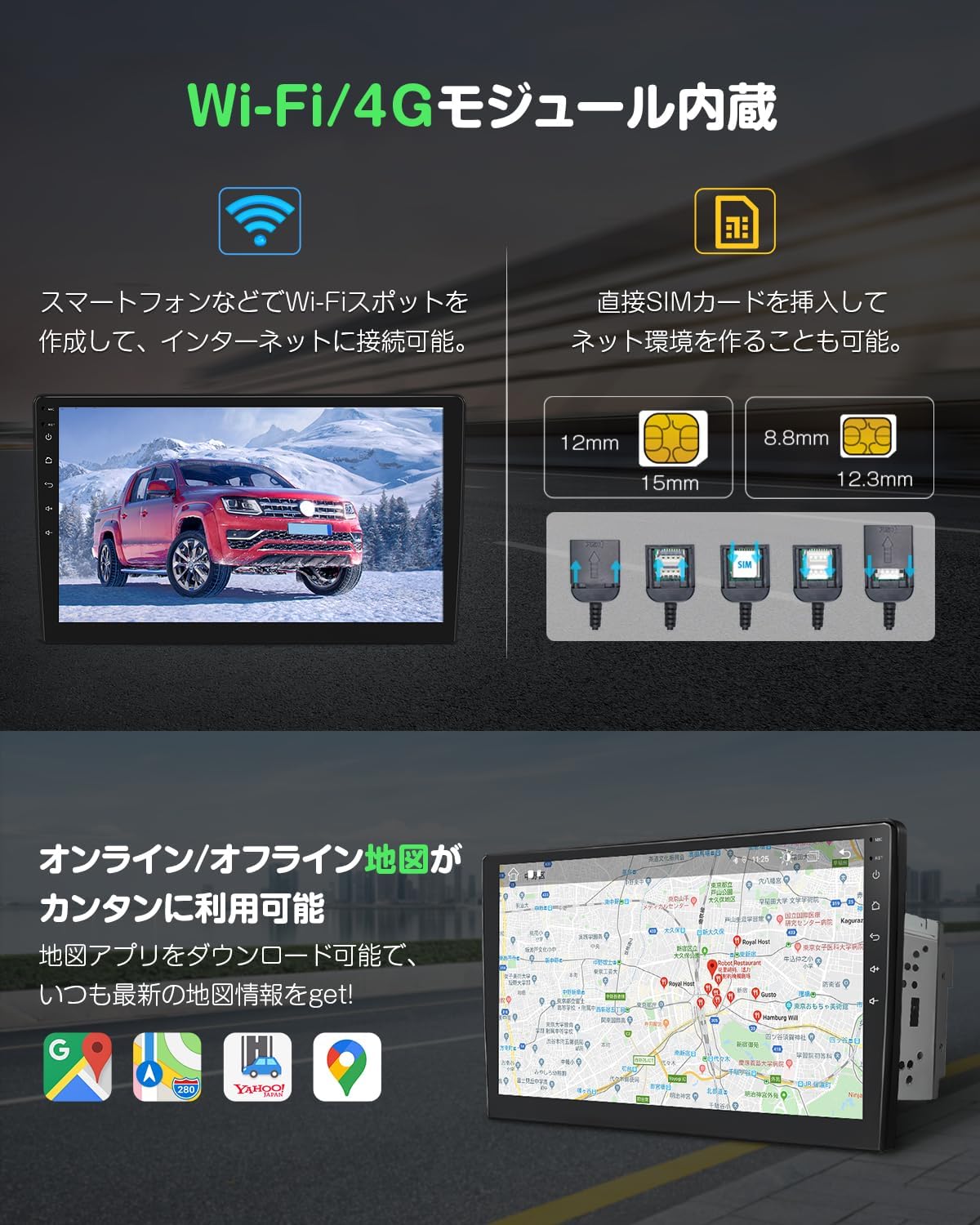
Figure 3.4: Shows the integrated Wi-Fi and 4G module, enabling internet connection via smartphone hotspot or direct SIM card insertion.
3.7 Navigation
Easily use online and offline maps by installing map applications or using an Android map card (G3048, sold separately). Download map apps like Google Maps to always get the latest map information. Offline map cards provide up-to-date road information and simple directions without an internet connection.
3.8 Multimedia and HDMI Input
The HDMI input function allows you to enjoy higher quality images. You can watch your favorite movies and videos in vivid quality inside your car.
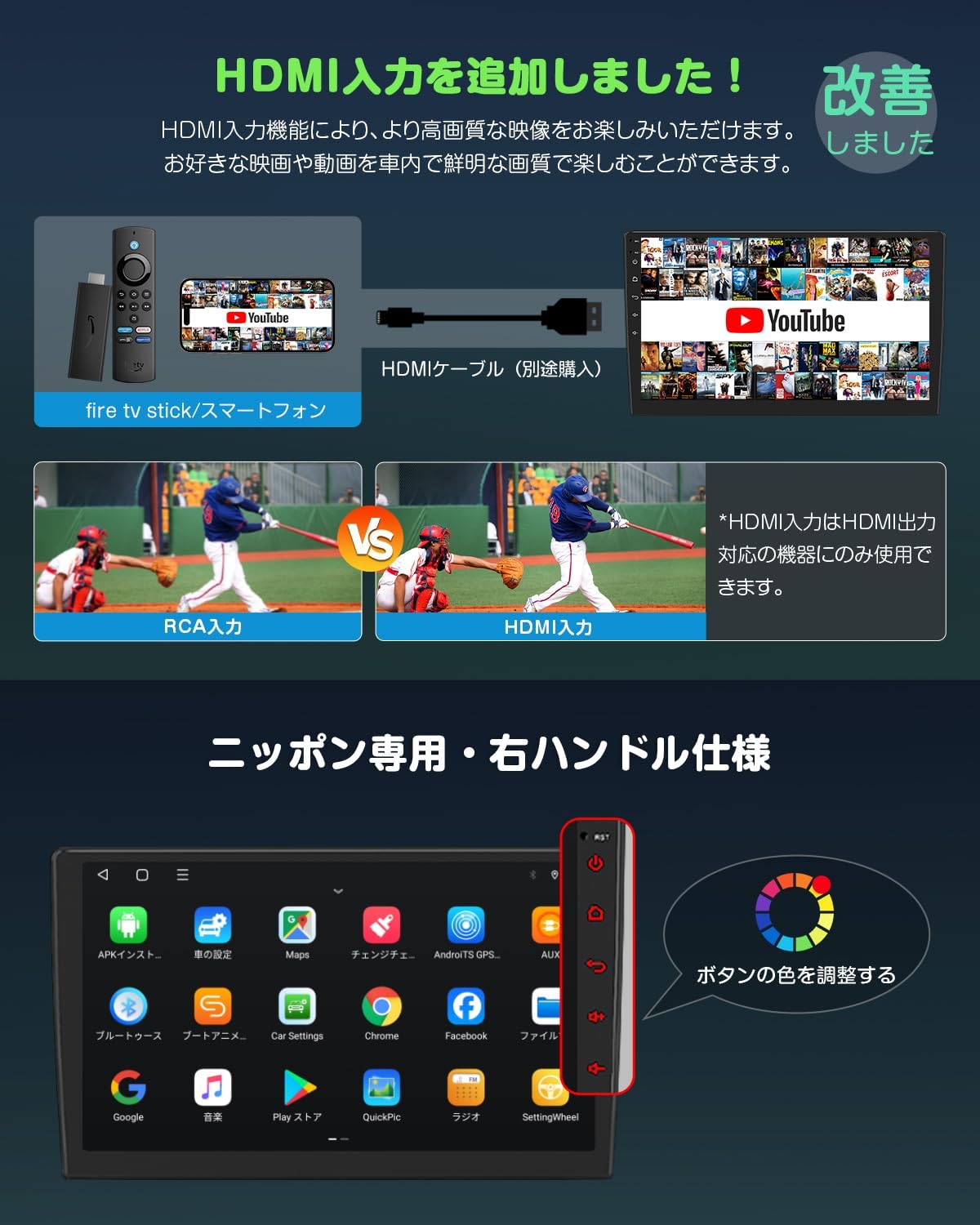
Figure 3.5: Illustrates the HDMI input capability, allowing connection of devices like Fire TV Stick or smartphones for high-quality video playback. Note: HDMI input is only for devices with HDMI output.
3.9 Advanced Features
- Multi-Window Display: The screen can be split into left and right sections, allowing two applications to be used simultaneously.
- Steering Wheel Control: Register frequently used operations to your steering wheel buttons for convenient control without touching the main unit or remote, enhancing driving safety.
- TV Viewing: By attaching an external digital tuner (EONON V0050/V0051 compatible, sold separately), you can watch TV.
- AHD Backup Camera Support: Supports AHD backup cameras up to 1920x1080 resolution (EONON A0119J compatible, sold separately). The screen automatically switches to the backup camera view when reverse gear is engaged.
- OBD2 Compatibility: Can link with an OBDII car diagnostic tool (EONON V0056, sold separately). Use the Torque app to check information related to engine RPM and other vehicle performance data.
- Drive Recorder Mode: Compatible with Android car USB HD drive recorders (EONON R0020, sold separately). You can check recorded footage and monitor traffic conditions on the navigation unit's large screen.
- RCA/HDMI Output: All modes and screen displays can be output to external monitors such as headrest monitors (EONON A0595/A0596, sold separately). High-quality HDMI output is also supported. Note: Some applications may not support video output.

Figure 3.6: Visual representation of various advanced features including TV viewing, backup camera linkage, steering wheel control, OBD2 compatibility, drive recorder mode, and RCA/HDMI output.
4. Maintenance
4.1 Software Updates (OTA)
Keep your device up-to-date with Over-The-Air (OTA) software updates. Simply tap to perform the device upgrade. If the connection between your smartphone and the main unit is unstable, updating the main unit's software via OTA online upgrade may improve performance.

Figure 4.1: Screenshot of the OTA software update interface, showing the option to check for and install updates.
5. Troubleshooting
- Touch Panel Unresponsive:
- Press the RST button to reset the unit.
- Check if there is poor contact or looseness in the film cable between the monitor and the main unit.
- Backup Camera Display Issues: If the image does not display or shows noise/black and white, the backup camera specifications may not be compatible with the unit's settings. You may need to adjust the backup image format.
- Bluetooth Disconnections: Ensure your smartphone's Bluetooth is enabled and within range. Consider performing an OTA software update as this may resolve connectivity issues.
- HDMI Audio Output Issues: If you are experiencing issues with audio output via HDMI, ensure that the HDMI or TV device's power is turned off if an AUX device is already connected. AUX, TV, and HDMI audio inputs share a common channel.
6. Specifications
| Feature | Specification |
|---|---|
| Screen Size | 10.1 inches |
| Display Type | QLED LCD |
| Resolution | 1280 x 720 |
| Processor | 8-core |
| RAM | 2GB |
| ROM (Storage) | 32GB |
| Bluetooth Version | 5.0 |
| Max Audio Output | 4 x 48W |
| Connectivity | Wi-Fi, 4G (via SIM card), Bluetooth |
| Human Interface Input | Touchscreen |
| Compatible Devices | Smartphones (CarPlay, Android Auto) |
| Included Components | Instruction manual, GPS antenna, microphone, power cable, AV cables |
7. Warranty and Support
For any product inquiries, technical support, or warranty claims, please contact EONON customer service. If the product size does not match your vehicle's console panel, please contact our service center directly for assistance.

Figure 7.1: EONON customer support representative, ready to assist with product inquiries.
Ask a question about this manual
Ask about setup, troubleshooting, compatibility, parts, safety, or missing instructions. Manuals+ will review the question and use this page’s manual context to help answer it.