
Introduction
The Beyerdynamic M 130 is a unique double-ribbon microphone designed for professional audio recording. Renowned for its figure-eight polar pattern, it excels in capturing stereo soundscapes, ambient recordings, and various instruments with an extraordinary sound character. This manual provides essential information for the proper setup, operation, and maintenance of your M 130 microphone.

Image: The Beyerdynamic M 130 Ribbon Microphone, a compact black microphone with a silver mesh grille.
What's in the Box
Upon unpacking your Beyerdynamic M 130, please ensure all components are present:
- Beyerdynamic M 130 Ribbon Microphone
- Microphone Clamp (MA-CL 25)
- Microphone Case

Image: Contents of the Beyerdynamic M 130 package, showing the microphone, its clamp, and a protective carrying case.
Setup
Connecting the Microphone
The M 130 connects via a standard XLR cable. Ensure your audio interface or mixer provides a suitable microphone input. This microphone does not require phantom power, as it is a passive ribbon microphone. Connecting it to a phantom power source will not damage the microphone, but it is unnecessary for operation.
Positioning the Microphone
The M 130 features a figure-eight polar pattern, meaning it picks up sound equally from the front and rear, while rejecting sound from the sides. This characteristic is crucial for effective placement.
- For Stereo Recording: Two M 130 microphones can be arranged in a Blumlein pair (crossed figure-eight patterns) for natural stereo imaging.
- For Instrument Recording: Position the microphone directly facing the sound source for direct sound, or slightly off-axis to capture more room ambience. Its side rejection is useful for isolating instruments in a live room.
- For Ambience: Place the microphone in a room to capture the natural reverberation and spaciousness.

Image: The Beyerdynamic M 130 microphone mounted on a stand in a recording studio, ready for use.

Image: Two Beyerdynamic M 130 microphones positioned in a Blumlein configuration for stereo recording, demonstrating their figure-eight polar pattern.

Image: The Beyerdynamic M 130 microphone placed on a stand directly in front of a guitar amplifier for close-miking.
Operating the M 130
Polar Pattern Characteristics
The M 130's figure-eight polar pattern is highly effective for rejecting off-axis sound, particularly from the sides. This makes it an excellent choice for:
- Reducing bleed from other instruments in a multi-microphone setup.
- Capturing the natural acoustics of a room without excessive direct sound.
- Creating detailed stereo recordings when used in pairs.
Recording Applications
The M 130 is versatile and can be used for a variety of recording tasks:
- Drums: Overhead, room, or snare bottom.
- Guitar Amplifiers: Capturing the full body and tone.
- Vocals: Can provide a warm, vintage tone, especially in well-treated rooms.
- Strings and Brass: Capturing the natural resonance and harmonics.
Care and Maintenance
To ensure the longevity and optimal performance of your Beyerdynamic M 130, follow these care guidelines:
- Storage: Always store the microphone in its protective case when not in use to prevent dust accumulation and physical damage.
- Cleaning: Use a soft, dry cloth to wipe the microphone body. Avoid using liquid cleaners or solvents, as these can damage the finish or internal components.
- Handling: Ribbon microphones are delicate. Avoid dropping the microphone or exposing it to strong vibrations.
- Moisture: Keep the microphone away from moisture and extreme temperature changes.
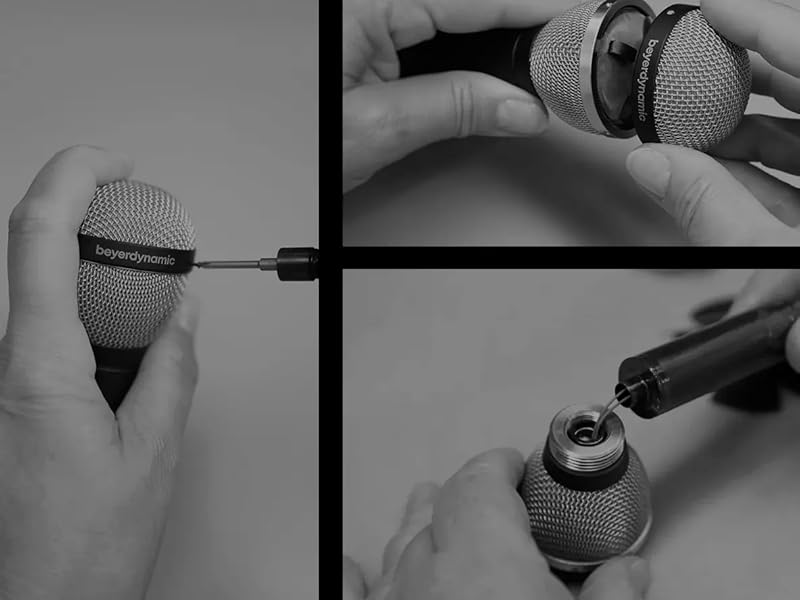
Image: A sequence of images demonstrating the careful disassembly and reassembly of a Beyerdynamic microphone's grille for maintenance or inspection.
Troubleshooting
If you encounter issues with your M 130 microphone, consider the following common troubleshooting steps:
- No Sound Output:
- Ensure the XLR cable is securely connected at both the microphone and the audio interface/mixer.
- Verify that the input channel on your audio interface/mixer is selected and its gain is appropriately set.
- Test with a different XLR cable to rule out cable failure.
- Low Output Level:
- Ribbon microphones typically have lower output than condenser microphones. Ensure your preamp has sufficient clean gain.
- Check microphone placement relative to the sound source; closer proximity generally increases output.
- Distorted Sound:
- Reduce the input gain on your audio interface/mixer.
- Ensure the sound source is not excessively loud for the microphone's capabilities, though ribbon mics generally handle high SPLs well.
- Unwanted Noise/Hum:
- Check for ground loops in your audio setup.
- Ensure all cables are properly shielded and in good condition.
- Move the microphone away from strong electromagnetic fields (e.g., power transformers, computer monitors).
Technical Specifications
| Feature | Specification |
|---|---|
| Manufacturer | Beyerdynamic |
| Model Number | M 130 |
| Connectivity Technology | XLR |
| Polar Pattern | Bidirectional (Figure-Eight) |
| Frequency Response | Not explicitly stated, but typically wide for ribbon mics (18000 Hz mentioned as max for some spec) |
| Audio Sensitivity | 54 Decibels |
| Signal-to-Noise Ratio | 60 dB |
| Item Weight | 5.6 ounces |
| Product Dimensions (L x W x H) | 9.4 x 6.6 x 3.45 inches |
| Power Source | Corded Electric (Passive, no external power required) |
| Recommended Uses | Voice Recording, Video Recording, Instrument Recording, Ambience |
Warranty and Support
The Beyerdynamic M 130 Ribbon Microphone comes with a manufacturer's warranty. For specific details regarding the warranty period and terms, please refer to the documentation included with your purchase or visit the official Beyerdynamic website. For technical support, service, or further inquiries, please contact Beyerdynamic customer service directly through their official channels.
You can find more information and support resources on the official Beyerdynamic website: www.beyerdynamic.com


