
1. Introduction
Thank you for choosing the Promate SparkTank-20 Car Jump Starter and Power Bank. This device is designed to provide reliable jump-starting for vehicles and portable power for your electronic devices. Please read this manual thoroughly before using the product to ensure safe and optimal operation. Keep this manual for future reference.
2. Product Overview and Features
The Promate SparkTank-20 is a versatile device combining a powerful car jump starter with a high-capacity power bank. Key features include:
- Powerful 2000A Peak Current: Capable of jump-starting large cars and motorcycles.
- 20000mAh High-Capacity Power Bank: Provides ample power to charge multiple devices.
- Smart Clamps with 6 Protection Systems: Ensures safe operation with protection against reverse charging and short circuits.
- 45W USB-C Power Delivery: Fast charging for USB-C compatible devices and quick recharging of the unit itself.
- Dual QC 3.0 USB Ports: Charges devices up to 4 times faster than conventional chargers.
- 150W DC Output: Powers DC-compatible accessories like tire inflators or car coolers.
- Integrated LED Flashlight: Features 3 LED modes (Normal, Strobe, SOS) for emergencies.
- LCD Indicator Display: Shows battery status and charging information.
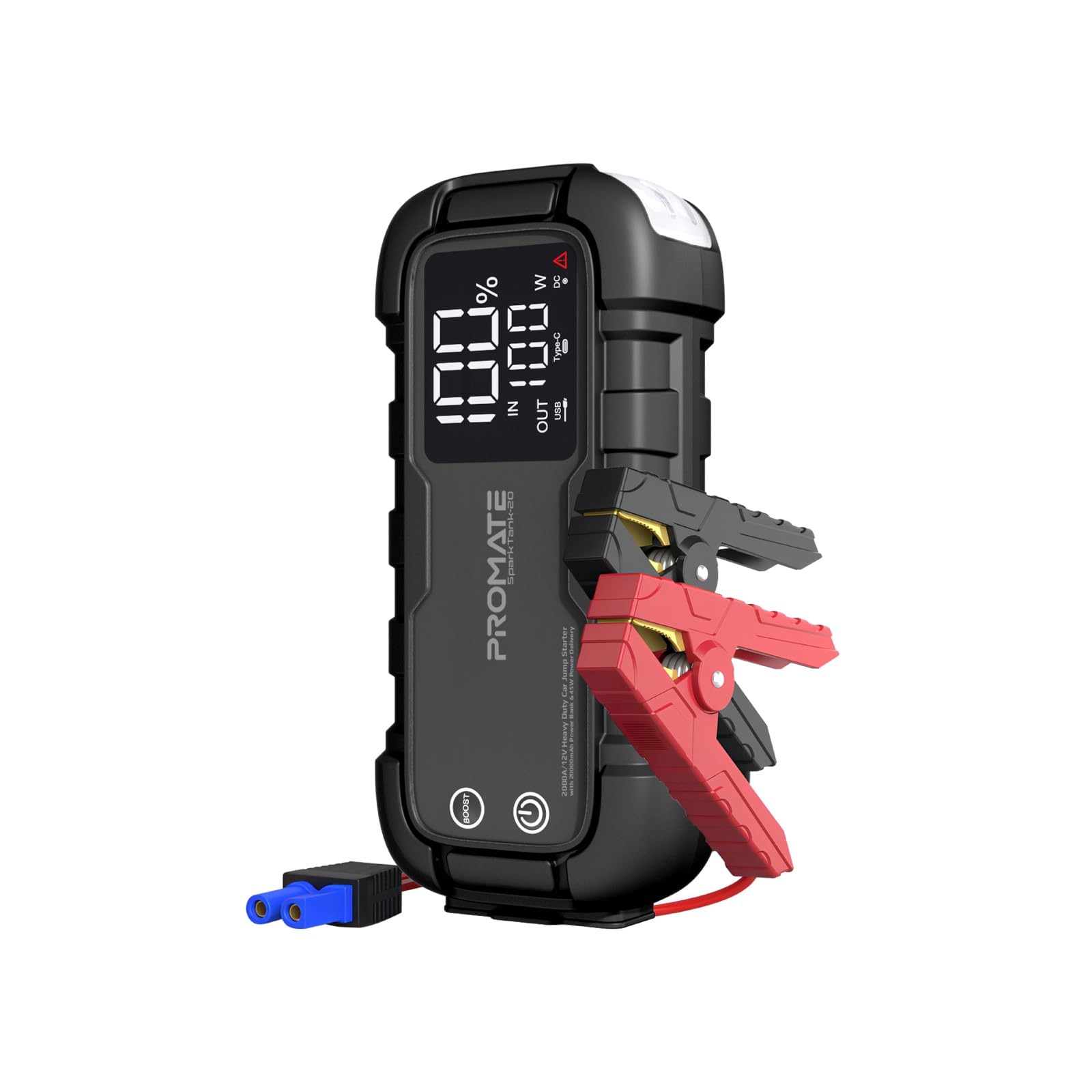
Image: Promate SparkTank-20 Jump Starter highlighting its 2000A peak current capability.

Image: Promate SparkTank-20 showcasing its 20000mAh high-capacity power bank feature.
3. Package Contents
Please check the product packaging for the following items:
- Promate SparkTank-20 Jump Starter and Power Bank Unit
- Smart Jumper Cables with Clamps
- USB-C Charging Cable
- User Manual
- Storage Case (may vary by region)

Image: Retail packaging of the Promate SparkTank-20, showing the unit and accessories.
4. Safety Information
Read and understand all safety information before using this product. Failure to follow these instructions may result in electric shock, explosion, fire, which may result in serious injury, death, or property damage.
- Do not jump-start a frozen battery.
- Do not use the jump starter if the battery voltage is below 12V.
- Ensure proper polarity when connecting the jumper cables (red to positive, black to negative).
- Do not allow the red and black clamps to touch each other.
- Keep the device away from children.
- Do not expose the device to water, rain, or extreme temperatures.
- Do not disassemble or modify the device.
- Use only the provided or approved charging cables and accessories.
- If the device becomes excessively hot during use, discontinue use immediately.

Image: Close-up of the Promate SparkTank-20 smart clamps, illustrating the built-in protection system.
5. Setup
5.1 Initial Charging
Before first use, fully charge the SparkTank-20 unit. Connect the provided USB-C charging cable to the USB-C input/output port on the device and to a compatible USB wall adapter (not included). The LCD display will show the charging progress. Charging time may vary depending on the power adapter used.
5.2 Checking Battery Level
Press the power button once to check the current battery level on the LCD display. Ensure the unit is sufficiently charged before attempting to jump-start a vehicle.
6. Operating Instructions
6.1 Jump Starting a Vehicle
- Ensure the SparkTank-20 is at least 75% charged.
- Turn off the vehicle's ignition and all accessories.
- Connect the red (+) clamp of the jumper cables to the positive (+) terminal of the vehicle's battery.
- Connect the black (-) clamp of the jumper cables to the negative (-) terminal of the vehicle's battery or a solid, unpainted metal part of the engine block.
- Insert the blue plug of the jumper cable into the jump starter port on the SparkTank-20.
- Once connected, the indicator light on the smart clamp will turn green, indicating a safe connection. If it shows red or flashes, check the connections.
- Start the vehicle's engine. If it doesn't start immediately, wait 30 seconds and try again. Do not crank for more than 3 seconds per attempt.
- Once the vehicle starts, immediately remove the blue plug from the jump starter unit.
- Then, disconnect the black (-) clamp, followed by the red (+) clamp from the vehicle battery.

Image: Promate SparkTank-20 smart clamps properly connected to a car battery for jump-starting.
6.2 Using as a Power Bank
The SparkTank-20 can charge various electronic devices using its USB-C and dual QC 3.0 USB-A ports.
- USB-C Port (45W Power Delivery): Connect your USB-C compatible device (e.g., laptop, tablet, smartphone) to the USB-C port using a USB-C to USB-C cable.
- Dual QC 3.0 USB-A Ports (18W Output): Connect your USB-A compatible device (e.g., smartphone, camera) to either of the QC 3.0 ports using a standard USB-A cable.
The device will automatically begin charging. The LCD display will show the output wattage.

Image: Promate SparkTank-20 simultaneously charging a tablet and a smartphone via its USB-C and QC 3.0 ports.

Image: Promate SparkTank-20 with an accessory connected to its 150W DC output port.
6.3 Using the LED Flashlight
The built-in LED flashlight has three modes: Normal, Strobe, and SOS.
- Press and hold the flashlight button for 3 seconds to turn on the flashlight in Normal mode.
- Press the flashlight button once to cycle through modes: Normal > Strobe > SOS.
- Press and hold the flashlight button for 3 seconds again to turn off the flashlight.

Image: Promate SparkTank-20 with its integrated LED flashlight illuminated.
7. Maintenance
7.1 Recharging the Unit
For optimal performance and longevity, recharge the SparkTank-20 after each use, especially after jump-starting a vehicle. It is recommended to fully charge the unit every 3-6 months even if not used, to maintain battery health.
7.2 Storage
Store the device in a cool, dry place, away from direct sunlight and extreme temperatures. Ensure the unit is fully charged before long-term storage.
7.3 Cleaning
Wipe the unit with a soft, dry cloth. Do not use harsh chemicals or abrasive materials. Ensure all ports are free of dust and debris.
8. Troubleshooting
| Problem | Possible Cause | Solution |
|---|---|---|
| Vehicle does not start. | Low battery on SparkTank-20. Incorrect cable connection. Vehicle battery completely dead. | Ensure SparkTank-20 is fully charged. Check cable connections for correct polarity. Consult a mechanic if the vehicle battery is severely damaged. |
| Smart clamp indicator light is red or flashing. | Incorrect connection (reverse polarity). Short circuit. Over-discharge protection activated. | Disconnect and re-connect clamps ensuring correct polarity. Check for any metal contact between clamps. Allow the unit to cool down if it was recently used. |
| Devices not charging from USB ports. | SparkTank-20 battery is low. Cable issue. Device incompatibility. | Recharge the SparkTank-20. Try a different charging cable. Ensure your device is compatible with USB charging standards. |
| Unit not charging. | Faulty charging cable or adapter. Port issue. | Try a different USB-C cable and wall adapter. Ensure the USB-C port is clean and free of debris. |
9. Specifications
| Feature | Specification |
|---|---|
| Brand | Promate |
| Model Number | SparkTank-20 |
| Battery Capacity | 20000 mAh |
| Peak Current | 2000 Amps |
| Voltage | 12 Volts (DC) |
| Battery Cell Composition | Lithium Polymer |
| USB-C Input/Output | 45W Power Delivery |
| USB-A Output (QC 3.0) | Dual 18W Ports |
| DC Output | 150W |
| Item Weight | 1.8 Kilograms |
| Dimensions | 15.9 x 12.9 x 29.3 cm |
| Service Type | Motorcycle, Passenger Car |
10. Warranty and Support
Promate products are designed with quality and reliability in mind. For warranty information, please refer to the warranty card included in your product packaging or visit the official Promate website. If you encounter any issues or have questions regarding your SparkTank-20, please contact Promate customer support through their official channels. Keep your purchase receipt as proof of purchase for warranty claims.


