
1. Introduction
Thank you for purchasing the RORRY D11 4-in-1 Wireless Charging Station. This versatile device is designed to simplify your charging experience by allowing you to simultaneously charge your iPhone, Apple Watch, and AirPods. It also features a detachable MagSafe-compatible power bank for convenient on-the-go charging. Please read this manual carefully before use to ensure proper operation and to maximize the lifespan of your device.
2. Package Contents
- RORRY D11 4-in-1 Wireless Charging Station
- PD20W Power Adapter
- USB-C to USB-C Cable
- MagSafe Ring (for non-MagSafe compatible phones)
- User Manual
3. Product Overview
The RORRY D11 combines multiple charging functionalities into a compact and foldable design, suitable for both home and travel use.

Figure 3.1: The RORRY D11 4-in-1 Wireless Charging Station in use, showing a smartphone, Apple Watch, and AirPods being charged simultaneously. A PD20W power adapter and USB-C cable are also visible.

Figure 3.2: The RORRY D11 charger demonstrating its foldable and flexible design, with adjustable angles for optimal viewing and charging. It can fold flat for portability.
Key Components:
- Main Charging Stand: Provides power to the detachable power bank and charges AirPods.
- Detachable MagSafe Charger/Power Bank: Charges MagSafe-compatible iPhones and features an integrated Apple Watch charger.
- AirPods Charging Pad: Located on the base of the main stand.
- Smart LED Indicator: Displays charging status on the power bank.
4. Setup
- Connect to Power: Connect the provided USB-C cable to the input port on the back of the RORRY D11 charging station. Plug the other end of the cable into the PD20W power adapter, and then plug the adapter into a wall outlet.
- Power On: The LED indicator on the base will light up, indicating the station is powered on and ready for use.
- (Optional) MagSafe Ring Installation: If your phone is not MagSafe compatible, attach the included MagSafe ring to the back of your phone or phone case according to the ring's instructions to enable magnetic alignment with the charger.
5. Operating Instructions
5.1 Charging Multiple Devices Simultaneously
The RORRY D11 allows you to charge up to four devices at once (iPhone, Apple Watch, AirPods, and an additional device via USB-C port on the power bank).
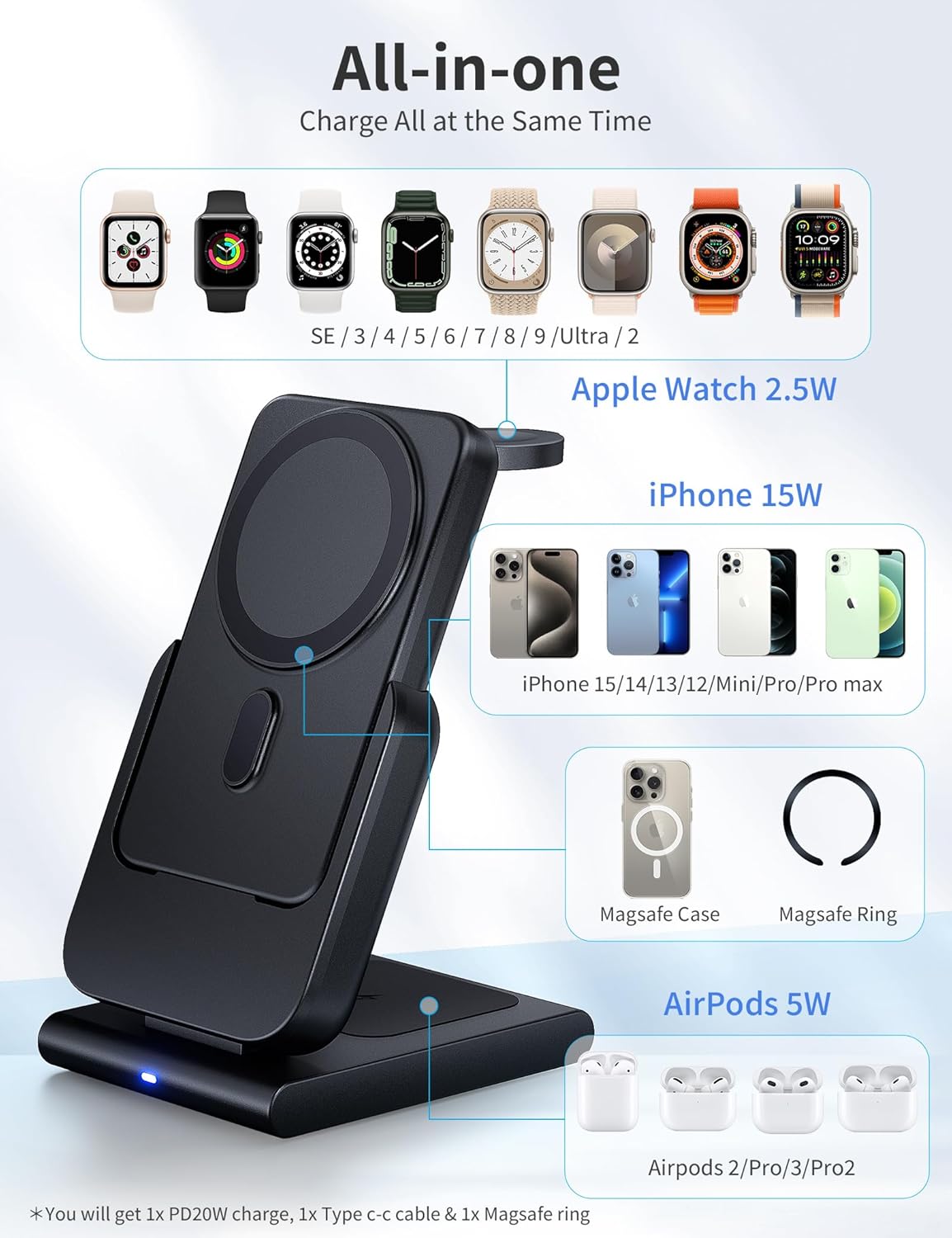
Figure 5.1: An illustration detailing the "All-in-one" charging capability of the RORRY D11, showing designated areas for iPhone (15W), Apple Watch (2.5W), and AirPods (5W), along with compatible models.
- For iPhone (MagSafe Compatible): Place your iPhone directly onto the magnetic charging surface of the detachable power bank. The magnetic connection will align your phone for optimal wireless charging.
- For Apple Watch: Extend the Apple Watch charging module from the side of the detachable power bank. Place your Apple Watch onto the module.
- For AirPods: Place your AirPods case (with wireless charging capability) onto the designated charging pad on the base of the main charging stand.
- For other USB-C devices: The detachable power bank also features a USB-C port for wired charging of other devices.
5.2 Using the Detachable Power Bank (On-the-Go Charging)
The MagSafe charging module is also a portable 5000mAh power bank, allowing you to charge your devices wirelessly even when away from the main charging station.

Figure 5.2: The 5000mAh removable power bank component of the RORRY D11, shown with an iPhone magnetically attached and an Apple Watch charging from its side module. It highlights super magnetic grip, Max 18W USB-C in/output, and official recognition.

Figure 5.3: The RORRY D11 power bank detached from its base, demonstrating its portability and ability to charge an iPhone and Apple Watch simultaneously while on the go. Dimensions of the base and power bank are also shown.
- Detach: Gently pull the MagSafe charging module upwards from the main charging stand to detach it.
- Charge iPhone: Attach your MagSafe-compatible iPhone to the magnetic surface of the power bank.
- Charge Apple Watch: Extend the Apple Watch charging module and place your Apple Watch on it.
- Recharge Power Bank: To recharge the power bank, simply place it back onto the main charging stand. It will automatically begin charging. Alternatively, you can charge it directly using a USB-C cable.
5.3 Foldable Design
The RORRY D11 is designed to be foldable and flexible, making it easy to adjust for optimal viewing angles or to pack for travel.
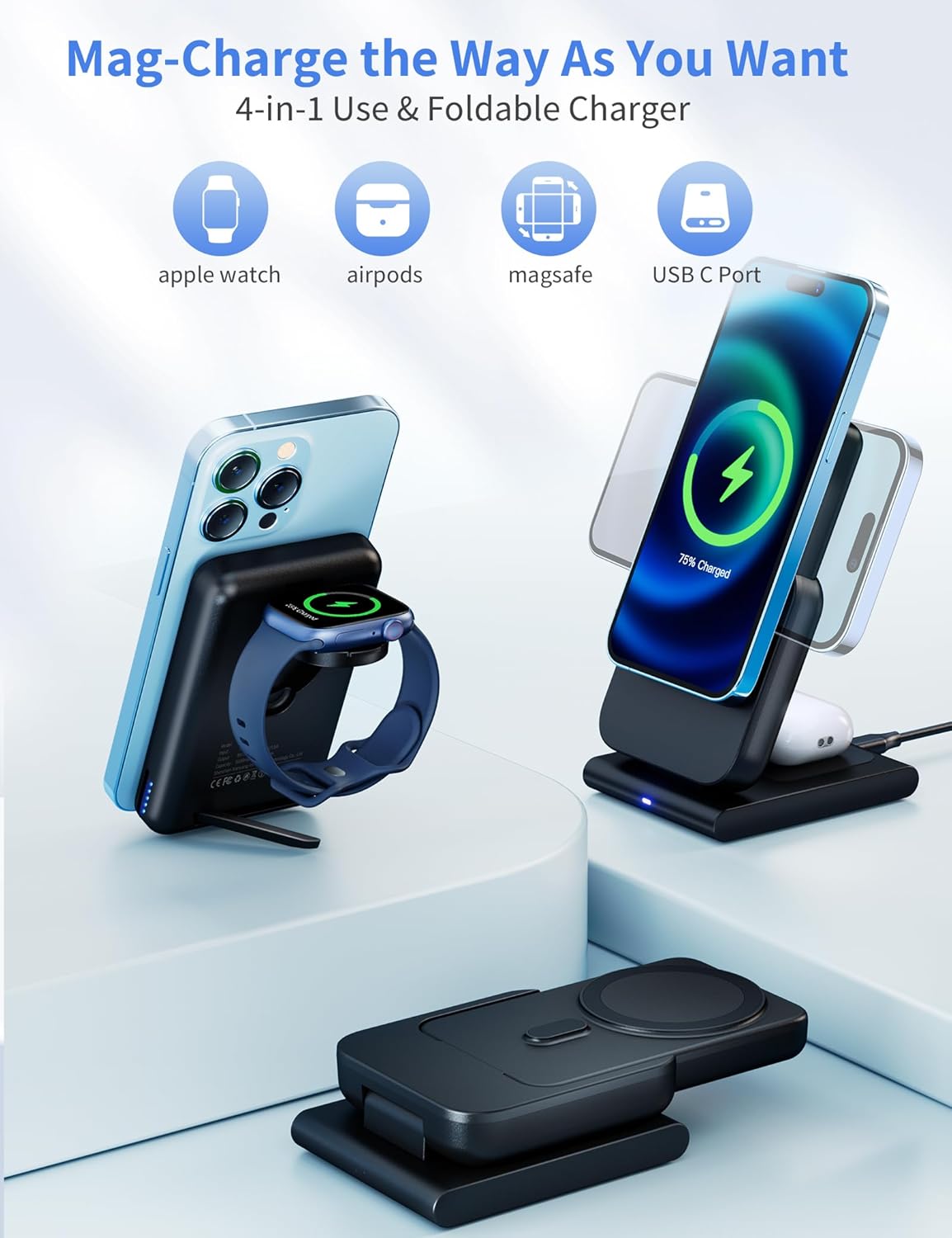
Figure 5.4: The RORRY D11 charger illustrating its "Mag-Charge the Way As You Want" feature, highlighting its 4-in-1 use (Apple Watch, AirPods, MagSafe, USB-C Port) and foldable design for versatile charging positions.
- Adjust the angle of the main charging arm to your preferred viewing or charging position.
- Fold the unit flat for compact storage or transport.
6. Maintenance
- Cleaning: Disconnect the charger from power before cleaning. Use a soft, dry cloth to wipe the surface of the device. Do not use liquid cleaners or aerosols.
- Storage: When not in use for extended periods, store the charger in a cool, dry place away from direct sunlight and extreme temperatures.
- Handling: Avoid dropping or subjecting the device to strong impacts.
7. Troubleshooting
| Problem | Possible Cause | Solution |
|---|---|---|
| Device not charging |
|
|
| Slow charging |
|
|
| LED indicator not lighting up |
|
|
8. Specifications
| Feature | Detail |
|---|---|
| Model Number | D11 |
| Brand | RORRY |
| Connectivity Technology | USB |
| Special Features | MagSafe Compatible, Wireless Charging, Portable |
| Input Voltage | 12 Volts |
| Amperage | 3 Amps |
| Wattage | 20 W |
| Total USB Ports | 1 |
| Item Weight | 250 grams |
| Package Dimensions | 15.39 x 8 x 5.11 cm |
| Battery Included | Yes |
| Battery Usage | Yes |
9. Safety Information
Please observe the following safety precautions to prevent damage to the device or injury to yourself:
- Do not expose the device to water, moisture, or extreme temperatures.
- Do not disassemble, repair, or modify the device.
- Keep the device away from strong magnetic fields.
- Do not place metal objects or credit cards between the charging surface and your device, as this may interfere with charging or damage the charger.
- Use only the provided power adapter and cable.
- Keep out of reach of children.
10. Warranty and Support
RORRY products come with a standard manufacturer's warranty. For detailed warranty information, technical support, or customer service inquiries, please refer to the contact information provided on the product packaging or visit the official RORRY website. Please retain your proof of purchase for warranty claims.
Contact Information:
- Website: RORRY Official Store on Amazon


