Introduction
This manual provides instructions for the HCDZ Replacement Remote Control, designed for use with AT&T Directv RC82V, RC83V, C71KW-200, C71KW-400 4K Streaming Midea Player Receivers. This remote operates via both Infrared (IR) and Bluetooth interfaces. The RC83V model specifically utilizes Bluetooth 2-way communication, eliminating the need for a direct line of sight between the remote and the paired device. Voice recognition functionality is available on the RC83V model, but it requires the remote to be paired with a C71KW device.
Setup
Battery Installation
The remote control requires two AA alkaline batteries (not included). Ensure correct polarity when inserting the batteries.
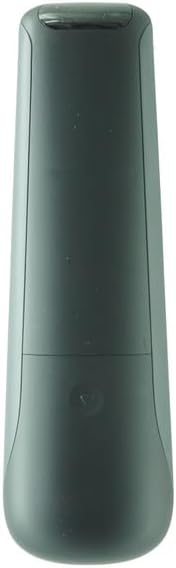
Image: Back of the remote control with the battery cover removed, illustrating the battery compartment. Insert two AA batteries according to the polarity indicators.

Image: Back of the remote control with the battery cover securely attached after battery installation.
Once batteries are inserted, the remote is ready for use. No programming is typically required for basic functions.
Pairing your Remote to Set Top Box (STB)
To pair the DIRECTV remote control to your Set Top Box, follow these steps:
- Press and HOLD the Rewind and Fast Forward buttons simultaneously for 3 seconds until the visible LED starts flashing.
- Enter digits 961, followed by the CH up key.
- Using the number keys, enter the last six digits of the RID number located behind the STB.
- Press and release the ENTER key (the green light will flash twice).
Note: Voice search functionality is only active when the remote is paired to a C71KW device.
Operating Instructions
This replacement remote control is designed to function immediately upon battery insertion for most basic operations. It supports both Infrared (IR) and Bluetooth connectivity, depending on the model (RC82V for IR, RC83V for IR and Bluetooth) and the device it's paired with.
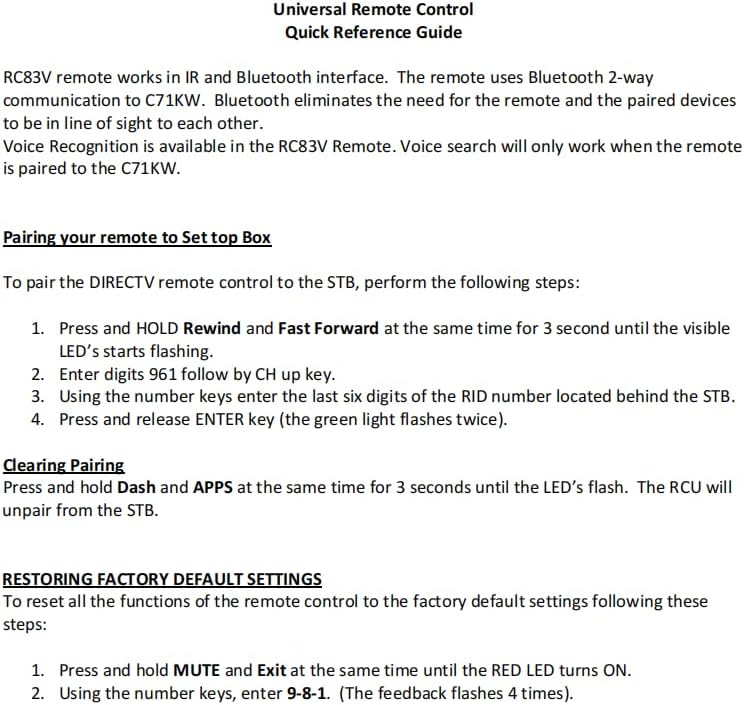
Image: Front view of the HCDZ remote control, displaying the button layout for various functions.
For specific functions related to your AT&T Directv or 4K Streaming Midea Player Receiver, refer to your device's manual for button assignments.
Maintenance
Battery Care
- Do not mix new batteries with old ones.
- If the remote will not be used for an extended period, remove the batteries to prevent leakage and corrosion.
- Avoid leaving the remote in extremely hot or humid environments.
Cleaning
Wipe the remote control with a soft, dry cloth. Do not use abrasive cleaners or solvents.
Troubleshooting
General Remote Malfunctions
- Remote not responding:
- Replace the remote control batteries with fresh ones.
- Check the battery terminals to ensure they are clean and making proper contact.
- Remote not controlling device:
- Ensure the remote is within range of the device (up to 10 meters for IR/Bluetooth).
- Move closer to the device if it's out of range.
- Remove any obstructions between the remote and the IR sensor of the device.
- Verify that the power cord to your device is plugged in and the device is turned on.
Clearing Pairing
To unpair the remote control unit (RCU) from the Set Top Box, perform the following:
- Press and HOLD the Dash (-) and APPS buttons simultaneously for 3 seconds until the LED flashes. This action will unpair the RCU from the STB.
Restoring Factory Default Settings
To reset all functions of the remote control to factory default settings, follow these steps:
- Press and HOLD the MUTE and Exit buttons simultaneously until the RED LED turns ON.
- Using the number keys, enter 9-8-1. The feedback LED will flash 4 times, indicating the reset is complete.
Specifications
| Feature | Detail |
|---|---|
| Brand | HCDZ |
| Model Name | RC82V (Compatible with RC83V) |
| Connectivity Technology | Infrared (IR), Bluetooth (for RC83V variant) |
| Compatible Devices | 4K Streaming Device, Directv Receiver (C71KW-200, C71KW-400) |
| Max Number of Supported Devices | 1 |
| Controller Type | Button Control |
| Button Quantity | 10 |
| Maximum Range | 10 Meters |
| Battery Type | Alkaline |
| Number of Batteries Required | 2 AA batteries |
| Color | Black |
Warranty and Support
This product comes with a 90-day warranty from the date of purchase. For warranty claims or technical support, please refer to the seller's contact information provided at the time of purchase.
For additional information or assistance, you may also visit the HCDZ Store on Amazon.


